
Winegard HS-CC01
Winegard RV Halo Contact Closure Security Sensor User Manual
Model: HS-CC01
Product Overview
The Winegard RV Halo Contact Closure Security Sensor is designed to enhance the security of your recreational vehicle by monitoring access points such as doors, windows, and storage compartments. When connected to the RV Halo app, it provides instant notifications to your mobile device upon detecting unauthorized entry or opening.
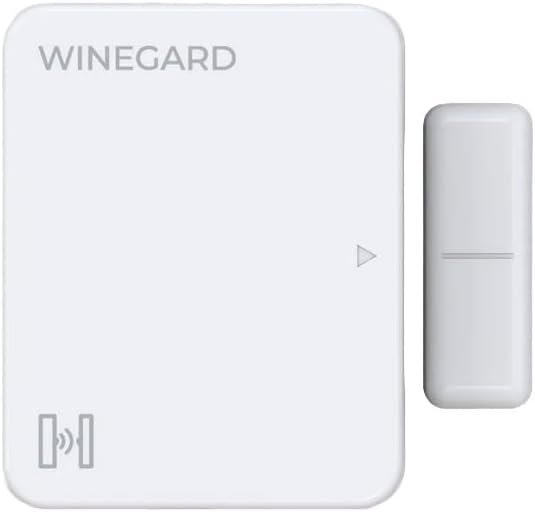
Image: The Winegard RV Halo Contact Closure Security Sensor, consisting of a larger main unit with "WINEGARD" branding and a smaller magnetic contact piece. Both are white with rounded corners.
Key Features:
- Monitors door, window, or compartment access.
- Alerts you instantly to unauthorized entry.
- Compact, discreet design ideal for RV interiors.
- Sends instant notifications to your mobile device via the RV Halo app.
Package Contents
Ensure all items are present before proceeding with installation:
- Winegard RV Halo Contact Closure Security Sensor (Main Unit and Magnetic Contact)
- Installation Hardware (e.g., adhesive strips, screws - details not specified in product info, assuming standard inclusion)
- Quick Start Guide (assuming standard inclusion)
Setup and Installation
Follow these steps to properly set up and install your Winegard RV Halo Contact Closure Security Sensor:
- Prepare the Surface: Choose a clean, dry, and flat surface on the door, window, or compartment you wish to monitor. Ensure the two parts of the sensor can be mounted within 1/2 inch of each other when the access point is closed.
- Mount the Main Unit: The larger sensor unit should be mounted on the stationary frame of the door/window. Use either the provided adhesive strips for a non-permanent solution or screws for a more secure, permanent installation. Ensure the alignment arrow on the main unit points towards where the magnetic contact will be.
- Mount the Magnetic Contact: Mount the smaller magnetic contact piece on the moving part of the door/window, directly opposite the main unit. When the door/window is closed, the magnetic contact should align with the main unit's alignment mark, ensuring they are within the specified distance.
- Connect to RV Halo App: Refer to your RV Halo app's instructions for pairing new devices. Typically, this involves putting the sensor into pairing mode (specific method not provided, common for such devices) and adding it through the app's device management section.
- Test the Sensor: Once paired, open and close the monitored access point. Verify that the RV Halo app registers the change in status and sends notifications as expected.
Note: For optimal performance, ensure the sensor is installed in an area free from extreme temperatures or direct moisture.
Operating Instructions
The Winegard RV Halo Contact Closure Security Sensor operates in conjunction with the Winegard RV Halo mobile application. Its primary function is to detect the opening and closing of monitored access points.
- Monitoring: Once installed and paired, the sensor continuously monitors the state of the door, window, or compartment.
- Notifications: When the monitored access point is opened (i.e., the magnetic contact separates from the main unit), the sensor sends a signal to your RV Halo system, which then triggers an instant notification to your linked mobile device.
- App Interaction: Use the RV Halo app to view the current status of the sensor (open/closed), review event history, and configure notification settings.
Maintenance
The Winegard RV Halo Contact Closure Security Sensor requires minimal maintenance to ensure reliable operation.
- Cleaning: Periodically wipe the sensor units with a soft, dry cloth to remove dust or dirt. Do not use abrasive cleaners or solvents.
- Battery Replacement: (Assuming battery-powered, as is common for such sensors. No battery info provided, so keep it general.) The sensor is powered by an internal battery. When the battery level is low, you may receive a notification via the RV Halo app. Refer to the app or product documentation for specific battery type and replacement instructions.
- Connection Check: Regularly check the physical connection of the sensor to its mounting surface to ensure it remains secure.
Troubleshooting
If you encounter issues with your Winegard RV Halo Contact Closure Security Sensor, try the following troubleshooting steps:
| Problem | Possible Cause | Solution |
|---|---|---|
| Sensor not responding/no notifications. |
|
|
| False alarms. |
|
|
If problems persist, contact Winegard customer support.
Specifications
| Model Number | HS-CC01 |
| Product Name | Winegard RV Halo Contact Closure Security Sensor |
| Brand | Winegard |
| Dimensions | 6.88 x 4.25 x 1.38 inches |
| Item Weight | 3.2 ounces |
| ASIN | B0DM6V6VXD |
| Manufacturer | Winegard Company |
Warranty Information
For detailed warranty information regarding your Winegard RV Halo Contact Closure Security Sensor, please refer to the official Winegard website or the warranty card included with your product. Typically, Winegard products come with a limited warranty covering defects in materials and workmanship under normal use.
Please retain your proof of purchase for warranty claims.
Customer Support
If you require further assistance, technical support, or have questions not covered in this manual, please contact Winegard Customer Support:
- Website: www.winegard.com (Look for Support or Contact Us section)
- Phone: Refer to the Winegard website for the most current contact numbers.
When contacting support, please have your product model number (HS-CC01) and ASIN (B0DM6V6VXD) ready.
Related documentsHS-CC01


Ask a question about this manual
Ask about setup, troubleshooting, compatibility, parts, safety, or missing instructions. Manuals+ will review the question and use this page’s manual context to help answer it.