
Introduction
The InfinaCore P3 Pro is a versatile 5-in-1 portable charger power bank designed for charging multiple devices on the go. With a 65W output and 10,000mAh capacity, it offers fast charging for laptops, smartphones, handheld gaming consoles, and Bluetooth speakers. Its universal travel adapter ensures compatibility in 193 countries, making it an ideal companion for global travelers. The integrated Qi2 wireless charging and smart LCD display provide convenience and real-time insights into your charging status.

Image: The InfinaCore P3 Pro charger, showcasing its compact design and the included international plug adapters.
What's in the Box

Image: A visual representation of all items included in the InfinaCore P3 Pro packaging.
- P3 Pro (Built-in Type A plug adapter, NEMA 1-15, 120V 60Hz)
- Type G Plug adapter (UK plug adapter, BS1363, 230V, 50Hz)
- Type C Plug adapter (Europlug plug adapter, CEE 7/16, 220-240V, 50Hz)
- Type I Plug adapter (Australian plug adapter, AS/NZS 3122, 220-240V, 50Hz)
- Mini carabiner + replacement surprise utility loop
Features
- 5-in-1 Versatility: Combines a portable power bank, wall charger, and wireless charger with multiple output ports (2x USB-C, 1x USB-A, Qi2 wireless charging).
- High Capacity & Output: 10,000mAh battery capacity with 65W output for fast charging of various devices, including laptops.
- Qi2-Certified Wireless Charging: Offers ultra-fast 15W wireless charging with MagSafe alignment for compatible devices, ensuring a secure and efficient charge.
- Universal Travel Compatibility: Includes 3 international power adapters (EU, UK, AU) and a foldable US plug, making it compatible in 193 countries.
- Smart LCD Display (Spec Deck Technology): Provides real-time information on battery percentage, remaining charge time, input/output power, and device temperature.
- Built-in Protection: Engineered with safeguards against overcharge, overvoltage, and overheating for safe and reliable use.
- GaN Technology: Utilizes next-generation Gallium Nitride semiconductors for faster, more compact, and efficient power delivery with less heat.

Image: Key features of the P3 Pro, including its ability to charge laptops, wireless charging, power display, and global compatibility.
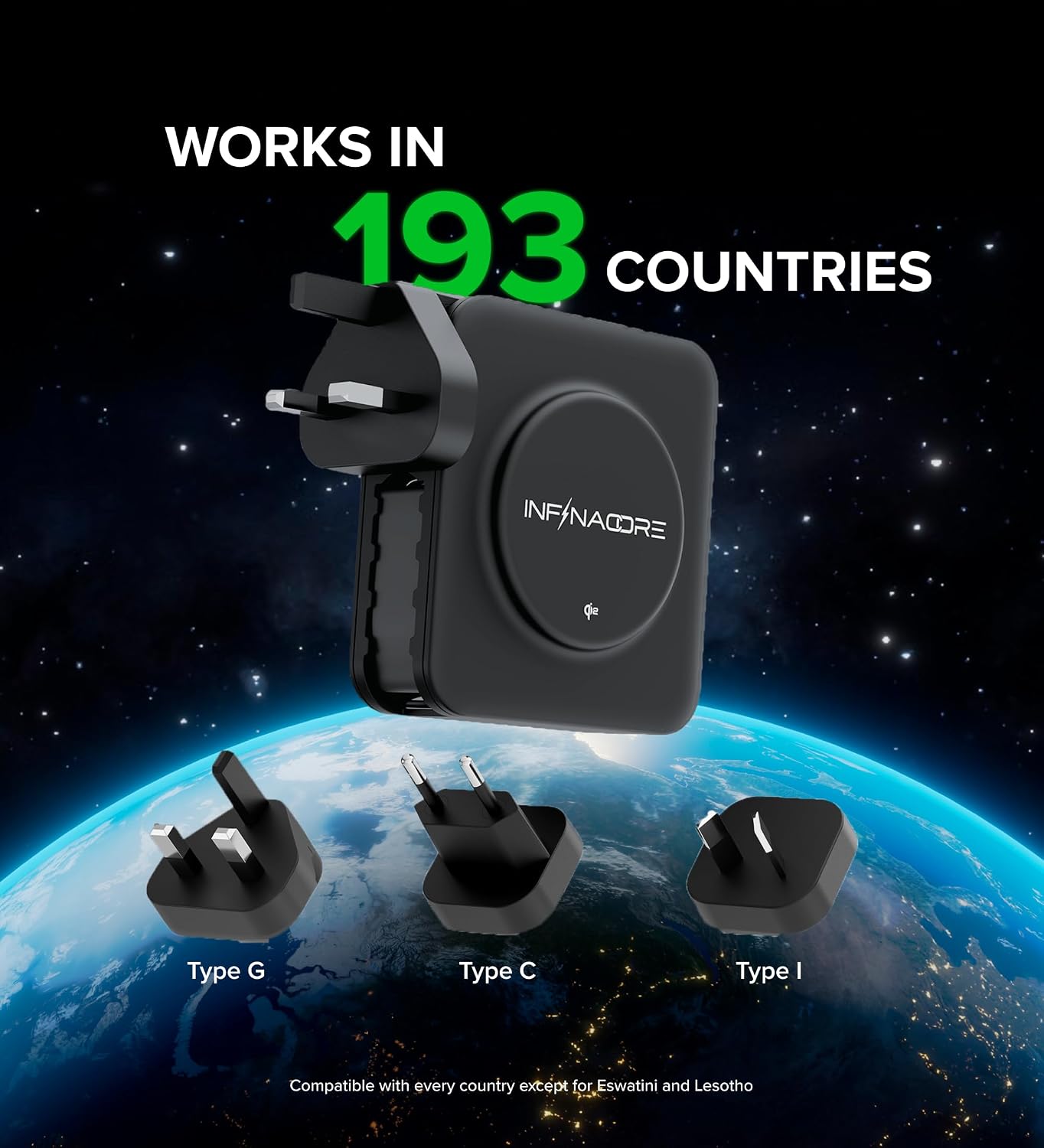
Image: The P3 Pro demonstrating its universal compatibility with various international plug types.

Image: The P3 Pro's versatility in charging a wide range of electronic devices.
Setup
Initial Charging of the P3 Pro
Before first use, it is recommended to fully charge your InfinaCore P3 Pro. You can charge it by plugging the built-in Type A plug directly into a wall outlet. Alternatively, you can use a USB-C cable to charge the power bank via one of its USB-C ports.

Image: The P3 Pro being plugged into a wall outlet for charging.
Attaching International Adapters
For international travel, attach the appropriate plug adapter (Type G, Type C, or Type I) to the P3 Pro's built-in Type A plug. Ensure the adapter clicks securely into place.

Image: Demonstrating how to attach the universal adapters to the P3 Pro.
Operating Instructions
Powering On/Off and Checking Battery
Press the power button once to turn on the device and view the battery percentage and other real-time stats on the LCD display. To turn off the device, press and hold the power button until the display turns off, or it will auto-shut off when not in use.

Image: The P3 Pro's smart display providing real-time charging information.
Charging Devices
The P3 Pro offers multiple ways to charge your devices:
- Wired Charging: Connect your devices using compatible USB-C or USB-A cables to the respective ports on the charger.
- Wireless Charging: Place your Qi2-compatible device (e.g., iPhone 15/16 with MagSafe) directly onto the circular wireless charging pad on the top surface of the P3 Pro. Ensure proper alignment for optimal charging speed. Note that some phone cases may interfere with wireless charging.
- Wall Charging Mode: When plugged into a wall outlet, the P3 Pro functions as a direct wall charger, simultaneously charging itself and connected devices.

Image: The P3 Pro in action, charging various devices efficiently.

Image: A smartphone being wirelessly charged on the P3 Pro's MagSafe-compatible surface.
Official Product Video
Video: An official product video from InfinaCore showcasing the P3 Pro Travel Power Bank and its features.
Maintenance
- Cleaning: Use a soft, dry cloth to clean the exterior of the P3 Pro. Avoid using harsh chemicals or abrasive materials.
- Storage: Store the device in a cool, dry place away from direct sunlight and extreme temperatures.
- Handling: Handle the device with care. While durable, avoid dropping it or subjecting it to strong impacts. Ensure the foldable plug is fully retracted when not in use to prevent damage.
Troubleshooting
| Problem | Possible Cause | Solution |
|---|---|---|
| Device not charging | Low battery on P3 Pro; cable issue; device incompatibility. | Recharge P3 Pro fully. Try a different cable. Ensure your device is compatible with the charging method (wired/wireless). |
| Slow charging speed | Using a non-fast charging port/cable; multiple devices charging simultaneously; phone case interference (wireless). | Use the designated fast-charging ports (USB-C). Disconnect other devices if faster charging is needed for one. Remove phone case for wireless charging if experiencing issues. |
| LCD display not working | Device is off; temporary software glitch. | Press the power button to activate the display. If persistent, try fully discharging and recharging the unit. |
| Unit feels warm during use | Normal operation during high power output; poor ventilation. | This is normal for high-power devices. Ensure adequate ventilation around the unit. If it becomes excessively hot, disconnect and allow to cool before resuming use. |
| Foldable plug feels flimsy | Normal design for portability. | Handle with care when extending or retracting the plug. It is designed to be compact and foldable. |
Specifications
| Feature | Detail |
|---|---|
| Model Number | P3PRO-240715 |
| Battery Capacity | 10,000mAh (10500 Milliamp Hours) |
| Max Output Power | 65W |
| Product Dimensions | 3.1 x 3.1 x 1.4 inches |
| Item Weight | 15.5 ounces |
| Connectivity | USB Type C, USB Type A, Wireless (Qi2) |
| Special Features | Digital Display, Auto Shut-Off, Pocket Size, Fast Charging, Wireless Charging |
| Included Plug Adapters | Type A (built-in), Type G (UK), Type C (Europlug), Type I (Australian) |
| Manufacturer | Shenzhen DEXINLY Technology Co., Ltd. |
| Country of Origin | USA |
Warranty and Support
InfinaCore offers a Lifetime Protection on all products, covering defects, accidents, and loss of function. For any inquiries, technical assistance, or warranty claims, please visit the official InfinaCore website or contact their customer support team. Refer to the product packaging or the official website for the most up-to-date contact information.
Online Support: Visit the InfinaCore Store on Amazon
