
1. Introduction
Thank you for purchasing the TecTake Kade Retro Mushroom Table Lamp. This manual provides essential information for the safe and efficient use of your new lamp. Please read these instructions carefully before use and retain them for future reference.
2. Safety Instructions
- Ensure the lamp is placed on a stable, flat surface to prevent tipping.
- Do not expose the lamp to water or excessive moisture. This product is for indoor use only.
- Keep the lamp away from heat sources, direct sunlight, and flammable materials.
- Do not attempt to disassemble or modify the lamp. This may void the warranty and pose a safety risk.
- Use only the provided charging cable or a certified USB-C cable for charging.
- Do not operate the lamp if the cable or any part of the lamp is damaged.
- The integrated battery is not user-replaceable.
- Dispose of the product responsibly according to local regulations at the end of its lifespan.
3. Package Contents
Please check that all items are present in the package:
- 1 x TecTake Kade Retro Mushroom Table Lamp
- 1 x USB-C Charging Cable
- 1 x User Manual (this document)
4. Product Overview
The TecTake Kade Retro Mushroom Table Lamp features a classic 70s-inspired design with modern functionality. It offers indirect, glare-free illumination with three adjustable brightness levels, controlled by a touch switch on the lampshade. The lamp is cordless and rechargeable, providing flexibility for placement.
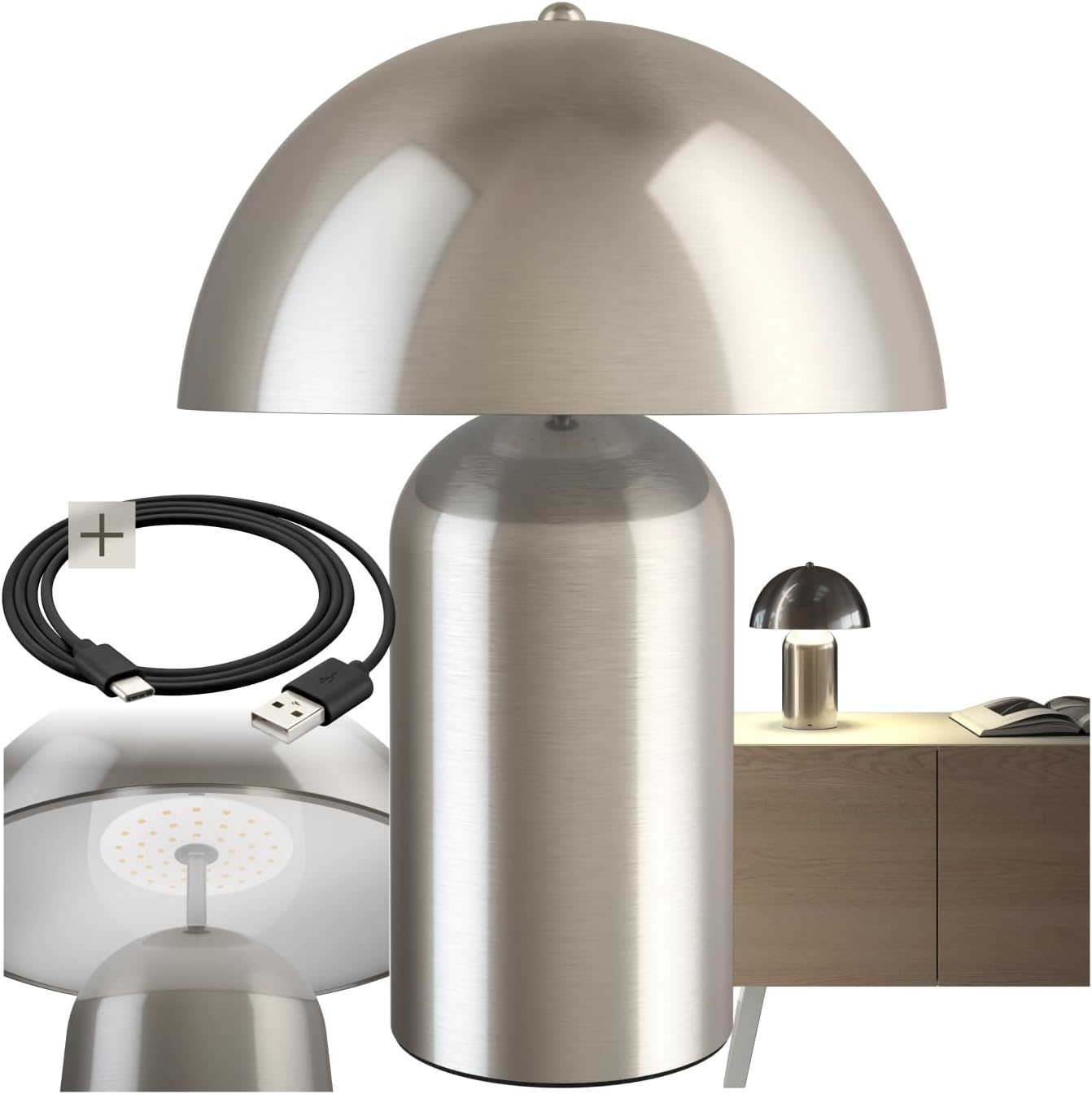
Image 1: The TecTake Kade Retro Mushroom Table Lamp, showcasing its full design and included USB-C charging cable.
5. Setup
- Unpacking: Carefully remove all components from the packaging. Retain packaging for future storage or transport.
- Initial Charge: Before first use, fully charge the lamp. Connect the USB-C end of the charging cable to the lamp's charging port (located on the base) and the USB-A end to a suitable USB power adapter (not included) or a computer USB port. The charging indicator (if present, usually a small LED) will show charging status. A full charge typically takes 4-6 hours.
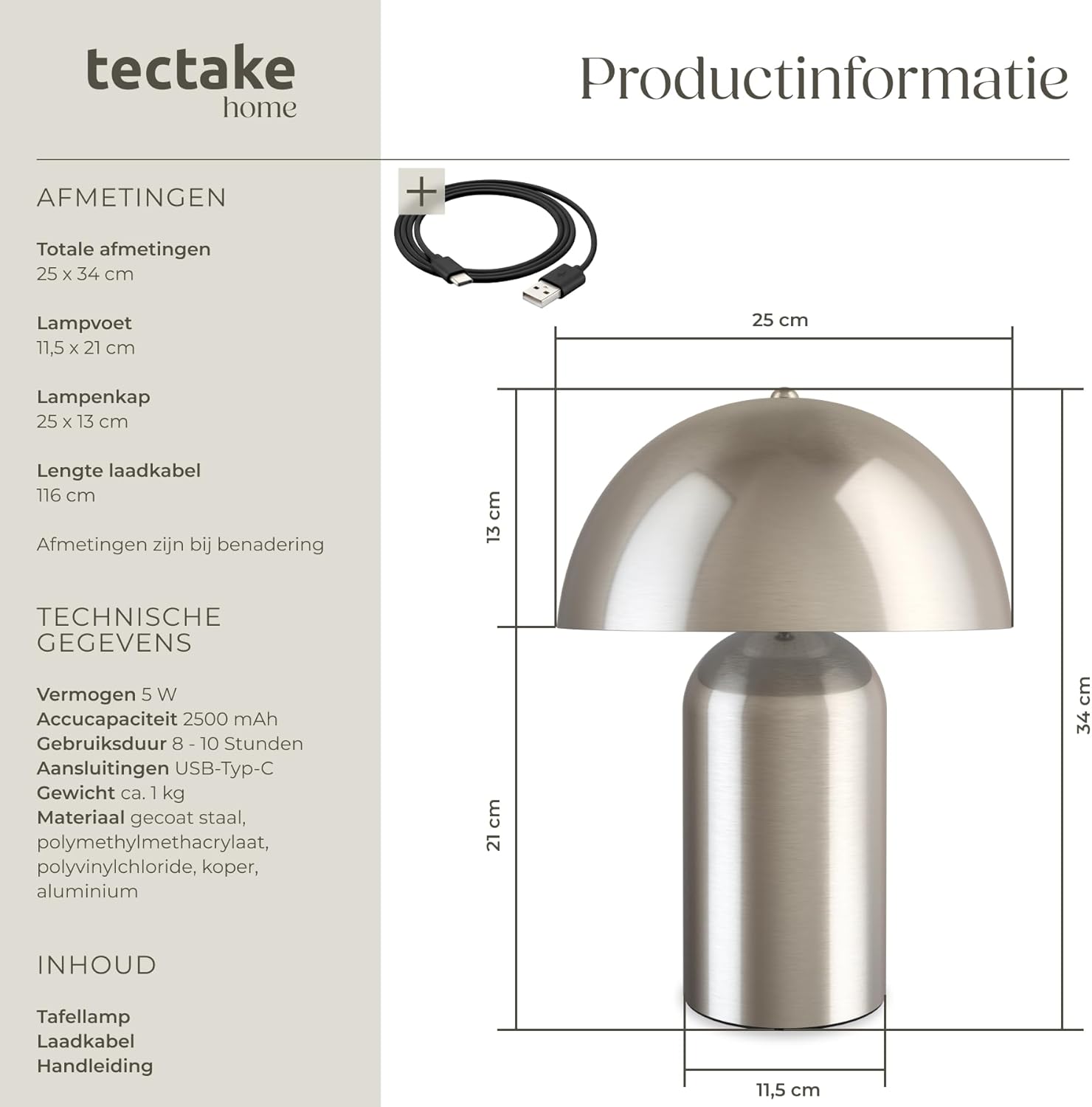
Image 2: Close-up view of the lamp's base, showing the USB-C charging port and the included charging cable.
6. Operating Instructions
The lamp features a touch-sensitive switch located on the top of the lampshade for easy control.
- Turning On/Off: Lightly touch the top of the lampshade to turn the lamp on. Touch it again to cycle through brightness levels and eventually turn it off.
- Adjusting Brightness: The lamp has three brightness levels. Each subsequent touch of the lampshade will cycle to the next brightness level (Low > Medium > High > Off).
- Charging: When the battery is low, the light output may diminish. Connect the lamp to a power source using the USB-C cable as described in the Setup section. The lamp can be used while charging. A full charge provides approximately 8-10 hours of operation, depending on the brightness level used.

Image 3: Underside view of the lampshade, highlighting the integrated LED light source and the area for touch control.
7. Maintenance
- Cleaning: Disconnect the lamp from any power source before cleaning. Wipe the lamp with a soft, dry, or slightly damp cloth. Do not use abrasive cleaners, solvents, or harsh chemicals.
- Storage: If storing the lamp for an extended period, ensure it is fully charged and store it in a cool, dry place. Recharge the lamp every 3-6 months to maintain battery health.
8. Troubleshooting
- Lamp does not turn on:
- Ensure the battery is charged. Connect the lamp to a power source and try again.
- Verify that the touch switch area is clean and unobstructed.
- Lamp does not charge:
- Check if the USB-C cable is securely connected to both the lamp and the power adapter.
- Try using a different USB-C cable or power adapter to rule out cable/adapter issues.
- Ensure the power outlet is functional.
- Brightness levels are not changing:
- Ensure you are touching the correct area on the lampshade.
- If the battery is very low, the lamp may not be able to sustain higher brightness levels. Charge the lamp.
If you encounter issues not covered here, please contact TecTake customer support.
9. Specifications

Image 4: Technical diagram illustrating the dimensions of the lamp, including total height, base diameter, and lampshade dimensions.
| Feature | Specification |
|---|---|
| Model Number | 405246 |
| Brand | TecTake |
| Total Dimensions (Diameter x Height) | Approx. 25 x 34 cm (9.8 x 13.4 inches) |
| Lamp Base (Diameter x Height) | Approx. 11.5 x 21 cm (4.5 x 8.3 inches) |
| Lampshade (Diameter x Height) | Approx. 25 x 13 cm (9.8 x 5.1 inches) |
| Charging Cable Length | Approx. 116 cm (45.7 inches) |
| Power | 5 W |
| Color Temperature | 3000 K |
| Battery Capacity | 2500 mAh |
| Charging Time | Approx. 4-6 hours |
| Operating Time | Approx. 8-10 hours (depending on brightness) |
| Connection Type | USB-C |
| Weight | Approx. 1.2 kg (2.6 lbs) |
| Material | Coated steel, polymethyl methacrylate, polyvinyl chloride, copper, aluminum |
10. Warranty and Support
TecTake products are designed for quality and reliability. For information regarding warranty terms and conditions, please refer to the warranty card included with your purchase or visit the official TecTake website. For technical support, spare parts, or service inquiries, please contact TecTake customer service directly.
Contact information can typically be found on the product packaging or the TecTake official website.