
RCA Wave-78 Black
RCA Wave-78 True Wireless Earbuds User Manual
Model: Wave-78 Black
Introduction
Thank you for choosing the RCA Wave-78 True Wireless Earbuds. This manual provides essential information for setting up, operating, and maintaining your earbuds to ensure optimal performance and longevity. Please read this manual thoroughly before using the product.
Key Features
- High-Resolution Sound Quality: Delivers immersive audio with enhanced bass.
- Long Battery Life: Up to 20 hours of playtime with the charging case.
- Transparency Mode: Allows ambient sound for situational awareness.
- TWS Fit Pro Connectivity: Ensures a stable and reliable Bluetooth connection.
- Ergonomic Design: Provides a comfortable and secure fit for extended wear.
- Intuitive Touch Controls: Easy management of music, calls, and voice assistant.

Image: A person relaxing comfortably while wearing the RCA Wave-78 earbuds, illustrating the ergonomic design for long-lasting comfort during listening sessions.

Image: A person on a bus wearing the RCA Wave-78 earbuds, depicting an immersive audio experience that feels real, rich, and vibrant, allowing the user to enjoy their sound environment.
Package Contents
- RCA Wave-78 True Wireless Earbuds (Left and Right)
- Charging Case
- USB Charging Cable
- User Manual
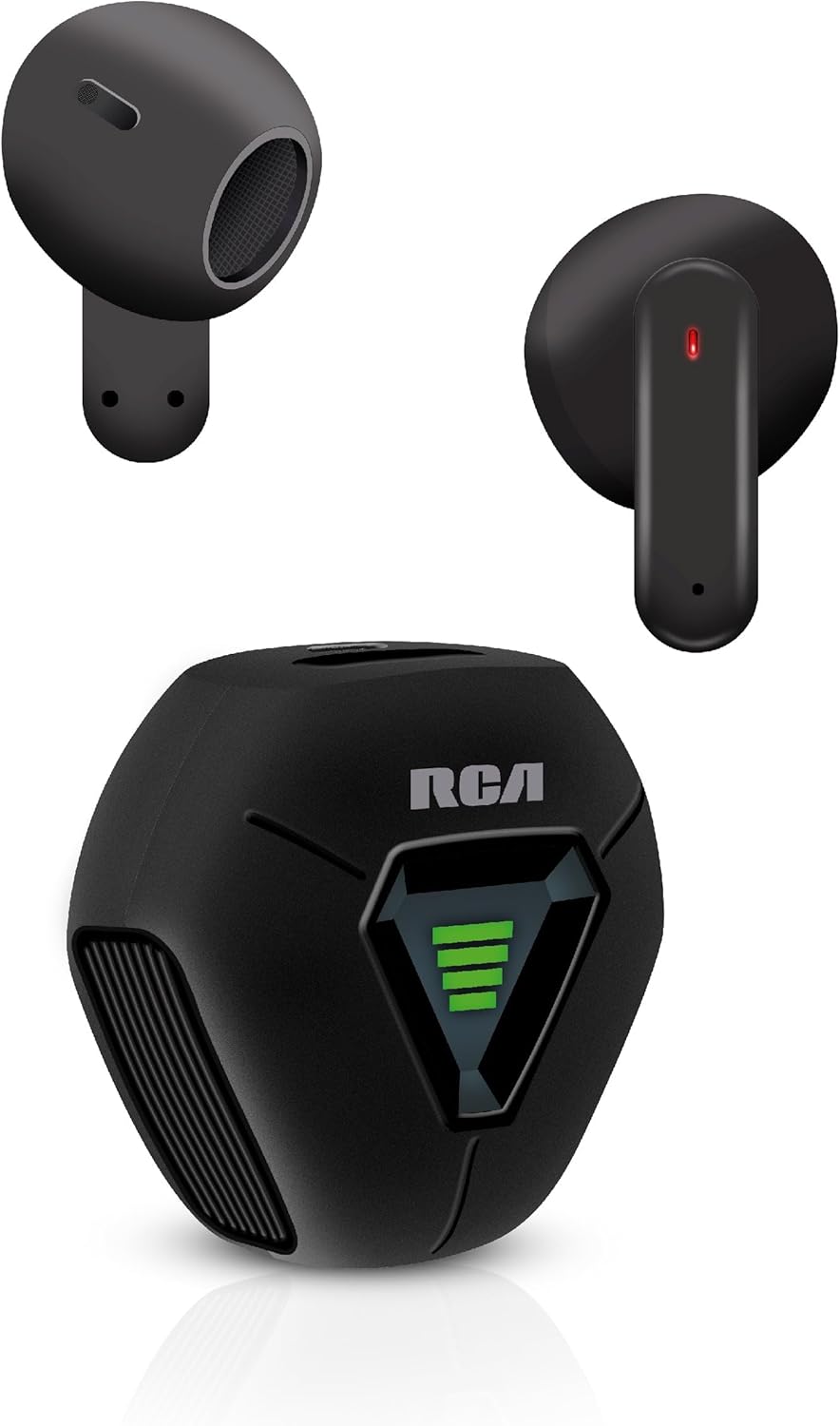
Image: The RCA Wave-78 True Wireless Earbuds, showing both earbuds and the compact charging case. The earbuds are black, and the case features the RCA logo and a battery indicator.
Product Overview
Earbud Components
- Touch Control Area: For managing playback, calls, and voice assistant.
- Microphone: For hands-free calling and voice commands.
- LED Indicator: Shows pairing status, charging status, and power.
- Charging Contacts: For charging within the case.

Image: A detailed diagram illustrating the touch control functions of the RCA Wave-78 earbud, including built-in mics, hands-free calling, touch control, high quality audio, volume control, ultra bass sound, play/pause, and true wireless capabilities.
Charging Case Components
- Earbud Charging Slots: Securely holds and charges the earbuds.
- Battery Indicator: Displays the charging case's battery level.
- USB-C Charging Port: For charging the case.

Image: The RCA Wave-78 True Wireless Earbuds placed inside their open charging case, showing the earbuds nestled in their slots and the green battery indicator lights on the case.
Setup
1. Charging the Earbuds and Case
Before first use, fully charge the earbuds and the charging case.
- Place the earbuds into the charging case. Ensure they are correctly seated.
- Connect the USB charging cable to the charging port on the case and to a USB power source (e.g., computer, wall adapter).
- The LED indicators on the earbuds and case will show charging status. Once fully charged, the indicators will change or turn off.
A full charge provides up to 20 hours of playtime with the charging case.

Image: An illustration highlighting the long-lasting and fast-charging capabilities of the earbuds, showing a person happily using their phone with the earbuds, and text indicating "20 Hours Playtime" and "Faster Charge".
2. Pairing with a Bluetooth Device
The earbuds will automatically enter pairing mode when taken out of the charging case.
- Open the charging case and remove both earbuds. They will automatically power on and attempt to pair with each other.
- On your device (smartphone, tablet, etc.), enable Bluetooth.
- Search for "RCA Wave-78" in the list of available Bluetooth devices.
- Select "RCA Wave-78" to connect. Once connected, you will hear a confirmation tone, and the earbud LED indicators will turn off or flash slowly.
The earbuds will automatically reconnect to the last paired device when removed from the case, if Bluetooth is enabled on the device.

Image: A graphic illustrating the Bluetooth 5.4 technology, showing compatibility with iOS, Android, and Windows, and demonstrating how opening the case auto-powers on and connects the earbuds, while closing it disconnects and powers them off.
Operating Instructions
Touch Controls
The RCA Wave-78 earbuds feature intuitive touch controls on each earbud. The specific functions are:
| Action | Function |
|---|---|
| Single Tap (Left/Right Earbud) | Play/Pause Music |
| Double Tap (Left/Right Earbud) | Answer/End Call |
| Triple Tap (Right Earbud) | Next Track |
| Triple Tap (Left Earbud) | Previous Track |
| Long Press (Left/Right Earbud) | Activate Voice Assistant (Siri/Google Assistant) |
| Long Press (Right Earbud) | Increase Volume |
| Long Press (Left Earbud) | Decrease Volume |

Image: A visual representation of the touch controls on the RCA Wave-78 earbuds, showing a person interacting with the earbud and icons for Play/Pause, Answer Phone Calls, Volume Control, and Assistive Siri/Google.
Transparency Mode
The RCA Wave-78 earbuds feature a Transparency Mode, which allows ambient sounds to blend with your audio. This is useful for maintaining awareness of your surroundings, such as when walking in a city or needing to hear announcements.
- To activate/deactivate Transparency Mode: Specific touch control action for Transparency Mode is not provided in the input. Please refer to the quick start guide or product packaging for the exact touch control gesture to toggle Transparency Mode.
Making and Receiving Calls
- Answer Call: Double tap either earbud.
- End Call: Double tap either earbud during a call.
- Reject Call: Long press either earbud for 2 seconds.
Voice Assistant
Activate your device's voice assistant (Siri, Google Assistant) by long pressing either earbud. This allows you to control your device using voice commands without needing to take it out of your pocket.

Image: A diagram showing the "Smart Button" functions of the RCA Wave-78 earbuds, including Play/Pause, Answer Phone Call, Increase Volume, and Button Assistant for Siri or Google.
Maintenance and Care
- Cleaning: Use a soft, dry, lint-free cloth to clean the earbuds and charging case. Do not use harsh chemicals or abrasive materials.
- Storage: When not in use, store the earbuds in their charging case to protect them and keep them charged.
- Temperature: Avoid exposing the earbuds to extreme temperatures (hot or cold) or high humidity.
- Water Resistance: These earbuds are not water resistant. Avoid contact with water or excessive moisture.
- Battery Life: To preserve battery life, fully charge the earbuds and case at least once every three months if not used regularly.
Troubleshooting
| Problem | Possible Solution |
|---|---|
| Earbuds not pairing with device. |
|
| Only one earbud is working. |
|
| No sound or low volume. |
|
| Charging case not charging. |
|
Specifications
| Feature | Detail |
|---|---|
| Model Name | Wave-78 Black |
| Connectivity Technology | Wireless (Bluetooth 5.4) |
| Playtime | Up to 20 hours (with charging case) |
| Audio Driver Type | Dynamic Driver |
| Frequency Range | 20 Hz - 20,000 Hz |
| Noise Control | Adaptive Noise Cancellation (Transparency Mode) |
| Special Features | Built-In Voice Assistant, Smart Button, Hi-Res Audio, Enhanced Bass |
| Ear Placement | In Ear |
| Item Weight | 10 pounds (Note: This weight is likely for shipping/packaging and not the product itself.) |
| Product Dimensions | 2.17 x 1.85 x 0.47 inches |
| Water Resistance Level | Not Water Resistant |
| UPC | 850068964413 |
Safety Information
- Do not disassemble, repair, or modify the product.
- Do not expose to fire or high temperatures.
- Keep out of reach of children and pets.
- Avoid listening at high volumes for extended periods to prevent hearing damage.
- Use caution when using earbuds in situations requiring awareness of surroundings (e.g., driving, cycling), unless Transparency Mode is specifically designed for such use and activated.
Warranty and Support
For warranty information and customer support, please refer to the warranty card included in your product packaging or visit the official RCA website. Keep your proof of purchase for warranty claims.
RCA Official Store: RCA Store on Amazon
Related documentsWave-78 Black


Ask a question about this manual
Ask about setup, troubleshooting, compatibility, parts, safety, or missing instructions. Manuals+ will review the question and use this page’s manual context to help answer it.