
1. Product Overview
The RCA Wave-78 True Wireless Earbuds provide a high-resolution audio experience with enhanced bass and a comfortable, secure fit. Featuring Bluetooth connectivity and a Transparency Mode, these earbuds are designed for versatile use, offering up to 20 hours of playtime.

Figure 1.1: RCA Wave-78 True Wireless Earbuds and their charging case. The image displays the red earbuds detached from the case, showing their ergonomic design, and the red charging case with a battery indicator.
Key Features:
- High-Resolution Sound Quality: Delivers clear audio and enhanced bass.
- Extended Playtime: Up to 20 hours of battery life for all-day use.
- Transparency Mode: Allows ambient sounds to be heard for situational awareness.
- Bluetooth Connectivity: Stable wireless connection for seamless audio.
- Ergonomic Design: Ensures a comfortable and secure fit.
- Touch Controls: Manage playback, calls, and voice assistant directly from the earbuds.
2. Initial Setup
2.1 Charging the Earbuds and Case
Before first use, fully charge the earbuds and the charging case.
- Place both earbuds into the charging case.
- Connect the charging case to a power source using the provided USB cable.
- The indicator lights on the case will show charging status. A full charge is indicated when all lights are solid.

Figure 2.1: RCA Wave-78 True Wireless Earbuds placed inside their charging case. The image shows the red earbuds nestled in the black interior of the open charging case, with green indicator lights visible, signifying charging or battery level.
2.2 Bluetooth Pairing
To connect your RCA Wave-78 earbuds to a device:
- Ensure the earbuds are charged and placed in the charging case.
- Open the charging case. The earbuds will automatically enter pairing mode.
- On your device (smartphone, tablet, etc.), go to Bluetooth settings and enable Bluetooth.
- Search for "RCA Wave-78" in the list of available devices and select it to pair.
- Once paired, you will hear a confirmation tone, and the earbuds will be ready for use.

Figure 2.2: Diagram illustrating Bluetooth 5.4 pairing. The image shows a smartphone displaying a call, with icons for iOS and Windows, and a visual representation of the earbuds case opening to auto-connect and closing to auto-disconnect.
2.3 Wearing the Earbuds
Gently insert each earbud into your ear canal. Adjust them for a snug and comfortable fit to ensure optimal sound quality and stability.
3. Operating Instructions
3.1 Power On/Off
- Power On: Open the charging case, and the earbuds will automatically power on.
- Power Off: Place the earbuds back into the charging case and close the lid. They will automatically power off and begin charging.
3.2 Touch Controls
The RCA Wave-78 earbuds feature intuitive touch controls on each earbud.

Figure 3.1: Diagram illustrating the touch control features of an RCA Wave-78 earbud. Icons around a single red earbud indicate functions such as built-in mics, hands-free calling, high quality audio, volume control, ultra bass sound, play/pause, true wireless, and touch control.
- Play/Pause: Single tap on either earbud.
- Answer/End Call: Single tap on either earbud.
- Reject Call: Press and hold either earbud for 2 seconds.
- Next Track: Double tap the right earbud.
- Previous Track: Double tap the left earbud.
- Volume Up: Triple tap the right earbud.
- Volume Down: Triple tap the left earbud.
- Activate Voice Assistant (Siri/Google Assistant): Press and hold either earbud for 3 seconds.
- Transparency Mode: The control method for Transparency Mode is not explicitly detailed in the provided information. Please refer to the manufacturer's website or included quick start guide for specific instructions.
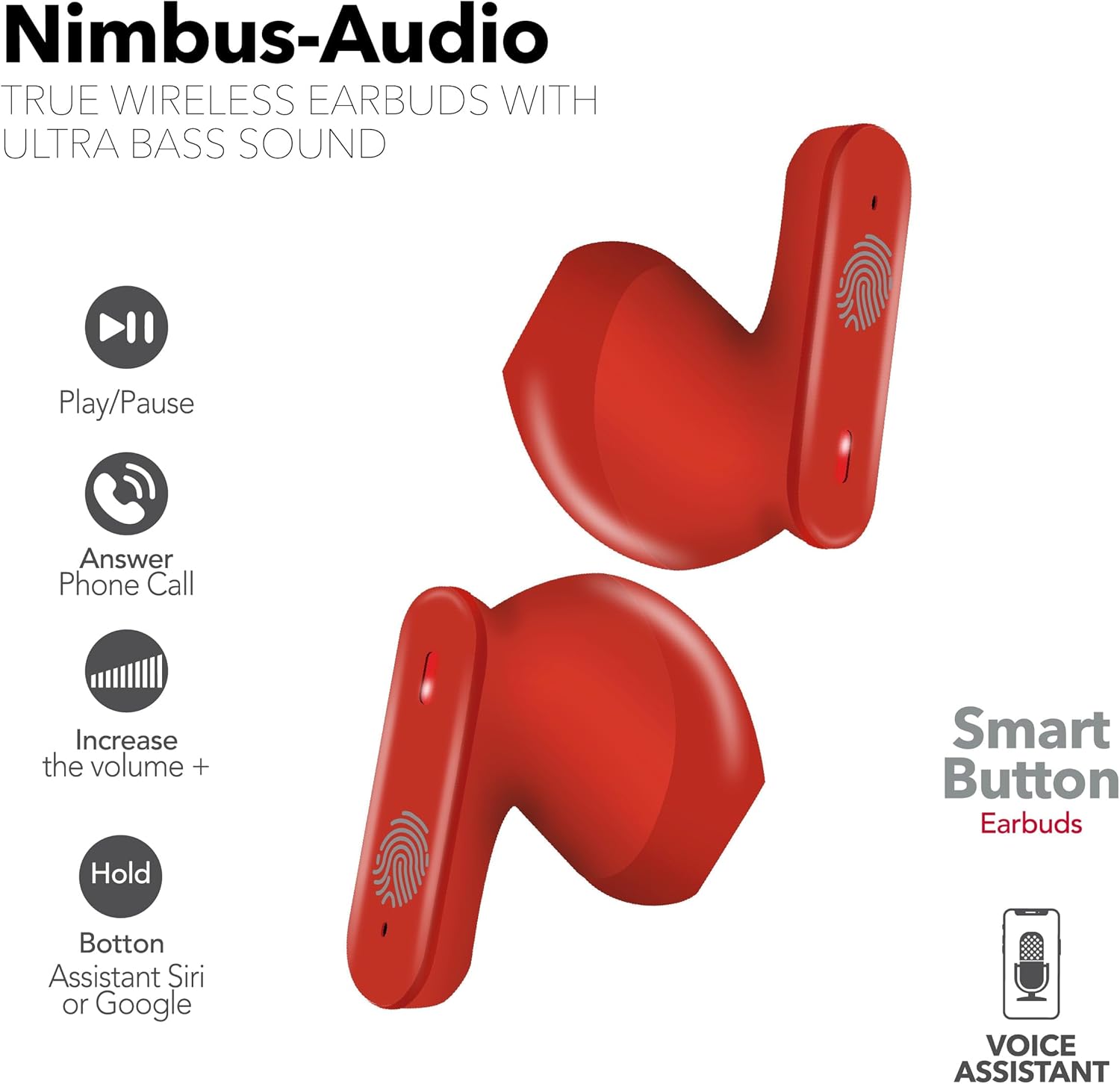
Figure 3.2: Illustration of the "Smart Button" functions on the RCA Wave-78 earbuds. The image shows two red earbuds with icons indicating functions like Play/Pause, Answer Phone Call, Increase Volume (+), and Hold for Assistant (Siri or Google).
4. Maintenance
4.1 Cleaning
Regular cleaning helps maintain optimal performance and hygiene.
- Use a soft, dry, lint-free cloth to wipe the earbuds and charging case.
- Do not use abrasive cleaners, alcohol, or chemical solvents.
- Gently clean the charging contacts on both the earbuds and the case with a dry cotton swab if necessary.
4.2 Storage
When not in use, store the earbuds in their charging case to protect them and keep them charged. Store in a cool, dry place away from extreme temperatures.
4.3 Battery Care
To prolong battery life:
- Avoid fully discharging the battery frequently.
- Charge the earbuds regularly, even if not used for extended periods.
- Do not expose to extreme heat or cold.
5. Troubleshooting
Common Issues and Solutions:
- Earbuds not pairing:
- Ensure both earbuds are charged.
- Place earbuds back in the case, close the lid, wait a few seconds, then open to re-enter pairing mode.
- Turn off and on Bluetooth on your device.
- Forget "RCA Wave-78" from your device's Bluetooth list and try pairing again.
- Only one earbud working:
- Ensure both earbuds are charged.
- Place both earbuds back in the charging case, close the lid, and then open it again.
- Try resetting the earbuds (refer to manufacturer's instructions for specific reset procedure if available, otherwise, a full charge and re-pairing often resolves this).
- No sound or low volume:
- Check the volume level on both your device and the earbuds.
- Ensure earbuds are properly seated in your ears.
- Clean any debris from the earbud speakers.
- Charging issues:
- Ensure the charging cable is securely connected to both the case and the power source.
- Check if the charging contacts on the earbuds and case are clean.
- Try a different USB cable or power adapter.
6. Specifications
| Model Name | Wave-78 |
| Brand | RCA |
| Connectivity Technology | Wireless (Bluetooth) |
| Bluetooth Version | 5.0 |
| Battery Life | Up to 20 Hours |
| Audio Driver Type | Dynamic Driver |
| Frequency Range | 20 Hz - 20,000 Hz |
| Control Method | Remote (Touch Controls) |
| Ear Placement | In Ear |
| Form Factor | In Ear |
| Item Weight | 6.4 ounces |
| Product Dimensions | 2.17 x 1.85 x 0.47 inches |
| Water Resistance Level | Not Water Resistant |
| UPC | 850068964437 |
7. Warranty and Support
For detailed warranty information and customer support, please refer to the official RCA website or contact their customer service directly.
You can visit the RCA Store on Amazon for more product information and support resources.


