Introduction
This manual provides detailed instructions for the proper use and maintenance of your RCA Wave-55 Wireless Over-Ear Bluetooth Headphones. Please read this manual thoroughly before using the product to ensure optimal performance and longevity. Keep this manual for future reference.
Product Overview
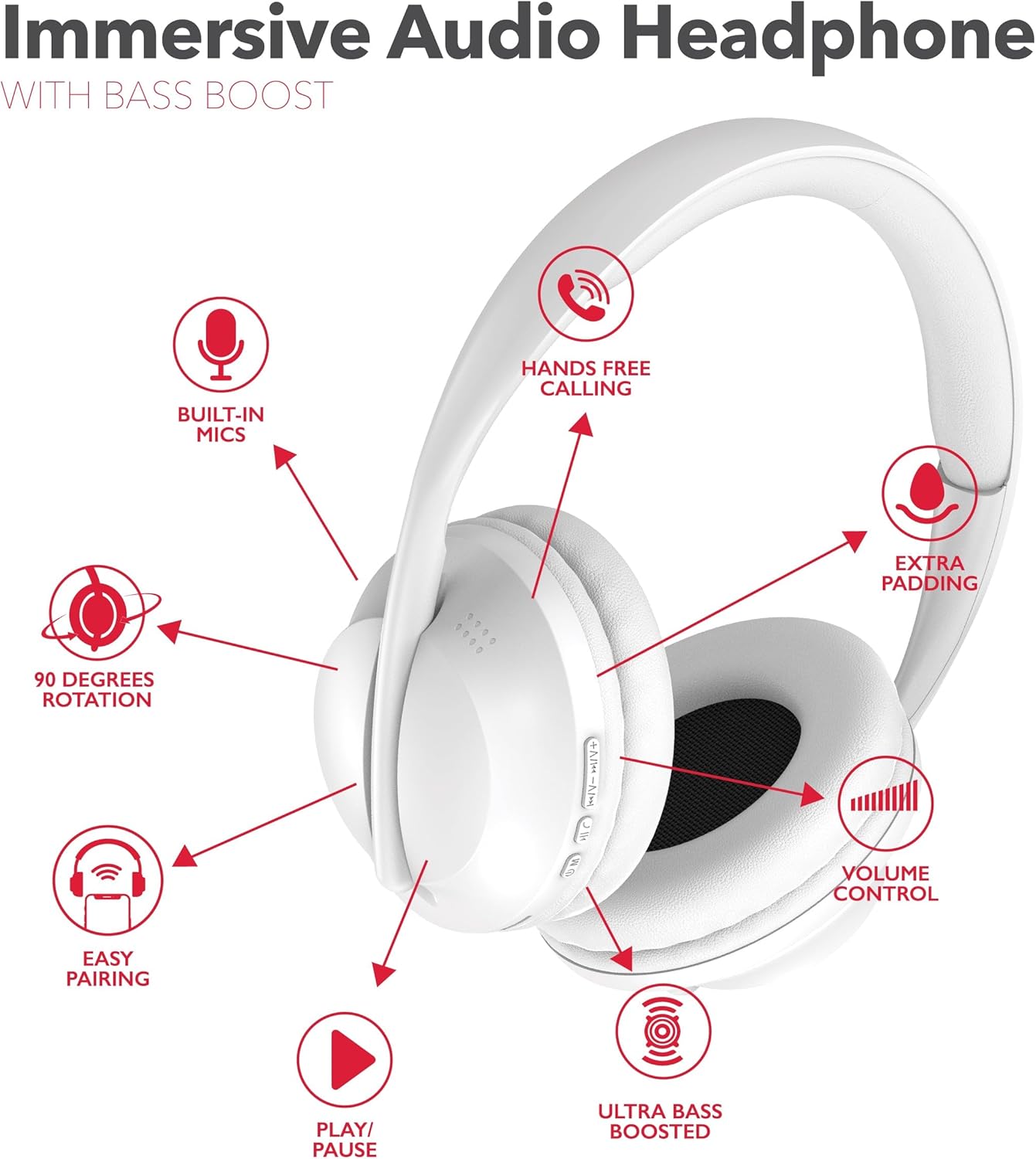
The RCA Wave-55 headphones are designed for an immersive audio experience with features like Hi-Res Audio, deep bass, and a comfortable over-ear design. Familiarize yourself with the components and controls.
Headphone Components
- Adjustable Headband
- Soft Over-Ear Cushions
- Control Buttons (Power, Play/Pause, Volume, Track Navigation)
- Built-in Microphone
- Charging Port (USB-C)
- 3.5mm Audio Jack
Control Layout
This diagram illustrates the dual-function buttons located on the earcups. These buttons control power, Bluetooth mode, play/pause, phone calls, previous/next track, and volume.

The image above provides a visual guide to the dual function buttons, allowing you to manage music and calls directly from the headphones.
Setup
Charging the Headphones
- Connect the provided USB-C charging cable to the charging port on the headphones.
- Connect the other end of the cable to a USB power source (e.g., computer, wall adapter).
- The LED indicator will illuminate to show charging status. It will change color or turn off when fully charged.
- A full charge provides up to 12 hours of playtime.
Note: The headphones cannot be used while charging.
Bluetooth Pairing
- Ensure the headphones are fully charged.
- Press and hold the Power/Bluetooth button until the LED indicator flashes, indicating pairing mode.
- On your device (smartphone, tablet, computer), enable Bluetooth and search for available devices.
- Select "RCA Wave-55" from the list of devices.
- Once connected, the LED indicator will stop flashing and remain solid.

The headphones offer quick Bluetooth pairing for wireless convenience and also include a 3.5mm audio jack for wired listening options.
Operating Instructions
Power On/Off
- Power On: Press and hold the Power button for approximately 3 seconds.
- Power Off: Press and hold the Power button for approximately 5 seconds.
Music Playback
- Play/Pause: Press the Play/Pause button once.
- Volume Up: Press the '+' button.
- Volume Down: Press the '-' button.
- Next Track: Press and hold the '+' button.
- Previous Track: Press and hold the '-' button.
Call Management
- Answer/End Call: Press the Play/Pause button once.
- Reject Call: Press and hold the Play/Pause button for 2 seconds.
- Redial Last Number: Double-press the Play/Pause button.
Transparency Mode
The Transparency Mode allows you to hear your surroundings while listening to audio. This feature is useful for maintaining awareness in busy environments. Refer to your device's specific instructions or the headphone's control layout for activating this mode.
Voice Assistant
Activate your device's voice assistant (e.g., Siri, Google Assistant) by pressing the dedicated Voice Assistant button or following the instructions in your device's manual.
Maintenance
Cleaning
- Wipe the headphones with a soft, dry cloth.
- Do not use abrasive cleaners, solvents, or strong chemicals.
- Avoid getting moisture into any openings.
Storage
- Store the headphones in a cool, dry place away from direct sunlight and extreme temperatures.
- Avoid placing heavy objects on the headphones.
- The earcups feature 90-degree rotation for compact storage.

The 90-degree rotating earcups and adjustable headband ensure a personalized and comfortable fit, as well as convenient storage.

The enhanced ear cushioning provides extra padding to reduce ear strain, contributing to a more enjoyable listening experience.
Troubleshooting
If you encounter issues with your RCA Wave-55 headphones, refer to the following common solutions:
- No Power: Ensure the headphones are fully charged. Connect to a power source and check the charging indicator.
- Cannot Pair: Make sure Bluetooth is enabled on your device and the headphones are in pairing mode (flashing LED). Move the headphones closer to your device. Try unpairing and re-pairing.
- No Sound: Check the volume level on both the headphones and your connected device. Ensure the headphones are properly paired. If using a wired connection, ensure the 3.5mm cable is fully inserted.
- Poor Sound Quality: Move closer to your device to avoid interference. Ensure there are no obstructions between the headphones and your device. Try disconnecting and reconnecting.
- Microphone Not Working: Ensure the headphones are properly connected and selected as the audio input device on your computer or smartphone.
Specifications
| Feature | Specification |
|---|---|
| Model Name | Wave-55 |
| Connectivity Technology | Wireless (Bluetooth 5.3) |
| Audio Driver Type | Dynamic Driver |
| Frequency Range | 20Hz - 40kHz |
| Battery Life | Up to 12 Hours |
| Control Method | Remote (On-ear buttons) |
| Special Features | 90 Degree Rotation, Built-in Mics, Easy Pairing, Transparency Mode |
| Water Resistance Level | Not Water Resistant |
| Product Dimensions | 8.66 x 1.97 x 8.07 inches |
| Item Weight | 1.1 pounds |
| UPC | 850068964321 |
Warranty and Support
For warranty information or technical support, please refer to the warranty card included with your product or visit the official RCA website. Contact customer service for assistance with product issues or inquiries.


