
1. Introduction
This manual provides detailed instructions for the safe installation, operation, and maintenance of your Carro 36-inch Low Profile Ceiling Fan. Please read this manual thoroughly before installation and use, and retain it for future reference. This ceiling fan is designed for indoor living spaces, offering efficient air circulation and integrated lighting.

Image 1.1: Overview of the Carro 36-inch Low Profile Ceiling Fan. This image displays the fan's compact design, white finish, and integrated light fixture.
2. Safety Information
To reduce the risk of electric shock, fire, or injury to persons, read and follow all instructions carefully. Ensure the power is turned off at the circuit breaker before installation or servicing. All wiring must be in accordance with national and local electrical codes. Installation should be performed by a qualified electrician if you are unsure.
- Do not install the fan if the mounting location cannot support the fan's weight.
- Ensure the fan blades are at least 7 feet (2.1 meters) from the floor.
- Do not operate the fan with damaged wiring or components.
- Avoid placing objects in the path of the fan blades.
- This fan is designed for indoor use only.
3. Package Contents
Verify that all components are present before beginning installation:
- Ceiling Fan Unit (including motor, blades, and integrated light) x1
- Remote Control x1
- Mounting Hardware Kit x1
- User Manual x1
4. Setup and Installation
The Carro 36-inch Low Profile Ceiling Fan features an intuitive flush-mount design, making it suitable for rooms with lower ceilings. Detailed instructions are provided in the separate installation guide included with your product. Ensure all electrical connections are secure and properly insulated.

Image 4.1: Close-up view of the fan's three white plastic blades. These blades are designed for efficient air movement and durability.
Key Installation Steps:
- Power Disconnection: Turn off power at the main circuit breaker.
- Mounting Bracket: Securely attach the mounting bracket to the ceiling junction box.
- Wiring: Connect the fan's electrical wires to the household wiring according to the color-coded instructions.
- Fan Assembly: Attach the fan motor assembly to the mounting bracket.
- Blade Attachment: Secure the fan blades to the motor housing.
- Light Kit Installation: Connect and secure the integrated LED light kit.
- Final Check: Ensure all connections are tight and the fan is securely mounted before restoring power.
5. Operating Instructions
Your Carro ceiling fan is operated using the included remote control. Ensure the remote has fresh batteries installed.
5.1 Fan Control
- Power On/Off: Press the power button to turn the fan on or off.
- Speed Adjustment: Use the speed control buttons to select from 10 adjustable fan speeds.
- Airflow Direction (Summer/Winter Mode): Press the reverse button to change the direction of the fan blades.

Image 5.1: Illustration of fan airflow in Summer Mode (downward airflow for cooling) and Winter Mode (upward airflow for recirculating warm air).
- Summer Mode: Blades rotate counter-clockwise, pushing air down to create a cooling breeze.
- Winter Mode: Blades rotate clockwise, drawing air up towards the ceiling to recirculate warm air.
5.2 Light Control
- Light On/Off: Press the light button to turn the integrated LED light on or off.
- Color Temperature Adjustment: Cycle through warm (2700K), natural (3500K), and cool (4000K) light options.
- Dimming: Use the dimming buttons to adjust the light brightness from 1% to 100%.
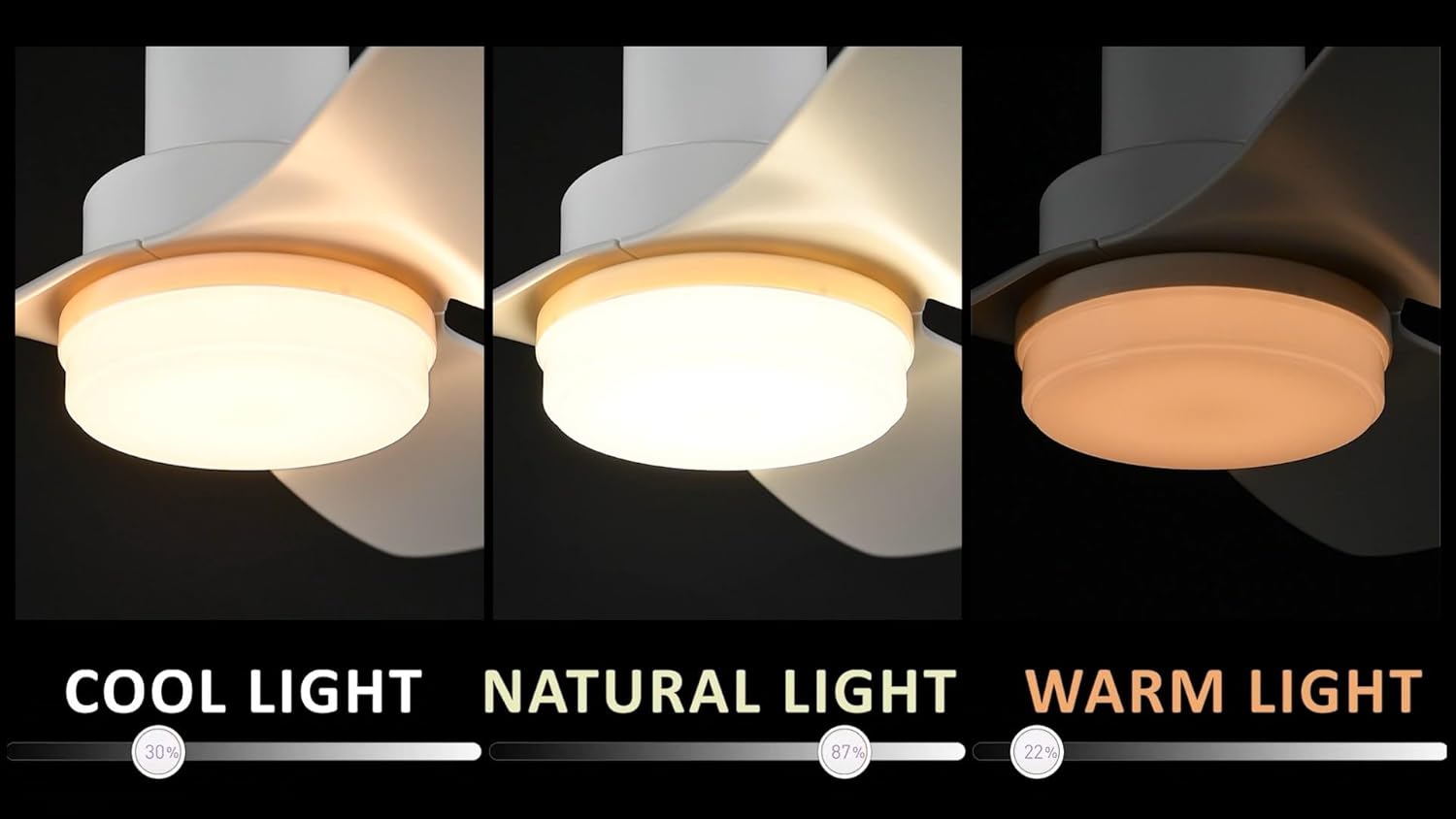
Image 5.2: Visual representation of the three adjustable light color temperatures: Cool Light (4000K), Natural Light (3500K), and Warm Light (2700K).
6. Maintenance
Regular maintenance ensures optimal performance and longevity of your ceiling fan.
- Cleaning: Periodically clean the fan housing and blades with a soft, damp cloth. Do not use abrasive cleaners or solvents.
- Blade Inspection: Check fan blades for any cracks or damage. Replace damaged blades immediately.
- Tightness Check: Ensure all screws and fasteners are tight, especially those securing the blades and mounting bracket.
- No Lubrication Required: The DC motor is permanently lubricated and does not require additional oiling.
7. Troubleshooting
If you experience issues with your ceiling fan, refer to the following common problems and solutions:
| Problem | Possible Cause | Solution |
|---|---|---|
| Fan does not start | No power to the fan; Loose wire connections; Remote control battery low or not paired. | Check circuit breaker; Verify all wire connections; Replace remote battery or re-pair remote. |
| Light does not work | Loose wire connection to light kit; LED driver issue. | Check light kit wiring; Contact customer support if LED driver is suspected. |
| Fan wobbles | Loose blade screws; Unbalanced blades; Loose mounting bracket. | Tighten all blade screws; Use a balancing kit (not included) if necessary; Ensure mounting bracket is secure. |
| Remote control not responding | Low or dead batteries; Remote not paired with fan. | Replace batteries; Refer to the remote control pairing instructions in the installation guide. |
If you are unable to resolve the issue after following these steps, please contact Carro customer support.
8. Specifications
| Feature | Specification |
|---|---|
| Brand | Carro |
| Model Number | 89cd23b0-5492-4454-a1b6-bc9a842cba24 |
| Size | 36 inches |
| Product Dimensions (D x W x H) | 36"D x 36"W x 10.9"H |
| Mounting Type | Flush Mount |
| Motor Type | DC Motor |
| Number of Speeds | 10 |
| Number of Blades | 3 |
| Blade Material | Plastic |
| Air Flow Capacity | 2650 Cubic Feet Per Minute |
| Voltage | 120 Volts |
| Control Method | Remote Control (Voice Control listed as a feature, but remote is primary) |
| Light Color Temperature | 2700K (Warm), 3500K (Natural), 4000K (Cool) |
| Dimming Range | 1% to 100% |
| Indoor/Outdoor Usage | Indoor |
| Certification | ETL |
9. Warranty and Support
Carro is committed to product quality and customer satisfaction. If you have any questions, concerns, or require assistance with your ceiling fan, please contact our professional after-sales support team. Refer to your purchase documentation or the Carro website for specific warranty details and contact information.