
1. Product Overview
The LEKATO Looper Guitar Pedal is a versatile 2-in-1 device combining a looper and a drum machine. It offers three distinct modes: Looper, Drum, and Looper+Drum, allowing for independent or combined operation. Designed with a durable full metal shell, this mini pedal is built for reliability and portability, making it suitable for various musical settings.
Key features include 20 minutes of loop recording time with unlimited overlay, 16 diverse drum grooves based on real drum samples, and a convenient tap tempo control for precise rhythm synchronization. Its optimal circuit design ensures clear and pure tone, with automatic saving of recorded files even if power is disconnected.
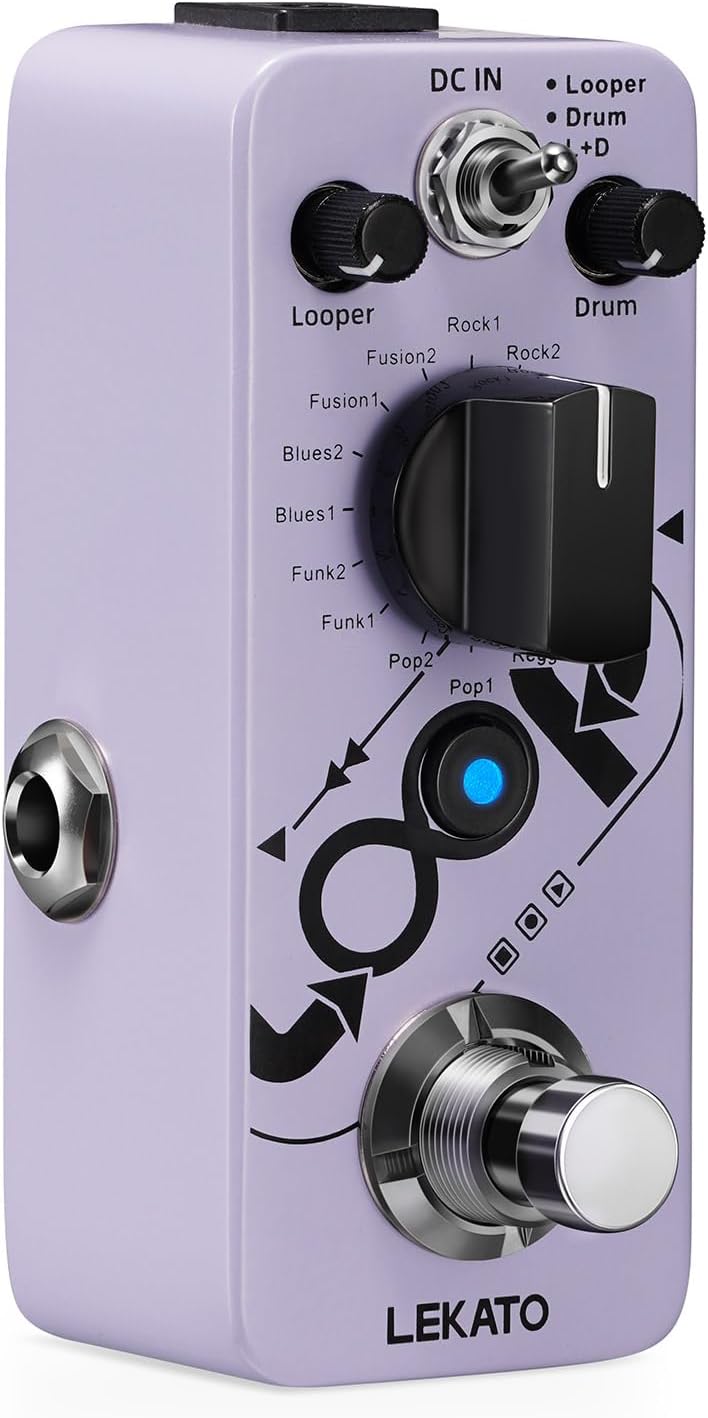
Figure 1: LEKATO Looper Guitar Pedal - Main View
2. Setup
To set up your LEKATO Looper Guitar Pedal, follow these steps:
- Power Supply: Connect a DC 9V center negative power supply (not included) to the 'DC IN' jack on the pedal. Ensure the power supply meets the specified voltage and polarity requirements.
- Guitar Connection: Connect your guitar to the 'IN' jack on the pedal using a standard 1/4-inch instrument cable.
- Amplifier Connection: Connect the 'OUT' jack on the pedal to your amplifier or other audio equipment using another 1/4-inch instrument cable.
- Power On: Once all connections are secure, turn on your amplifier and then the LEKATO pedal.

Figure 2: Pedal Connections and True Bypass Switch
The pedal features a true bypass switch, ensuring a clean and lossless signal path when the effect is disengaged.
3. Operating Instructions
The LEKATO Looper Guitar Pedal offers intuitive controls for its various functions.
3.1. Modes of Operation
The pedal features a mode switch to select between three operational modes:
- Looper: Activates only the looper function.
- Drum: Activates only the drum machine function.
- L+D (Looper + Drum): Activates both the looper and drum machine simultaneously.

Figure 3: 2-in-1 Looper + Drum Machine Modes
3.2. Looper Functionality
The looper supports unlimited overlay recording for up to 20 minutes. Use the 'Looper' knob to adjust the playback level of your recorded loops. The footswitch controls various looping functions:
- Single Stomp: Record, Play, or Dub (overdub).
- Double Stomp: Play/Stop.
- Long Stomp: Undo/Redo.

Figure 4: 20 Minutes Loop Time and Recording Capabilities
3.3. Drum Machine Functionality
The drum machine offers 16 drum grooves, comprising 8 styles with 2 variations each, suitable for various genres like Rock, Metal, Jazz, Reggae, Pop, Funk, Blues, and Fusion. All drum sounds are based on real drum samples. Use the 'Drum' knob to adjust the master volume of the drum groove and the 'Groove Selector' knob to choose your desired groove.
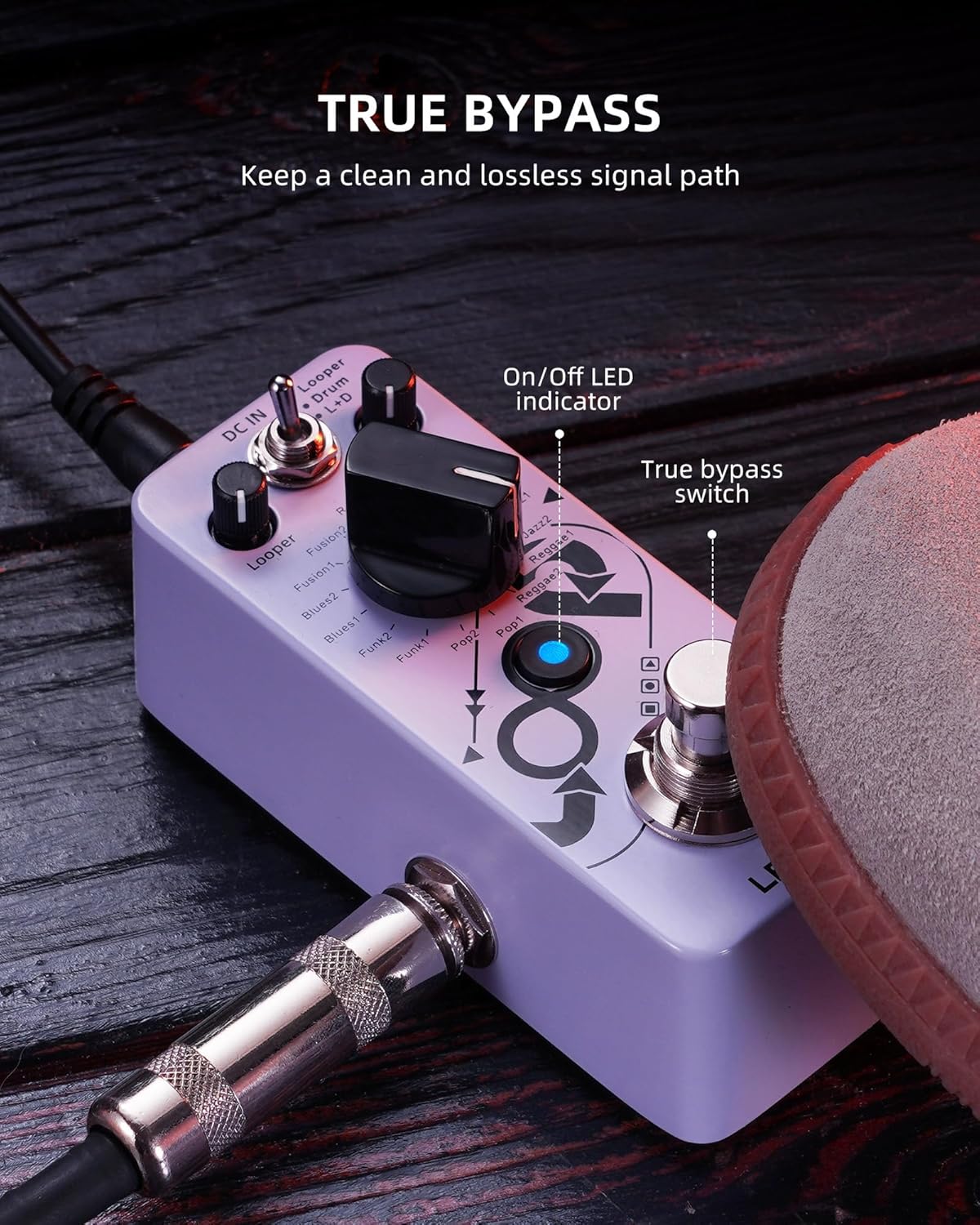
Figure 5: 16 Drum Grooves Selection
3.4. Tap Tempo Control
To adjust the tempo of the drum groove, simply tap the footswitch multiple times. The pedal will synchronize the groove tempo to your tapping speed.
3.5. Controls Overview

Figure 6: Detailed View of Pedal Controls
This diagram illustrates the various knobs and switches on the pedal, including DC IN, Looper Level, Drum Level, Groove Selector, Mode Switch, Input, Output, and Footswitch.
3.6. Official Product Video
Video 1: Official LEKATO Looper Guitar Pedal demonstration, showcasing its features and sound.
4. Maintenance
To ensure the longevity and optimal performance of your LEKATO Looper Guitar Pedal, consider the following maintenance tips:
- Cleaning: Use a soft, dry cloth to clean the pedal's exterior. Avoid using abrasive cleaners or solvents that could damage the finish or internal components.
- Storage: Store the pedal in a dry environment, away from extreme temperatures, humidity, and direct sunlight.
- Connections: Periodically check all cable connections for tightness and wear. Loose connections can lead to signal loss or noise.
- Power: Always use a compatible DC 9V center negative power supply. Disconnect power when the pedal is not in use for extended periods.
The pedal features an optimal circuit design with a high-quality chip that automatically saves recorded files even if the device is powered off, minimizing data loss.
5. Troubleshooting
If you encounter issues with your LEKATO Looper Guitar Pedal, try the following basic troubleshooting steps:
- No Power: Ensure the DC 9V power supply is correctly connected and functioning. Check the power outlet.
- No Sound: Verify all instrument cables are securely connected to the 'IN' and 'OUT' jacks. Check your guitar and amplifier settings. Ensure the pedal's volume knobs (Looper, Drum) are not set to zero.
- Distorted Sound: Check if the input signal is too strong, causing clipping. Adjust your guitar's volume or the pedal's input level if applicable.
- Looping Issues: Ensure you are performing the correct footswitch actions for recording, playing, and overdubbing. Refer to section 3.2.
- Drum Groove Issues: Verify the 'Drum' volume knob is up and the 'Groove Selector' is set to an active groove.
If problems persist after attempting these steps, please contact LEKATO customer support for further assistance.
6. Specifications
| Feature | Specification |
|---|---|
| Item Weight | 6.3 ounces |
| Package Dimensions | 4.13 x 2.28 x 1.85 inches |
| Country of Origin | China |
| Item Model Number | Looper |
| Color Name | Purple Looper |
| Hardware Interface | 1/4-inch Audio |
| Signal Format | Analog |
| Power Source | Corded Electric (DC 9V center negative) |
| Voltage | 9 Volts (DC) |
| Audio Output Effects | Drum, Looper |
The compact design of the pedal optimizes pedal board real estate, making it easy to carry for performers.

Figure 7: Mini Portable Design
Constructed with a high-quality full metal shell, the pedal is durable and solid.
7. Warranty and Support
For any product inquiries, technical support, or warranty information, please visit the official LEKATO store or contact their customer service. Detailed contact information can typically be found on the product packaging or the brand's official website.
Visit the LEKATO Store on Amazon for more products and information.


