
Introduction
The LEKATO High Gain Distortion Pedal is an analog mini effect pedal designed for electric guitars, offering a wide range of distortion tones. It features two distinct modes, Vintage and Turbo, allowing guitarists to achieve various sonic textures from classic warm distortion to powerful high-gain sounds. Constructed from durable aluminum alloy, this pedal incorporates true bypass circuitry to maintain signal integrity when disengaged. This manual provides essential information for the proper setup, operation, and maintenance of your LEKATO distortion pedal.
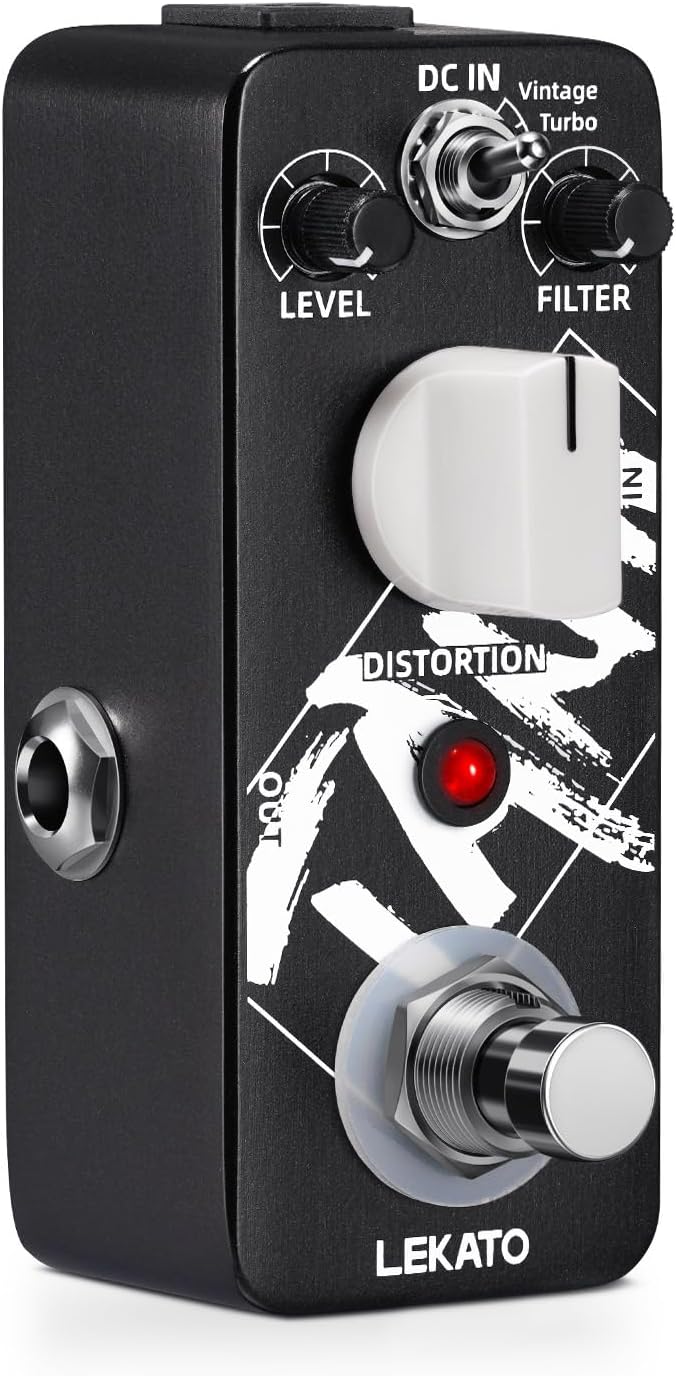
Image: Front view of the LEKATO High Gain Distortion Pedal, showcasing its compact design and control layout.
Safety Information
- Use only a DC 9V power adapter with center-negative polarity. Incorrect power supply can damage the unit.
- Do not expose the pedal to water, moisture, or extreme temperatures.
- Avoid dropping or subjecting the pedal to strong impacts.
- Do not attempt to disassemble or modify the pedal. Refer all servicing to qualified personnel.
Setup
1. Power Connection
The LEKATO High Gain Distortion Pedal requires a DC 9V power supply with a center-negative barrel jack. Ensure your power adapter meets these specifications.
- Connect the DC 9V power adapter (not included) to the "DC IN" jack on the top of the pedal.
- Plug the power adapter into a standard electrical outlet.

Image: The pedal connected to a DC 9V power supply, illustrating the power input jack.
2. Audio Connections
Use standard 1/4-inch instrument cables for audio connections.
- Connect your electric guitar to the "IN" jack on the right side of the pedal.
- Connect the "OUT" jack on the left side of the pedal to your amplifier or other effects pedals in your signal chain.
Operating Instructions
Controls Overview

Image: Diagram of the pedal highlighting the Power Jack, Level, Filter, Distortion knobs, Output, LED Indicator, and Footswitch.
- LEVEL Knob: Adjusts the overall output volume of the effect. Turn clockwise to increase volume, counter-clockwise to decrease.
- FILTER Knob: Controls the tone brightness or EQ of the distorted sound. Adjust to shape the high-frequency content.
- DISTORTION Knob: Adjusts the intensity or amount of distortion. Turn clockwise for more gain and saturation.
- MODE Switch (Vintage/Turbo): Toggles between two distinct distortion characteristics.
- Vintage Mode: Produces natural, warm, and smooth classic distortion tones.
- Turbo Mode: Delivers a powerful, high-gain distorted sound.
- FOOTSWITCH: Engages or bypasses the effect. Press to activate the distortion; press again to return to true bypass mode.
- LED INDICATOR: Illuminates when the effect is active.

Image: Close-up of the mode switch on the LEKATO pedal, showing the "Vintage" and "Turbo" settings.

Image: Close-up of the three functional knobs (Level, Filter, Distortion) on the LEKATO pedal.
True Bypass Functionality
The pedal features true bypass circuitry. When the effect is disengaged (LED off), your guitar signal passes directly through the pedal without any coloration or loss of tone. This ensures a clean and uncompromised signal path when the distortion is not in use.

Image: The pedal with an arrow indicating the true bypass switch and LED indicator, emphasizing its signal integrity.
Maintenance
- Cleaning: Use a soft, dry cloth to clean the pedal's exterior. Do not use abrasive cleaners or solvents.
- Storage: Store the pedal in a dry environment away from direct sunlight and extreme temperatures when not in use.
- Connections: Periodically check all cable connections for wear and tear. Ensure jacks are free of dust and debris.
Troubleshooting
| Problem | Possible Cause | Solution |
|---|---|---|
| No sound when pedal is engaged. |
|
|
| Weak or distorted sound (unintended). |
|
|
| LED indicator not lighting up. |
|
|
Specifications
- Model: M0033
- Material: Aluminum Alloy
- Signal Format: Analog
- Connector Type: Barrel Jack (DC 9V, center negative)
- Hardware Interface: 1/4-inch Audio Input/Output
- Power Requirement: DC 9V (center negative)
- Item Weight: Approximately 6.4 ounces (0.18 Kilograms)
- Package Dimensions: 4.53 x 2.44 x 2.13 inches
- Modes: Vintage, Turbo
- Bypass: True Bypass

Image: The pedal highlighting its mini portable design, dimensions, power requirements (DC 9V), and weight (5.9 ounces).
Warranty and Support
For warranty information and technical support, please refer to the official LEKATO website or contact your authorized dealer. Keep your purchase receipt as proof of purchase.
Visit the LEKATO Store on Amazon for more products and information.


