
1. Introduction
This manual provides essential instructions for setting up, operating, and maintaining your GOBOULT Mirage Smart Watch. Please read this manual thoroughly to ensure proper use and to maximize the features of your device.
2. What's in the Box
- GOBOULT Mirage Smart Watch (Inox Steel)
- Charging Cable
- User Manual
- Warranty Card
3. Setup
3.1 Initial Charging
Before first use, fully charge your GOBOULT Mirage Smart Watch. Connect the provided charging cable to the charging port on the back of the watch and to a standard USB power adapter (not included).
3.2 App Installation and Pairing
- Scan the QR code in the user manual or search for the companion app (e.g., 'BoultFit' or similar, as per your watch's specific app) on your smartphone's app store (Android or iOS).
- Install and open the app.
- Enable Bluetooth on your smartphone.
- Follow the in-app instructions to search for and pair with your GOBOULT Mirage Smart Watch. Ensure the watch is powered on and discoverable.
3.3 Bluetooth Calling Setup
To enable Bluetooth calling functionality:
- After initial pairing, open your phone's Bluetooth settings.
- Look for a second Bluetooth device named 'GOBOULT Mirage_CALL' or similar and pair with it. This separate connection handles the call audio.
- Once connected, you can make and receive calls directly from your watch.

Image: The GOBOULT Mirage Smart Watch displaying an incoming call, highlighting its Bluetooth calling capabilities with a dedicated speaker and microphone.
4. Operating Instructions
4.1 Display and Navigation
The GOBOULT Mirage features a 1.39-inch HD display with 360x360 pixel resolution and up to 500 nits brightness for clear visibility. Navigate the watch using the touchscreen and the digital crown.
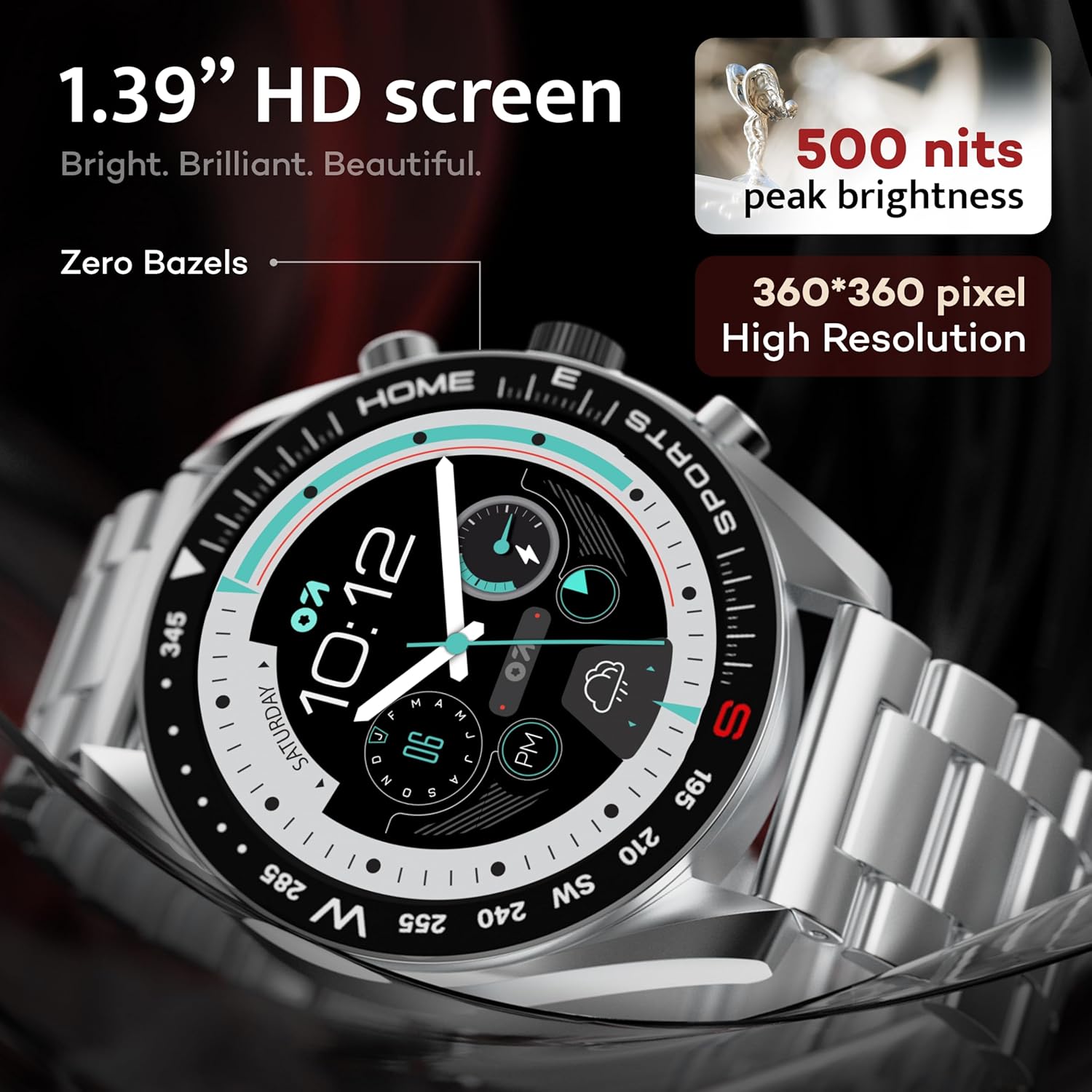
Image: Close-up of the GOBOULT Mirage Smart Watch display, showcasing its 1.39-inch HD screen with 500 nits peak brightness and 360x360 pixel resolution.
4.2 Digital Crown Functions
The digital crown provides intuitive control:
- Press and Hold: Power On/Off, Sleep-wake.
- Rotate: Scroll through menus, adjust settings.
- Single Press: Return to home screen, select items.
- Double Press: Switch UI or launch specific functions.

Image: The GOBOULT Mirage Smart Watch highlighting the digital crown and its associated functions like power control, voice assistant access, UI switching, and sports mode launch.
4.3 Watch Faces
Customize your watch's appearance with over 300 cloud-based watch faces. Access and change watch faces through the companion app or directly on the watch by long-pressing the home screen.
4.4 Sports Modes
The watch supports over 120 sports modes to track various physical activities. Access sports modes from the main menu or via shortcut buttons for quick launch. Track metrics such as calories burned, distance, and heart rate during your workouts.

Image: The GOBOULT Mirage Smart Watch displaying various sports modes, including running, cycling, yoga, cricket, and badminton, indicating quick access via shortcut buttons.
4.5 Health Monitoring
The GOBOULT Mirage Smart Watch offers comprehensive health tracking features:
- SpO2 Blood Oxygen Monitor: Measures blood oxygen levels.
- Heart Rate Monitor: 24/7 heart rate tracking.
- Sleep Monitor: Tracks sleep patterns and quality.
- Blood Pressure Monitor: Provides blood pressure readings.
- Breath Training Mode: Guides through breathing exercises.
- Drink Water Reminder: Prompts you to stay hydrated.
- Sedentary Reminder: Alerts you after periods of inactivity.
- Activity Tracking: Records steps, distance, and calories burned.
- Menstrual Cycle Tracking: Helps monitor menstrual cycles.

Image: The back of the GOBOULT Mirage Smart Watch showing its sensors, alongside a list of health monitoring features including SpO2, heart rate, sleep, and activity tracking.
4.6 Smart Notifications
Receive SMS and other smart notifications directly on your watch when connected to your smartphone. Manage notification settings through the companion app.
4.7 AI Voice Assistant & Find My Phone
- AI Voice Assistant: Long press the side button to activate the intelligent AI voice assistant (compatible with Google Assistant and Siri) for hands-free control.
- Find My Phone: If your paired phone is misplaced, use the 'Find Phone' feature on your watch. Navigate to the watch menu, select 'Find Phone', and your connected phone will ring or vibrate.

Image: The GOBOULT Mirage Smart Watch displaying the 'Find' screen, illustrating how to locate a connected smartphone by making it ring or vibrate.
4.8 Mini Games
The watch includes mini-games for entertainment. Access them through the watch's application menu.

Image: The GOBOULT Mirage Smart Watch displaying a selection of mini-games, including '2048', 'Battleship', 'Hamster', and 'Young Bird'.
5. Maintenance
5.1 Water Resistance (IP67)
The GOBOULT Mirage Smart Watch is IP67 water-resistant, meaning it is protected against dust ingress and can withstand immersion in water up to 1 meter for 30 minutes. It is suitable for daily wear and activities like hand washing or light rain. Avoid prolonged immersion, hot water, or use during swimming/diving.

Image: The GOBOULT Mirage Smart Watch submerged in water, illustrating its IP67 water resistance for protection against water and dust.
5.2 Cleaning
Wipe the watch and strap regularly with a soft, dry cloth. For stubborn dirt, use a slightly damp cloth and then dry thoroughly. Avoid harsh chemicals or abrasive materials.
5.3 Strap Care
The watch comes with a stainless steel strap. Ensure the strap is clean and dry to prevent skin irritation. Use the provided metallic strap adjustment tool if you need to resize the strap.
6. Troubleshooting
- Watch not turning on: Ensure the watch is fully charged.
- Cannot pair with phone: Ensure Bluetooth is enabled on both devices, the app is open, and the watch is discoverable. Try restarting both the watch and phone.
- Bluetooth calling not working: Confirm that both 'GOBOULT Mirage' and 'GOBOULT Mirage_CALL' (or similar) are paired in your phone's Bluetooth settings.
- Inaccurate health data: Ensure the watch is worn snugly on your wrist, not too tight or too loose. Clean the sensors regularly.
- Short battery life: Reduce screen brightness, disable unnecessary notifications, and limit continuous heart rate monitoring if not needed.
7. Specifications
| Feature | Specification |
|---|---|
| Model Name | Mirage 8906133853457 |
| Display | 1.39" HD Display, 360 x 360 Resolution, 500 Nits Brightness |
| Connectivity | Bluetooth 5.3, App |
| Water Resistance | IP67 (Water Resistant up to 1 meter) |
| Frame Material | Zinc Alloy |
| Strap Material | Stainless Steel |
| Battery Type | Lithium Polymer |
| Health Monitoring | SpO2, Heart Rate, Sleep, Blood Pressure, Menstrual Cycle Tracking |
| Sports Modes | 120+ (Badminton, Cricket, Cycling, Football, Running, etc.) |
| Voice Assistant | AI Voice Assistant (Google Assistant, Siri) |
| Dimensions (D x W x H) | 12D x 28W x 46H Millimeters |
| Item Weight | 106 Grams |
8. Warranty and Support
8.1 Warranty Information
Your GOBOULT Mirage Smart Watch comes with a 1-year manufacturer's warranty from the date of purchase. Please refer to the included Warranty Card for detailed terms and conditions.
8.2 Manufacturer Contact
For support, service, or warranty claims, please contact the manufacturer:
Exotic Mile Private Limited, Boult Audio
B-67 Wazirpur Industrial Area, New Delhi 110052