
Introduction
The RAINLEOTI NF-513s is an advanced 5-in-1 multi-functional wall detector designed for comprehensive scanning and measurement tasks. This device combines wood detection, metal detection, live cable detection, laser distance measurement, and a digital level into a single, robust unit. It is an essential tool for DIY enthusiasts, contractors, and home improvement professionals, ensuring safety and accuracy in various projects such as drilling, mounting, and installation.

Figure 1: RAINLEOTI NF-513s 5-in-1 Stud Finder Wall Scanner
Equipped with an upgraded detection chip and a professional optical lens, the NF-513s provides accurate and reliable results. Its user-friendly design includes a backlit LCD display, audio alerts, and voice prompts for easy operation in diverse conditions. The device is powered by a rechargeable lithium battery and can store up to 50 sets of measurement data.
Setup and Basic Operation
Charging the Device
The NF-513s comes with a built-in rechargeable lithium battery. Use the provided USB Type-C cable to charge the device. Connect the Type-C end to the device's charging port and the USB-A end to a compatible power adapter or computer USB port. The battery indicator on the LCD screen will show the charging status.

Figure 2: Type-C Interface for Charging and Data Storage Overview
Power On/Off
To power on the device, press and hold the power button (usually labeled 'back' or with a power icon) until the LCD screen illuminates. To power off, press and hold the same button until the screen turns off.
Operating Modes
The NF-513s features three primary detection modes and multiple laser measurement functions. Always ensure the device is properly calibrated before use for accurate results.
Wall Detection Modes
The device can detect wood, metal, and live AC wires behind walls, ceilings, and floors. It is crucial to perform calibration before each use or when moving to a different scanning surface.

Figure 3: Overview of Wood, Cable, and Metal Detection Capabilities
1. Metal Detection
This mode detects magnetic metals (e.g., steel, iron) and non-magnetic metals (e.g., copper, aluminum). It can detect objects up to a depth of 80mm. To enter metal detection mode, short press the 'SURVEY' button. The display will show a metal detection icon. Scan the surface slowly. When a metal object is detected, the screen will display the depth and signal strength. The device will also provide voice announcements like "Metal Mode" and "Metal" as it detects.
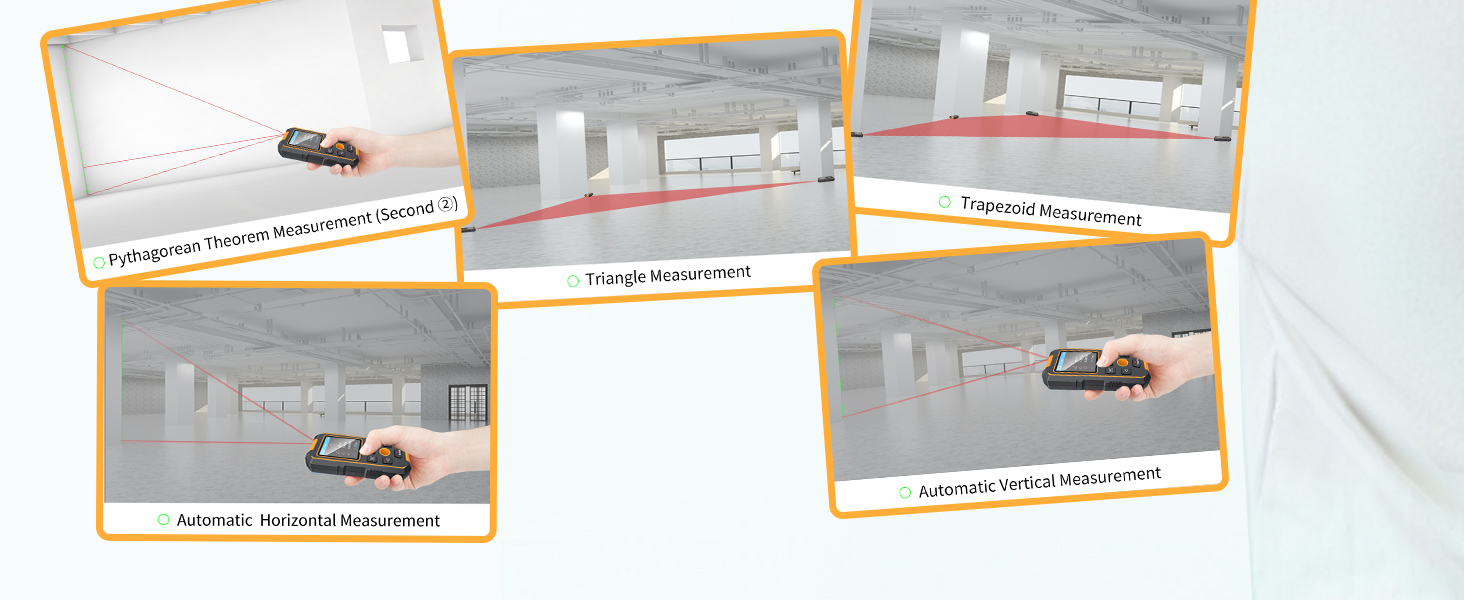
Figure 4: Metal Detection Operation and Display
2. Wooden Detection
This mode is used to detect hidden wooden objects such as studs, beams, and joists behind gypsum board walls, bare wood floors, plywood, and wood blocks. It can detect objects up to a depth of 38mm. To switch to wooden detection, short press the 'SURVEY' button until the wood detection icon appears. Keep the instrument closely attached to the target surface and move it slowly. When a wooden object is detected, the device will announce "Rib" and display the signal strength.
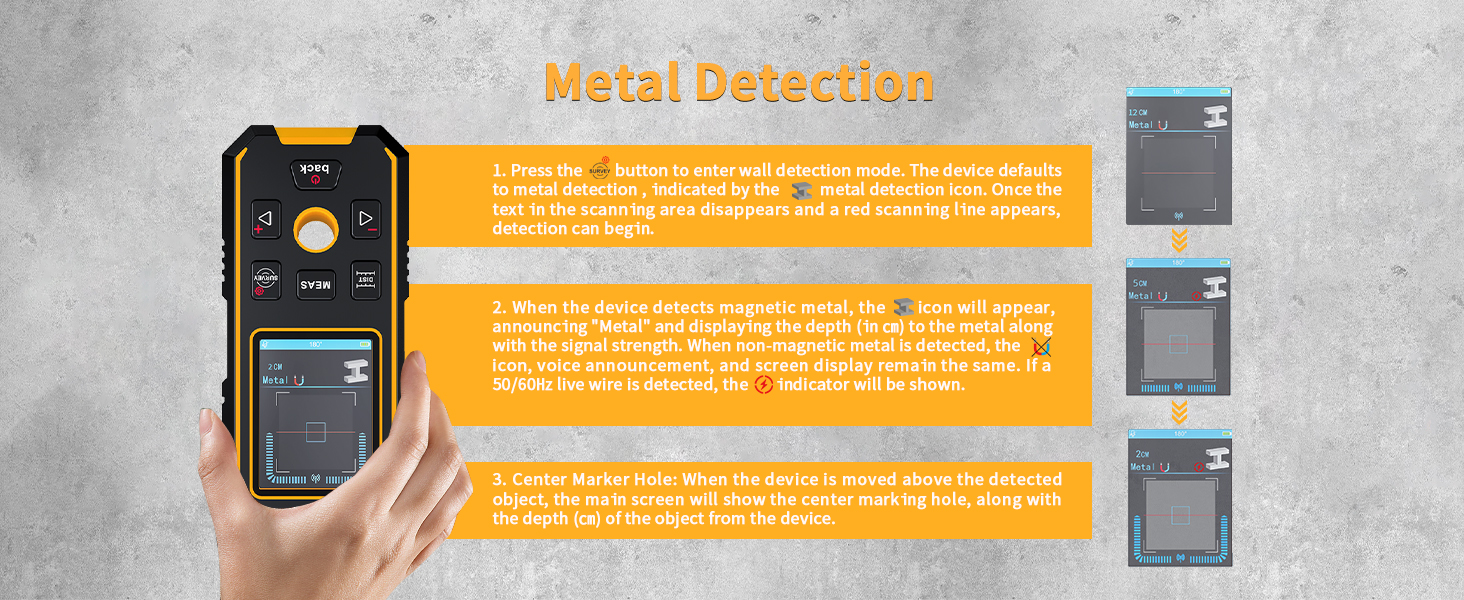
Figure 5: Wooden Detection Operation and Display
3. AC Power (Cable) Detection
This mode identifies live wires in walls, detecting objects up to a depth of 50mm. To enter AC detection mode, short press the 'SURVEY' button until the AC voltage icon appears. Move the device slowly across the surface. When a 50/60Hz AC power source is detected, the device will announce "AC Power" and display the signal strength. The device detects live AC wires in all modes to prevent potentially dangerous accidents.

Figure 6: AC Power Detection Operation and Display

Figure 7: Safety First - AC Wire Warning
Calibration
For accurate detection, calibration is essential. The device supports both automatic and manual calibration modes for wooden detection, and self-calibration for metal detection.
- Metal Detection Self-Calibration: Ensure no metal objects are around. Navigate to 'Metal calibration' in the System Menu and press 'MEAS' to start.
- Wooden Detection Calibration: Place the instrument close to the target surface. The device will perform automatic calibration. If the detected target surface is dark or cannot be calibrated, press the 'SURVEY' button to enter manual calibration mode. Slowly move the instrument in the area to be tested.
Laser Measurement Functions
The NF-513s includes advanced laser distance measurement capabilities, offering 14 powerful functions for various measurement needs. The Class II laser has an accuracy of ±1.5mm and a wavelength of 630-670nm.

Figure 8: Overview of Laser Measurement Functions
Use the directional buttons (left/right) to navigate through the different laser measurement functions. Press 'MEAS' to confirm and take measurements.
- Single Measurement: Short press 'MEAS' to take a single distance measurement.
- Continuous Measurement: Long press 'MEAS' for 1 second to enter continuity measurement. The screen will display MAX/MIN length.
- Area Measurement: In Single Measurement or Digital Level mode, short press the right directional button to enter area measurement. Press 'MEAS' to measure length and width.
- Volume Measurement: Short press the right directional button to choose the volume measurement function. Take measurements for length, width, and height.
- Pythagorean Theorem: Select the function to measure length for horizontal/vertical and hypotenuse.
- Secondary Pythagorean Theorem 1 & 2: Used to measure heights between two hypotenuses.
- Triangle Area Measurement: Select the function and measure the length for three lines.
- Trapezoid Area Measurement: Select the function and take measurements for two vertical lengths and one horizontal length.
- Self-Level Measurement: Measures the length for hypotenuses. The device automatically calculates the leaning angle, length for horizontal and vertical direction.
- Countdown Measurement: Adjust the countdown time and press 'MEAS' to start. The device displays the length figure when the countdown ends.
- Digital Level Measurement: Displays the current tilt and roll angle information on the screen.
- Plus & Minus Measurement: Only works in single measurement, area measurement, and volume measurement modes. Long press the left directional button after getting a result to perform addition/subtraction.
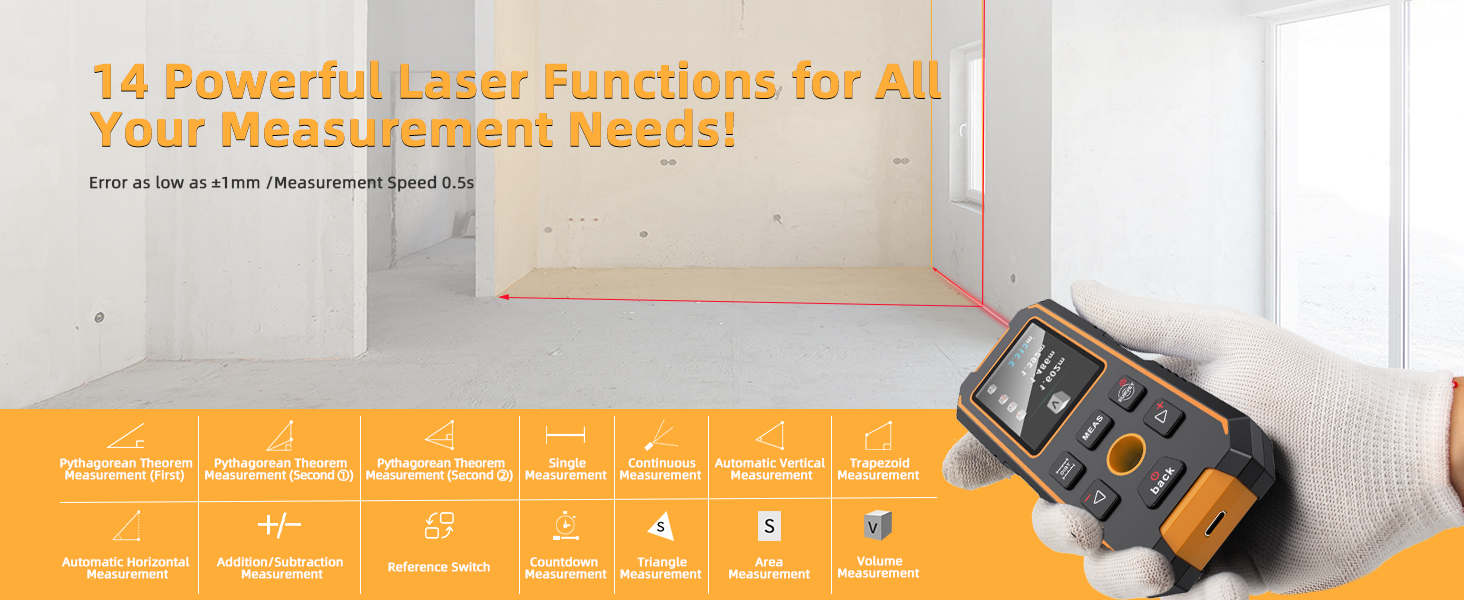
Figure 9: Digital Level Measurement in Use
Official Product Video: 5-in-1 Wall Detector with Laser Measure
Video 1: This video provides a comprehensive demonstration of the RAINLEOTI NF-513s, covering its 5-in-1 detection capabilities including metal, wood, and AC wire detection, as well as various laser measurement functions like single, continuous, area, volume, Pythagorean theorem, and digital level measurements. It also illustrates the calibration process and data storage features.
Data Management
Record Storage
The NF-513s can store up to 50 records of measurement results. To record a result after calculating, short press the 'MEAS' button. You can review stored records by logging into the system menu. To delete all record data, press the left and right directional buttons simultaneously.
Bench Mark Switch
Long press the 'DIST' button to switch the bench mark between including or excluding the length of the device in measurements. This allows for flexible measurement from the front or rear of the device.
Specifications
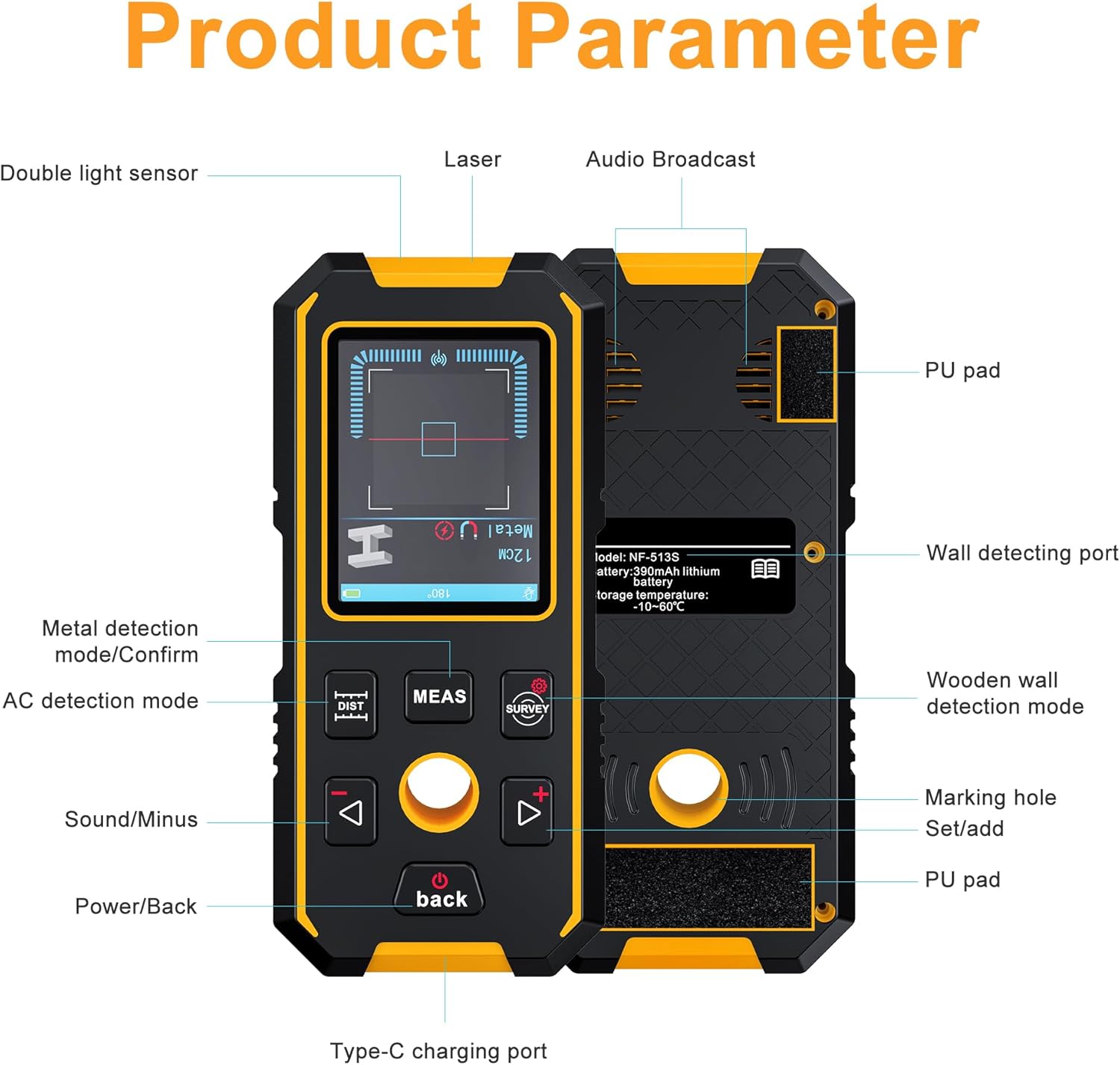
Figure 10: Product Parameter Overview
| Feature | Specification |
|---|---|
| Brand | RAINLEOTI |
| Model Number | NF-513s |
| Detection Functions | Wood, Metal (Magnetic & Non-magnetic), Live Cable |
| Wood Detection Depth | Up to 38mm |
| Live Cable Detection Depth | Up to 50mm |
| Metal Detection Depth | Up to 80mm (Non-magnetic & Magnetic) |
| Laser Class | Class II, <5mW |
| Laser Ranging Accuracy | ±1.5mm + d*0.5% |
| Digital Level Accuracy | ±0.1° |
| Display Type | LCD |
| Power Source | Rechargeable Lithium Ion Battery (390mAh) |
| Data Storage | 50 sets |
| Material | Acrylonitrile Butadiene Styrene |
| Item Weight | 0.44 Pounds (approx. 7 ounces) |
| Package Dimensions | 6.54 x 4.21 x 2.13 inches |
Troubleshooting
Inaccurate Detection Results
- Calibration: Always ensure the device is properly calibrated before each use and when moving to a new scanning surface. Refer to the 'Calibration' section under 'Wall Detection Modes'.
- Surface Contact: Maintain firm and even contact with the scanning surface. Uneven pressure or lifting the device can lead to inaccurate readings.
- Scanning Speed: Move the device slowly and steadily across the surface. Rapid movements can cause missed detections or false positives.
- Environmental Factors: High humidity or certain wall materials (e.g., heavily textured drywall, lath and plaster) can affect performance. Test on a known area first.
Screen Orientation Issues
Some users may experience the screen orientation appearing upside down in certain modes. This is a known characteristic of the device's display. While it does not affect functionality, users can adjust their viewing angle or refer to the manual for button layouts if needed. The device is designed for intuitive operation despite this display behavior.
No Power/Device Not Turning On
- Battery Charge: Ensure the device is fully charged. Connect it to a power source using the provided Type-C cable and allow sufficient charging time.
- Power Button: Press and hold the power button firmly for a few seconds to ensure it registers.
Maintenance
- Cleaning: Wipe the device with a soft, dry cloth. Do not use abrasive cleaners or solvents.
- Storage: Store the device in a cool, dry place, away from direct sunlight and extreme temperatures. Use the provided belt pouch for protection.
- Battery Care: For optimal battery life, avoid fully discharging the battery frequently. Charge the device regularly, even if not in use, to maintain battery health.
- Physical Protection: The device features a rubberized casing for protection against bumps and drops. However, avoid excessive force or impact to prevent damage to internal components.

Figure 11: Design Features for Durability and Ease of Use
Warranty and Support
RAINLEOTI is committed to providing a superior testing experience. If you have any questions or require assistance with your NF-513s 5-in-1 Stud Finder Wall Scanner, please do not hesitate to contact our customer support. We value your inquiries and aim to respond within 24 hours.
For more information or to explore other products, visit the RAINLEOTI Store.