
1. Introduction
The TECKNET TK-WA131 Water Leak Detector is designed to provide early warning of water leaks and drips in your home or office. Equipped with multiple high-sensitivity probes and a loud 120dB alarm, it helps prevent potential water damage by alerting you promptly. Its compact, wireless, and IP66 waterproof design allows for flexible placement in various locations prone to leaks.
Package Contents
- 3 x TECKNET Water Leak Detectors
- 6 x AAA Batteries (pre-installed or included separately)
- 1 x Battery Compartment Opening Tool
- 1 x User Manual (this document)

Image 1.1: Three TECKNET TK-WA131 Water Leak Detectors. Each detector is white, square-shaped with rounded corners, featuring a central 'TECKNET' button, a red indicator light, and a 'TEST' button below it. Water droplets are visible on their surfaces, indicating their waterproof nature.
2. Product Features
- Dual Leakage Detection: Equipped with 2 top-mounted high-sensitivity probes for pipe and drain drip detection, and 4 bottom probes for simultaneous floor moisture and water accumulation detection. This multi-probe system ensures comprehensive and rapid detection of various leak types.
- Adjustable Alarm Volume: Features a 120dB maximum alarm volume with 4 adjustable levels and a flashing indicator light. Includes volume reduction and mute functions for user convenience.
- Wireless and Compact Design: No wiring or installation required. Its small size allows for discreet placement in various locations. Note: This device does not support WiFi or Bluetooth connectivity.
- IP66 Waterproof Rating: Constructed from ABS and stainless steel, ensuring durability and consistent operation in damp environments like bathrooms, kitchens, and laundry rooms. The IP66 rating prevents internal moisture, extending battery life.
- Extended Battery Life: Utilizes a power-saving circuit, allowing the included 2x AAA batteries to last for over 2 years under normal use. A low power indicator (flashing red light and alarm) signals when battery replacement is needed.

Image 2.1: Double Leakage Warning. This image shows a kitchen sink area with a water leak detector placed on the floor. One circle highlights the detector's bottom sensors for 'Water Immersion Alarm' (pooling water), and another circle highlights the top sensors for 'Dripping Alarm' (water dripping from pipes). The note explains that bottom sensors in a parallel line trigger an alarm, while diagonal sensors do not.

Image 2.2: 4 Levels Adjustable Volume. The image depicts a water leak detector in a kitchen, with sound waves emanating from it, indicating its 120dB alarm. Text instructs to press and hold the 'TEST' button for 3 seconds to switch between the four different volume levels.

Image 2.3: IP66 Waterproof. This image shows a TECKNET water leak detector partially submerged in water with splashes, illustrating its IP66 waterproof rating. The text states that this rating prevents internal moisture, effectively extending battery life.
3. Product Structure
Familiarize yourself with the components of your TECKNET Water Leak Detector:

Image 3.1: Product Structure Introduction. This diagram labels the key parts of the detector: 120dB Buzzer, Water Drop Sensor (top), 2*Batteries (AAA), Water Leak Sensor (bottom probes), Test Button, Indicator Light, and Battery Compartment Opening.
- 120dB Buzzer: Emits the alarm sound.
- Water Drop Sensor: Top-mounted probes for detecting drips.
- Water Leak Sensor: Bottom-mounted probes for detecting pooling water.
- Test Button: Used for testing the alarm and adjusting volume.
- Indicator Light: Provides visual feedback (e.g., low battery, alarm activation).
- Battery Compartment: Houses the AAA batteries.
4. Battery Installation
The TECKNET Water Leak Detector requires 2 AAA batteries for operation. These are typically included in the package. Follow these steps to install or replace the batteries:
- Open the Battery Compartment: Use the provided opening tool (or a similar thin, flat object) to gently pry open the battery compartment cover. Insert the tool into the small groove on the side of the detector and rotate it left and right to release the clips.
- Insert Batteries: Place two AAA batteries into the compartment, ensuring correct polarity (+ and - ends match the markings inside the compartment).
- Close the Cover: Align the battery compartment cover and press firmly until it clicks securely into place.
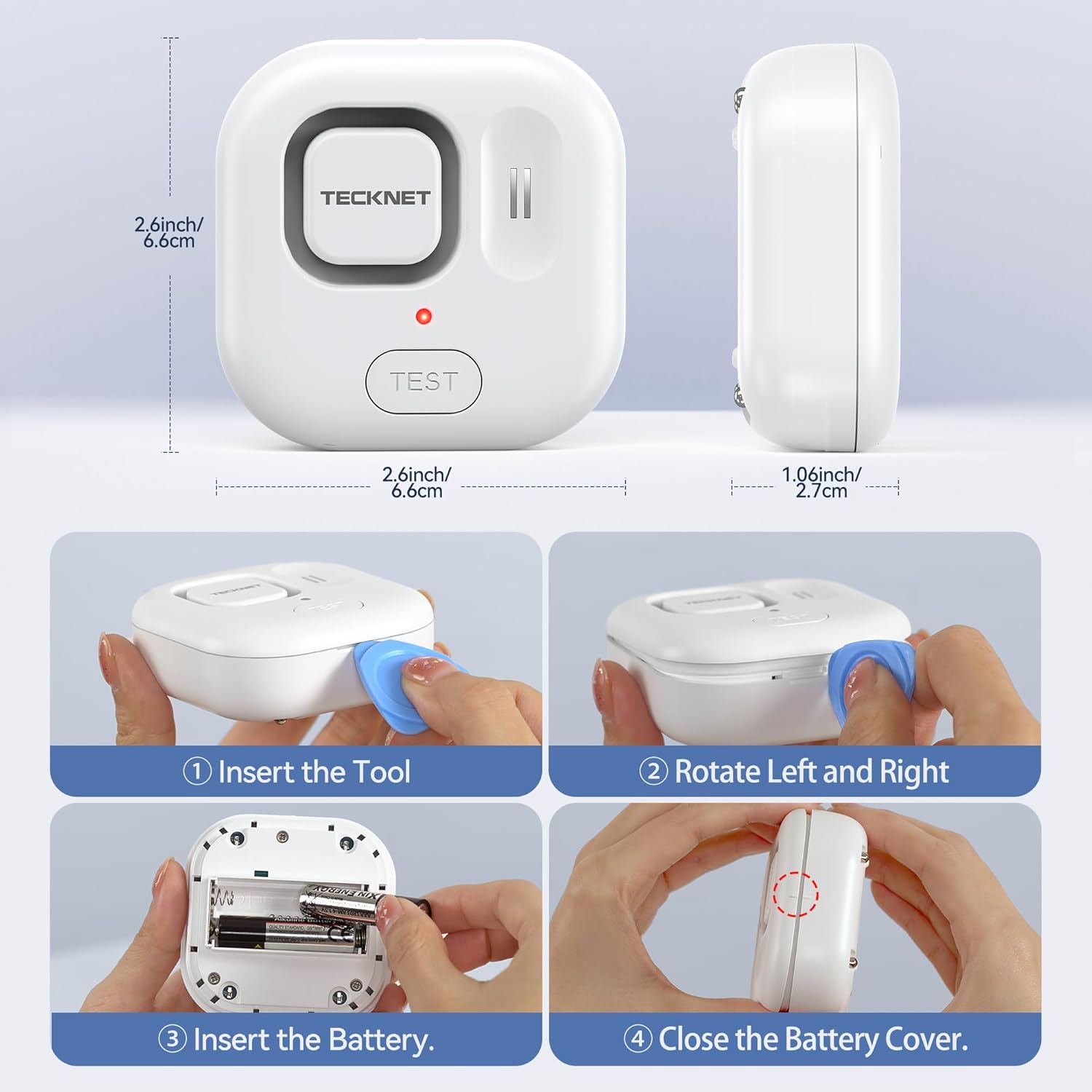
Image 4.1: Battery Installation Steps. This image provides a visual guide: (1) Insert the tool into the side groove, (2) Rotate left and right to open, (3) Insert AAA batteries with correct polarity, and (4) Close the battery cover securely.
5. Operation
Powering On/Off
The device is typically active once batteries are installed. To activate or deactivate the unit, a long press on the 'TEST' button is required:
- To Turn On: Press and hold the 'TEST' button for approximately 10 seconds. A single short beep will confirm activation.
- To Turn Off: Repeat the process by pressing and holding the 'TEST' button for approximately 10 seconds.
Testing the Alarm
It is recommended to test the detector periodically to ensure proper function:
- Manual Test: Briefly press the 'TEST' button. The alarm should sound, and the indicator light should flash.
- Water Test: Place the detector on a damp cloth or in a shallow amount of water (ensuring the bottom probes make contact). The alarm should activate immediately. Remove from water to stop the alarm.
Adjusting Volume
The detector features 4 adjustable volume levels:
- While the unit is on, press and hold the 'TEST' button for approximately 3 seconds.
- Each 3-second press will cycle through the volume levels, indicated by a varying number of short beeps (e.g., 4 beeps for highest, 1 beep for lowest).
- Release the button at your desired volume level.
6. Placement Guidelines
Place the TECKNET Water Leak Detector in areas where water leaks are likely to occur. Ensure the bottom probes are in direct contact with the surface where water might accumulate, or the top probes are positioned to catch drips.

Image 6.1: Usage Scenarios. This image displays four common areas for detector placement: under a kitchen sink (detecting a pipe leak), near a bathroom sink (detecting an overflow), next to a washing machine (detecting a machine leak), and in a basement or storage area (detecting general water accumulation).
Recommended Locations:
- Under sinks (kitchen, bathroom)
- Near washing machines, dishwashers, and refrigerators with ice makers
- Next to water heaters and sump pumps
- In basements, utility rooms, and crawl spaces
- Near toilets and showers
- Under pipes or areas prone to condensation
7. Maintenance
Battery Replacement
When the indicator light flashes red and the alarm sounds intermittently, it signifies low battery power. Replace the batteries promptly to ensure continuous protection. Refer to Section 4 for battery installation instructions.
Cleaning
Wipe the detector with a dry or slightly damp cloth as needed. Do not use harsh chemicals or abrasive cleaners. Ensure the probes are clean and free of debris for optimal performance.
8. Troubleshooting
| Problem | Possible Cause | Solution |
|---|---|---|
| Alarm does not sound when water is detected. |
|
|
| Alarm is too quiet or too loud. | Volume setting is not optimal. | Press and hold the 'TEST' button for 3 seconds to cycle through volume levels. |
| False alarms. | Probes are in contact with moisture or conductive material (e.g., metal). | Relocate the detector to a dry area. Ensure probes are not touching metal surfaces. |
| Indicator light flashes red. | Low battery. | Replace both AAA batteries. |
9. Specifications
| Feature | Specification |
|---|---|
| Model Number | TK-WA131 |
| Power Source | 2 x AAA Alkaline Batteries (included) |
| Voltage | 3 Volts |
| Alarm Volume | Up to 120 dB |
| Waterproof Rating | IP66 |
| Sensor Technology | Contact Sensor (6 probes: 2 top, 4 bottom) |
| Mounting Type | Tabletop Mount |
| Product Dimensions | 2.59 x 2.59 x 1.02 inches (6.6 x 6.6 x 2.6 cm) |
| Item Weight | 9.9 ounces (approx. 280g for 3-pack with batteries) |
| Color | White |
10. Warranty and Support
Warranty Information
TECKNET offers a 36-Month Warranty for registered products. Please refer to the warranty card included with your purchase or visit the official TECKNET website for detailed terms and conditions.
Customer Support
If you encounter any issues or have questions regarding your TECKNET Water Leak Detector, please contact our professional customer service team. Contact information can typically be found on the TECKNET website or on the product packaging.
