
Introduction
This manual provides essential information for the safe and efficient installation, operation, and maintenance of your VENTS-US VKP 125 Centrifugal Ventilation Fan. Please read these instructions thoroughly before beginning any procedures.
About the VENTS-US VKP 125 Fan
The VENTS-US VKP 125 is a centrifugal ventilation fan designed for extract and input ventilation in areas with limited space. It provides small to medium airflow and is suitable for ducting from multiple sources. The fan is constructed with a galvanized steel housing for durability and corrosion resistance. Its compact, low-profile design makes it suitable for installation in tight or concealed spaces, including residential and light commercial applications. The fan is designed to operate effectively within airstreams ranging from 13°F to 140°F.

Image: The VENTS-US VKP 125 fan integrated into a ventilation system within a ceiling, illustrating its compact design for discreet installation.
Features
- Inline centrifugal ventilation fan for five-inch ducts.
- Specially designed for extract and input ventilation in tight spaces.
- Suitable for working airstreams from 13°F to 140°F.
- Dimensions: 5-inch ducting; fan unit is 16.19 x 12.19 x 7.5 inches with a 5-inch collar.
- IPX4 Protection / Thermal Overload Protection.
- General purpose: Ventilation and dryer exhaust application.
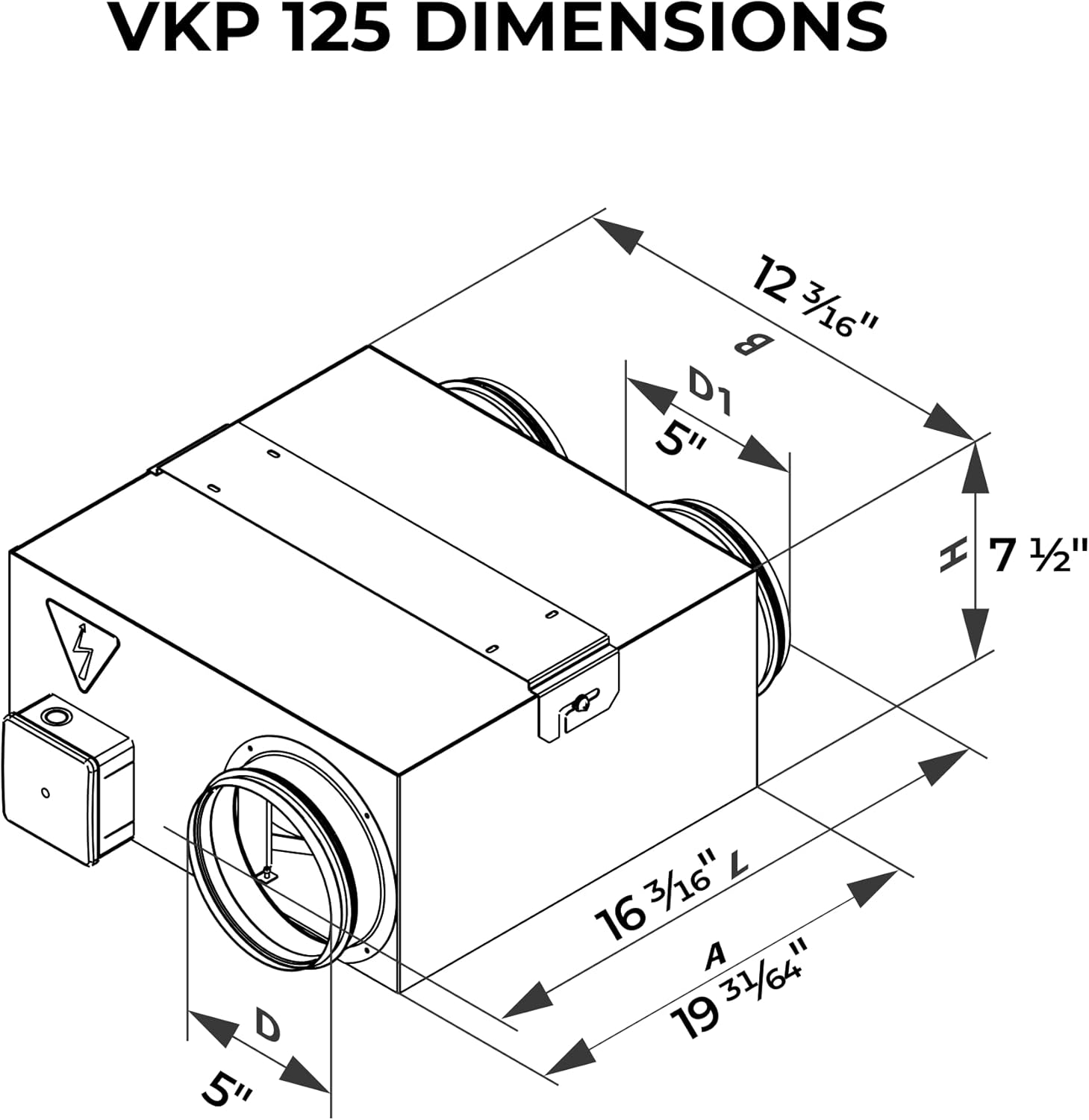
Image: Detailed dimensions of the VKP 125 fan, crucial for planning installation space.
Setup and Installation
The VENTS-US VKP 125 fan is designed for inline duct installation. Due to the electrical connections and ductwork requirements, professional installation is recommended to ensure safety and optimal performance. Ensure the installation location provides adequate space for the fan unit and allows for future maintenance access.
Mounting
The fan can be mounted in various orientations (horizontal, vertical, or at an angle) within the duct system. Secure the fan firmly to a stable structure using appropriate mounting hardware (not included) to prevent vibration and noise. Ensure that the airflow direction indicated on the fan housing aligns with the desired ventilation path.
Duct Connection
Connect the fan to 5-inch diameter ductwork using appropriate clamps or fasteners to create airtight seals. Flexible ducting can be used to minimize vibration transmission to the building structure.
Electrical Connection
The VKP 125 model comes with a power cord for direct connection to a standard 120V/60Hz electrical outlet. Ensure the power supply matches the fan's requirements. For hardwired installations, consult a qualified electrician.

Image: The VKP 125 fan with its power cord, ready for electrical connection.
Product Overview Video
Video: A detailed product overview of the VENTS-US VKP Ventilation Fan, highlighting its features and design.
360-Degree Product View
Video: A comprehensive 360-degree view of the VKP 125 Centrifugal Fan, showcasing its exterior from all angles.
Operation
Once properly installed and connected to power, the VENTS-US VKP 125 fan will operate when power is supplied. The fan is designed for continuous or intermittent operation, providing consistent airflow for ventilation needs.
- Airflow Capacity: The VKP 125 delivers an airflow capacity of up to 211 Cubic Feet Per Minute (CFM).
- Temperature Range: The fan is engineered to handle working airstreams from 13°F to 140°F.
- Noise Level: The fan operates at a noise level of 4.2 Sones.
Maintenance
Regular maintenance ensures the longevity and efficient operation of your VENTS-US VKP 125 fan. Always disconnect power to the unit before performing any maintenance or cleaning.
Cleaning the Impeller
- Disconnect the fan from the power supply.
- Locate and open the access door on the fan housing. This door provides access to the motor and impeller assembly.
- Carefully remove any accumulated dust or debris from the impeller blades and the interior of the fan housing using a soft brush or vacuum cleaner. Avoid using harsh chemicals or abrasive materials.
- Ensure the impeller spins freely without obstruction.
- Close and secure the access door.
- Reconnect power to the fan.

Image: The fan with its access door open, showing the impeller for cleaning and maintenance.
General Inspection
Periodically inspect the fan and ductwork for any signs of damage, loose connections, or excessive vibration. Address any issues promptly to prevent further damage or reduced performance.
Troubleshooting
| Problem | Possible Cause | Solution |
|---|---|---|
| Fan does not turn on | No power supply; tripped circuit breaker; faulty wiring. | Check power connection and circuit breaker. Consult an electrician for wiring issues. |
| Reduced airflow | Clogged impeller or ductwork; restricted air intake/exhaust. | Clean impeller and inspect ductwork for obstructions. Ensure clear air paths. |
| Excessive noise or vibration | Loose mounting; unbalanced impeller; foreign object in fan. | Check mounting for tightness. Disconnect power and inspect impeller for debris or damage. |
If you encounter issues not listed here or if the suggested solutions do not resolve the problem, please contact VENTS-US customer support or a qualified technician.
Specifications
| Specification | Detail |
|---|---|
| Brand | VENTS |
| Model Name | VENTS-US VKP 125 (120V/60Hz) |
| Electric Fan Design | Exhaust Fan |
| Power Source | AC |
| Voltage | 120 Volts |
| Wattage | 75 watts |
| Air Flow Capacity | 211 Cubic Centimeters Per Minute (CFM) |
| Noise Level | 4.2 Sones |
| Product Dimensions | 17"D x 13.27"W x 7.48"H |
| Item Weight | 12.61 pounds |
| Duct Size | 5" Diameter |
| Included Components | Cable and cord included, Single-Phase asynchronous Motor |
| Protection | IPX4 Protection / Thermal Overload Protection |
| Manufacturer | VENTS-US |
Warranty and Support
For warranty information, technical support, or service inquiries, please refer to the warranty card included with your product or visit the official VENTS-US website. Keep your purchase receipt as proof of purchase for warranty claims.
VENTS-US Contact Information:
- Visit the VENTS-US Store on Amazon


