
Introduction
This manual provides essential instructions for the safe and efficient operation of your Ninja Foodi 6.5 qt Multi-Cooker, Model MC1100. Please read all instructions carefully before first use and retain this manual for future reference.
The Ninja Foodi Multi-Cooker is a versatile kitchen appliance designed to simplify meal preparation. It combines multiple cooking functions into one compact unit, allowing you to slow cook, sear/sauté, keep warm, and prepare various types of rice and pasta.
Important Safety Information
WARNING: To reduce the risk of fire, electric shock, injury, or damage, always follow these basic safety precautions.
- Read all instructions before using the appliance.
- Do not touch hot surfaces. Use handles or knobs.
- To protect against electrical shock, do not immerse cord, plugs, or heating base in water or other liquid.
- Close supervision is necessary when any appliance is used by or near children.
- Unplug from outlet when not in use and before cleaning. Allow to cool before putting on or taking off parts.
- Do not operate any appliance with a damaged cord or plug, or after the appliance malfunctions or has been damaged in any manner.
- The use of accessory attachments not recommended by the appliance manufacturer may cause injuries.
- Do not use outdoors.
- Do not let cord hang over edge of table or counter, or touch hot surfaces.
- Do not place on or near a hot gas or electric burner, or in a heated oven.
- Extreme caution must be used when moving an appliance containing hot oil or other hot liquids.
- Always attach plug to appliance first, then plug cord into the wall outlet. To disconnect, turn any control to "off", then remove plug from wall outlet.
- Do not use appliance for other than intended use.
Setup
- Unpack: Carefully remove all packaging materials and promotional labels from the multi-cooker.
- Clean: Wash the cooking pot and glass lid in warm, soapy water. Rinse thoroughly and dry completely. Wipe the heating base with a damp cloth.
- Placement: Place the multi-cooker on a stable, level, heat-resistant surface, away from walls and heat sources. Ensure adequate ventilation around the unit.
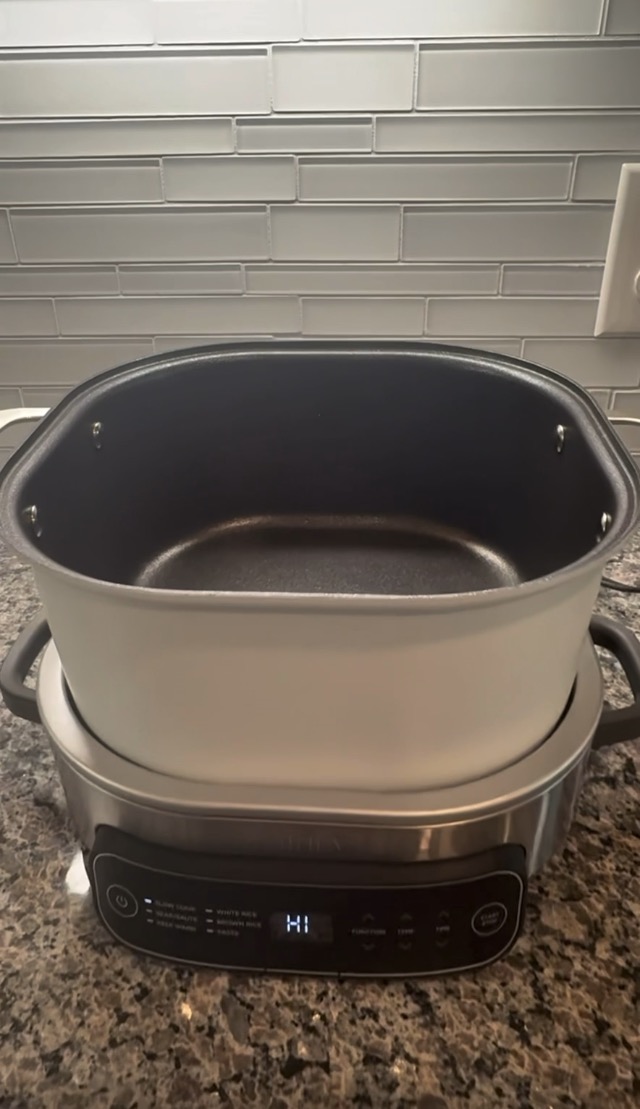
- Assemble: Place the clean cooking pot securely into the heating base.
Operating Instructions
The Ninja Foodi Multi-Cooker features a digital control panel with various functions. Refer to the specific function for detailed usage.
Control Panel Overview
- Power Button: Turns the unit on/off.
- Function Buttons: Selects cooking modes (Slow Cook, Sear/Sauté, Keep Warm, White Rice, Brown Rice, Pasta).
- Temp/Time Buttons: Adjusts temperature or cooking time.
- Start/Stop Button: Initiates or cancels a cooking cycle.
- Digital Display: Shows selected function, temperature, and remaining time.
Using Cooking Functions
1. Slow Cook
- Add ingredients to the cooking pot.
- Place the glass lid on the pot.
- Press the Slow Cook button.
- Use the Temp buttons to select HIGH or LOW.
- Use the Time buttons to set the desired cooking duration.
- Press Start/Stop to begin.
2. Sear/Sauté
- Ensure the cooking pot is in the heating base.
- Press the Sear/Sauté button.
- Use the Temp buttons to adjust the heat level (e.g., Low, Med, High).
- Press Start/Stop to begin preheating. The display will show "HI" or "LO" depending on the setting.
- Once preheated, add oil and ingredients.
3. Keep Warm
- This function can be used after cooking or independently.
- Press the Keep Warm button.
- Use the Time buttons to set the desired duration for keeping warm.
- Press Start/Stop to activate.
4. Rice & Pasta Functions (White Rice, Brown Rice, Pasta)
- Add appropriate ingredients (rice/pasta and water) to the cooking pot according to recipe or package instructions.
- Place the glass lid on the pot.
- Select the desired function (White Rice, Brown Rice, or Pasta).
- The appliance will automatically set the appropriate cooking time and temperature.
- Press Start/Stop to begin.
Maintenance and Cleaning
Proper maintenance ensures the longevity and optimal performance of your multi-cooker.
- Unplug: Always unplug the appliance from the power outlet and allow it to cool completely before cleaning.
- Cooking Pot and Lid: The non-stick cooking pot and glass lid are dishwasher safe. Alternatively, wash them with warm, soapy water using a non-abrasive sponge or cloth. Rinse thoroughly and dry completely.
- Heating Base: Wipe the exterior of the heating base with a soft, damp cloth. Do not immerse the heating base in water or any other liquid.
- Storage: Store the cleaned and dried multi-cooker in a cool, dry place.
Troubleshooting
If you encounter issues with your Ninja Foodi Multi-Cooker, refer to the following common problems and solutions:
| Problem | Possible Cause | Solution |
|---|---|---|
| Appliance does not turn on. | Not plugged in or power outlet issue. | Ensure the power cord is securely plugged into a functional outlet. |
| Food not cooking evenly. | Incorrect temperature/time setting or uneven ingredient distribution. | Verify settings. Stir ingredients periodically if applicable. |
| Display shows an error code. | Internal malfunction or sensor issue. | Unplug the unit, wait 5 minutes, then plug back in. If the error persists, contact customer support. |
Specifications
- Brand: Ninja
- Model Number: MC1100
- Capacity: 6.5 Quarts
- Control Method: Touchpad
- Number of Settings: 8 (Functions: Slow Cook, Sear/Sauté, Keep Warm, White Rice, Brown Rice, Pasta, plus temperature settings for Slow Cook/Sear)
- Product Dimensions: 18 x 12.65 x 10.6 inches
- ASIN: B0DM2RGJ1M
Warranty and Support
For warranty information, product registration, or customer support, please refer to the official Ninja website or contact their customer service department. Keep your purchase receipt as proof of purchase.
Online Support: www.ninjakitchen.com/support/
Note: As this model is listed as "discontinued", support options may vary.


