
Introduction
This manual provides detailed instructions for the installation, operation, and maintenance of your CGOGC Android Car Stereo. Designed for Toyota Tacoma models from 2005 to 2015, this head unit offers advanced features including Wireless CarPlay, Android Auto, an 8-core processor, a 1280x720 touchscreen, Bluetooth, GPS navigation, FM/AM radio, 5G WiFi, and comprehensive multimedia capabilities. Please read this manual thoroughly before use to ensure proper functionality and safety.
Safety Information
- Always ensure the vehicle is turned off and the parking brake is engaged before beginning installation or maintenance.
- Disconnect the vehicle's battery before installation to prevent electrical shorts or damage.
- Professional installation is recommended for optimal performance and to avoid damage to the vehicle or product.
- Do not operate the device in a manner that distracts you from driving. Always prioritize road safety.
- Keep the device away from water, moisture, and extreme temperatures.
Package Contents
Verify that all components are present before proceeding with installation:

Image: Included components for the CGOGC Android Car Stereo.
- Head Unit
- Power Cable
- Adapter Cable
- RCA Cable
- Dual USB Cables
- Backup Camera
- Camera Input Cable
- GPS Antenna
- Microphone
- Crowbar (for trim removal)
Setup and Installation
The CGOGC Android Car Stereo is designed for direct plug-and-play installation in Toyota Tacoma models from 2005-2015. Follow these steps for proper installation:
- Remove the Original Radio: Carefully use the provided crowbar to pry open the trim around your original car radio player. Disconnect all cables from the back of the original unit.
- Connect Wiring Harness: Connect the new wiring harness plug to the corresponding socket on the back of the CGOGC head unit. Ensure all connections are secure.
- Connect Accessories: Attach the GPS antenna, external microphone, USB cables, and RCA cables to their respective ports on the head unit.
- Connect Backup Camera: If installing the backup camera, connect the reversing image detection cable and video plug to the head unit.
- Install Head Unit: Carefully slide the CGOGC head unit into the center console opening. Ensure all cables are tucked away neatly and do not interfere with other components.
- Secure and Test: Secure the head unit in place and reattach any removed trim pieces. Reconnect the vehicle's battery and power on the unit to test all functions.

Image: Comparison of the dashboard before and after installing the CGOGC Android Car Stereo, highlighting the integrated fit.
Installation Video Guide
Video: A detailed installation guide for the CGOGC Android Car Stereo, demonstrating the process of removing the old unit, connecting the wiring harness, and installing the new head unit. This video also includes a product demonstration.
Operating Instructions
Wireless CarPlay & Android Auto
Connect your smartphone wirelessly for seamless integration of navigation, music, calls, and messages. The system supports both Apple CarPlay and Android Auto.
- Ensure Bluetooth is enabled on your smartphone.
- On the head unit, navigate to the Bluetooth settings and pair with your phone.
- Once paired, the system will automatically prompt to activate CarPlay or Android Auto.

Image: Demonstrates the wireless and wired connection options for Apple CarPlay and Android Auto on the car stereo display.
DSP Sound Settings
The built-in Digital Signal Processing (DSP) chip allows for advanced audio customization. Access the DSP settings to adjust:
- Equalizer: Fine-tune audio frequencies with a 30-band equalizer.
- Loudness & Smart Bass: Enhance low and high frequencies for a richer sound.
- Sound Filter: Adjust High-Pass Filter (HPF) and Low-Pass Filter (LPF) settings for speakers.
- Sound Delay & Balance: Optimize sound staging and balance for different seating positions.

Image: Visual representation of the DSP sound settings interface, showing equalizer, loudness, and sound field adjustments.
Multimedia Functions
- Radio: Access FM/AM radio with one-click search and station presets.
- Music Player: Supports various audio formats for local playback.
- Video Player: Enjoy 1080p HD video playback.
- Split Screen: Run two applications simultaneously, such as navigation and video playback.
- Navigation: Utilize built-in GPS or install preferred navigation apps from the Google Play Store.
- Bluetooth: Hands-free calling and audio streaming.
- Steering Wheel Control (SWC): Control essential functions directly from your steering wheel buttons.
- Backup Camera: Automatic display of the rear view when reversing, with parking guidelines.
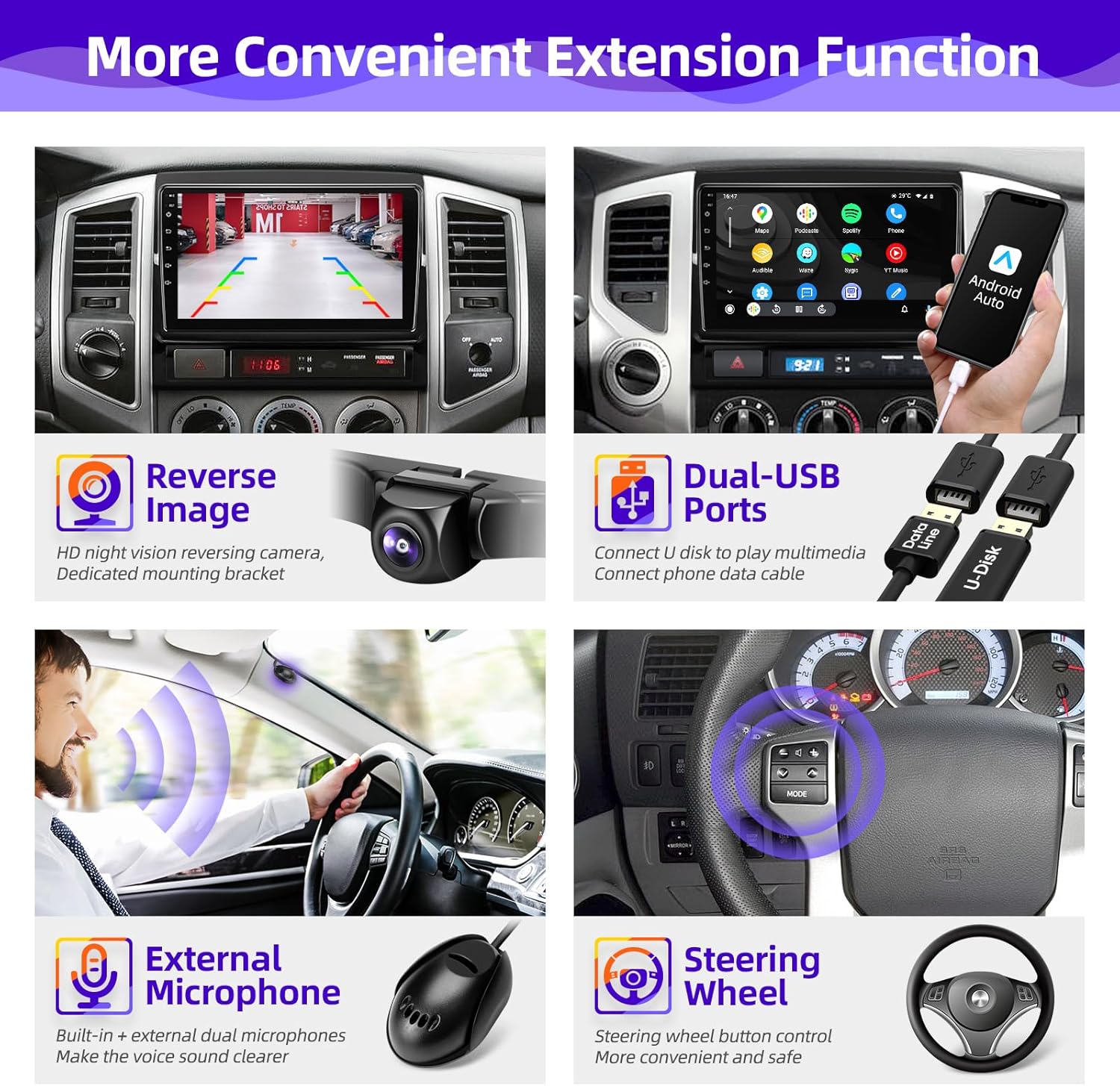
Image: Overview of convenient extension functions such as reverse image display, dual USB ports, external microphone support, and steering wheel control compatibility.
Maintenance
- Screen Cleaning: Use a soft, lint-free cloth to gently wipe the touchscreen. For stubborn smudges, slightly dampen the cloth with water or a screen-safe cleaner. Avoid harsh chemicals.
- Software Updates: Periodically check for software updates through the system settings or the manufacturer's website to ensure optimal performance and access to new features.
- Cable Connections: Ensure all cables remain securely connected. Loose connections can lead to intermittent functionality.
Troubleshooting
- No Power: Check all power connections and the vehicle's fuse box. Ensure the ignition is on.
- No Sound: Verify speaker connections, volume settings, and audio source selection. Check DSP settings for any active filters or delays.
- CarPlay/Android Auto Not Connecting: Ensure Bluetooth is on and paired. Try restarting both your phone and the head unit. Check for any software updates for the head unit.
- GPS Signal Issues: Ensure the GPS antenna is properly installed and has a clear line of sight to the sky.
- System Freezes/Restarts: Perform a system reset (refer to the device settings for the reset option). If the issue persists, contact customer support.
Specifications
- Operating System: Android Smart Operating System
- Processor: Octa Core 2.0GHz
- RAM: 2GB
- ROM: 32GB
- Screen: 9-inch Super Clear IPS Screen
- Resolution: 1280*720
- Radio Chip: TDA7708
- Power Amplifier Chip: TDA7388
- Connectivity: Bluetooth, USB, 5G WiFi
- Special Features: Wireless CarPlay, Android Auto, GPS Navigation, FM/AM RDS Radio, Bluetooth Music, Multi-format Music Player, 1080p Video Player, APP Download, Backup Camera Input, Audio Output, AUX Audio/Video Input, External Microphone, SWC Steering Wheel Control, DSP Digital Processing Audio Streaming (Smart Bass, Balance, Equalizer, Loudness, Filter)
- Item Weight: 4.8 pounds
- Package Dimensions: 13.73 x 11.8 x 3.54 inches

Image: Highlights key hardware specifications and features such as the Octa-core CPU, IPS 1280x720 display, Android 12 system, DSP adjustment, Wi-Fi, navigation, Bluetooth, radio, and MFS control.
Warranty Information
This product comes with a 1-year warranty from the date of purchase. The warranty covers manufacturing defects and malfunctions under normal use. Please retain your proof of purchase for warranty claims. The warranty does not cover damage caused by improper installation, misuse, accidents, or unauthorized modifications.
Customer Support
For any questions, technical assistance, or warranty inquiries, please contact CGOGC customer support:
- Email: CGOGCZCT@outlook.com
- When contacting support, please provide your product model number (B0DM25WTS6) and a detailed description of your issue.