
ODK B01XS140401001UK
ODK Desk with 4 Drawers User Manual
Model: B01XS140401001UK
1. Introduction
Thank you for choosing the ODK Desk with 4 Drawers. This manual provides essential information for the safe assembly, operation, and maintenance of your new desk. Please read these instructions carefully before beginning assembly and retain this manual for future reference.
The ODK Desk is designed to provide a functional and organized workspace, featuring integrated storage and convenient power access.
2. Safety Warnings
Your safety is paramount. Please adhere to the following warnings to prevent injury or damage to the product:
- Always unplug the desk when not in use, especially if it features integrated electrical components.
- Keep the desk away from heat sources and liquids to prevent damage to materials and electrical components.
- Do not place heavy objects on the desk that could cause it to tip over or exceed its weight capacity.
- Always follow the assembly instructions carefully to ensure the desk is stable and secure before use. Improper assembly can lead to instability and potential hazards.
- Ensure all screws and fasteners are tightened securely during assembly and periodically check them for looseness.
- Do not allow children to climb on or play with the desk.
3. Product Overview and Dimensions
The ODK Desk is designed for efficiency and comfort, featuring a spacious desktop, integrated storage, and a monitor stand. Below are the key dimensions of the desk.

Figure 3.1: Overall dimensions of the ODK Desk, including height, width, and depth measurements for various components like the desktop, monitor stand, and drawer unit. The image also indicates the weight capacity for the desktop (50 kg) and drawers (5 kg).
Key Dimensions:
- Overall Desk Dimensions (L x W x H): 140 cm x 52 cm x 90.5 cm (approx. 55.1 x 20.5 x 35.6 inches)
- Desktop Height: 75.7 cm (approx. 29.8 inches)
- Monitor Stand Height: 90.5 cm (approx. 35.6 inches)
- Monitor Stand Depth: 18 cm (approx. 7.1 inches)
- Drawer Unit Dimensions: 33.7 cm (W) x 46.8 cm (D) x 16.1 cm (H) per drawer (approx. 13.3 x 18.4 x 6.3 inches)
- Weight Capacity: Desktop up to 50 kg (110 lbs), each drawer up to 5 kg (11 lbs).
4. Setup and Assembly
Assembly is required for this product. Please ensure you have all components and tools listed in the packaging before starting. It is recommended to assemble the desk with at least two people for ease and safety.
4.1 Before You Begin
- Unpack all components: Carefully remove all parts from the packaging and lay them out on a clean, soft surface (e.g., a blanket or carpet) to prevent scratches.
- Verify parts: Cross-reference all components with the parts list provided in your product's assembly manual. Contact customer support immediately if any parts are missing or damaged.
- Tools required: Ensure you have the necessary tools as specified in your assembly manual (typically a screwdriver and Allen wrench, often included).
4.2 Assembly Instructions
For detailed, step-by-step assembly instructions, please refer to the dedicated assembly manual included in your product packaging. The general steps typically involve:
- Assemble the main frame of the desk.
- Attach the desktop and monitor stand.
- Install the keyboard tray rails and tray.
- Assemble and insert the fabric drawers into the drawer unit.
- Install the adjustable shelf on the side.
- Integrate the recessed power strip.
- Tighten all fasteners and ensure the desk is stable and level.
Note: Always follow the specific diagrams and instructions provided in your physical assembly manual for accurate and safe construction.
5. Features and Components
The ODK Desk is equipped with several features designed to enhance your productivity and organization.
5.1 Recessed Power Strip

Figure 5.1: Close-up view of the integrated recessed power strip, featuring two AC outlets and two USB ports for convenient device charging and power access directly on the desktop.
The desk includes a built-in power strip with 2 AC outlets (110-240V) and 2 USB-A ports (5V/2A). This allows for easy charging of your devices and powering of your electronics directly on the desk, reducing cable clutter.
5.2 Large Storage Space (4 Drawers)

Figure 5.2: The four fabric drawers of the ODK Desk, shown partially open to illustrate their storage capacity for various office supplies and personal items. The image highlights the ease of assembly and cleaning for these drawers.
The desk features a unit with four spacious fabric drawers, providing ample storage for documents, office supplies, and personal items. These drawers are designed for easy assembly and cleaning, offering a private and multifunctional storage solution.
5.3 Extendable Keyboard Tray
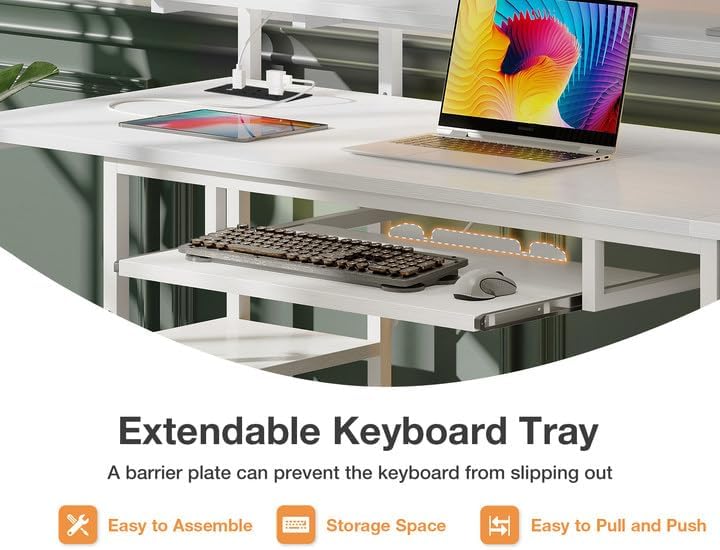
Figure 5.3: The pull-out keyboard tray of the ODK Desk, designed to hold a keyboard and mouse, with a barrier plate to prevent items from slipping off. This feature helps save desktop space.
A smooth-gliding, extendable keyboard tray is integrated beneath the main desktop. This tray provides a dedicated space for your keyboard and mouse, freeing up valuable desktop surface. It includes a barrier plate to prevent items from slipping off.
5.4 Adjustable Shelf

Figure 5.4: The adjustable shelf on the side of the ODK Desk, demonstrating its flexibility to accommodate different heights, such as for a CPU tower or various storage items.
The desk features an adjustable shelf on one side, allowing you to customize its height to accommodate a CPU tower, books, or other items, optimizing your storage space.
6. Operating Instructions
Using your ODK Desk is straightforward. Once assembled, it is ready for use as a functional workspace.
- Desktop Use: Place your monitors, laptop, and other work essentials on the main desktop and the elevated monitor stand. Ensure weight is distributed evenly.
- Keyboard Tray: Gently pull the keyboard tray outwards to use, and push it back in when not needed to save space.
- Drawers: Use the fabric drawers for organized storage of office supplies, documents, and personal items. Ensure not to overload them beyond their 5 kg capacity.
- Power Strip: Plug the desk's power cord into a wall outlet. Use the AC outlets and USB ports on the recessed power strip to power and charge your electronic devices.
- Adjustable Shelf: Adjust the shelf height as needed during assembly or later by re-positioning the support pins.
7. Maintenance and Care
Proper care will extend the life and appearance of your ODK Desk.
- Cleaning: Wipe surfaces with a soft, damp cloth. Avoid harsh chemicals or abrasive cleaners, which can damage the finish. For the fabric drawers, spot clean with a mild detergent and allow to air dry.
- Spills: Immediately wipe up any spills to prevent staining or damage to the wood and metal components.
- Fasteners: Periodically check all screws and fasteners to ensure they remain tight. Re-tighten if necessary to maintain stability.
- Weight Distribution: Avoid concentrating heavy loads in one area. Distribute weight evenly across the desktop and shelves.
- Environmental Conditions: Avoid placing the desk in direct sunlight or near extreme heat/cold sources, as this can cause material warping or discoloration.
8. Troubleshooting
If you encounter any issues with your ODK Desk, refer to the following common troubleshooting tips:
| Problem | Possible Cause / Solution |
|---|---|
| Desk is wobbly or unstable. |
|
| Drawers do not slide smoothly. |
|
| Power strip not working. |
|
If you continue to experience issues, please contact ODK customer support for assistance.
9. Specifications
Detailed technical specifications for the ODK Desk with 4 Drawers:
| Feature | Value |
|---|---|
| Brand | ODK |
| Model Number | B01XS140401001UK |
| Color | White |
| Material | Engineered Wood, Metal |
| Product Dimensions (L x W x H) | 140 x 52 x 90.5 cm (55.1 x 20.5 x 35.6 inches) |
| Item Weight | 22.5 Kilograms (49.6 lbs) |
| Number of Drawers | 4 |
| Components Included | Integrated Power Strip |
| Assembly Required | Yes |
| Power Strip Outlets | 2 AC Outlets (110-240V) |
| Power Strip USB Ports | 2 USB-A Ports (5V/2A) |
| Desktop Weight Capacity | Up to 50 kg (110 lbs) |
| Drawer Weight Capacity | Up to 5 kg (11 lbs) per drawer |
10. Warranty and Support
ODK stands behind the quality of its products. For information regarding warranty coverage, product registration, or technical support, please refer to the warranty card included with your purchase or visit the official ODK website.
If you have any questions or require assistance with assembly, parts, or troubleshooting that is not covered in this manual, please contact ODK customer service. Have your model number (B01XS140401001UK) ready when contacting support.
11. Additional Resources
No official product videos from the seller were found to be relevant for inclusion in this manual.

Figure 11.1: The ODK Desk with 4 Drawers, showcasing its overall design and functionality in a typical home office environment. This image provides a comprehensive view of the desk's features, including the monitor stand, keyboard tray, and drawer unit.

Figure 11.2: The ODK Desk integrated into a modern living space, demonstrating its aesthetic appeal and how it complements various interior designs. This view highlights the desk's versatility as a functional piece of furniture.
Related documentsB01XS140401001UK


Ask a question about this manual
Ask about setup, troubleshooting, compatibility, parts, safety, or missing instructions. Manuals+ will review the question and use this page’s manual context to help answer it.