
1. Introduction
This instruction manual provides essential information for the safe and effective use of your DCH 4200mAh Ni-MH replacement battery, model CS-TPM280SL. This battery is specifically designed for compatibility with the Taga PM280 thermal camera. Please read this manual thoroughly before installation and operation to ensure proper function and longevity of your battery.
2. Safety Information and Warnings
Your safety is paramount. Please observe the following warnings and precautions when handling and using the battery:
- Do Not Disassemble: Do not attempt to disassemble, open, or service the battery pack. This can lead to electric shock, fire, or exposure to hazardous materials.
- Compatibility: Replace only with the battery pack designated for the Taga PM280 thermal camera. Using an incompatible battery may cause damage to the device or personal injury.
- Physical Damage: Do not crush, puncture, or short external contacts. Physical damage can lead to internal short circuits, overheating, and fire.
- Water and Fire: Do not dispose of the battery in fire or water. Exposure to high temperatures or moisture can cause explosion or leakage.
- Temperature Limits: Do not store the battery above 60°C (140°F). High temperatures can degrade battery performance and pose a safety risk.
- Disposal: Dispose of used batteries according to local regulations. Do not dispose of with household waste.
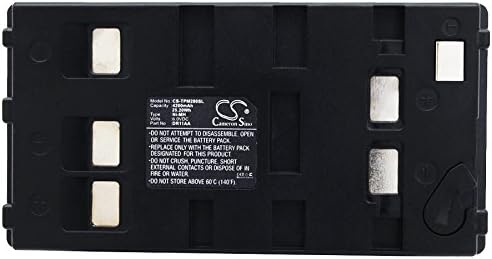
Image 2.1: Top view of the DCH CS-TPM280SL battery, clearly displaying the product label with model number, capacity, type (Ni-MH), voltage, and critical safety warnings regarding disassembly, physical damage, temperature limits, and disposal.
3. Product Specifications
| Battery Model Number | CS-TPM280SL |
| Compatible Device Model | Taga PM280 Thermal Camera |
| Battery Type | Ni-MH (Nickel-Metal Hydride) |
| Capacity | 4200mAh |
| Watt-Hours (Wh) | 25.2Wh |
| Voltage | 6.0V |
| Dimensions (L x W x H) | 89.2 x 46.8 x 39.4mm (3.51 x 1.84 x 1.55 inches) |
| Weight | 415.2g (14.6 ounces) |
| Manufacturer | DCH |

Image 3.1: A clear front view of the DCH CS-TPM280SL replacement battery, showcasing its compact black casing.
4. Setup and Installation
Follow these steps to safely replace the battery in your Taga PM280 thermal camera:
- Power Off Device: Ensure your Taga PM280 thermal camera is completely powered off and disconnected from any charging source before proceeding.
- Locate Battery Compartment: Identify the battery compartment on your Taga PM280 device. Refer to your thermal camera's original manual if you are unsure.
- Remove Old Battery: Carefully open the battery compartment cover. Remove the old battery, noting its orientation.
- Insert New Battery: Insert the DCH CS-TPM280SL replacement battery into the compartment, ensuring it is correctly oriented according to the device's markings. The battery contacts should align properly with the device's terminals.
- Secure Compartment: Close the battery compartment cover securely.
- Initial Charge: It is recommended to fully charge the new battery before its first use.

Image 4.1: An angled view of the DCH CS-TPM280SL battery, highlighting the metallic contact points on its surface, which are essential for proper connection with the device.
5. Operating Instructions
Once installed, the DCH replacement battery operates similarly to the original battery in your Taga PM280 thermal camera.
- Charging: Use the original charger provided with your Taga PM280 thermal camera to charge the battery. Ensure the charger is compatible with Ni-MH batteries.
- First Use: For optimal performance, fully charge the battery before its initial use.
- Discharge Cycle: Ni-MH batteries benefit from occasional full discharge and recharge cycles to maintain capacity. However, avoid deep discharge for extended periods.
- Temperature: Operate the device with the battery within the recommended temperature range specified by the Taga PM280 manufacturer. Extreme temperatures can affect battery performance and lifespan.
6. Maintenance
Proper maintenance can extend the life of your DCH replacement battery:
- Storage: If storing the battery for an extended period, store it in a cool, dry place, ideally at a partial charge (around 50%). Avoid extreme temperatures.
- Cleaning: Keep the battery contacts clean and free from dust or debris. Use a dry, soft cloth to gently wipe the contacts if necessary.
- Avoid Impact: Protect the battery from physical shocks or drops, which can damage internal components.

Image 6.1: A side profile view of the DCH CS-TPM280SL battery, illustrating its robust black casing and overall form factor.
7. Troubleshooting
If you encounter issues with your DCH replacement battery, consider the following:
- Battery Not Charging:
- Ensure the battery is correctly inserted and contacts are clean.
- Verify the charger is functioning and properly connected to both the device and a power source.
- Check if the charging indicator on your Taga PM280 is active.
- Short Battery Life:
- Ensure the battery has been fully charged.
- Operating the device in extreme temperatures (very hot or very cold) can reduce battery life.
- High power consumption features of the Taga PM280 will naturally deplete the battery faster.
- If the battery is new, it may require a few charge/discharge cycles to reach full capacity.
- Device Not Powering On:
- Confirm the battery is fully charged and correctly installed.
- Test with a known working battery if available to rule out a device issue.
If troubleshooting steps do not resolve the issue, please contact customer support.