
Introduction
This manual provides detailed instructions for the assembly, operation, maintenance, and troubleshooting of your GTRACING Gaming Recliner Chair (Model GT208M). Please read this manual thoroughly before use to ensure proper function and safety.
Safety Information
Always follow assembly instructions carefully. This chair has a maximum weight recommendation of 300 pounds. Exceeding this limit may cause damage or injury. Keep children and pets away from moving parts during operation. Ensure all connections are secure before use.
Package Contents
Verify that all components are present before beginning assembly. If any parts are missing or damaged, please contact customer support.
- Chair Base
- Backrest
- Armrests (Left and Right)
- Footrest Assembly
- Lumbar Cushion (with USB cable)
- Hardware Kit (screws, washers, Allen wrench)
- Power Adapter (for massage function)
- Instruction Manual
Assembly Instructions
Assembly typically takes 1-2 hours. It is recommended to have a second person assist with certain steps.
- Unpack Components: Carefully remove all parts from the packaging and lay them out on a clean, soft surface to prevent scratches.
- Attach Armrests: Secure the left and right armrests to the chair base using the provided screws. Ensure they are firmly attached.
- Connect Backrest: Slide the backrest onto the chair base, aligning the metal brackets. Secure with screws.
- Install Footrest: Attach the footrest assembly to the designated points on the chair base.
- Position Lumbar Cushion: Place the lumbar cushion on the backrest. The USB cable for the massage function should be accessible.
- Final Checks: Ensure all screws are tightened and the chair is stable before use.

Operating Instructions
Reclining Function
The chair features a push-back reclining mechanism, allowing you to adjust the backrest and footrest to your desired position. Simply lean back to recline and push forward to return to an upright position. The reclining angle can reach up to 155 degrees.

Bluetooth Speakers
Your GTRACING recliner is equipped with built-in Bluetooth speakers for an immersive audio experience.
- Power On: Locate the power button on the side of the chair (usually near the speaker). Press and hold to power on the speakers.
- Pairing Mode: The speakers will automatically enter pairing mode, indicated by a flashing LED light.
- Connect Device: On your mobile device or computer, enable Bluetooth and search for "GTRACING Speaker" (or similar name). Select it to pair.
- Audio Playback: Once paired, audio from your device will play through the chair's speakers. Adjust volume via your device.

Lumbar Massage Function
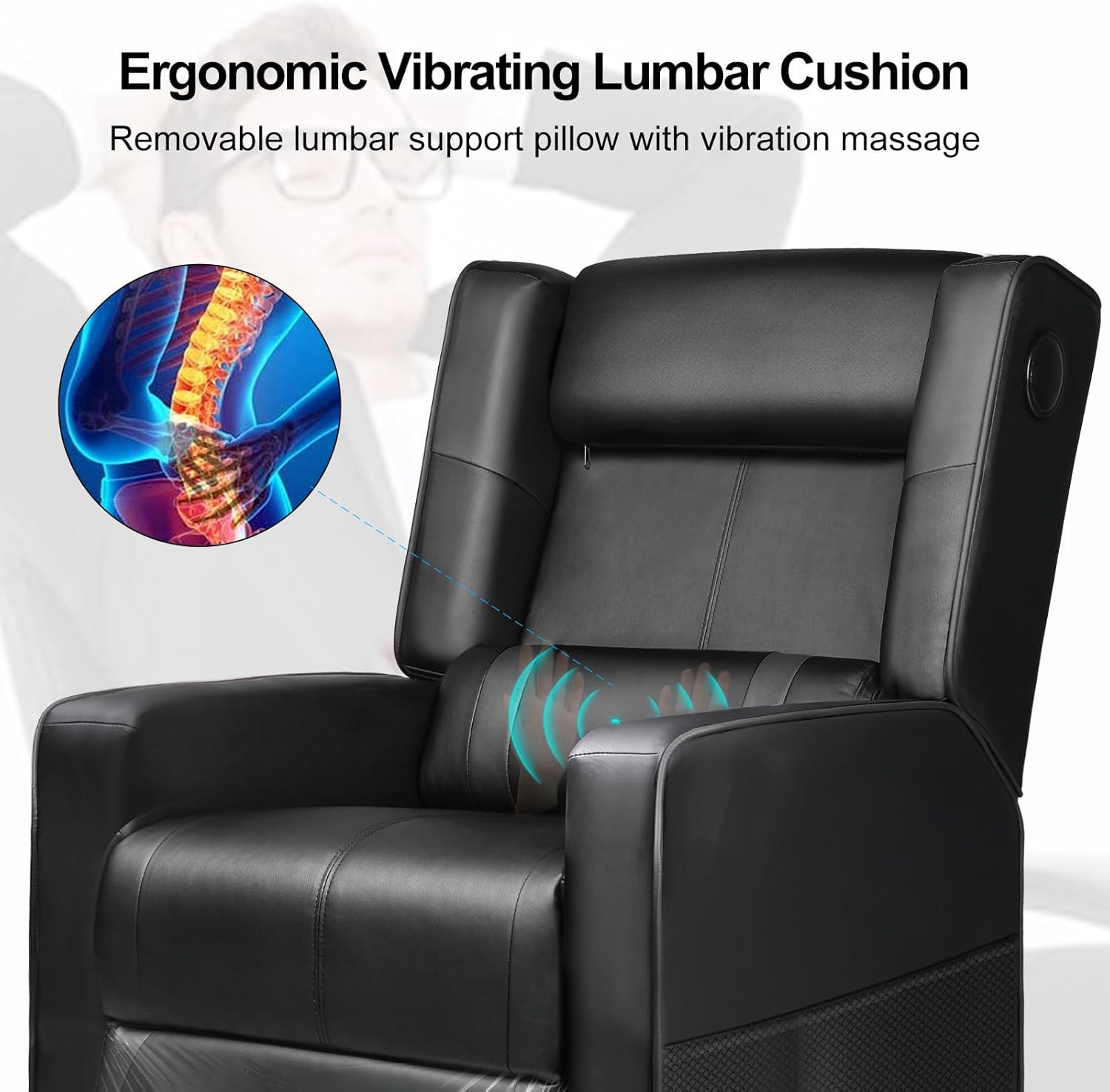
The integrated lumbar cushion provides a vibrating massage function for added comfort. It is powered via a USB connection.
- Connect Power: Plug the USB cable from the lumbar cushion into a compatible USB power source (e.g., computer USB port, power bank, USB wall adapter).
- Activate Massage: The massage function will typically activate upon connection. Some models may have an inline switch on the USB cable.
- Deactivate Massage: To turn off the massage, disconnect the USB power source.
Maintenance and Care
- Cleaning: Wipe clean with a damp cloth. Avoid harsh chemicals or abrasive cleaners, as these can damage the faux leather material.
- Regular Inspection: Periodically check all screws and connections to ensure they remain tight. Retighten if necessary.
- Avoid Direct Sunlight: Prolonged exposure to direct sunlight can cause the faux leather to fade or crack.
- Weight Limit: Do not exceed the maximum weight recommendation of 300 pounds.
Troubleshooting
| Problem | Possible Cause | Solution |
|---|---|---|
| Chair does not recline smoothly. | Obstruction in mechanism; insufficient space behind chair. | Check for obstructions. Ensure chair is 18-20 inches from a wall. |
| Bluetooth speakers not pairing. | Speakers not in pairing mode; device Bluetooth off; too far from device. | Ensure speakers are powered on and in pairing mode. Turn on device Bluetooth. Move device closer to chair. |
| Massage function not working. | USB cable not connected; power source issue. | Verify USB cable is securely connected to a working power source. Try a different USB port or power bank. |
| Chair feels unstable or wobbly. | Loose assembly screws. | Check and tighten all assembly screws. |
Product Specifications
- Model: GT208M
- Brand: GTRACING
- Color: Black
- Material: Faux Leather, Foam Fill
- Product Dimensions (D x W x H): 35.03"D x 26.77"W x 38.97"H (Upright)
- Item Weight: 52.9 pounds
- Maximum Weight Recommendation: 300 Pounds
- Reclining Angle: Up to 155 degrees
- Special Features: Bluetooth Speakers, Lumbar Massage, Push-back Reclining, Side Pockets
- UPC: 810170303272
Warranty and Support
For warranty information, technical support, or assistance with missing/damaged parts, please contact GTRACING customer service. Refer to your purchase documentation for specific warranty terms and contact details.
You can often find support contact information on the official GTRACING website or through the retailer where the product was purchased.


