
1. Introduction
The Auxbeam AS-600 is a 6-gang slim switch panel designed for controlling various automotive accessories. It features Bluetooth app control, a wireless remote, and customizable RGB backlighting. This system is compatible with 12-24V vehicles and offers multiple lighting modes and safety protections.
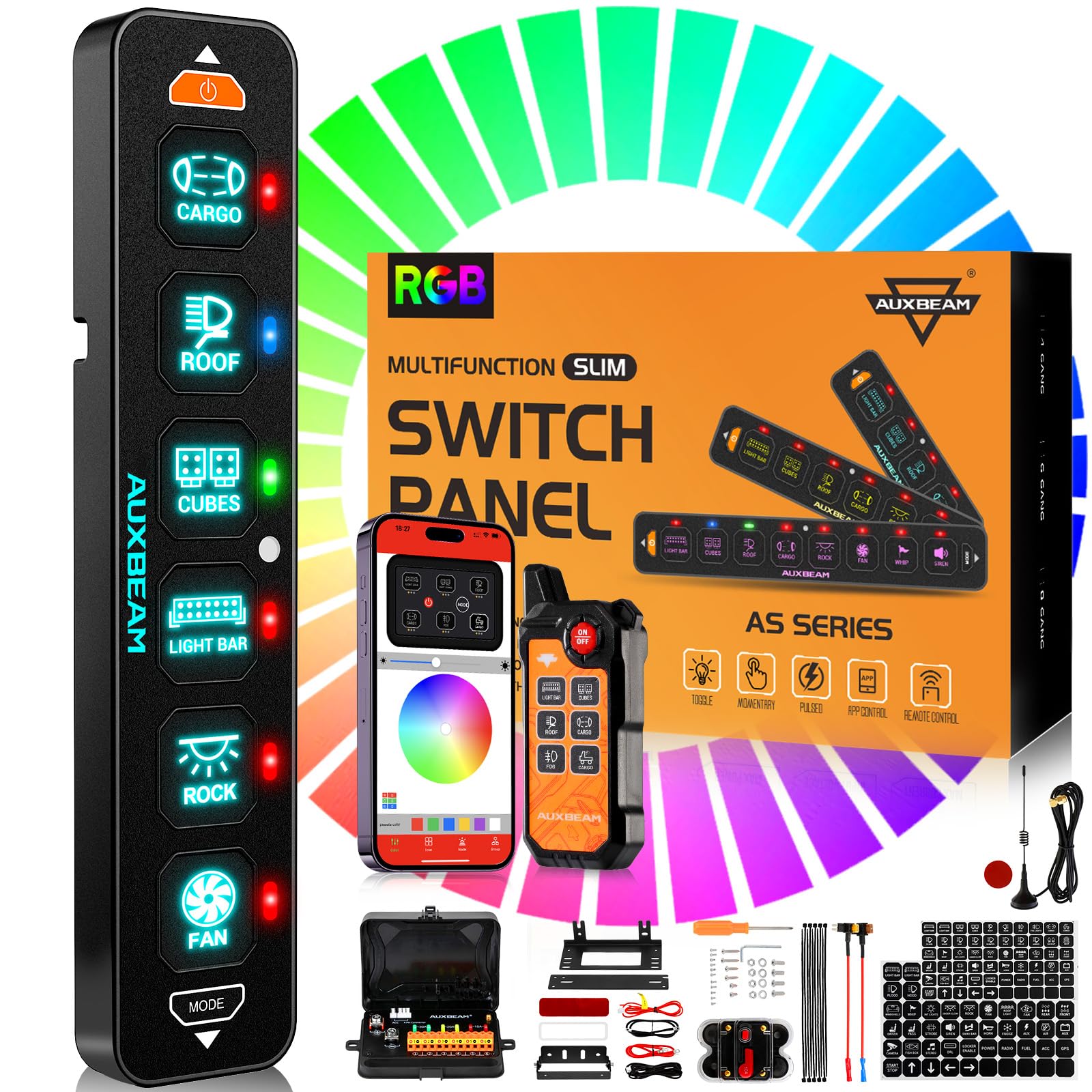
Image: The Auxbeam AS-600 6 Gang Slim Switch Panel with its wireless remote control.
2. Package Contents
The Auxbeam AS-600 package includes the following components:
- RGB Bluetooth Switch Panel (6-gang)
- Wireless Remote Control
- Control Box with built-in solid-state relays
- 60A Resettable Circuit Breaker
- Fuses
- Waterproof Covers
- 60pcs Stickers (including 5 DIY stickers)
- Mounting Brackets
- 10ft Wiring Harness
- 2 CR2 batteries (for remote control)
3. Setup and Installation
3.1 Wiring Diagram
Connect the switch panel to your vehicle's electrical system using the provided wiring harness and control box. Ensure all connections are secure and follow the circuit diagram for proper functionality. The control box manages up to 6 accessories with varying current ratings.

Image: A detailed wiring diagram illustrating connections from the battery to the control box and individual circuits for accessories.
3.2 Mounting Options
The switch panel can be mounted horizontally or vertically using the included brackets. Choose a location that is easily accessible and does not obstruct your view or vehicle controls.

Image: Examples of the AS-600 switch panel mounted horizontally on a dashboard and vertically on a pillar.
4. Operating Instructions
4.1 App Bluetooth Control
Download the Auxbeam app to control your accessories via Bluetooth. The app allows you to customize panel colors, adjust brightness, set icons (from 60 default options or DIY from your photo album), and group multiple lights for simultaneous control.

Image: A smartphone displaying the Auxbeam app interface, showing options for color customization, group settings, and lighting modes.
4.2 Wireless Remote Control
The included wireless remote control allows you to operate accessories from inside or outside the vehicle, with a range of up to 200 feet. The remote features a strong magnetic back for convenient placement. It comes with two CR2 batteries installed.

Image: An illustration demonstrating the 200-foot range of the wireless remote control from a vehicle.
4.3 Lighting Modes
The switch panel supports three distinct lighting modes for connected accessories:
- TOGGLE Mode: Provides constant lighting, remaining on until manually switched off.
- MOMENTARY Mode: Activates the accessory only while the switch is pressed.
- PULSED Mode: Offers a strobe effect for the connected accessory.

Image: Visual representation of the three lighting modes: Toggle (constant light), Momentary (ignition power), and Pulsed (strobe mode).
4.4 Backlight Adjustment
The backlight brightness can be adjusted in three ways:
- App Manual Adjustment: Use the Auxbeam app to manually set the desired backlight brightness.
- Automatic Sensing: The panel's built-in light sensor automatically adjusts brightness based on ambient light conditions.
- Manual ON/OFF Control: Press the 'MODE' button on the panel to quickly turn the backlight on or off.

Image: Depicts the three methods for adjusting backlight brightness: via the app, automatic sensing, and manual button control.
4.5 Memory Function
The 'ON/OFF' button on the switch panel includes a memory function. When pressed, the panel will automatically restore the light settings that were active before it was last turned off, providing convenience and personalized operation.
5. Maintenance and Safety
5.1 Protection Features
The control box incorporates built-in solid-state relays and a high-quality resettable circuit breaker. These components provide protection against reverse polarity, overcurrent, overvoltage, and overheating, ensuring the safety and longevity of your electrical system.

Image: A comparison showing the compact design of the Auxbeam control box with built-in solid-state relays versus traditional external relays.

Image: A clear view of the included 60A resettable circuit breaker, designed for system protection.
5.2 Waterproofing and Environmental Protection
The switch panel and control box are designed with an IP67 international protection rating, indicating high resistance to dust and water ingress. A silicone protective cover is also included to further shield the switch panel from splashing water, snowfall, wind, sand, and dirt.

Image: An illustration highlighting the IP65 waterproof feature of the switch panel, showing it resistant to water splashes.

Image: The silicone protective cover for the switch panel, demonstrating its ability to prevent damage from various environmental elements.
5.3 Customization
The package includes 60 stickers, comprising 55 default icons and 5 DIY options, allowing you to customize the labels for each switch to match your connected accessories. These stickers can be easily replaced if needed.

Image: The switch panel shown with various icon stickers, illustrating the customization options available.
6. Troubleshooting
If you encounter issues with your Auxbeam AS-600 switch panel, consider the following:
- No Power to Accessories: Check all wiring connections, ensuring they are secure. Verify the 60A circuit breaker has not tripped. Inspect fuses within the control box.
- Remote Control Not Responding: Ensure the remote batteries (2 CR2) are correctly installed and have sufficient charge. The remote operates on 433MHz; check for potential interference from other devices operating on similar frequencies.
- App Connectivity Issues: Ensure Bluetooth is enabled on your mobile device and the switch panel is within range. Restart the app and try reconnecting.
- Backlight Malfunction: If the backlight is not functioning as expected, check the backlight adjustment settings via the app or the manual 'MODE' button.
- Interference with Vehicle Systems: In rare cases, the remote control's frequency (433MHz) may interfere with other vehicle systems, such as key fobs. If this occurs, try operating the remote from a different position or consult with Auxbeam support.
For further assistance, refer to the contact information in the Warranty and Support section.
7. Specifications
| Feature | Specification |
|---|---|
| Model Number | AS-600 |
| Input Voltage | DC 12-24V |
| Maximum Power | 720W (12V) / 1400W (24V) |
| Maximum Current | 60A |
| Operating Temperature | -40°F to 221°F (-40°C to 105°C) |
| International Protection Rating | IP67 |
| Control Method | App (Bluetooth), Push Button, Remote, Touch |
| Number of Positions | 6 |
| Product Dimensions (L x W x H) | 33.02 x 22.1 x 10.92 cm (13 x 8.7 x 4.3 inches) |
| Item Weight | 2.52 kg (5.56 lbs) |
| Material | Aluminum |
| Country of Origin | China |
8. Warranty and Support
The Auxbeam AS-600 switch panel comes with a 3-year warranty, ensuring coverage for manufacturing defects and malfunctions under normal use.
For technical support, warranty claims, or any inquiries, please contact Auxbeam customer service. They offer 24-hour friendly online service.
Manufacturer Contact Information: auxbeam
Please retain your proof of purchase for warranty validation.


