
1. Overview
The EAZYRC FMS 1/24 FCX24M RC Crawler, Defender90 model, is a highly detailed, ready-to-run (RTR) remote-controlled vehicle. This model features an officially authorized rugged appearance, faithfully replicating its Eastnor Yellow paint, intricate interior, and accessories like the roof rack, paying homage to the thrilling spirit of the Camel Trophy. Designed for off-road enthusiasts, it offers a realistic driving experience with advanced features.

Figure 1: EAZYRC FMS 1/24 Land Rover Series RC Crawlers, Camel Trophy Edition, showcasing various models including the Defender90.
2. What's in the Box
Your EAZYRC FMS 1/24 FCX24M RC Crawler package includes the following components:
- 1x EAZYRC FMS 1/24 FCX24M RC Crawler (Defender90)
- 1x 2.4Ghz Remote Control
- 1x Lithium Polymer Battery (7.4V, included)
- 1x USB Battery Charger
- 1x Small Screwdriver and spare screws
- Various accessory parts (e.g., R3A Receiver V3, Steering Servo, Oil Shock Absorbers Assembly, 050 Motor Set, Front Axle Assembly, Rear Axle Assembly, Ball Bearing Set)
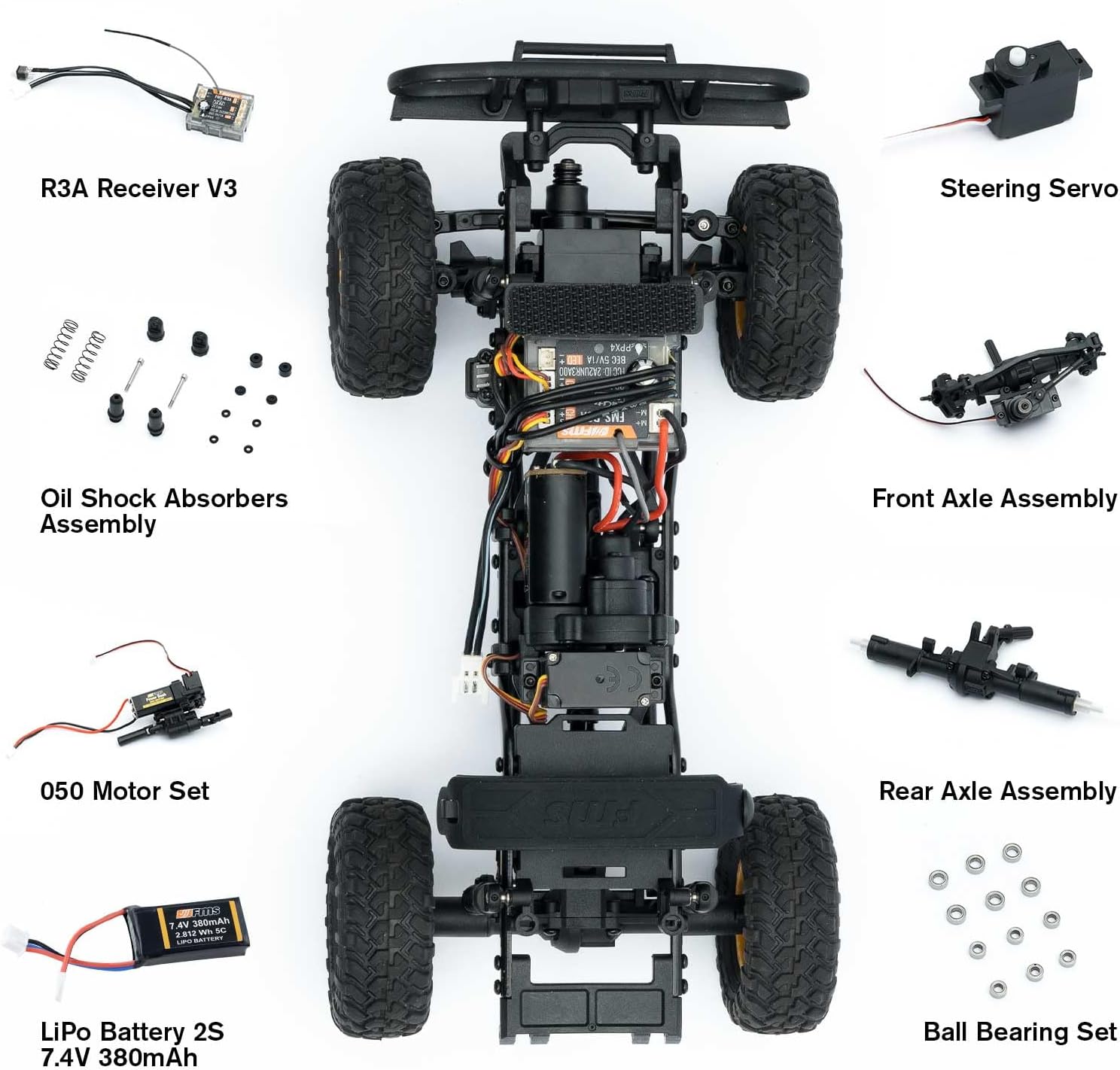
Figure 2: Exploded view of the FCX24M Chassis components, including the R3A Receiver V3, Steering Servo, Oil Shock Absorbers Assembly, 050 Motor Set, Front Axle Assembly, Rear Axle Assembly, Ball Bearing Set, and LiPo Battery.
3. Setup
3.1. Charging the Vehicle Battery
- Locate the 7.4V Lithium Polymer battery and the USB charger.
- Connect the battery to the USB charger.
- Plug the USB charger into a compatible USB power source (e.g., computer USB port, USB wall adapter). The charging time is approximately 4-5 hours. The LED indicator on the charger will show charging status (usually red for charging, green for full).
- Once fully charged, disconnect the battery from the charger.
3.2. Installing Batteries in the Remote Control
- Locate the battery compartment on the underside of the remote control.
- Use a small screwdriver to open the battery compartment cover.
- Insert 2x 1.5V AA alkaline non-rechargeable batteries, ensuring correct polarity.
- Replace the battery compartment cover and secure it with the screw.
3.3. Installing the Vehicle Battery
- Open the rear bed of the RC crawler to access the battery compartment.
- Connect the charged 7.4V LiPo battery to the vehicle's power interface, ensuring a secure connection.
- Carefully place the battery into the compartment and close the rear bed.
3.4. Binding the Remote Control and Vehicle
The vehicle and remote control are typically pre-bound from the factory. If re-binding is necessary:
- Ensure both the vehicle and remote control are turned OFF.
- Turn ON the remote control. The power LED will blink.
- Turn ON the vehicle. The power LED on the remote control should become solid, indicating a successful bind.
- If the binding fails, repeat the steps or consult the troubleshooting section.

Figure 3: The 2.4Ghz Remote Control for the FCX24M RC Crawler.
4. Operating
4.1. Basic Controls
- Throttle Trigger: Pull the trigger to move forward. Push the trigger away from you to brake, then push again for reverse.
- Steering Wheel: Turn the steering wheel left or right to control the vehicle's direction.
- Steering Trim: Use the steering trim dial on the remote control to adjust the steering so the vehicle drives straight when the steering wheel is centered.
4.2. Two-Speed Transmission
The FCX24M features a two-speed transmission for versatile driving. Refer to your remote control's specific buttons or switches for shifting between high and low gears. Low gear provides more torque for crawling over obstacles, while high gear offers faster speeds for open terrain.
4.3. Lighting System
The vehicle is equipped with brightenable headlights. The lighting can typically be controlled via a switch or button on the remote control. Consult your remote control's manual for specific lighting controls.
4.4. Driving Tips
- Always operate your RC crawler in a safe and open area, away from people, pets, and obstacles.
- Avoid driving in deep water or extreme mud unless the vehicle is specifically rated for such conditions, as this can damage electronics.
- Practice driving in various terrains to get accustomed to the vehicle's handling characteristics.
Video 1: Official FMS FCX24 Land Rover promotional video, demonstrating the vehicle's capabilities and features.
5. Maintenance
5.1. Cleaning
- After each use, especially in dirty or dusty conditions, clean the vehicle to prevent debris from affecting performance.
- Use a soft brush or compressed air to remove loose dirt. A damp cloth can be used for stubborn grime, but avoid excessive moisture on electronic components.
5.2. Battery Care
- Always fully charge the LiPo battery before use.
- Do not overcharge or completely discharge the battery, as this can reduce its lifespan.
- Store batteries in a cool, dry place away from direct sunlight and extreme temperatures.
- Remove batteries from the vehicle and remote control when not in use for extended periods.
5.3. General Inspection
- Regularly inspect all screws, linkages, and moving parts for looseness or damage. Tighten any loose screws.
- Check the tires for wear and tear. Replace if necessary to maintain optimal traction.
- Ensure all wires and connectors are secure and free from damage.
6. Troubleshooting
| Problem | Possible Cause | Solution |
|---|---|---|
| Vehicle does not respond to remote control | Low battery in vehicle or remote; Not properly bound | Charge vehicle battery; Replace remote batteries; Re-bind vehicle and remote. |
| Steering servo issues (e.g., only steers one way, no steering) | Damaged steering servo; Loose connection | Check servo connections; Replace steering servo if damaged (as noted in customer reviews, this can be a common issue). |
| Vehicle moves too slowly or lacks power | Low vehicle battery; Motor issue | Fully charge vehicle battery; Inspect motor for damage or debris. |
| Vehicle pulls to one side | Steering trim not adjusted; Damaged steering components | Adjust steering trim on remote; Inspect steering linkages. |
7. Specifications
- Model: Defender 90
- Product Dimensions: 9.5 x 4.2 x 5 inches
- Item Weight: 2.29 pounds
- Battery: 1 Lithium Polymer battery (7.4V, included)
- Recommended Age: 16 years and up
- Scale: 1/24
- Drive: 4X4
8. Warranty & Support
For warranty information, please refer to the documentation included with your purchase or contact the retailer. For technical support, parts, or service inquiries, please contact EAZYRC customer service through their official website or the retailer where the product was purchased.
Video 2: EAZYRC FMS 1/24 RC Crawler RTR, Land Rover series overview, highlighting features and performance.


