
Okin DS2.451.3W.01.WU.110
Okin Dual Motor Electric Standing Desk Frame
User Manual
1. Introduction
This manual provides detailed instructions for the assembly, operation, and maintenance of your Okin Dual Motor Electric Standing Desk Frame. Please read this manual thoroughly before installation and use to ensure proper function and safety.
The Okin Dual Motor Electric Standing Desk Frame is designed to enhance your workspace by allowing seamless transitions between sitting and standing positions. It features a robust steel construction, dual high-performance motors, and an intuitive memory controller for personalized height settings.
2. Safety Information
- Always ensure the desk is properly anchored to the floor to prevent tipping.
- Do not exceed the maximum weight limit of 270 lbs (122.5 kg).
- Keep children and pets away from the desk during operation.
- Ensure no obstacles are in the path of the desk frame during height adjustments.
- Do not open the motor housing or control box. Refer all servicing to qualified personnel.
- Disconnect power before cleaning or performing any maintenance.
3. Components List
Before beginning assembly, verify that all components are present and undamaged. The package includes the following:
- Desk Frame (legs, crossbar, feet)
- Memory Controller
- Power Adapter and Cable
- Motor Connection Cables
- Assembly Hardware (screws, washers, Allen wrenches)
- Installation Manual
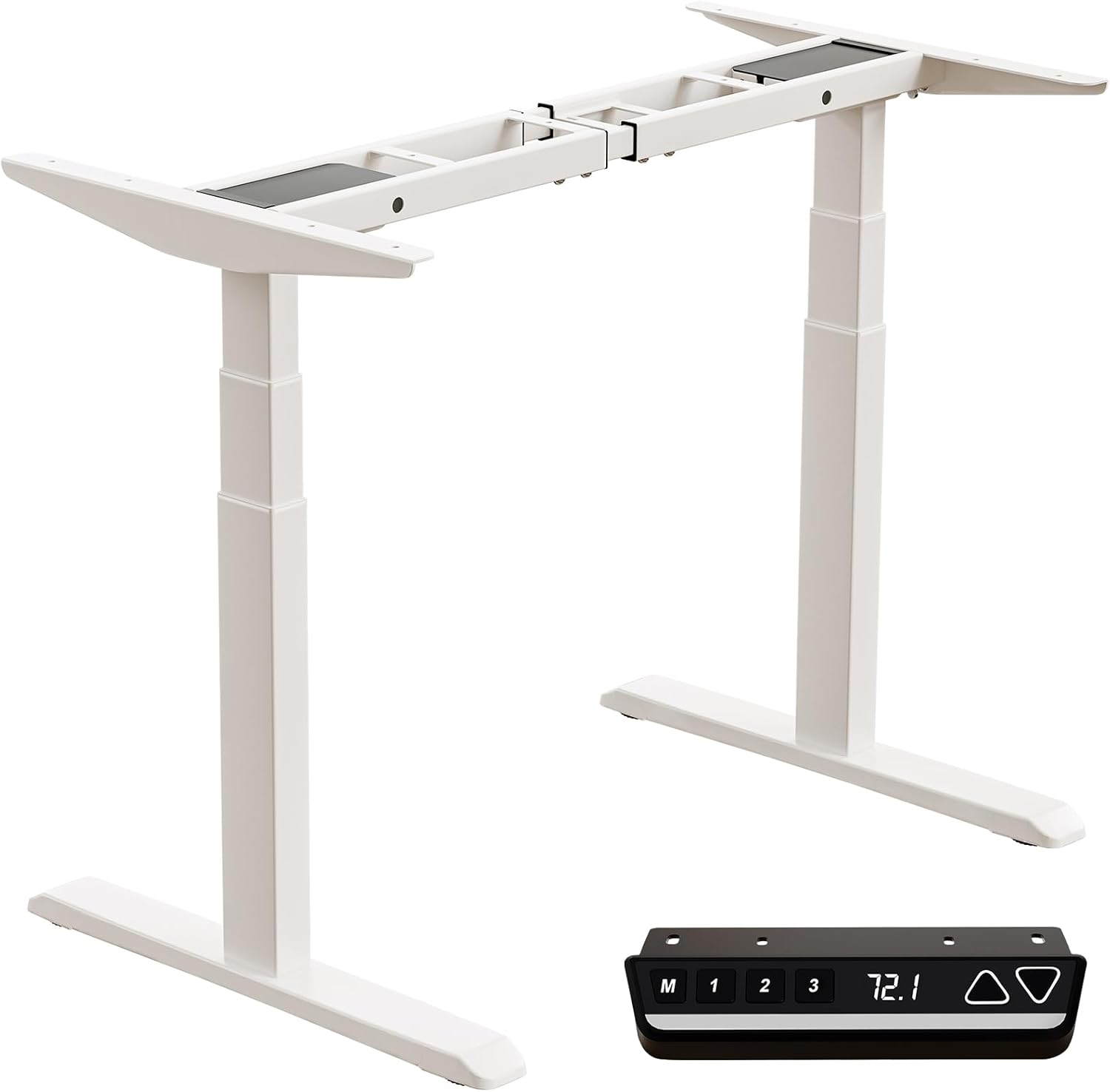
Image: All components of the Okin Dual Motor Electric Standing Desk Frame, including the white frame, feet, and the black memory controller.
4. Setup and Assembly
The Okin Dual Motor Electric Standing Desk Frame is designed for easy assembly. A complete installation manual is included with your product. Follow the steps below for a general overview:
- Unpack Components: Carefully remove all parts from the packaging and lay them out on a clean, flat surface.
- Assemble Legs and Feet: Attach the feet to the bottom of the desk legs using the provided hardware.
- Connect Crossbar: Secure the adjustable crossbar between the two leg columns. Ensure it is extended to your desired width for your desktop.
- Install Motors and Controller: Connect the dual motors to the leg columns and the control box. Mount the memory controller to your preferred location on the desk frame, ensuring the extra-long cable provides flexibility for placement (left or right).
- Attach Desktop (Not Included): Place your chosen desktop (recommended sizes: 47.2"x23.6" to 78.8"x39.4", minimum thickness 0.6") onto the assembled frame and secure it using appropriate screws.
- Cable Management: Organize and secure all cables to prevent tangling and ensure smooth operation.

Image: Diagram illustrating the assembly of the desk frame and the placement of a desktop, with suggested desktop dimensions and minimum thickness.

Image: Overhead view showing the flexible placement of the controller on either the left or right side of the desk frame, highlighting the 51.2-inch extra-long cable for convenience.
5. Operating Instructions
The Okin Electric Standing Desk Frame features an intuitive control panel for easy height adjustment and memory functions.

Image: Close-up of the multi-function intelligent keypad, showing buttons for memory presets (M, 1, 2, 3), LED screen display, and up/down arrows.
- Height Adjustment: Use the Up (▲) and Down (▼) arrow buttons to smoothly raise or lower the desk to your desired height. The current height is displayed on the LED screen. The desk operates at a quiet 48 dB.
- Memory Presets: The controller allows you to save up to three favorite height settings.
- Adjust the desk to your desired height.
- Press the M button. The display will show 'S-'.
- Within 3 seconds, press the desired memory button (1, 2, or 3) to save the current height.
- To recall a saved height, simply press the corresponding memory button (1, 2, or 3).
- Change Display Unit (CM/IN): The controller allows you to switch between centimeters (CM) and inches (IN) for height display. Refer to the detailed installation manual for specific instructions on how to toggle this setting.

Image: Visual representation of the desk frame adjusting from its minimum height of 23.7 inches to its maximum height of 49.3 inches.
6. Maintenance
To ensure the longevity and optimal performance of your Okin Electric Standing Desk Frame, follow these simple maintenance guidelines:
- Cleaning: Wipe with a dry cloth. Avoid using abrasive cleaners or solvents that could damage the finish.
- Regular Checks: Periodically check all screws and connections to ensure they are tight. Retighten if necessary.
- Cable Management: Ensure cables remain tidy and are not pinched or tangled, which could affect motor operation.
- Weight Distribution: Distribute weight evenly on the desktop to prevent strain on the motors and frame.
7. Troubleshooting
If you encounter any issues with your desk frame, please refer to the following common troubleshooting tips:
- Desk Not Moving:
- Check if the power cable is securely plugged into both the wall outlet and the control box.
- Ensure all motor connection cables are properly seated.
- If the display shows an error code, consult the detailed installation manual for specific error interpretations and solutions.
- Uneven Movement:
- Ensure the desk is on a level surface.
- Verify that the weight on the desktop is evenly distributed and does not exceed the maximum capacity.
- Unusual Noises:
- While the desk operates quietly (48 dB), any new or loud noises may indicate an issue. Check for loose components or obstructions.
If the problem persists after attempting these solutions, please contact Okin customer support for assistance.
8. Specifications
| Feature | Specification |
|---|---|
| Model Number | DS2.451.3W.01.WU.110 |
| Brand | Okin |
| Color | White |
| Base Material | Alloy Steel |
| Minimum Height | 23.7 inches (60 cm) |
| Maximum Height | 49.3 inches (125 cm) |
| Crossbar Length (Adjustable) | 43.3 inches to 70.9 inches (110 cm to 180 cm) |
| Crossbar Width (Fixed) | 19.1 inches (48.6 cm) |
| Maximum Weight Capacity | 270 lbs (122.5 kg) |
| Speed | 1.4 inches/second |
| Noise Level | 48 dB |
| Motor Type | Dual Motor |
| Product Dimensions (D x W x H) | 42.52"D x 14.17"W x 8.66"H (packaged) |
| Item Weight | 70.55 Pounds (32 kg) |

Image: Detailed dimensions of the adjustable steel frame, showing minimum and maximum lengths and heights.

Image: Illustration of the 3-stage sturdy frame design, emphasizing strong support and excellent durability.

Image: Visual representation highlighting the two high-performance motors and the 270 lbs weight capacity of the desk frame.
9. Warranty and Support
Okin is committed to providing quality products and customer satisfaction. While specific warranty details are not provided in this manual, please refer to your purchase documentation or the product listing on Amazon for warranty information.
For any questions, concerns, or assistance with setup or operation, our dedicated support team is ready to help. You can typically find contact information for Okin America support on the product's Amazon page or through the Okin brand store: Okin Store on Amazon.
Related documentsDS2.451.3W.01.WU.110


Ask a question about this manual
Ask about setup, troubleshooting, compatibility, parts, safety, or missing instructions. Manuals+ will review the question and use this page’s manual context to help answer it.