
1. Safety Information
Please read all instructions carefully before installation and use. Keep this manual for future reference.
- Do not expose the lock to extreme temperatures or direct sunlight for prolonged periods.
- Avoid contact with water or corrosive substances.
- Use only the specified battery type (3 x 1.5V alkaline batteries). Do not mix old and new batteries or different battery types.
- Ensure proper polarity when inserting batteries.
- Keep mechanical keys in a safe place outside the property.
- Do not attempt to disassemble or repair the lock yourself. Contact support if issues arise.
2. Product Overview
The AVATTO Smart Door Lock SDL-S1 offers multiple unlocking methods for enhanced security and convenience.

Figure 2.1: Overview of the AVATTO Smart Door Lock and its accessories.
2.1 Key Features
- Multiple Unlocking Methods: Fingerprint, Password, RFID Card, Smart Life App, and Mechanical Key.
- Adjustable Cylinder Length: The interior and exterior cylinder lengths can be freely adjusted (30-45mm exterior, 30-65mm interior).
- Door Thickness Compatibility: Suitable for doors with a thickness of 60mm to 90mm.
- Symmetric and Asymmetric Door Support: Adapters (5mm, 10mm, 20mm) are included to accommodate various door types.
- Smart Life App Integration: Manage users, set administrative rights, view lock logs, and receive notifications.
- Bluetooth Connectivity: Effective transmission distance of 50 meters. A separate AVATTO Bluetooth Gateway is required for remote control via the app outside of Bluetooth range.

Figure 2.2: The five primary methods for unlocking the smart door lock.

Figure 2.3: Detailed view of the AVATTO Door Lock components.
3. Before Installation
Before proceeding with installation, it is crucial to confirm the following measurements and door characteristics:
- Confirm Cylinder Type: Ensure your existing door lock cylinder is compatible.
- Confirm Cylinder Hole Size: Measure the dimensions of the cylinder hole in your door.
- Measure Door Thickness: The lock is suitable for doors between 60mm and 90mm thick.
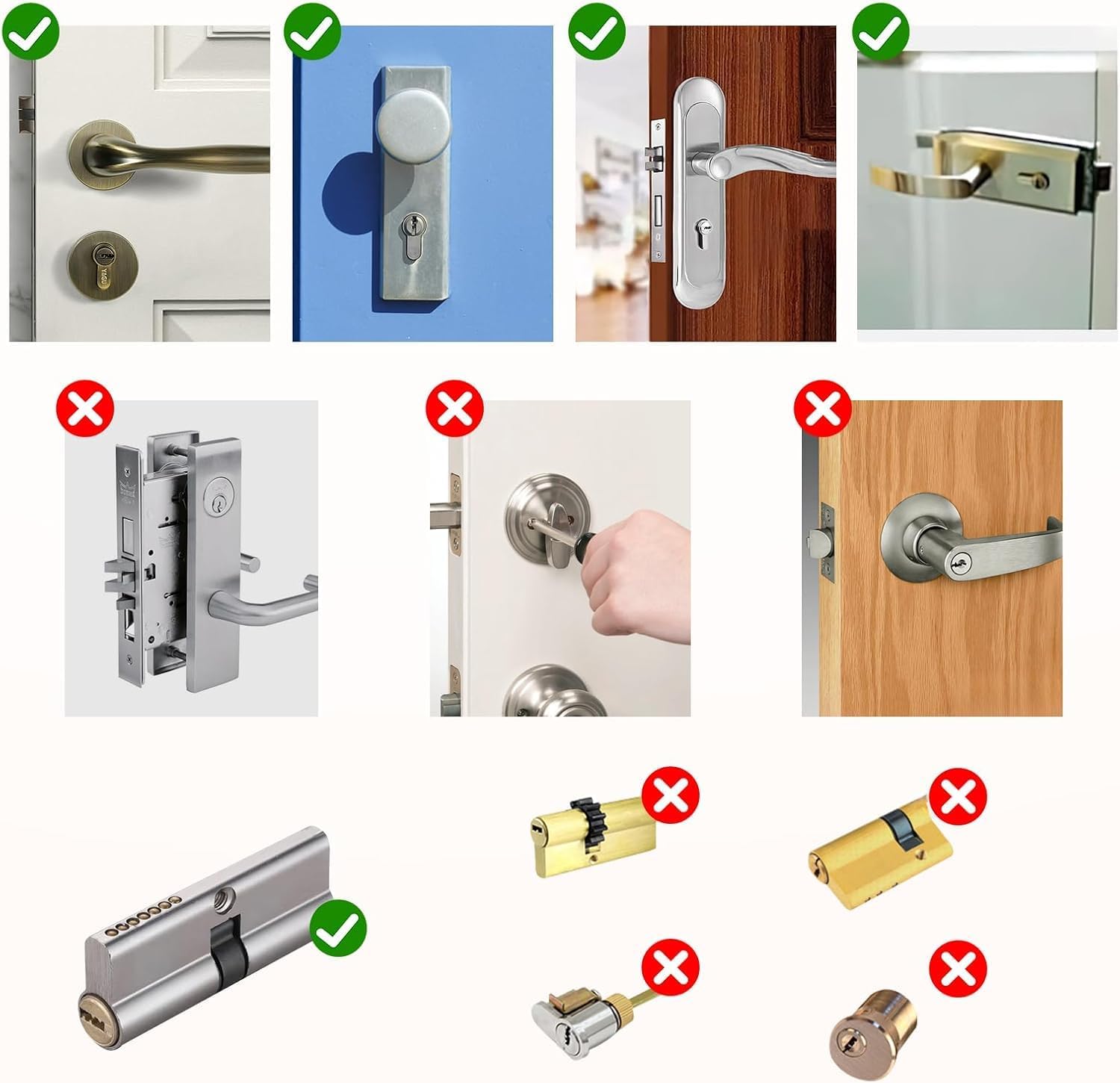
Figure 3.1: Examples of compatible (green check) and incompatible (red cross) door lock types.

Figure 3.2: Required dimensions for the lock cylinder hole.
4. Installation Guide
The AVATTO Smart Door Lock is designed for easy installation. Follow these general steps:
- Prepare the Door: Ensure your door meets the thickness and cylinder hole requirements as outlined in Section 3.
- Adjust Cylinder Length: The lock cylinder length is adjustable to fit various door thicknesses. Refer to the table below and the diagrams for symmetric and asymmetric door configurations. The interior length can be adjusted from 30mm to 65mm, and the exterior from 30mm to 45mm.
- Install the Cylinder: Insert the adjusted cylinder into the door's lock hole.
- Secure the Lock: Fasten the lock components securely using the provided screws.
- Insert Batteries: Open the battery compartment and insert 3 x 1.5V alkaline batteries, ensuring correct polarity.
- Test Functionality: After installation, test all unlocking methods (mechanical key, fingerprint, password, RFID card) to ensure proper operation before closing the door.

Figure 4.1: Adjustable lock cylinder length guide. Note: Product is suitable for 60-90mm door thickness.
4.1 Symmetric Door Installation
For symmetric doors, the distance from the center screw hole to both the interior and exterior sides of the door is equal.

Figure 4.2: Installation example for a symmetric door (e.g., 60mm door with 30mm interior and 30mm exterior).
4.2 Asymmetric Door Installation
For asymmetric doors, the distances from the center screw hole to the interior and exterior sides of the door are different. Use the provided adapters (5mm, 10mm, 20mm) to achieve the correct length.

Figure 4.3: Installation example for an asymmetric door, demonstrating the use of adapters.
5. Operating Instructions
5.1 Unlocking Methods
- Fingerprint Unlock: Place your registered finger on the fingerprint sensor. The lock will unlock if the fingerprint is recognized.
- Password Unlock: Enter your registered password on the keypad.
- RFID Card Unlock: Tap your registered RFID card on the designated area of the lock.
- Smart Life App Unlock: Open the Smart Life app on your smartphone and follow the prompts to unlock the door. Ensure Bluetooth is enabled on your phone and you are within range.
- Mechanical Key Unlock: In case of emergency or battery depletion, use one of the provided mechanical keys to unlock the door.

Figure 5.1: The smart lock showing various unlocking interfaces.
5.2 Smart Life App Usage
The Smart Life app allows comprehensive management of your AVATTO Smart Door Lock:
- Adding Users: Register new fingerprints, passwords, and RFID cards for family members or guests.
- Administrative Rights: Assign different levels of access and control to various users.
- Lock Log: View a history of all lock and unlock events, including method and time.
- Notifications: Receive real-time alerts on your phone for lock activity.
- Remote Control (with Gateway): To control the lock remotely from outside your home or office, an AVATTO Bluetooth Gateway (sold separately) is required. The gateway connects the lock to your Wi-Fi network.
5.3 Battery Status
The battery status can be checked via the Smart Life app interface. When the battery is low, the lock may provide an audible or visual warning. In case of complete battery depletion, you can use an external battery (via the Type-C port) or the mechanical key to open the lock.
6. Maintenance
- Battery Replacement: Replace all three 1.5V alkaline batteries when the low battery indicator appears.
- Cleaning: Wipe the lock surface with a soft, dry cloth. Do not use abrasive cleaners or solvents.
- Regular Checks: Periodically check that all screws are tight and the lock operates smoothly.
7. Troubleshooting
| Problem | Possible Cause | Solution |
|---|---|---|
| Lock does not respond. | Low or dead batteries. | Replace batteries. Use external battery or mechanical key for emergency access. |
| Fingerprint not recognized. | Finger is dirty or wet; fingerprint not properly registered. | Clean and dry finger. Re-register fingerprint if issue persists. Try another registered fingerprint. |
| Password not working. | Incorrect password entered; keypad issue. | Ensure correct password. Try resetting password via app if possible. |
| RFID card not working. | Card not registered or damaged. | Register the card via the app. Try another registered card. |
| Smart Life App cannot connect to lock. | Bluetooth off; out of range; app issue. | Ensure Bluetooth is on and you are within 50m. Restart app/phone. Check gateway connection for remote access. |
| Lock is stuck or difficult to turn. | Improper installation; mechanical obstruction. | Recheck installation steps. Ensure no foreign objects are obstructing the mechanism. Do not force. |
8. Specifications
- Model: SDL-S1
- Brand: AVATTO
- Dimensions (L x W x H): 1.8 x 4 x 4 cm (Cylinder); 680 grams
- Material: Metal
- Color: Black
- Power Type: Electric operation (Battery-powered)
- Batteries Required: 3 x 1.5V Alkaline Batteries (not included)
- Door Thickness Compatibility: 60mm - 90mm
- Special Features: Fingerprint Unlock, Password Unlock, RFID Unlock, Smart Life App Unlock, Mechanical Key Unlock, Adjustable Cylinder Length.
- Included Components: Smart Door Lock, 2 Mechanical Keys, IC Card, User Manual.
9. Warranty and Support
This product comes with a 2-year warranty from the date of purchase.
For any questions, technical support, or to obtain additional resources such as detailed installation videos, network connection guides, or product presentation videos, please contact AVATTO customer support. Refer to your purchase documentation for specific contact details.
You can also visit the official AVATTO website for the latest support information and FAQs.


