
1. Introduction
The ENFITNIX XliteBT is a smart rear bicycle light designed to enhance cycling safety and provide anti-theft protection. It features a high-lumen COB light for visibility, an integrated alarm system, smart braking detection, and Bluetooth connectivity for app control. This manual provides detailed instructions for the proper installation, operation, and maintenance of your XliteBT light.

Image: The XliteBT Anti-Theft Alarm Rear Bike Light securely mounted on a bicycle's seatpost, showcasing its compact design and rear visibility.
2. Package Contents
Please verify that all items listed below are included in your package:
- XliteBT Smart Taillight (1 unit)
- USB Type-C Cable (1 unit)
- Saddle Mount Bracket (1 unit)
- Seatpost Mount Bracket (1 unit)
- Rubber Bands (2 units)
- Zip Ties (4 units)
- User Manual (1 unit)

Image: An illustration detailing the XliteBT product and its accompanying accessories, including mounting options and charging cable.
3. Specifications
| Feature | Description |
|---|---|
| Model Name | XliteBT Smart Tail Light with Thief Alarm |
| Light Modes | Flash1, Flash2, Flash3, Breath, Constant On |
| Battery | 750mAh rechargeable Lithium-ion battery |
| Run Time | 13-67 hours (depending on mode) |
| Dimensions | 98mm (L) x 42mm (W) x 21.5mm (H) |
| Weight | Approx. 79g (without mounting bracket) |
| Color | Black |
| Waterproof Rating | IPX6 |
| Wireless Connectivity | Bluetooth 5.0 |
| Bluetooth Signal Range | Approx. 40m (in open area) |
| Lock Distance (Auto Mode) | 3-5m |
Note: Bluetooth signal range and lock distance may be affected by surrounding obstacles or interference.


Images: The XliteBT light on a scale demonstrating its lightweight design, and a close-up view highlighting its durable aluminum alloy construction.
4. Setup and Installation
The XliteBT offers two primary mounting options: seatpost mount and saddle mount. Choose the option that best suits your bicycle and preferences.
4.1 Seatpost Mount Installation
- Attach the seatpost mount bracket to your bicycle's seatpost using the provided rubber bands or zip ties. Ensure it is securely fastened and positioned vertically.
- Slide the XliteBT light onto the bracket until it clicks into place.
- Verify that the light is firmly attached and facing directly backward.
4.2 Saddle Mount Installation
- Secure the saddle mount bracket to the rails under your bicycle saddle. Use the provided zip ties to ensure a tight and stable fit.
- Slide the XliteBT light onto the saddle mount bracket until it locks.
- Confirm the light is securely mounted and visible from the rear.
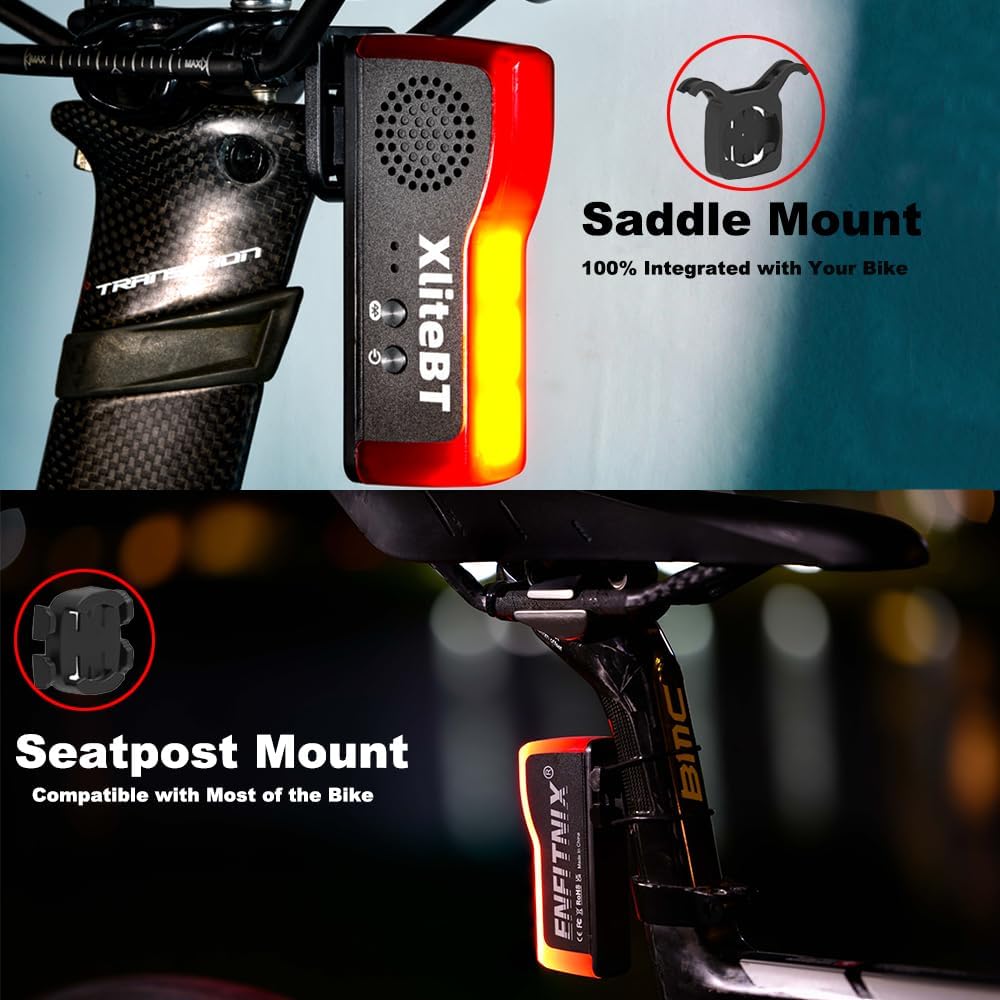
Image: Visual guide demonstrating the two quick-release mounting options: saddle mount for under the seat and seatpost mount for the seat tube.
5. Operating Instructions
The XliteBT features multiple lighting modes, smart braking, and an anti-theft alarm system.
5.1 Power On/Off and Mode Switching
- Power On: Press and hold the power button for 2 seconds.
- Power Off: Press and hold the power button for 2 seconds.
- Switch Light Modes: Click the power button once to cycle through the available lighting modes (Flash1, Flash2, Flash3, Breath, Constant On).
- Switch Automatic/Manual Modes: Double-click the power button to toggle between automatic and manual modes.

Image: The XliteBT light displaying various illumination patterns, emphasizing its five lighting modes and extended battery life.
5.2 Smart Braking Feature
The XliteBT is equipped with a high-sensitive accelerometer that detects braking. When braking is detected, the light will automatically switch to a high-brightness mode to alert following traffic, enhancing safety.

Image: A visual representation of the advanced brake sensing technology, where the taillight intensifies its illumination upon detecting deceleration.
5.3 Anti-Theft Alarm
The XliteBT integrates an anti-theft alarm system that activates upon detecting movement or vibration when armed. The alarm emits a high-decibel sound to deter potential thieves.
- Arming the Alarm: This can be done manually via the light's button (refer to the full user manual for specific button sequences) or automatically through the EFXLink app when in Auto Mode.
- Disarming the Alarm: Disarm using the EFXLink app or the light's button.
- Auto Start-Stop: In Auto Mode, the light automatically turns on when motion is detected and turns off after 10 seconds of inactivity.

Image: A diagram explaining the anti-theft alarm's keyless access and the auto start-stop feature, showing how the light locks/unlocks based on proximity and movement.
6. App Control (EFXLink APP)
The XliteBT can be controlled and customized using the EFXLink mobile application, available for both Android and iOS devices. The app allows for brightness adjustment, alarm selection, and mode switching.
- Download the App: Scan the QR codes below or visit your device's app store to download the EFXLink app.
- Connect via Bluetooth: Open the app and follow the on-screen instructions to connect to your XliteBT light via Bluetooth 5.0.
- Features: Control anti-theft alarm settings, adjust brightness, select flash modes, and manage automatic/manual modes.

Image: A visual representation of the EFXLink app interface, demonstrating its capability to help locate your bike and manage alarm settings.

Image: An overview of the EFXLink app's control functions for the XliteBT, including QR codes for downloading the app on Android and iOS devices.
Download EFXLink App:
7. Charging
The XliteBT is powered by a 750mAh rechargeable Lithium-ion battery and supports USB-C charging.
- Charging Port: Locate the USB-C charging port on the device.
- Connect Charger: Connect the provided USB-C cable to the light and plug the other end into a compatible USB power source (e.g., power adapter, power bank, laptop, car charger).
- Charging Indicator: The light will indicate charging status (refer to the full user manual for specific LED indicators).
- Charging Time: A full charge typically takes 2-3 hours.
- Low Battery Reminder: The device will provide a low battery reminder when charging is needed.

Image: The XliteBT light connected to a USB-C cable for charging, illustrating compatibility with various power sources like adapters, power banks, laptops, and car chargers.
8. Maintenance
- Cleaning: Wipe the light with a soft, damp cloth. Avoid using abrasive cleaners or solvents.
- Water Resistance: The XliteBT has an IPX6 waterproof rating, meaning it is protected against high-pressure water jets. It can withstand rain and splashes but should not be submerged in water.
- Storage: Store the light in a cool, dry place when not in use for extended periods. Charge the battery periodically to maintain its health.
- Battery Care: Avoid fully discharging the battery frequently. Charge it before it completely runs out to prolong battery life.

Image: The XliteBT light covered in water droplets, demonstrating its IPX6 waterproof capability, designed to cope with harsh environments.
9. Troubleshooting
- Light not turning on: Ensure the battery is charged. Press and hold the power button for 2 seconds to power on.
- Alarm not activating: Check if the alarm is armed via the app or manual controls. Ensure the light is in Auto Mode for automatic arming/disarming.
- Bluetooth connection issues: Ensure Bluetooth is enabled on your phone and the light is within range. Restart both the light and your phone, then try reconnecting via the EFXLink app.
- Light not responding to button presses: The battery might be critically low or depleted. Charge the device. If the issue persists, contact customer support.
- Inaccurate Auto Start-Stop: Ensure the light is securely mounted and not experiencing excessive vibrations that could interfere with its motion sensor.
10. Warranty and Support
ENFITNIX provides a 12-month product protection plan and a 30-day free return/exchange policy after purchase. The product also comes with a 1-year manufacturer's warranty.
For any questions, technical assistance, or warranty claims, please contact ENFITNIX customer support. Refer to the contact information provided with your purchase or visit the official ENFITNIX website for support details.
