
1. Introduction
This manual provides comprehensive instructions for the installation, operation, and maintenance of your POCREATION Smart Rain Sensor. This device is designed to detect rainfall and light conditions, integrating with the Tuya ZigBee App for smart home automation. It features solar charging for sustained operation and an IPX6 waterproof rating for outdoor use.
2. Product Features
- Solar Charging: Equipped with a built-in 3.7V 1300mAh Li-ion battery, charged via an integrated solar panel, eliminating the need for external power sources.
- IPX6 Waterproof Design: Engineered to withstand various weather conditions, ensuring stable performance even during heavy rain.
- Real-time Updates: Provides instant alerts on rain conditions through the connected mobile application.
- 2-in-1 Detection: Features both rain sensing and light detection functionalities for comprehensive outdoor monitoring.
- Smart Home Integration: Compatible with Tuya ZigBee App and Smart Life App for automation and scene linkage.
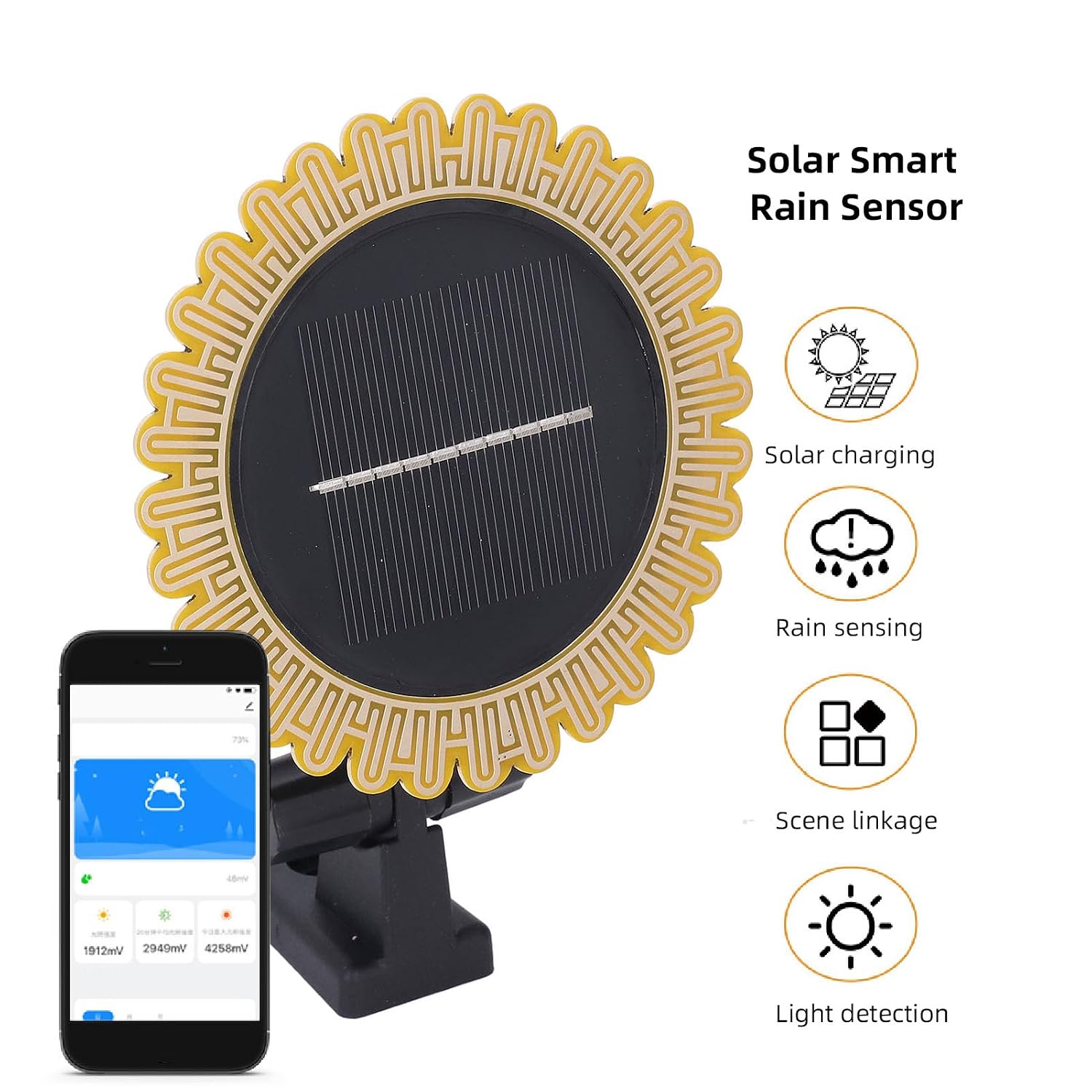
Image: The Smart Rain Sensor highlighting its key features: solar charging, rain sensing, scene linkage, and light detection.
3. Product Components
The POCREATION Smart Rain Sensor consists of the following main parts:

Image: Front and back views of the Smart Rain Sensor, showing the solar panel and the mounting bracket.

Image: Detailed view of the sensor with labels pointing to the rain sensing plate, light induction area, solar panel, and adjustable support.
- Rain Sensing Plate: The surface designed to detect the presence of rain.
- Light Induction: Area responsible for detecting ambient light levels.
- Solar Panel: Converts sunlight into electrical energy to charge the internal battery.
- Adjustable Support: Allows for flexible positioning and mounting of the sensor.
- Reset Button: Located on the back, used for network pairing.
4. Package Contents
Please verify that all items are present in the package:
- 1 x Smart Rain Sensor
- 1 x Bracket
- 1 x Adhesive Plate
- 5 x Accessories (e.g., screws, anchors)
- 1 x User Manual (this document)
5. Specifications
| Item Type | Smart Rain Sensor |
| Charging Method | Solar Powered |
| Dimensions (excluding bracket) | Approx. 103.5 x 103.5 x 20.5mm / 4.1 x 4.1 x 0.8in |
| Battery | Li-ion Battery 3.7V / 1300mAh (built-in) |
| Working Temperature | -10-50°C |
| Water Level Rating | IPX6 |
| Data Collection Period | 60 seconds |
| Control Software | Tuya APP / Smart Life APP (for ZigBee) |
| Weight | Approx. 155.00g / 5.47oz |
| Model Number | POCREATION0imw1zb3qe |

Image: Diagram showing the dimensions of the Smart Rain Sensor (103.5mm / 4.1in in width and height).
6. Setup and Installation
Follow these steps to set up and install your Smart Rain Sensor:
- Gateway Requirement: This product requires a ZigBee gateway (not included) to function with the Tuya APP. Ensure your ZigBee gateway is already added and configured in the Tuya APP.
- Mounting Location: Choose an outdoor location that receives direct sunlight for optimal solar charging and is exposed to rainfall for accurate detection. The adjustable support allows for flexible mounting on various surfaces, such as windows or fences.
- Mounting the Sensor: Use the provided bracket and adhesive plate or other accessories to securely mount the sensor. Ensure the rain sensing plate is unobstructed and facing upwards.
- Reset and Pairing: Locate the red dot on the back of the sensor, which is the reset button. Press and hold this button for approximately 5 seconds until the indicator light flashes. Release the button to prepare the sensor for network connection.
- Add Device in App: Open the Tuya APP, navigate to the ZigBee gateway interface, and click on 'Add sub-device'. The app will automatically search for and add the sensor.

Image: Visual guide for connecting the sensor to the Tuya app, showing the reset button and app interface.

Image: The Smart Rain Sensor installed on a window, demonstrating a typical mounting scenario.
7. Operating Instructions
Once the sensor is successfully paired with your ZigBee gateway and the Tuya APP, you can utilize its features for smart home automation:
- Real-time Monitoring: View the current rain and light detection status directly within the Tuya APP.
- Automation Linkage: Use the app's automation features to create custom scenarios based on sensor readings. For example:
- Rain Detection: Configure the system to automatically close window lifters or retract awnings when rain is detected.
- Light Detection: Set up routines to open curtains or turn off night lights based on ambient light levels, such as at 8:00 AM.
- App Alerts: Receive notifications on your smartphone when rain is detected, allowing you to take manual action if needed, such as bringing in laundry.
- Battery Status: Monitor the battery level of the sensor through the Tuya APP to ensure continuous operation.

Image: Example of rain detection automation: sensor detects rain, sends signal via gateway, and a window lifter closes the window.

Image: Example of light detection automation: sensor detects light, sends signal via gateway, and a curtain opener opens curtains.

Image: Example of an app alert: sensor detects rain, sends signal via gateway, and a smartphone displays a notification.
8. Maintenance
To ensure the longevity and optimal performance of your Smart Rain Sensor, consider the following maintenance tips:
- Regular Cleaning: Periodically clean the rain sensing plate and solar panel with a soft, damp cloth to remove dirt, dust, or debris that may accumulate and affect performance. Avoid abrasive cleaners.
- Solar Panel Exposure: Ensure the solar panel remains unobstructed by leaves, snow, or other objects to allow for efficient charging.
- Battery Health: The built-in Li-ion battery is designed for long life. Consistent solar exposure will help maintain its charge. If the sensor is stored for extended periods, ensure it is fully charged before storage and recharged periodically.
- Check Mounting: Periodically inspect the mounting bracket and adhesive to ensure the sensor remains securely attached and properly positioned.
9. Troubleshooting
If you encounter issues with your Smart Rain Sensor, refer to the following common problems and solutions:
- Sensor Not Connecting to App:
- Ensure your ZigBee gateway is powered on and connected to your network.
- Verify the sensor is within range of the ZigBee gateway.
- Repeat the pairing process (Section 6, Step 4 & 5).
- Check if the sensor's battery is sufficiently charged.
- Inaccurate Rain Detection:
- Clean the rain sensing plate to remove any obstructions or residue.
- Ensure the sensor is mounted in a location fully exposed to rain and not under an overhang.
- Battery Not Charging:
- Ensure the solar panel is clean and free from dirt or obstructions.
- Verify the sensor is placed in a location that receives ample direct sunlight throughout the day.
- Automation Not Triggering:
- Check the automation rules configured in the Tuya APP to ensure they are set correctly.
- Verify that all linked devices (e.g., window lifters) are properly connected and functioning.
- Ensure the ZigBee gateway has a stable internet connection.
10. Warranty and Support
For warranty information and technical support, please refer to the product packaging or contact POCREATION customer service through the retailer where the product was purchased. Keep your purchase receipt as proof of purchase.