
1. Product Overview
The Dowinx Ergonomic Office Chair is designed to provide optimal comfort and support for extended periods of sitting. It features a breathable mesh backrest, a pocket spring cushion, adjustable lumbar support, and an adjustable headrest. The chair also includes a retractable footrest and a sturdy steel base with smooth-rolling wheels for versatile use in various environments.

Image 1.1: The Dowinx Ergonomic Office Chair, beige model, positioned in an office environment with a desk and computer.
Key Features:
- Ergonomic Design: Adjustable lumbar support and headrest for optimal posture and reduced strain.
- Pocket Spring Cushion: Innovative cushion with independent springs for even weight distribution and enhanced comfort.
- Breathable Mesh Backrest: Promotes air circulation to keep you cool and comfortable.
- Versatile Adjustments: 360° swivel, smooth-rolling wheels, and a backrest recline up to 135° with a retractable footrest.
- Durable Construction: Built with a steel base to support up to 300 pounds.
2. Assembly Instructions
This chair requires assembly. Please follow the included detailed assembly guide carefully. It is recommended to lay out all components and hardware before beginning. Some bolts may require extra strength to tighten. If a screw does not go in easily, try re-positioning the component or tipping the chair to allow the screw to go straight down.
Before You Begin:
- Ensure all parts are present according to the packing list.
- Use the provided tools. Do not overtighten screws initially; tighten fully once all components are aligned.
- Assemble on a soft, clean surface to prevent scratching.
For detailed step-by-step instructions, refer to the assembly manual included in the packaging.
3. Operating Instructions
The Dowinx Ergonomic Office Chair offers several adjustable features to customize your seating experience.
3.1. Height Adjustment
To adjust the chair's height, locate the lever under the seat on the right side. Pull the lever up while seated to lower the chair, or pull the lever up while standing to raise the chair. Release the lever at your desired height.
3.2. Adjustable Headrest
The headrest can be adjusted both in height and angle to support your neck and head, preventing hunching and promoting proper posture.
- Height Adjustment: Gently pull the headrest up or push it down to adjust its vertical position. It offers approximately 2.4 inches of lifting range.
- Angle Adjustment: Tilt the headrest forward or backward to find the most comfortable angle. It can rotate up to 50 degrees.

Image 3.2.1: Detailed view of the headrest adjustment, illustrating its 2.4-inch lifting and 50-degree rotating capabilities.

Image 3.2.2: An individual demonstrating the ergonomic support provided by the adjustable headrest.
3.3. Adjustable Lumbar Support
The lumbar support can be adjusted to conform to the natural curve of your spine, providing targeted support and relieving back pain.
- Adjustment Knob: Locate the knob on the side of the chair's backrest. Rotate the knob to adjust the depth of the lumbar support.
- Height Adjustment: The lumbar support can also be moved vertically by approximately 1.8 inches to align with your specific back curvature.
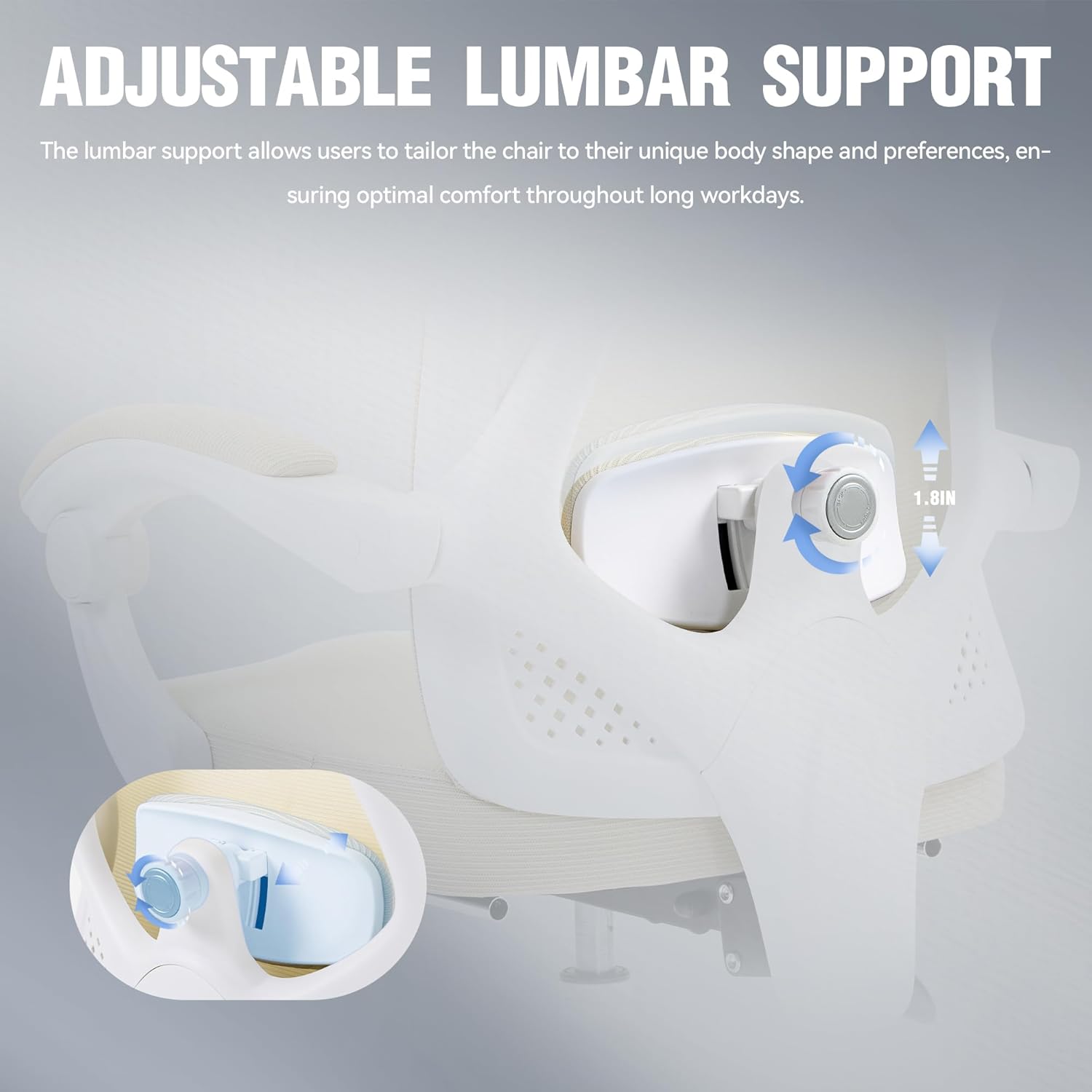
Image 3.3.1: Detailed view of the lumbar support adjustment knob and its vertical movement capability.

Image 3.3.2: Visual representation of the responsive lumbar support system and its adjustment methods.
3.4. Backrest Recline and Retractable Footrest
The chair's backrest can recline to multiple angles, and a retractable footrest is available for relaxation.
- Recline Function: Use the recline lever (typically on the left side under the seat) to adjust the backrest angle. The chair supports recline positions up to 135 degrees.
- Footrest Operation: Pull the footrest out from under the seat when you wish to recline. Push it back in when not in use.
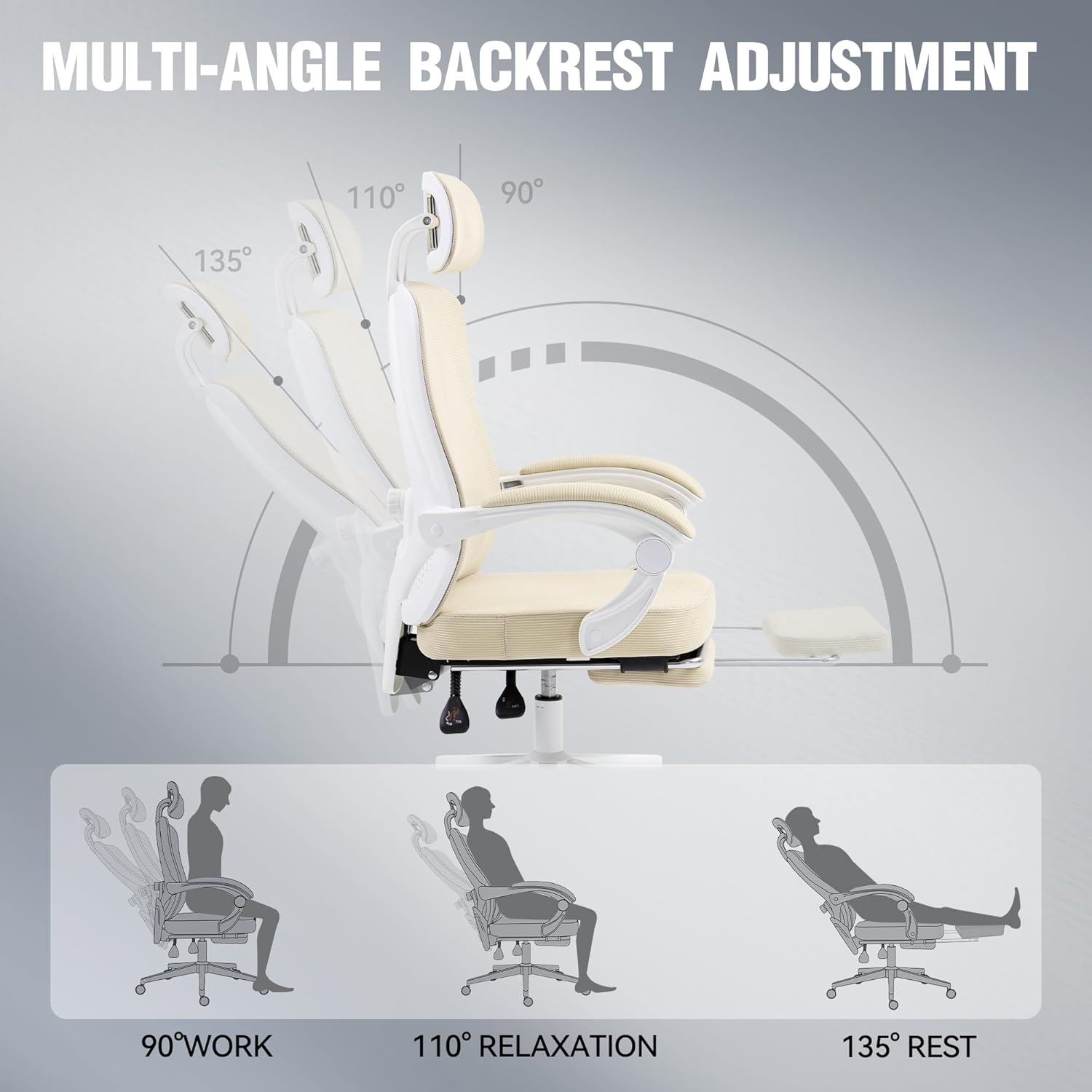
Image 3.4.1: Illustration of the chair's multi-angle backrest adjustment, demonstrating 90° work, 110° relaxation, and 135° rest positions with the footrest.

Image 3.4.2: The chair with its retractable footrest extended, designed for enhanced relaxation.
4. Maintenance
Proper maintenance ensures the longevity and optimal performance of your Dowinx Ergonomic Office Chair.
- Cleaning: Wipe clean with a damp cloth. Avoid harsh chemicals or abrasive cleaners that may damage the mesh or fabric.
- Regular Checks: Periodically check all screws and bolts to ensure they are tight. Re-tighten if necessary.
- Caster Care: Keep the casters (wheels) free of hair and debris to ensure smooth movement.
- Fabric Care: For the pocket spring cushion and mesh, spot clean with a mild detergent if needed. Allow to air dry completely.
5. Troubleshooting
This section addresses common issues you might encounter with your office chair.
Common Issues and Solutions:
| Problem | Possible Cause | Solution |
|---|---|---|
| Chair does not adjust height | Gas lift mechanism issue or lever not engaged. | Ensure the height adjustment lever is fully engaged. Check if the gas lift cylinder is damaged. |
| Chair wobbles or feels unstable | Loose screws or uneven assembly. | Check and tighten all assembly screws, especially those connecting the base and seat. Ensure the chair is on a flat surface. |
| Casters (wheels) do not roll smoothly | Debris caught in casters or damaged casters. | Clean any hair or debris from the caster wheels. If damaged, consider replacing the casters. |
| Backrest does not recline | Recline mechanism locked or damaged. | Ensure the recline lock is disengaged. Check the recline mechanism for any obstructions or damage. |
If you experience issues not listed here or require further assistance, please contact Dowinx customer support.
6. Specifications
Detailed specifications for the Dowinx Ergonomic Office Chair.
| Feature | Detail |
|---|---|
| Brand | Dowinx |
| Model Number | Ergonomic Office Chair |
| Color | Beige |
| Product Dimensions | 20.1"D x 19.7"W x 51.2"H |
| Item Weight | 40.8 pounds |
| Maximum Weight Recommendation | 300 Pounds |
| Back Style | Mesh |
| Special Feature | Adjustable Height, Adjustable Lumbar Support, Adjustable Headrest, Retractable Footrest |
| Reclining Position Count | 2 (up to 135 degrees) |
| Included Components | Arm Pad (chair includes armrests) |

Image 6.1: Dimensional drawing of the Dowinx Ergonomic Office Chair, including height, width, and depth measurements.

Image 6.2: Illustration of the internal structure of the chair's 4-inch thickened cushion, highlighting the skin-friendly mesh, sponge, quiet spring packs, and sturdy plank layers.
7. Safety Information
For safe use, ensure the chair is properly assembled and adjusted to your body size and weight. Do not exceed the maximum weight capacity of 300 pounds stated in this manual. Always sit centrally on the seat and avoid standing on the chair. Keep children and pets away from the chair during assembly and adjustment.
8. Warranty and Support
For warranty information or customer support, please refer to the documentation included with your purchase or visit the official Dowinx website. Keep your purchase receipt as proof of purchase for any warranty claims.
You can also visit the Dowinx Store on Amazon for more product information and support resources.