
1. Introduction
This manual provides essential information for the safe and effective operation, maintenance, and troubleshooting of your DCA 20V Cordless Impact Drill, model ADJZ2035i13. Please read this manual thoroughly before using the tool and keep it for future reference.
2. Safety Instructions
Always follow basic safety precautions to reduce the risk of fire, electric shock, and personal injury. Failure to follow these instructions may result in serious injury.
- Work Area Safety: Keep your work area clean and well-lit. Cluttered or dark areas invite accidents. Do not operate power tools in explosive atmospheres, such as in the presence of flammable liquids, gases, or dust.
- Electrical Safety: Avoid body contact with earthed or grounded surfaces. Do not expose power tools to rain or wet conditions. Water entering a power tool will increase the risk of electric shock.
- Personal Safety: Always wear eye protection. Use hearing protection when operating impact drills. Dress properly; do not wear loose clothing or jewelry. Keep hair, clothing, and gloves away from moving parts.
- Tool Use and Care: Do not force the power tool. Use the correct power tool for your application. Disconnect the battery pack from the power tool before making any adjustments, changing accessories, or storing power tools.
- Battery Pack Use and Care: Recharge only with the charger specified by the manufacturer. Do not use battery packs with any other power tools.
3. Package Contents
The DCA 20V Cordless Impact Drill ADJZ2035i13 set includes the following items:
- 1x DCA 20V Cordless Impact Drill
- 1x 2.0Ah Li-ion Battery
- 1x Charger (1.5A)
- 1x Carrying Bag
- 9x Drill Bits (for various materials)
- 10x Screwdriver Bits
- 1x Bit Extension Rod
- 1x Flexible Shaft
- 1x Integrated Bit Holder
- 1x Belt Hook

Image: Complete kit including the DCA 20V Cordless Impact Drill, battery, charger, and a selection of drill and screwdriver bits, all neatly organized in a durable carrying bag.
4. Product Features
- High-Performance Motor: Equipped with a pure copper motor, delivering 40 Nm of torque for powerful drilling and driving with reduced noise and extended durability.
- Hammer Function & Variable Speeds: Features a hammer function with 22,500 impacts per minute (IPM) for masonry. Two variable speed settings (0–400 RPM for driving, 0–1500 RPM for drilling) allow for precise control across different applications.
- 18+1+1 Clutch Settings: Provides 18 torque settings for screwdriving, 1 setting for drilling, and 1 setting for impact drilling, preventing overtightening and ensuring optimal performance.
- 13mm Keyless Chuck: Allows for quick and easy bit changes without the need for additional tools. Supports maximum drilling diameters of 8mm (brick), 13mm (steel), and 22mm (wood).
- Long-Lasting 2.0Ah Battery: The 20V 2.0Ah Li-ion battery provides extended runtime, capable of driving up to 800 screws (4mm x 25mm) per charge.
- Integrated LED Work Light: Illuminates the work area for improved visibility in dimly lit conditions.
- Compact and Lightweight Design: Weighing only 1 kg (tool only), it offers comfortable handling and reduces user fatigue during prolonged use.

Image: The DCA 20V Cordless Impact Drill highlighting its compact design and powerful 40 Nm torque.
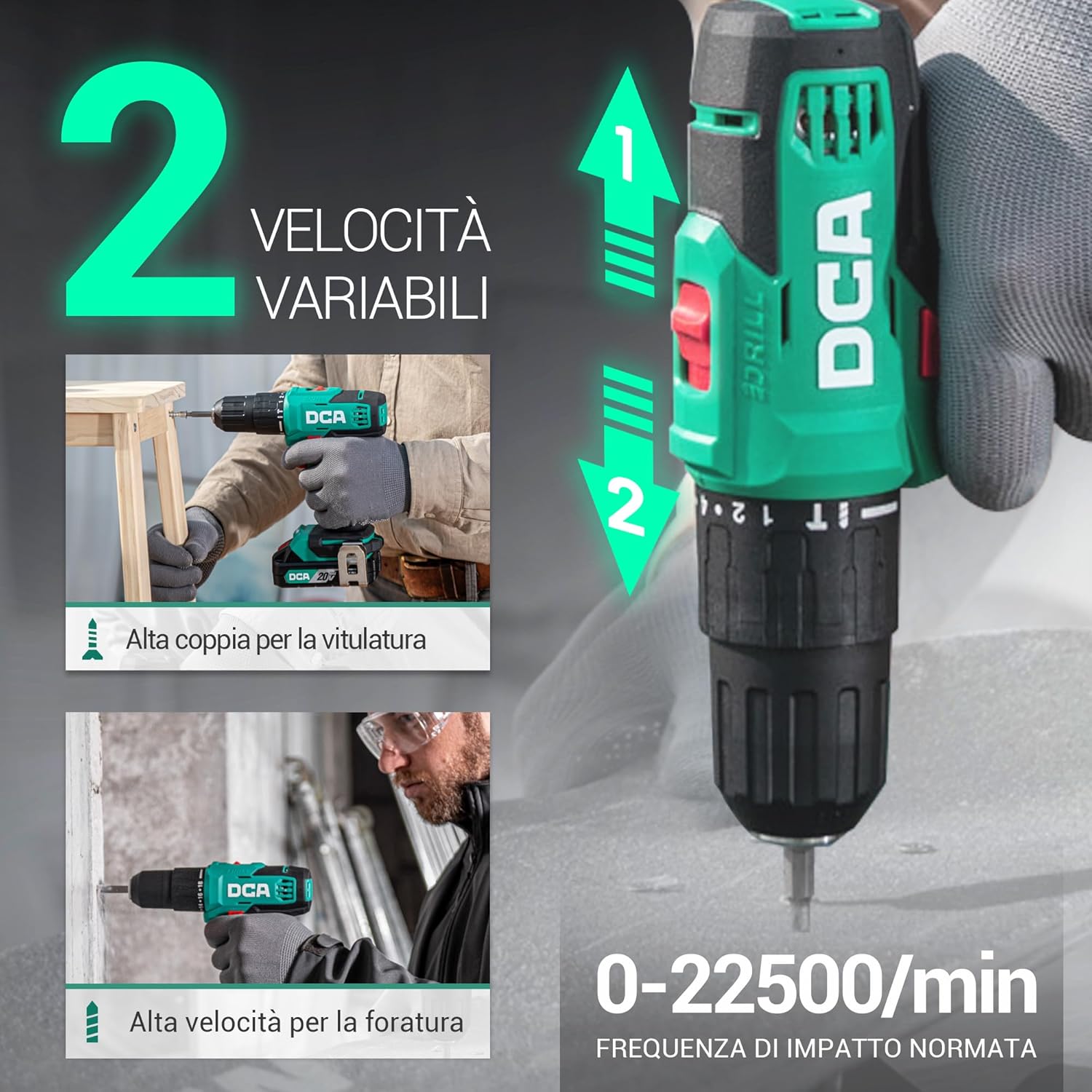
Image: Visual representation of the drill's two variable speed settings and its 22,500 IPM impact frequency for versatile use.

Image: An internal view of the drill's motor, illustrating its 100% pure copper winding for enhanced performance and durability.
5. Setup
5.1. Charging the Battery
- Connect the charger to a standard power outlet.
- Insert the charging cable into the battery pack's charging port.
- The indicator light on the charger will show the charging status (e.g., red for charging, green for fully charged).
- Once fully charged, disconnect the charger from the battery and the power outlet.

Image: The battery charger indicating charging status with green and red lights.
5.2. Attaching/Detaching the Battery Pack
- To attach: Align the battery pack with the base of the drill handle and slide it in until it clicks securely into place.
- To detach: Press the battery release button (usually located on the front or sides of the battery pack) and slide the battery pack out.
5.3. Inserting/Removing Drill Bits
- To insert: Rotate the chuck counter-clockwise until the jaws are wide enough to accept the bit. Insert the bit fully into the chuck. Rotate the chuck clockwise to tighten it securely around the bit.
- To remove: Rotate the chuck counter-clockwise until the jaws open, then pull the bit out.

Image: A detailed view of the 13mm keyless chuck, designed for secure and easy bit changes.
6. Operating Instructions
6.1. Selecting Speed
Use the speed selector switch located on top of the drill to choose between two speed ranges:
- Speed 1 (Low, 0-400 RPM): Ideal for screwdriving and applications requiring high torque.
- Speed 2 (High, 0-1500 RPM): Suitable for drilling and applications requiring higher speed.
6.2. Adjusting Torque and Mode
Rotate the torque adjustment collar behind the chuck to select the desired setting:
- 1-18: Torque settings for screwdriving. Start with a lower setting and increase as needed to prevent overtightening.
- Drill Symbol: For general drilling applications without impact.
- Hammer Symbol: For impact drilling into masonry.

Image: The drill's collar displaying the 18+1+1 clutch settings for precise control in various tasks.
6.3. Drilling and Driving
- Select the appropriate bit for the material and task.
- Choose the correct speed and torque/mode setting.
- Hold the drill firmly with both hands if necessary.
- Position the bit on the workpiece and press the variable speed trigger. Apply steady, even pressure.
- The integrated LED light will illuminate the work area when the trigger is pressed.

Image: The drill in action, demonstrating its versatility across different materials and applications.

Image: The flexible shaft accessory attached to the drill, enabling access to confined work areas.
6.4. Forward/Reverse Rotation
The forward/reverse switch, located above the trigger, controls the direction of rotation. Push it left for forward rotation (drilling/driving) and right for reverse rotation (removing screws/bits).

Image: Illustration of the forward and reverse rotation function for efficient screwdriving and removal.
6.5. Official Product Video
Video: An official product demonstration showcasing the DCA 20V Cordless Impact Drill's features and capabilities, including drilling and screwdriving tasks.
7. Maintenance
Regular maintenance ensures optimal performance and extends the lifespan of your tool.
- Cleaning: Keep the tool's ventilation slots clean to prevent overheating. Use a soft, damp cloth to clean the housing. Do not use harsh chemicals or abrasive cleaners.
- Battery Care: Store batteries in a cool, dry place away from direct sunlight. Do not store fully discharged batteries for extended periods. Charge them periodically if not in use.
- Chuck Maintenance: Periodically clean the chuck jaws to ensure proper gripping of bits.
- Storage: Store the drill and accessories in the provided carrying bag in a dry, secure location out of reach of children.
8. Troubleshooting
If you encounter issues with your DCA 20V Cordless Impact Drill, refer to the following common problems and solutions:
| Problem | Possible Cause | Solution |
|---|---|---|
| Drill does not start | Battery is not charged or not properly inserted. | Charge the battery fully and ensure it is securely clicked into place. |
| Loss of power during operation | Battery charge is low. | Recharge the battery. |
| Bit slips in chuck | Chuck not tightened sufficiently or bit shank is dirty/damaged. | Tighten chuck firmly. Clean or replace the bit if necessary. |
| Overheating | Blocked ventilation slots or prolonged heavy use. | Clean ventilation slots. Allow the tool to cool down. Reduce load. |
9. Specifications
| Feature | Specification |
|---|---|
| Brand | DCA |
| Model Number | ADJZ2035i13(ADW-DE01) |
| Power Source | Battery Powered |
| Voltage | 20 Volts |
| Battery Capacity | 2 Ampere/hours |
| Max Torque | 40 Newton Meters |
| Max Rotational Speed | 1500 Revolutions per minute |
| Impact Frequency | 22500 impacts/min |
| Chuck Size | 13 Millimeters |
| Number of Speeds | 2 |
| Clutch Settings | 18+1+1 |
| Drilling Capacity (Wood) | 22 Millimeters |
| Drilling Capacity (Metal) | 13 Millimeters |
| Drilling Capacity (Brick) | 8 Millimeters |
| Special Features | Compact, Cordless, Speed Lock Button |
| Color | Green |
| Item Dimensions (LxWxH) | 33L x 27l x 10H cm |
10. Warranty and Support
Your DCA 20V Cordless Impact Drill ADJZ2035i13 comes with a 2-year warranty against manufacturing defects. Please retain your proof of purchase for warranty claims.
For technical support, spare parts, or warranty inquiries, please contact the seller or visit the official DCA website. Contact information can typically be found on the product packaging or the seller's Amazon store page.
You can visit the DCA Store for more products and support: DCA Store