
FLEXISPOT XCT3
FLEXISPOT XCT3 Futon Sofa Bed Instruction Manual
Model: XCT3
1. Introduction
Thank you for choosing the FLEXISPOT XCT3 Futon Sofa Bed. This versatile piece of furniture is designed to provide comfort and functionality for various living spaces, including apartments, studios, dorms, and guest rooms. It seamlessly transitions between a comfortable sofa, a recliner, and a flat sleeper, offering convenience with its built-in USB and Type-C charging ports and a foldable console with cup holders. Please read this manual thoroughly before assembly and use to ensure proper setup and safe operation.

Figure 1: FLEXISPOT XCT3 Futon Sofa Bed in sofa configuration, showcasing charging ports and cup holders.
2. Safety Information
To ensure safe use and prolong the life of your futon sofa bed, please adhere to the following safety guidelines:
- Weight Limit: Do not exceed the maximum weight capacity of 500 pounds. Overloading can cause damage and potential injury.
- Assembly: Assemble the unit strictly according to the instructions provided. Ensure all parts are securely fastened before use.
- Placement: Place the futon on a flat, stable surface. Avoid uneven floors that could cause instability.
- Electrical Safety: When using the USB and Type-C charging ports, ensure the power cord is properly connected to a suitable power outlet. Do not expose electrical components to water or excessive moisture.
- Moving: When moving the futon, lift it rather than dragging it to prevent damage to the legs and floor.
- Children and Pets: Keep small children and pets away from moving parts during conversion to prevent pinching or injury.
- Cleaning: Follow the cleaning instructions carefully to avoid damaging the velvet upholstery.
3. Package Contents
Please verify that all components are present before beginning assembly. If any parts are missing or damaged, contact customer support immediately.
- Futon Sofa Bed Sections (Main body)
- Metal Legs (4)
- Removable Armrests (2)
- Power Adapter for Charging Ports
- Assembly Hardware (Screws, Washers, Allen Wrench)
- Instruction Manual (This document)
4. Setup and Assembly
Assembly is required for this product. It is recommended that at least one person is available for assembly. Please follow these steps carefully:
- Unpack Components: Carefully remove all parts from the packaging and lay them out on a clean, soft surface to prevent scratches.
- Attach Legs: Locate the attachment points on the underside of the futon sections. Securely attach the metal legs using the provided hardware and Allen wrench. Ensure all legs are tightened firmly.
- Connect Sections: If the futon comes in multiple sections, align and connect them using the designated component connectors. Ensure a secure fit.
- Install Armrests: The armrests are removable and attach via Velcro. Position them on the sides of the futon as desired.
- Connect Power: Locate the power input for the USB and Type-C charging ports. Connect the provided power adapter to this input and then plug the adapter into a standard wall outlet.
- Final Check: Before first use, gently shake the futon to ensure all connections are stable and secure.
5. Operating Instructions
5.1. Adjustable Backrest
The FLEXISPOT XCT3 features a 3-level adjustable backrest, allowing you to easily switch between different positions for sitting, lounging, or sleeping.
- Sitting Position (90°): For upright seating, ensure the backrest is fully upright.
- Lounging Position (120°): To recline, gently push the backrest forward until you hear a click, then slowly release it to the desired reclining angle.
- Sleeping Position (180°): To lay the futon completely flat, push the backrest forward until it clicks past the reclining positions, then gently lower it all the way down.
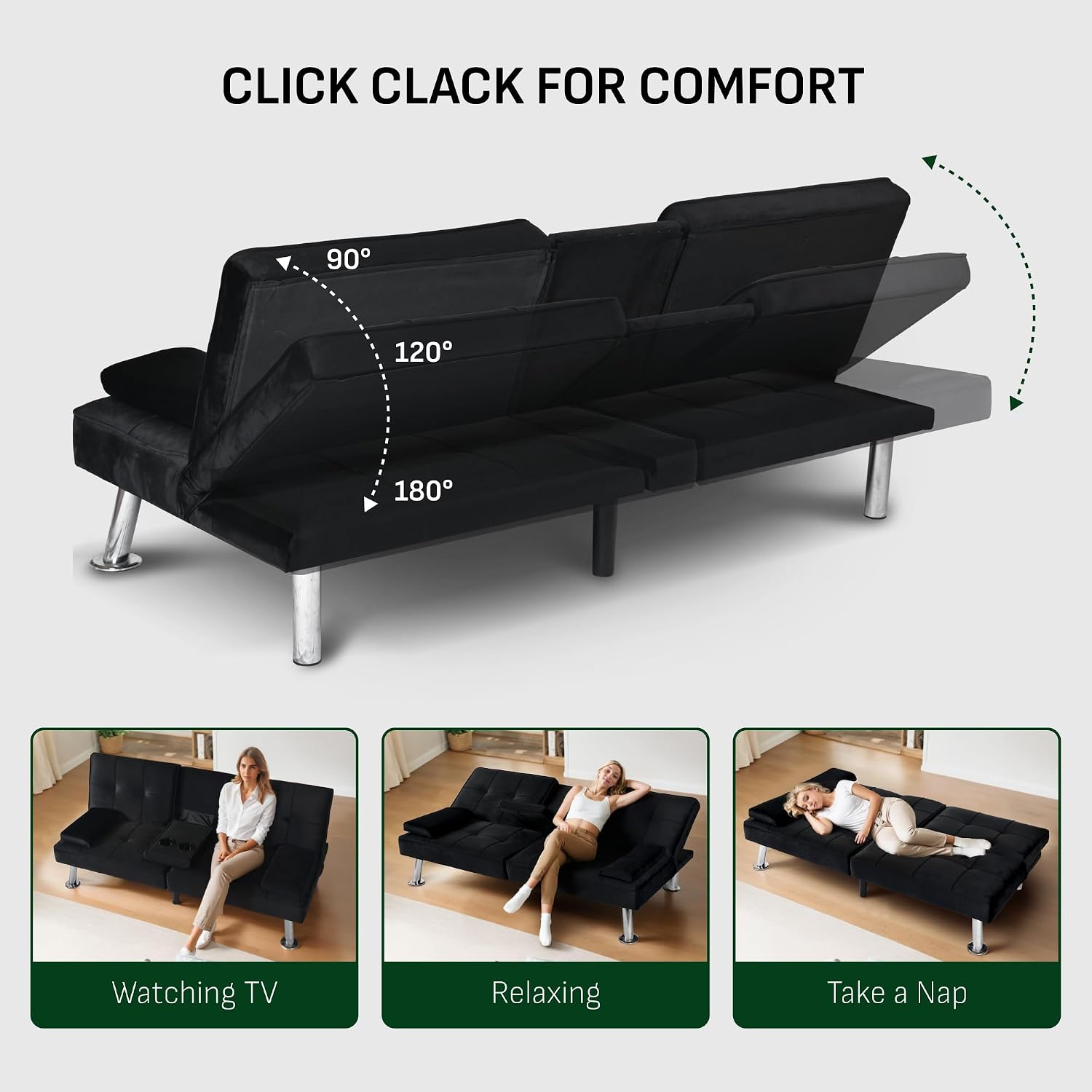
Figure 2: Illustration of the adjustable backrest positions (90°, 120°, 180°).
5.2. USB & Type-C Charging Ports
The futon is equipped with built-in USB and Type-C charging ports for convenient device charging.
- Usage: Once the futon is connected to power, simply plug your compatible USB or Type-C charging cable into the respective port located on the side of the futon.
- Compatibility: These ports are designed for charging small electronic devices such as smartphones, tablets, and e-readers.
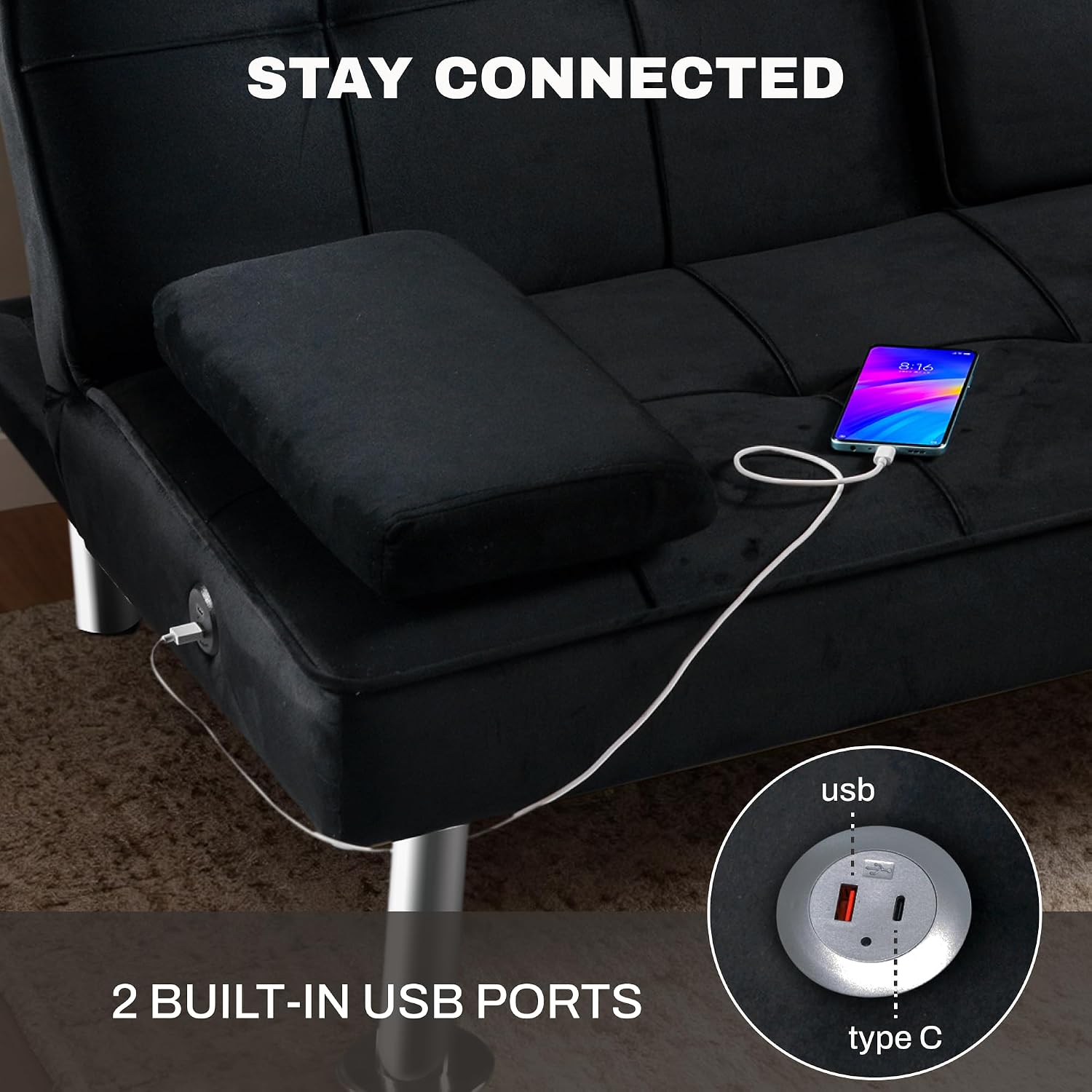
Figure 3: Detail of the integrated USB and Type-C charging ports.
5.3. Foldable Console with Cup Holders
The central backrest section can be folded down to reveal a convenient console with two cup holders.
- Activation: To access the console, gently push the central backrest cushion forward and then fold it down.
- Storage: When not in use, simply fold the console back up into the upright backrest position.

Figure 4: The foldable console with integrated cup holders.
6. Maintenance and Care
Proper care will help maintain the appearance and longevity of your FLEXISPOT XCT3 Futon Sofa Bed.
- Cleaning Upholstery: For general cleaning, spot clean the velvet upholstery with a damp cloth. For tougher stains, use a mild fabric cleaner and test on an inconspicuous area first.
- Dusting: Regularly wipe clean with a dry cloth to remove dust and debris.
- Spills: Blot spills immediately with a clean, dry cloth. Do not rub, as this can spread the stain.
- Avoid Direct Sunlight: Prolonged exposure to direct sunlight can cause the fabric to fade.
- Inspect Connections: Periodically check all screws and connections to ensure they remain tight. Retighten as necessary.

Figure 5: The upgraded soft velvet fabric, easy to maintain.
7. Troubleshooting
If you encounter any issues with your futon sofa bed, please refer to the following common problems and solutions:
| Problem | Possible Cause | Solution |
|---|---|---|
| Charging ports not working. | Power adapter not plugged in or loose connection. | Ensure the power adapter is securely plugged into the futon and a working wall outlet. Check for any kinks in the power cord. |
| Backrest difficult to adjust. | Mechanism obstructed or not fully engaged. | Ensure there are no objects obstructing the backrest mechanism. Push the backrest fully forward until it clicks, then release to the desired position. |
| Futon feels unstable or wobbly. | Legs not securely tightened or uneven floor. | Check and tighten all leg screws. Move the futon to a flat, even surface. |
| Fabric appears discolored or stained. | Improper cleaning or prolonged exposure to sunlight. | Refer to the Maintenance section for proper cleaning instructions. Avoid direct sunlight. |
8. Product Specifications
| Feature | Detail |
|---|---|
| Brand | FLEXISPOT |
| Model | XCT3 |
| Product Dimensions (D x W x H) | 37"D x 65"W x 28"H |
| Item Weight | 75 Pounds |
| Weight Limit | 500 Pounds |
| Seating Capacity | 2 |
| Material Type | Velvet |
| Frame Material Type | Metal |
| Furniture Leg Material | Metal |
| Seat Height | 9.5 Inches |
| Seat Depth | 18 inches |
| Item Firmness Description | Medium |
| Assembly Required | Yes |
| Recommended Number of People for Assembly | 1 |
| Special Feature | Folding, USB & Type-C Charging Ports, Cup Holders |

Figure 6: Product dimensions and weight limit.
9. Warranty and Support
The FLEXISPOT XCT3 Futon Sofa Bed comes with a Limited Warranty. For specific details regarding warranty coverage, please refer to the warranty card included with your purchase or contact FLEXISPOT customer service.
Customer Support:
- Email: contact@flexispot.com
- Phone: +1 (855) 585-5618
- Returns: You are allowed to return/exchange the furniture within 30 days of when you receive it. Please refer to your purchase platform's return policy for detailed instructions.
10. Product Videos
Currently, there are no official seller-provided product videos available for direct embedding in this manual. Please refer to the product page on the retailer's website for any available video content.
Ask a question about this manual
Ask about setup, troubleshooting, compatibility, parts, safety, or missing instructions. Manuals+ will review the question and use this page’s manual context to help answer it.