
1. Introduction
Thank you for choosing the Surtime 42-inch Palm Leaf Ceiling Fan. This tropical-style ceiling fan combines aesthetic appeal with powerful airflow, featuring a unique palm leaf design and advanced control options. It is suitable for both indoor and covered outdoor spaces, such as living rooms, bedrooms, kitchens, balconies, and corridors. This manual provides essential information for safe installation, operation, and maintenance of your new ceiling fan.

Figure 1: Surtime 42-inch Palm Leaf Ceiling Fan (Brown)
2. Safety Information
Please read all safety instructions carefully before installation and use to prevent personal injury and product damage. Keep this manual for future reference.
- Ensure the main power supply is turned off before installation, maintenance, or cleaning.
- All wiring must be in accordance with national and local electrical codes.
- The ceiling fan must be securely mounted to a structural support capable of holding the fan's weight.
- To avoid personal injury and damage, the fan blades should be installed with a minimum clearance of 7 feet (2.13 meters) from the floor and 18 inches (45.72 centimeters) from walls or other obstacles.
- Do not insert objects into the path of the rotating blades.
- This fan is suitable for indoor use and covered outdoor areas not affected by direct wind and rain. It is not waterproof.
3. Package Contents
Verify that all components are present and undamaged before beginning installation:
- Ceiling Fan Kit (includes motor, blades, light kit, mounting hardware)
- Instruction Manual
- Remote Control (batteries included)
4. Specifications
| Feature | Detail |
|---|---|
| Brand | Surtime |
| Model Name | 6669-Brown |
| Size | 42 inches |
| Color | Brown-Palm Leaf |
| Material | Acrylic |
| Style | Modern |
| Power Source | DC |
| Voltage | 110 Volts |
| Wattage (Light) | 21 watts |
| Control Method | App, Remote |
| Special Features | App Operable, Dimmable Light, Light Memory Function, Palm Leaf Design, Snap-in Fan Blades, Reversible DC Motor |
| Product Dimensions | 41.73 x 41.73 x 11.81 inches |
| Item Weight | 8.82 pounds |
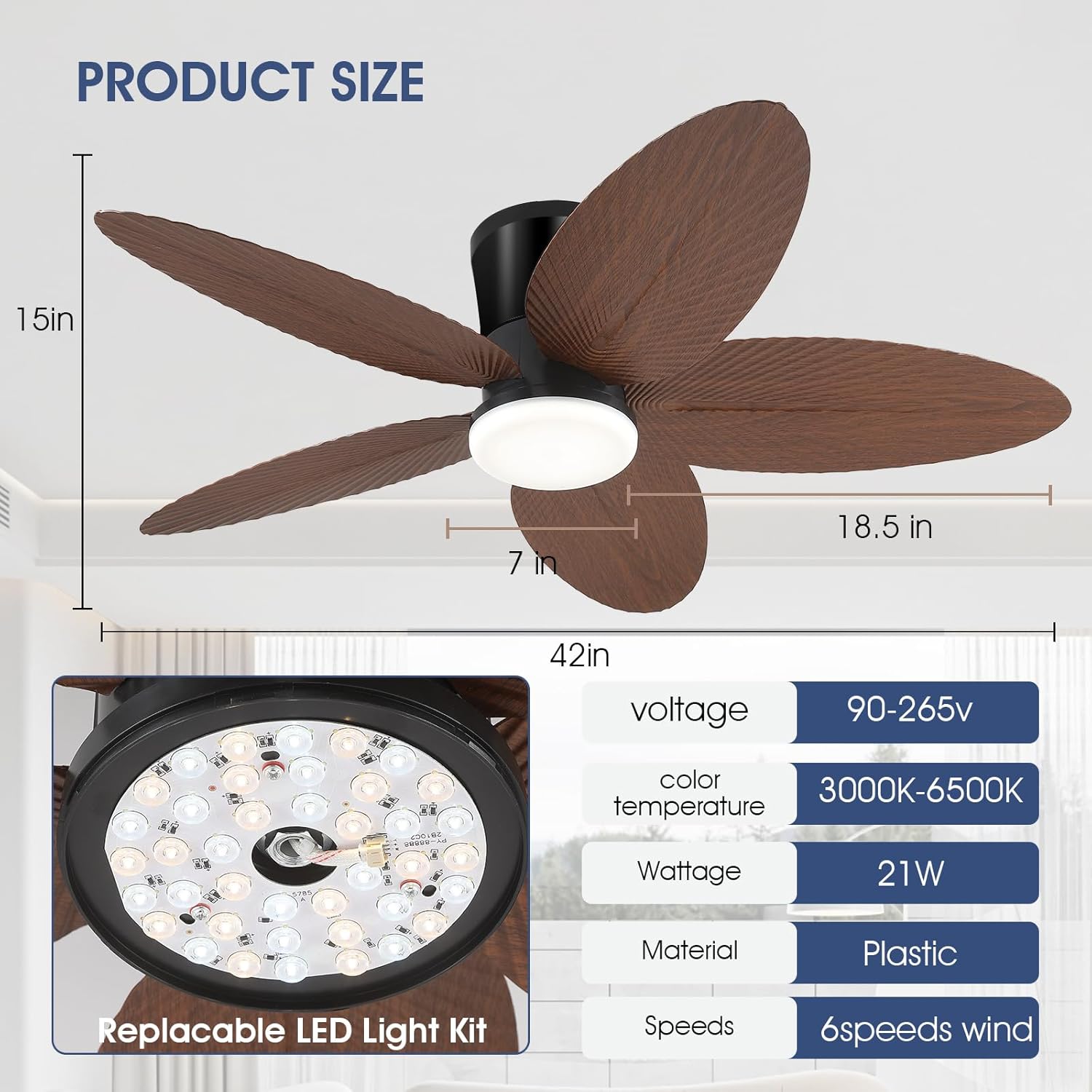
Figure 2: Product Dimensions and Key Specifications
5. Setup and Installation
Installation of the Surtime ceiling fan is designed to be straightforward. Please follow these general steps. For detailed visual guidance, refer to the official installation video provided.
5.1 Pre-Installation Checklist
- Ensure power is OFF at the circuit breaker.
- Verify all package contents are present and undamaged.
- Gather necessary tools (e.g., screwdriver, wire strippers, ladder).
5.2 Mounting the Fan
Attach the mounting bracket to the ceiling junction box. Ensure the junction box is securely fastened to the building structure and can support the fan's weight.
5.3 Wiring Connections
Connect the fan's electrical wires to your household wiring according to the provided wiring diagram in the separate installation guide. Always match wire colors (e.g., black to black, white to white, ground to ground).
5.4 Attaching Fan Blades
The fan features innovative snap-in blades, allowing for tool-free installation. Simply align the blade with its slot on the motor housing and push until it clicks securely into place.

Figure 3: Snap-in Fan Blade Installation
5.5 Light Kit Installation
Attach the LED light kit to the bottom of the fan motor assembly. Ensure all electrical connections are firm before securing the light cover.
6. Operating Instructions
Your Surtime ceiling fan can be controlled via the included remote control or a dedicated mobile application.
6.1 Remote Control Operation
The remote control provides full functionality for your fan and light. Ensure the remote has working batteries (2 x 12V batteries, included).
- Fan Speed: Adjust between 6 wind speeds.
- Light Control: Turn the light ON/OFF.
- Color Temperature: Cycle through three color temperatures: 3000K (Warm Light), 4500K (Natural Light), and 6000K (White Light).
- Brightness Adjustment: Dim the light from 10% to 100%.
- Timer: Set a 2-hour or 4-hour timer for automatic shutdown.
- Forward/Reverse: Change the direction of blade rotation for summer (downward airflow) or winter (upward airflow for air circulation).
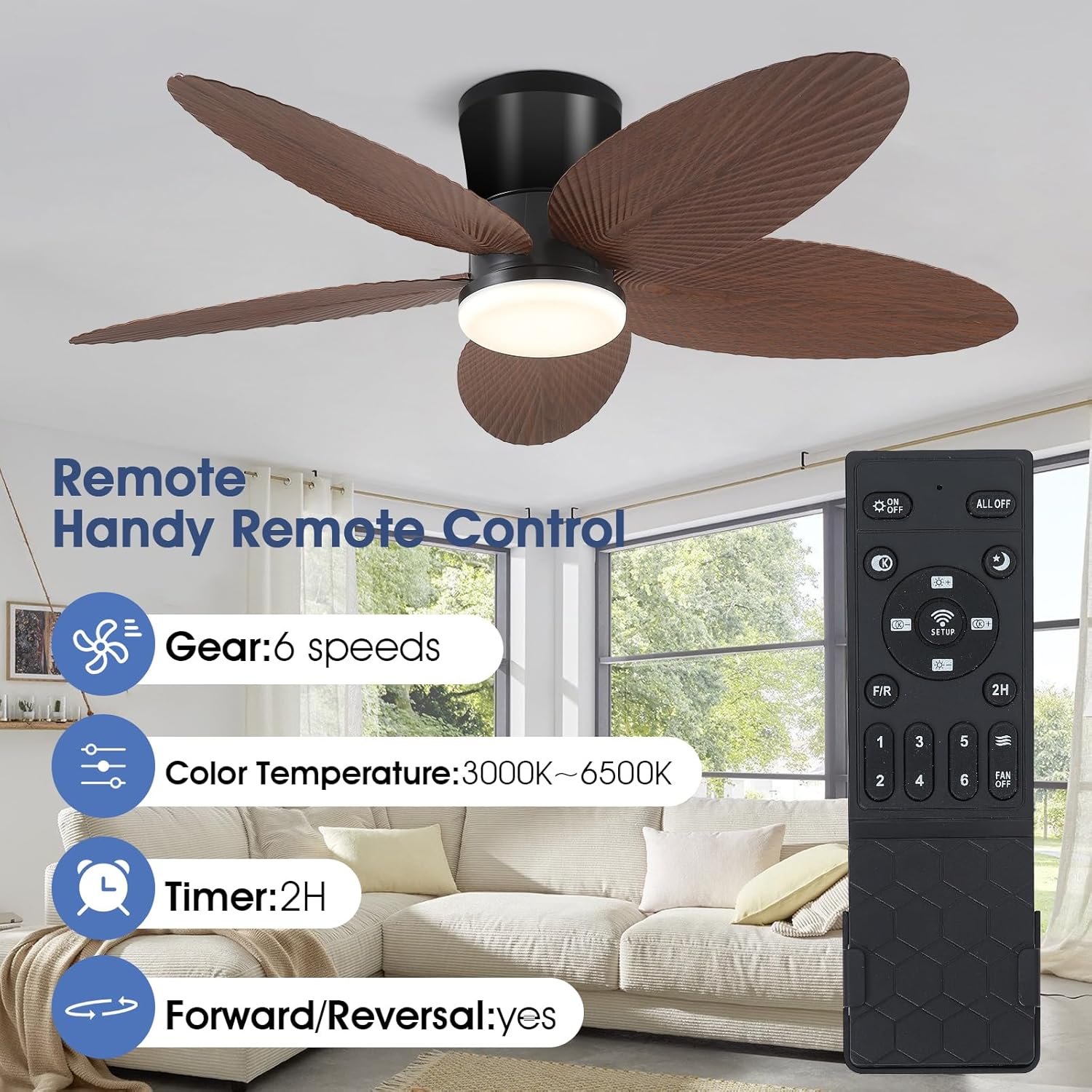
Figure 4: Remote Control and App Interface Overview

Figure 5: Six Adjustable Fan Speeds
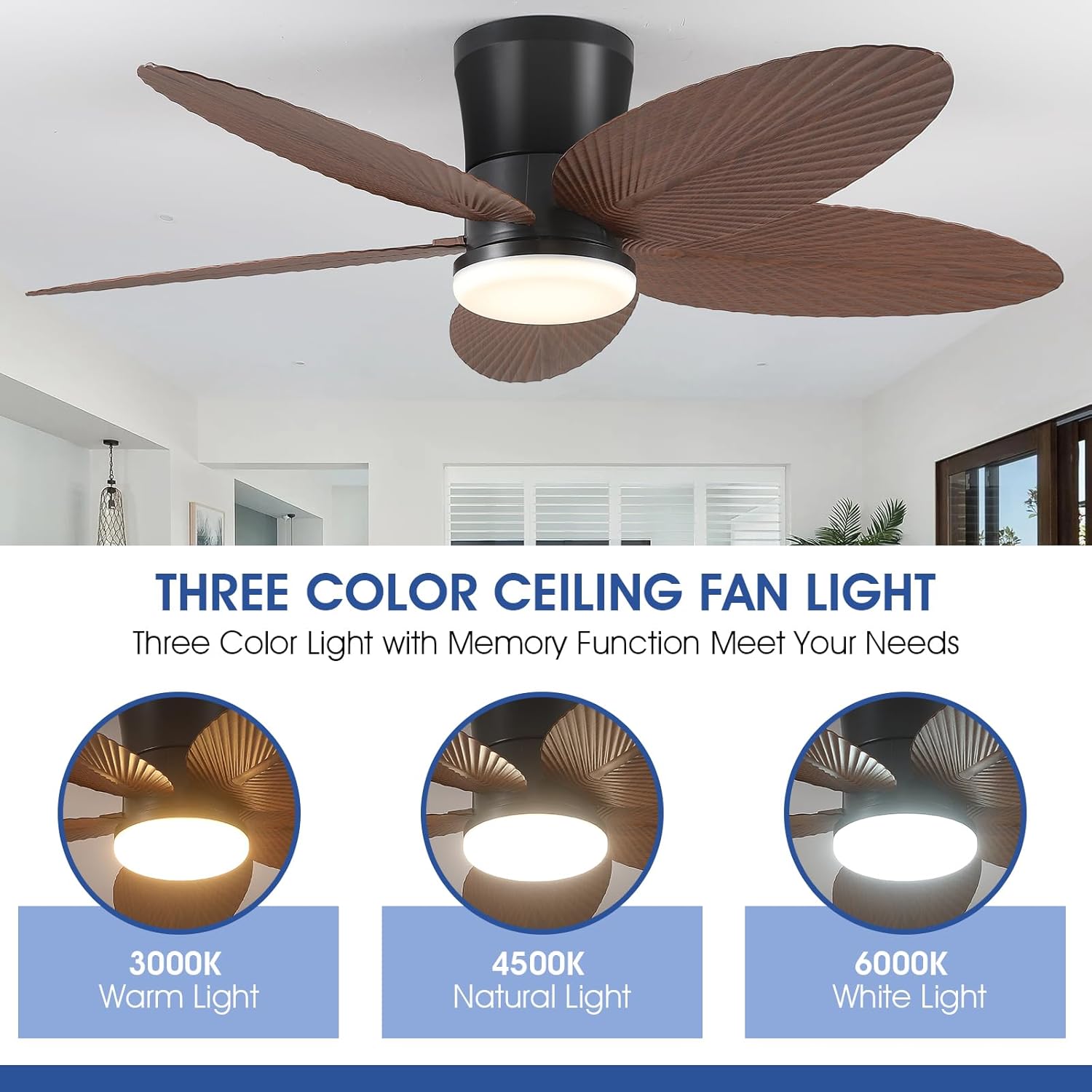
Figure 6: Three Color Temperature Options (3000K, 4500K, 6000K)

Figure 7: Reversible Motor for Summer and Winter Modes
6.2 Mobile App Control
The fan can also be controlled via a mobile application. Scan the QR code in the video or refer to the separate app instructions for download and pairing.
Video 1: APP Controls Connection Display (Model 6669)
This video demonstrates how to connect and control your Surtime ceiling fan using the mobile application, including language settings, device pairing, and basic fan/light operations.
- Smart Memory Function: The fan remembers your preferred brightness and color settings. Turn off the light for at least 10 seconds for settings to be saved. Turning on the light within 10 seconds will change the color temperature.
- Wall Switch Limitation: When using a wall switch, only light control can be performed. Full fan and light features require the remote or app.
7. Maintenance
Regular maintenance ensures optimal performance and longevity of your ceiling fan.
- Cleaning: To clean the fan, wipe with a soft, damp cloth. Do not use abrasive cleaners or solvents, as they may damage the finish or electrical components.
- Blade Care: Periodically check the fan blades for dust accumulation. Clean gently to maintain balance and airflow.
- Motor: The fan features a copper motor designed for stable power and low noise, requiring minimal maintenance.
8. Troubleshooting
If you experience issues with your Surtime ceiling fan, refer to the following common problems and solutions:
| Problem | Possible Cause | Solution |
|---|---|---|
| Fan does not operate | No power supply; Loose wiring; Remote control battery low/dead. | Check circuit breaker; Ensure all connections are secure; Replace remote control batteries. |
| Light does not turn on | Loose wiring; Light kit issue; Wall switch limitation. | Check wiring connections; Ensure light kit is properly installed; Remember wall switch only controls light, not fan. |
| Fan wobbles | Loose blades; Improper mounting; Unbalanced blades. | Ensure all blade screws are tight; Verify mounting bracket is secure; Use a balancing kit if necessary. |
| Remote/App not responding | Pairing issue; Obstruction; Battery issue. | Re-pair the remote/app (refer to section 6.2 and Video 1); Ensure no obstructions between remote/phone and fan; Check/replace batteries. |
If the problem persists after attempting these solutions, please contact Surtime customer support for assistance.
9. Warranty and Support
Surtime stands by the durability and performance of its products. Your ceiling fan comes with a worry-free 1-year warranty on quality-related issues.
For any questions, concerns, or technical support, please do not hesitate to contact Surtime customer service. You can often find contact information on the product packaging or by visiting the official Surtime store on Amazon.
For additional support and FAQs, you may also visit the Surtime Store on Amazon.
