
DaranEner
DaranEner NEO600 Portable Power Station User Manual
Model: NEO600
1. Product Overview
The DaranEner NEO600 Portable Power Station is a versatile and robust power solution designed for various applications, including outdoor adventures, emergency backup, and home use. It features a high-capacity LiFePO4 battery, multiple output ports, and fast charging capabilities to keep your devices powered wherever you are.

Figure 1.1: Front view of the DaranEner NEO600 Portable Power Station.
2. Key Features
- High Capacity & Output: 576Wh (180,000mAh) capacity with 600W AC output (1200W surge), capable of powering various appliances from laptops to small household devices.
- Uninterruptible Power Supply (UPS): Features a UPS function with a switching time of less than 10ms, protecting sensitive devices from data loss during power outages.
- Rapid AC Recharging: Recharges to full capacity in approximately 1 hour using a standard AC outlet, utilizing DaranEner's fast charging technology.
- Durable LiFePO4 Battery: Equipped with LiFePO4 battery cells, offering over 3,500 charge cycles while maintaining over 70% of original capacity, ensuring a lifespan exceeding 10 years. Advanced BMS protection monitors voltage, current, and temperature.
- Multiple Output Options: Includes 1 AC outlet (600W), 1 cigarette lighter port (120W max), 2 USB-C ports (100W max), 1 USB-A port (18W max), 2 DC5521 outputs, and LED lights for versatile power needs.

Figure 2.1: The NEO600 can power a variety of devices, including mini-fridges, fans, and drones.

Figure 2.2: LiFePO4 battery technology ensures long-term durability and safety.
3. Product Components and Ports
The DaranEner NEO600 is equipped with a comprehensive set of input and output ports to meet diverse power requirements. Familiarize yourself with the layout and function of each component.

Figure 3.1: Overview of the 7-in-1 power station ports.

Figure 3.2: Detailed view of ports and dimensions (12.13"L x 7.72"W x 9.72"H).
Port Descriptions:
- AC Outlet: 1 x 600W (1200W surge) for standard household appliances.
- Car Socket: 1 x 120W max for automotive devices.
- USB-C Ports: 2 x 100W max for fast charging compatible devices.
- USB-A Port: 1 x 18W max for standard USB charging.
- DC5521 Outputs: 2 ports for various DC-powered devices.
- LED Lights: Integrated lighting for convenience.
4. Setup and Charging
Before first use, it is recommended to fully charge the DaranEner NEO600. The power station offers multiple charging methods.
4.1 AC Wall Charging
Connect the power station to a standard AC wall outlet using the provided AC charging cable. The unit supports fast charging, reaching 80% capacity in approximately 1 hour and full charge in about 1.3 hours.
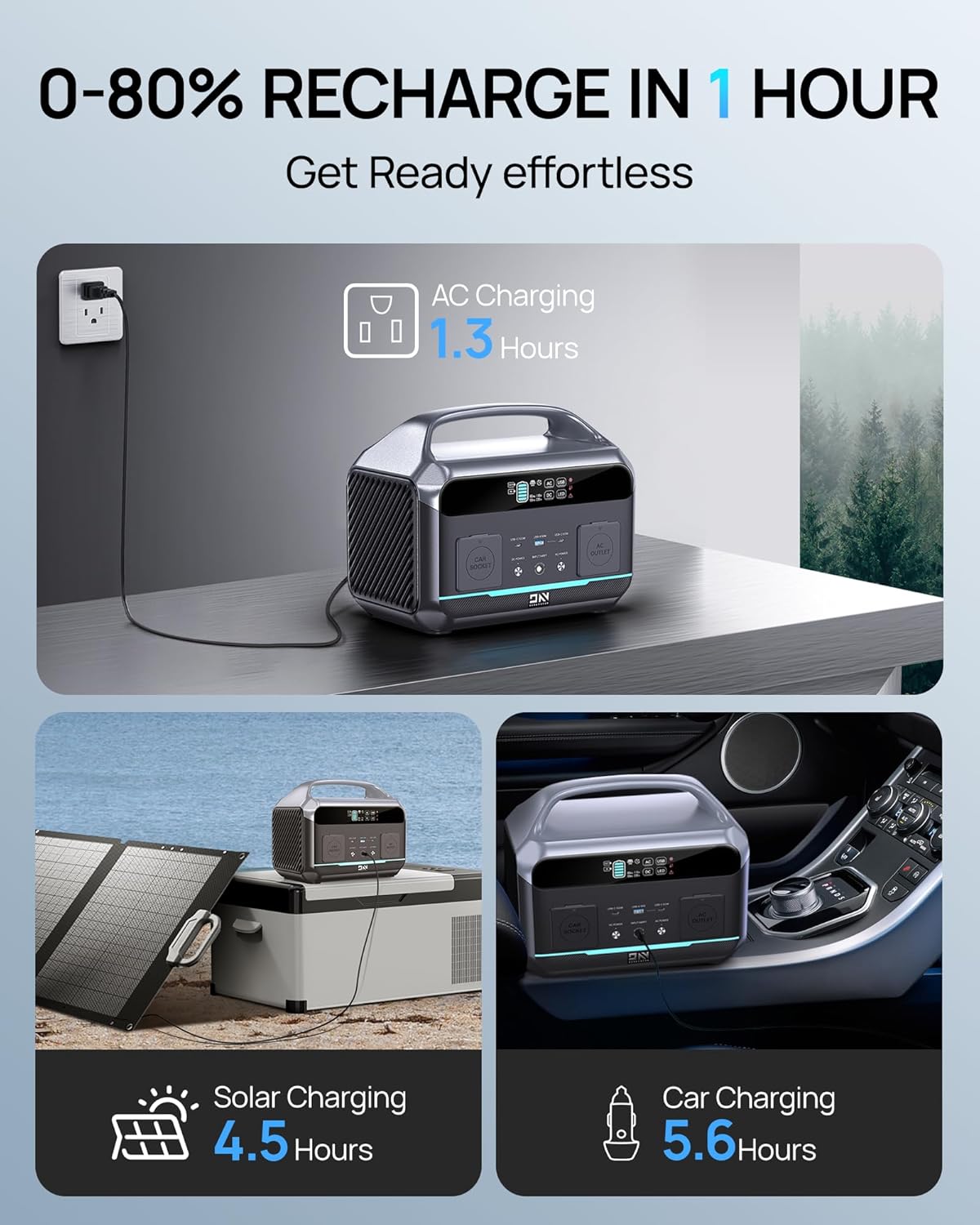
Figure 4.1: The NEO600 supports AC, Solar, and Car charging.
Video 4.1: Demonstrates the fast AC charging capability of the Portable Power Station 600W.
4.2 Solar Charging (Optional)
For off-grid charging, connect a compatible solar panel (not included) to the power station's solar input port. Solar charging time is approximately 4.5 hours (depending on solar intensity and panel wattage).
4.3 Car Charging
The power station can be charged via your vehicle's 12V cigarette lighter socket. This method is convenient for charging while on the go, taking approximately 5.6 hours for a full charge.
5. Operating Instructions
5.1 Powering On/Off
Press and hold the main power button to turn the unit on or off. The display screen will illuminate, showing battery status and output information.
5.2 Using AC/DC/USB Outputs
To activate specific output types (AC, DC, USB), press the corresponding button on the control panel. Ensure the indicator light for the desired output is on before connecting devices. Always check the power requirements of your devices to ensure they do not exceed the power station's output limits (600W AC, 120W car socket, 100W USB-C, 18W USB-A).
5.3 Uninterruptible Power Supply (UPS) Function
The NEO600 can function as an Uninterruptible Power Supply. When connected to an AC wall outlet and simultaneously powering devices, it will automatically switch to battery power within 10 milliseconds in the event of a power outage. This protects connected sensitive electronics like desktop PCs or CPAP machines from interruption.

Figure 5.1: The NEO600's UPS function provides reliable backup power.
5.4 LED Lighting
The integrated LED light can be activated by pressing the dedicated LED button. It typically offers multiple modes (e.g., low, high, SOS) for various situations.
Video 5.1: Demonstrates the Portable Power Station's use for camping, including powering devices and using the LED light.
Video 5.2: A short preview video showcasing the portability and charging capabilities of the power station.
6. Maintenance and Storage
Proper maintenance ensures the longevity and optimal performance of your DaranEner NEO600.
- Regular Recharging: To maintain battery health, use and recharge the power station at least once every three months.
- Storage Conditions: Store the unit in a cool, dry place away from direct sunlight and extreme temperatures.
- Cleaning: Use a dry, soft cloth to clean the exterior of the unit. Do not use abrasive cleaners or immerse the unit in water.
- Power Off AC Output: Always turn off the AC output when not in use, even without loads, to prevent battery drain.
7. Troubleshooting
If you encounter issues with your DaranEner NEO600, please refer to the following common solutions:
| Problem | Possible Cause | Solution |
|---|---|---|
| Unit does not power on. | Battery is completely drained; power button not pressed correctly. | Charge the unit using an AC adapter. Ensure the power button is pressed and held for a few seconds. |
| AC output not working. | AC output not activated; device exceeds 600W limit; unit is in protection mode. | Press the AC ON/OFF button. Verify device wattage. Restart the unit. |
| Slow charging. | Using a non-fast charging method (e.g., car charger vs. AC); environmental factors. | Use the AC wall charger for fastest charging. Ensure proper ventilation and avoid extreme temperatures. |
| Display not working. | Unit is off; display malfunction. | Ensure the unit is powered on. If the issue persists, contact customer support. |
For further assistance, please refer to the Warranty & Support section.
8. Technical Specifications
| Specification | Detail |
|---|---|
| Model Name | NEO600 |
| Battery Type | LiFePO4 (Lithium-Phosphate) |
| Capacity | 576Wh (180,000mAh) |
| AC Output | 600W (1200W Surge) |
| Voltage | 110 Volts |
| USB-C Output | 2 x 100W Max |
| USB-A Output | 1 x 18W Max |
| Car Socket Output | 1 x 120W Max |
| DC5521 Output | 2 ports |
| AC Recharge Time | Approx. 1 hour (to 80%) |
| Solar Input | Max 150W |
| Dimensions (L x W x H) | 12.13" x 7.72" x 9.72" |
| Item Weight | 6.6 Pounds |
9. Warranty and Support
DaranEner provides comprehensive support for its products.
9.1 Product Warranty
The DaranEner NEO600 Portable Power Station comes with a 2-year warranty from the date of purchase. This warranty covers manufacturing defects and ensures reliable operation under normal use conditions.
9.2 Customer Support
For any questions, technical assistance, or warranty claims, please contact DaranEner customer service. Our team is dedicated to providing premium service and will respond to inquiries within 24 hours to ensure a worry-free experience.
Please visit the official DaranEner website or refer to your purchase documentation for the most current contact information.
10. Important Safety Information
Please read and understand all safety warnings before operating the DaranEner NEO600.
- Do not use this power station to power devices with a rated power of more than 600 watts to avoid damage.
- Do not disassemble, repair, or modify the unit.
- Keep the unit away from water, fire, and extreme temperatures.
- Ensure proper ventilation during use to prevent overheating.
- Keep out of reach of children.
Related documents


Ask a question about this manual
Ask about setup, troubleshooting, compatibility, parts, safety, or missing instructions. Manuals+ will review the question and use this page’s manual context to help answer it.