1. Introduction
Thank you for choosing the SUNCROWN 2-Drawer Metal Vertical File Cabinet. This manual provides essential information for the safe assembly, operation, and maintenance of your new file cabinet. Please read these instructions carefully before use and retain them for future reference.
This file cabinet is designed for organizing and securing documents in home or office environments. It features two spacious drawers, a secure locking mechanism, and an anti-tilt design for enhanced safety.
2. Safety Information
- Always place the cabinet on a flat, stable surface to prevent tipping.
- Do not overload drawers. Distribute weight evenly.
- Anti-Tilt Design: This cabinet is equipped with an anti-tilt interlock system. Only one drawer can be opened at a time. This feature prevents the cabinet from tipping over when a drawer is fully extended, especially when loaded with heavy items. Do not attempt to force open both drawers simultaneously.
- Keep fingers clear of drawer slides when opening or closing drawers.
- Keep keys in a safe place, away from children.

Figure 1: Anti-Tilt Interlock System. Only one drawer can be extended at a time for safety.
3. Package Contents
Please check that all components are present before beginning assembly. If any parts are missing or damaged, contact SUNCROWN customer support.
- Cabinet Body (1)
- Drawers (2)
- Keys (2)
- Assembly Hardware (screws, drawer slides, hanging file bars)
4. Setup and Assembly
Assembly is required for this file cabinet. Follow these general steps:
- Unpack all components and verify against the package contents list.
- Attach the drawer slides to the cabinet body and drawers using the provided hardware. Ensure they are securely fastened and aligned for smooth operation.
- Carefully insert the assembled drawers into the cabinet body, aligning the drawer slides.
- Install the locking mechanism if it is not pre-installed. Ensure the lock functions correctly with the provided keys.
- Insert the adjustable hanging file bars into the drawers as needed for your file type.

Figure 2: Smooth Metal Glide System and Secure Lock for safe storage.

Figure 3: Adjustable Hanging Bar for efficient file management.
5. Operating Instructions
5.1 Opening and Closing Drawers
Gently pull the drawer handle to open. Push the drawer firmly until it clicks into place to close. The smooth metal tracks ensure effortless sliding. Remember the anti-tilt mechanism allows only one drawer to be open at a time.
5.2 Locking and Unlocking
To lock the cabinet, ensure both drawers are fully closed. Insert the key into the lock cylinder and turn it clockwise until the drawers are secured. To unlock, insert the key and turn counter-clockwise.
5.3 File Organization
Each drawer provides ample space for various file sizes. The adjustable hanging file bars accommodate Letter, Legal, A4, and F4 sized folders. Adjust the bars to fit your specific document requirements.

Figure 4: Drawer capacity for various file types including Letter/Legal, A4/B5/F4, and Box.
6. Maintenance
The SUNCROWN file cabinet is constructed from high-strength rolled solid all-steel material with a smooth coating, making it durable and easy to maintain.
- Cleaning: Wipe the exterior surfaces with a soft, damp cloth. Avoid abrasive cleaners or solvents that could damage the finish.
- Drawer Slides: Periodically check drawer slides for smooth operation. If they become stiff, a small amount of silicone lubricant can be applied.
- Lock Mechanism: Ensure the lock mechanism is free of debris. Do not force the key if it feels stuck.
7. Troubleshooting
- Drawer is stuck or difficult to open/close:
- Check if the anti-tilt mechanism is engaged (i.e., another drawer is open). Close any open drawers.
- Ensure the drawer is not overloaded or unevenly weighted.
- Inspect the drawer slides for any obstructions or damage.
- Cabinet will not lock:
- Ensure both drawers are fully closed and pushed in completely.
- Check if the key is fully inserted and turning freely.
- Cabinet feels unstable:
- Verify that the cabinet is placed on a level surface.
- Ensure all assembly hardware is tightened securely.
8. Specifications
| Brand | SUNCROWN |
| Model | 15"W-2Drawer |
| Color | Black |
| Material | Metal |
| Product Dimensions (D x W x H) | 17.7" x 15" x 28.7" |
| Item Weight | 33.1 pounds |
| Assembly Required | Yes |
| Special Feature | Lockable, Anti-tilt design |
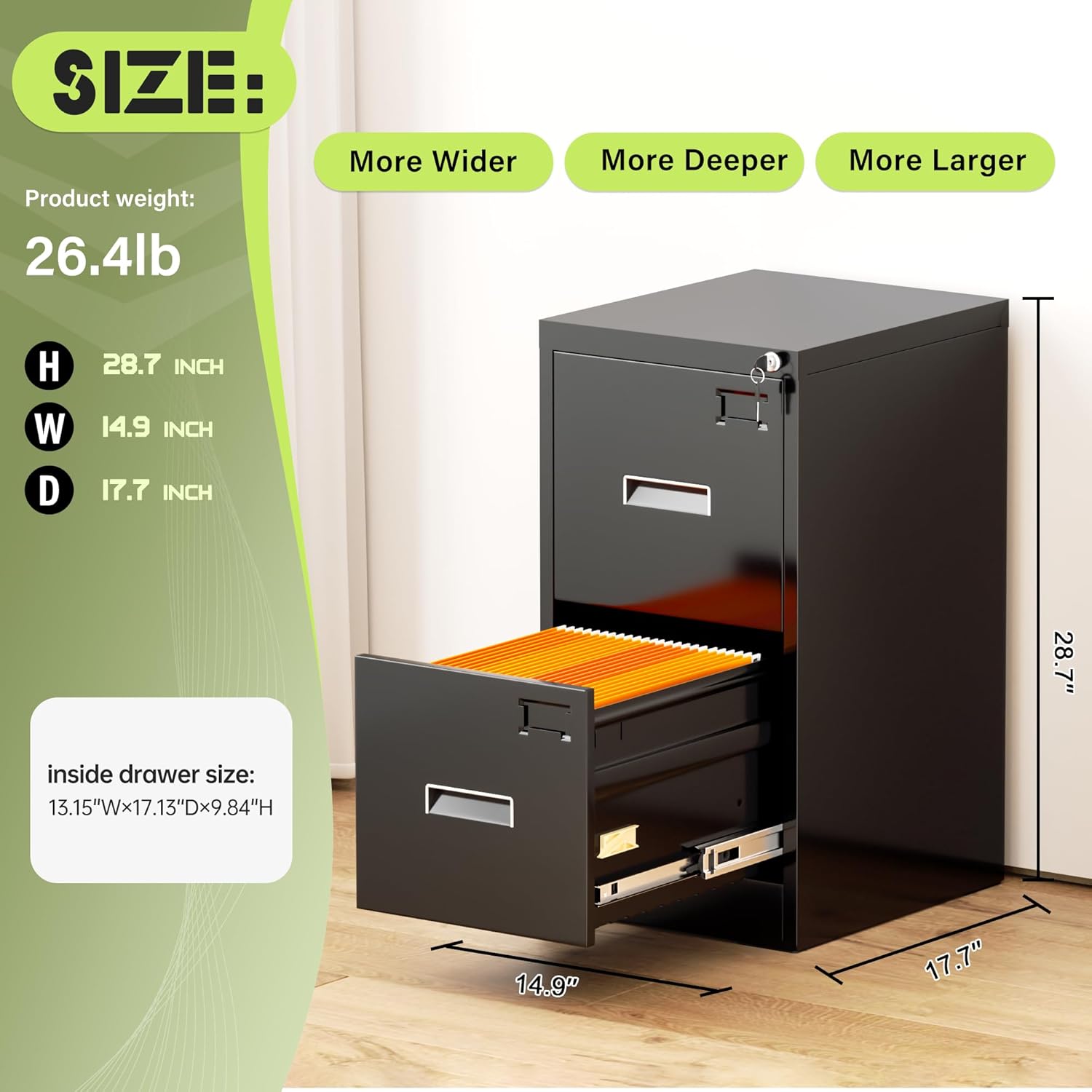
Figure 5: Product Dimensions.
9. Warranty and Support
SUNCROWN is committed to providing quality products. For any questions, concerns, or assistance with your file cabinet, please contact SUNCROWN customer support. Please have your model number and purchase information ready when contacting support.
For the most up-to-date warranty information, please refer to the documentation included with your purchase or visit the official SUNCROWN website.