
SEUNKWANG x99
EWEADN X99 Wireless Mechanical Keyboard User Manual
Model: X99
1. Product Overview
The EWEADN X99 is a versatile 99-key wireless mechanical keyboard designed for seamless connectivity and enhanced typing experience. It features three-mode connectivity (Bluetooth 5.0, 2.4GHz wireless, and USB Type-C wired), an 8000mAh long-lasting battery, hot-swappable PCB, gasket mount design, and PBT double-shot keycaps. The integrated control knob provides convenient access to system and volume adjustments.

Image 1.1: EWEADN X99 Wireless Mechanical Keyboard with included accessories.
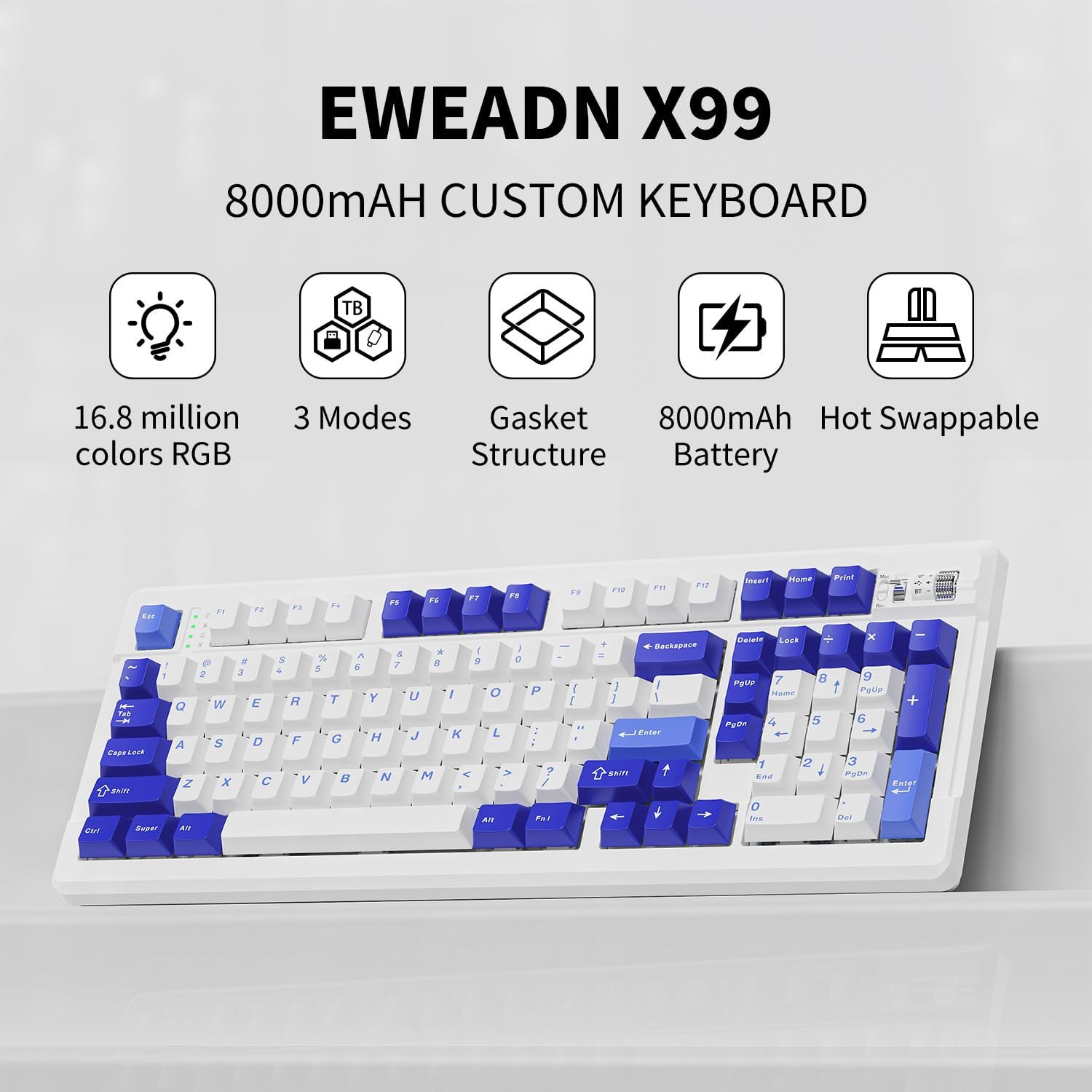
Image 1.2: Key features of the EWEADN X99 keyboard.
2. What's in the Box
- EWEADN X99 Wireless Mechanical Keyboard
- USB Type-C Cable
- 2.4GHz Wireless Receiver (USB Dongle)
- Keycap and Switch Puller
- Spare Switches
3. Setup
3.1 Connectivity Modes
The EWEADN X99 supports three connection methods: Bluetooth 5.0, 2.4GHz wireless, and USB Type-C wired. You can switch between these modes using the integrated control knob or dedicated switches on the keyboard.

Image 3.1: Three-mode connection options for the EWEADN X99.
3.2 Wired Connection (USB Type-C)
- Connect the provided USB Type-C cable to the keyboard's port.
- Connect the other end of the cable to an available USB port on your computer.
- The keyboard will automatically be recognized and ready for use.
3.3 2.4GHz Wireless Connection
- Locate the 2.4GHz wireless receiver (USB dongle), typically stored under the left foot of the keyboard.
- Plug the USB dongle into an available USB port on your computer.
- Switch the keyboard's mode to 2.4GHz using the control knob or switch. The keyboard should connect automatically.
3.4 Bluetooth Connection
- Switch the keyboard's mode to Bluetooth using the control knob or switch.
- On your device (computer, tablet, etc.), enable Bluetooth and search for new devices.
- Select "EWEADN X99" from the list of available devices to pair.
- The keyboard supports connecting to up to three Bluetooth devices simultaneously. Use the designated key combinations (e.g., Fn + 1, Fn + 2, Fn + 3) to switch between paired devices.
4. Operating Instructions
4.1 Integrated Control Knob
The centralized knob in the top right corner allows for quick adjustments:
- Rotate: Adjusts volume (clockwise to increase, counter-clockwise to decrease).
- Press: Mutes/unmutes audio.
- Long Press: Switches between system modes (e.g., Windows/Mac) or connection modes (Bluetooth/2.4GHz/Wired).
4.2 RGB Lighting Effects
The X99 features 16.8 million RGB lighting effects, including dynamic modes and music rhythm synchronization. You can customize these effects using the keyboard's function keys or the dedicated driver software.

Image 4.1: Custom software interface for lighting and macro programming.
For advanced customization, download the driver software from the official EWEADN website. This software allows you to remap keys, record macros, and fine-tune lighting effects.
4.3 Hot-Swappable Keys
The X99's hot-swappable PCB allows you to easily change 3-pin/5-pin mechanical switches without soldering. This feature enables full customization of your typing experience.
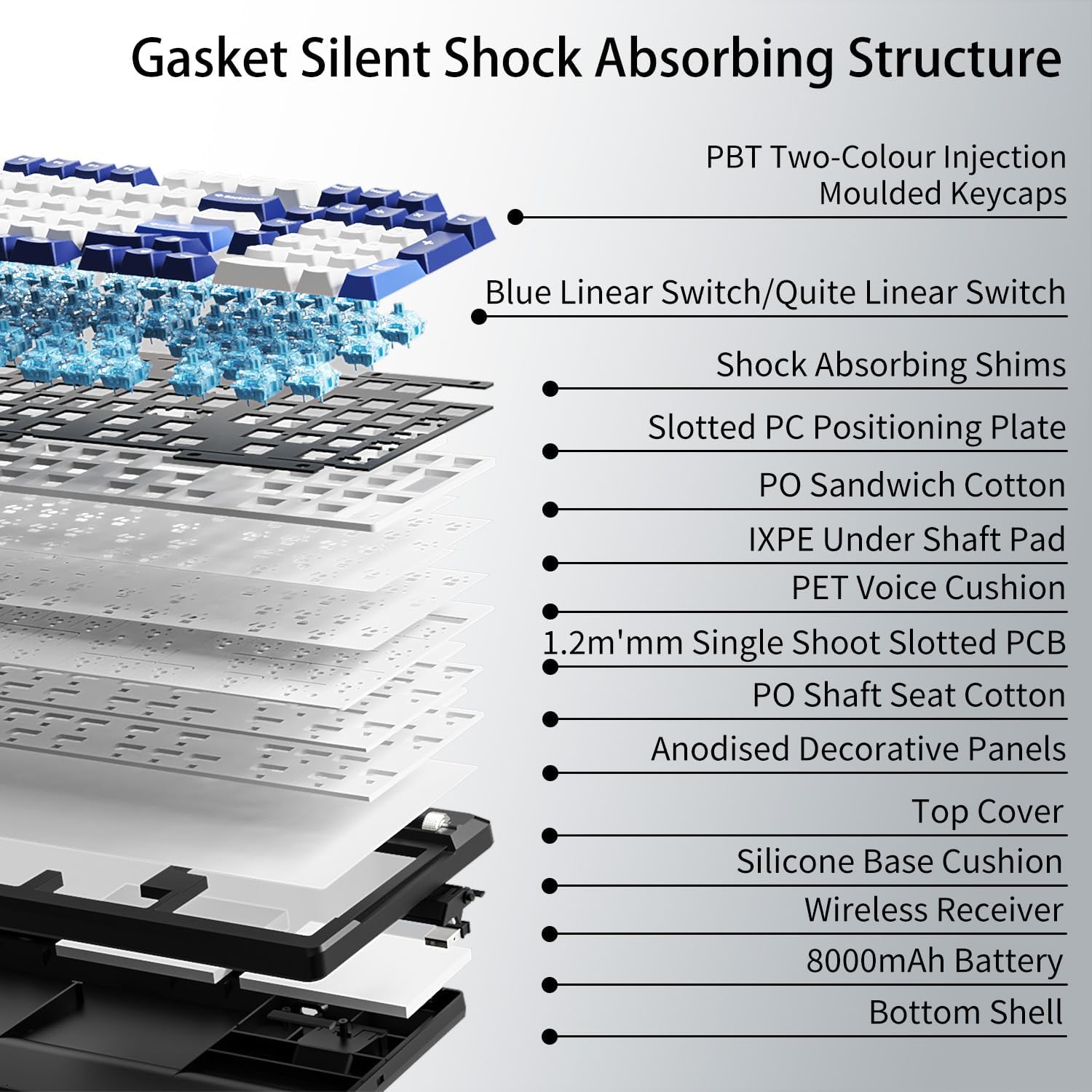
Image 4.2: Gasket mount and internal structure for enhanced typing comfort.

Image 4.3: Illustration of hot-swappable switch mechanism.
4.4 PBT Double-Shot Keycaps
The keyboard is equipped with durable PBT double-shot keycaps, ensuring legends remain crisp and resistant to wear and fading over time.

Image 4.4: Double-shot PBT keycaps for durability and clear legends.
4.5 Battery Management
The 8000mAh battery provides extended wireless usage. To conserve battery, the keyboard will enter sleep mode after a period of inactivity. Recharge the keyboard using the provided USB Type-C cable.

Image 4.5: Battery capacity and usage details.
4.6 Official Product Videos
Video 4.6.1: X99 Music Rhythm Showcase. This video demonstrates the dynamic RGB lighting effects of the keyboard, synchronized with music.
Video 4.6.2: X99 Blue Linear Switch Sound Test. Listen to the sound profile of the Blue Linear switches on the EWEADN X99 keyboard.
Video 4.6.3: X99 Gradient Side Printed Berry Pink Music Rhythm Showcase. Another demonstration of RGB lighting, this time on the Berry Pink variant.
Video 4.6.4: X99 Typing Sound Display. A general sound display of the keyboard while typing.
Video 4.6.5: EWEADN X99 Wireless Keyboard, Sound Showcase & RGB Showcase. A comprehensive showcase of both the sound and RGB lighting features.
Video 4.6.6: X99 Gradient Side Printed Gray Music Rhythm Showcase. RGB lighting demonstration on the Gray variant.
Video 4.6.7: X99 Introduction and Demonstration. A general introduction and demonstration of the keyboard's features and functionality.
5. Maintenance
- Cleaning: Use a soft, dry cloth to wipe the keyboard surface. For deeper cleaning, use a can of compressed air to remove dust and debris from between keycaps.
- Keycap Removal: Use the provided keycap puller to carefully remove keycaps for cleaning or switch replacement. Pull straight up to avoid damaging the switch stem.
- Switch Replacement: Use the provided switch puller to gently remove switches. Align new switches carefully with the PCB pins and press down firmly until they click into place.
- Battery Care: Avoid fully discharging the battery frequently. For long-term storage, charge the battery to around 50% and store in a cool, dry place.
6. Troubleshooting
| Problem | Possible Cause | Solution |
|---|---|---|
| Keyboard not responding (wired) | Loose cable connection, faulty USB port | Ensure USB-C cable is securely connected. Try a different USB port or cable. |
| Keyboard not connecting (2.4GHz wireless) | Dongle not plugged in, incorrect mode, low battery | Ensure 2.4GHz dongle is plugged in. Switch keyboard to 2.4GHz mode. Charge the keyboard. |
| Keyboard not connecting (Bluetooth) | Bluetooth not enabled on device, not in pairing mode, interference, low battery | Ensure Bluetooth is enabled on your device. Put keyboard in Bluetooth pairing mode. Move closer to device. Charge the keyboard. |
| Keys not registering or double-typing | Dust/debris under keycap, faulty switch | Remove keycap and clean. If issue persists, replace the switch using the hot-swappable feature. |
| RGB lighting not working or incorrect | Software issue, incorrect setting | Check keyboard lighting settings via function keys. Reinstall or update driver software. |
| Battery drains quickly | High brightness, frequent use, aging battery | Reduce RGB brightness. Ensure keyboard is off when not in use. |
7. Specifications

Image 7.1: Product dimensions of the EWEADN X99 keyboard.
| Feature | Detail |
|---|---|
| Model | X99 |
| Connectivity | Bluetooth 5.0, 2.4GHz Wireless, USB Type-C Wired |
| Number of Keys | 99 |
| Battery Capacity | 8000mAh |
| Keycap Material | PBT Double-Shot |
| Mounting Style | Gasket Mount with 5-layer Sound-Dampening Structure |
| Switches | Hot-Swappable (3-pin/5-pin compatible) |
| Backlighting | 16.8 Million RGB Colors, Customizable Effects |
| Dimensions (L x W x H) | 16.22 x 6.10 x 1.33 inches (412 x 155 x 34 mm) |
| Item Weight | 3.07 pounds |
| Compatible Devices | Laptop, PC, Gaming Console, Tablet, Mac |
8. Warranty and Support
EWEADN provides a 360-day manufacturer warranty for the X99 keyboard. For any questions or concerns regarding your product, please do not hesitate to contact the seller, Yiershi Store, directly through the Amazon platform. They are available to assist you and provide genuine brand support.

Image 8.1: EWEADN Brand Logo.

Image 8.2: EWEADN Brand Support details.
Ask a question about this manual
Ask about setup, troubleshooting, compatibility, parts, safety, or missing instructions. Manuals+ will review the question and use this page’s manual context to help answer it.