
1. Setup
1.1 Unpacking
Carefully remove all components from the packaging. Ensure all parts are present: the double dance mat, the central control unit, and the remote control.
1.2 Battery Installation
The dance mat's central control unit requires four (4) AA batteries (not included). The remote control requires two (2) AAA batteries (not included).
- Locate the battery compartment on the underside of the central control unit.
- Using a screwdriver, open the battery compartment cover.
- Insert four AA batteries, ensuring correct polarity (+/-).
- Replace the cover and secure it with the screw.
- Repeat the process for the remote control, inserting two AAA batteries.

Image: Battery compartment on the central control unit.
1.3 Mat Placement
Unfold the dance mat completely and place it on a flat, stable surface. The mat features a textured TPR anti-slip base to minimize movement during use. For optimal stability on smooth floors, consider placing a rug gripper underneath the mat.
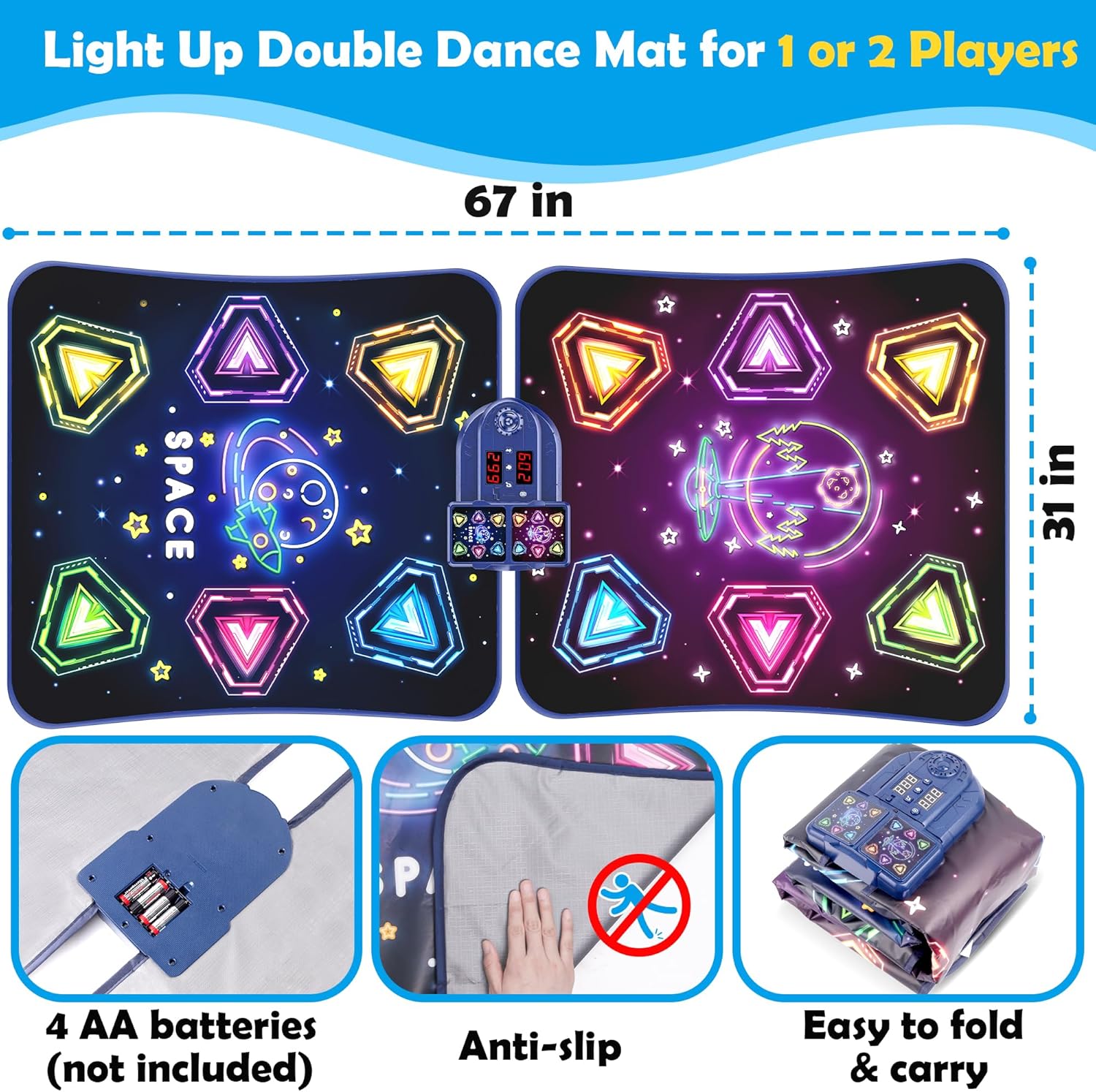
Image: Unfolded dance mat with dimensions and anti-slip feature highlighted.
2. Operating Instructions
2.1 Powering On/Off
To power on the dance mat, slide the ON/OFF switch located on the central control unit to the 'ON' position. To power off, slide the switch to the 'OFF' position.
2.2 Remote Control Overview
The included remote control allows for convenient selection of modes, adjustment of volume, and control of difficulty levels. Ensure batteries are correctly installed in the remote for functionality.
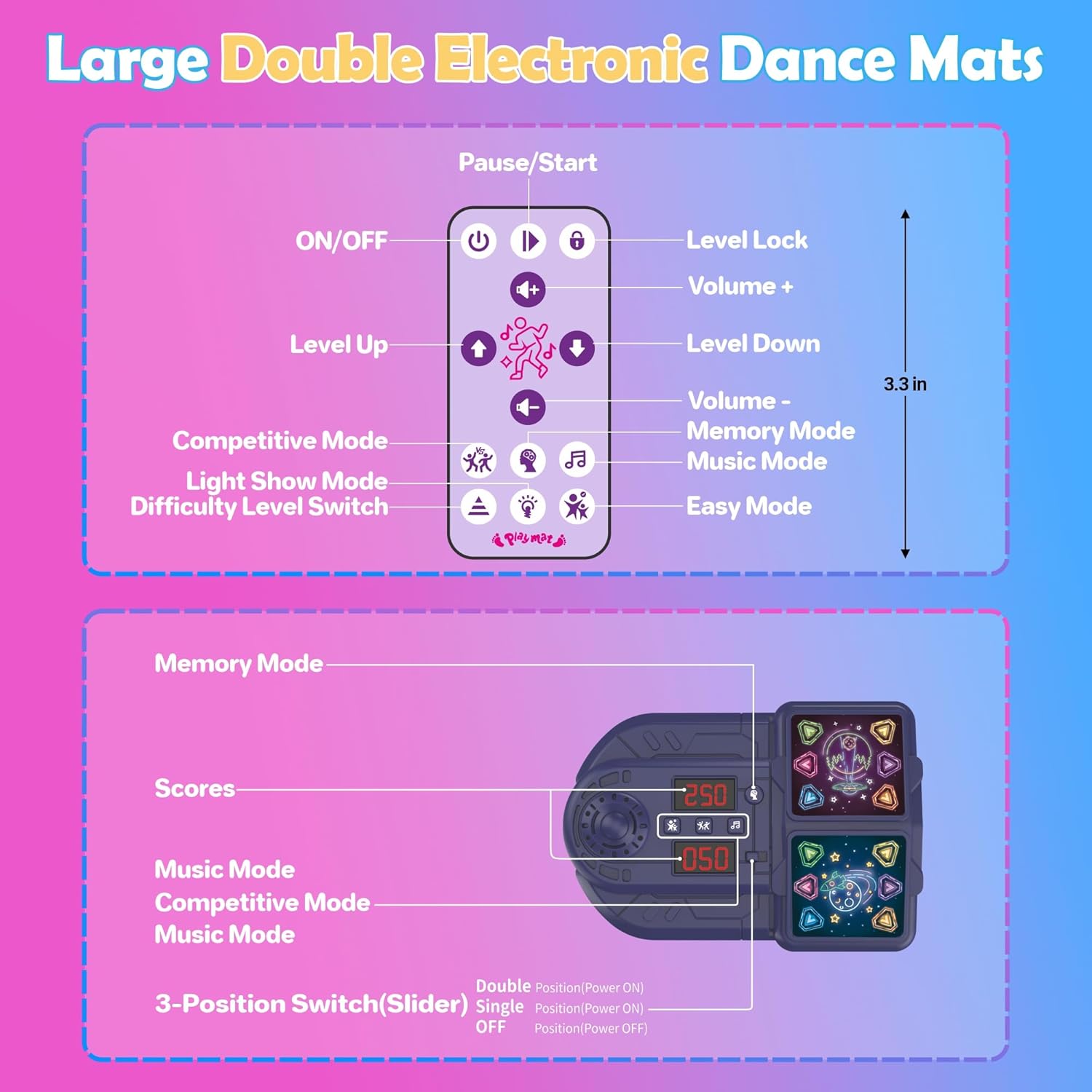
Image: Remote control for the dance mat.
2.3 Game Modes
The Pafolo Electronic Dance Mat offers five distinct game modes to enhance engagement and skill development:
- Memory Mode: Designed to improve focus and cognitive skills by challenging players to remember and repeat sequences of lights. Recommended for ages 6-12 years.
- Competitive Mode: Encourages understanding of rules and sportsmanship through head-to-head play.
- Music Mode: Allows players to dance along to a selection of classic tunes.
- Easy Mode: A toddler-friendly option for free exploration without pressure or complex challenges.
- Light Show Mode: Provides a dynamic light display for free-form dancing and enjoyment without specific level challenges.

Image: Overview of the five dancing modes.
2.4 Bluetooth Connectivity
To connect your device via Bluetooth and play your own music:
- Ensure the dance mat is powered on.
- Press the Bluetooth button on the central control unit or the remote control.
- On your mobile device, search for available Bluetooth devices and select 'Pafolo Dance Mat'.
- Once connected, you can play music from your device through the mat's speakers and dance to your favorite beats.
Video: Demonstrates the Pafolo Dance Mat's features, including Bluetooth connectivity and various game modes for two players.
3. Maintenance
3.1 Cleaning
The dance mat is crafted with a durable, wipe-clean PVC surface. To clean, simply wipe the surface with a damp cloth. Avoid using harsh chemicals or abrasive cleaners.

Image: Easy-clean feature of the dance mat.
3.2 Storage
The flexible, foldable design allows for compact storage. After use, allow the mat to cool down. Fold the mat in half along its length, then fold it again into a smaller, compact size for easy storage in a closet or box.
Image: Foldable design for compact storage.
4. Troubleshooting
| Issue | Solution |
|---|---|
| Mat not powering on | Ensure batteries are correctly installed in the central control unit. Replace with fresh AA batteries if necessary. Check the ON/OFF switch position. |
| No sound from speakers | Increase the volume using the remote control or the central unit. If using Bluetooth, ensure your device's volume is up and the connection is stable. |
| Mat is slipping during play | Ensure the mat is placed on a dry, flat surface. For extra stability on smooth floors, place a rug or a non-slip rug gripper underneath the mat. |
| Remote control not responding | Check battery installation in the remote. Replace with fresh AAA batteries if needed. Ensure there are no obstructions between the remote and the central unit. |
| Bluetooth connection issues | Ensure the mat is in Bluetooth mode. Turn off and on both the mat and your device's Bluetooth. Try pairing again. Keep your device close to the mat. |
5. Specifications
- Product Dimensions: 66.9 x 30.7 x 2 inches
- Item Weight: 2.86 pounds
- Recommended Age: 3 years and up
- Power Source: 4 x AA batteries (mat), 2 x AAA batteries (remote) - not included
- Material: Durable PVC surface, Textured TPR anti-slip base
- Connectivity: Bluetooth
- Number of Players: 2-Player design
- Number of Game Modes: 5 (Memory, Competitive, Music, Easy, Light Show)
- Difficulty Levels: 9 adjustable levels
6. Safety Information
- Adult supervision is recommended during play, especially for younger children.
- Ensure the mat is placed on a stable, non-slip surface to prevent falls.
- Avoid excessive jumping or rough play that could damage the mat or cause injury.
- Keep the mat away from open flames, heat sources, and sharp objects.
- Do not immerse the central control unit in water. Wipe clean only.
- Remove batteries if the product will not be used for an extended period to prevent leakage.
7. Warranty and Support
This product is eligible for a 30-day return policy through Amazon. For specific warranty details or further product support, please refer to the manufacturer's official website or contact customer service via the Pafolo Store on Amazon.