
SANODESK E2L
SANODESK Electric Corner L-Shaped Standing Desk User Manual
Model: E2L
Introduction
Thank you for choosing the SANODESK Electric Corner L-Shaped Standing Desk. This manual provides essential information for the safe and efficient assembly, operation, and maintenance of your new desk. Please read this manual thoroughly before beginning assembly or operation.

Image: The SANODESK Electric Corner L-Shaped Standing Desk, showcasing its spacious design with multiple monitors and a laptop, highlighting its suitability for a comprehensive workstation.
Important Safety Information
Please observe the following safety precautions to prevent injury or damage to the product:
- Always ensure the desk is properly anchored to the floor to prevent tipping.
- Do not exceed the maximum weight capacity of 176 lbs (80 kg) for the desk.
- Follow the assembly instructions carefully to avoid injury.
- Keep the desk area clear of obstacles to prevent accidents during height adjustment.
- Ensure all cables are managed to prevent entanglement during desk movement.
Setup and Assembly
The SANODESK Electric Corner L-Shaped Standing Desk requires assembly. Please ensure all parts are present before beginning. Tools recommended for assembly include a screwdriver.
Assembly Options
This L-shaped desk offers two assembly configurations to best suit your space and preference. You can choose to install the longer desktop section on either the left or the right side.

Image: Illustration demonstrating the two possible assembly configurations for the L-shaped desk, allowing users to choose the orientation of the longer desktop section (left or right).
Pre-Assembly Checklist
- Unpack all components and verify against the parts list provided in the separate assembly guide.
- Ensure you have adequate space for assembly.
- Gather necessary tools (screwdriver).
Refer to the detailed assembly instructions included in your product packaging for step-by-step guidance.
Operating Instructions
The SANODESK Electric Corner L-Shaped Standing Desk features an electric height adjustment system with memory presets for convenience.
Control Panel Overview
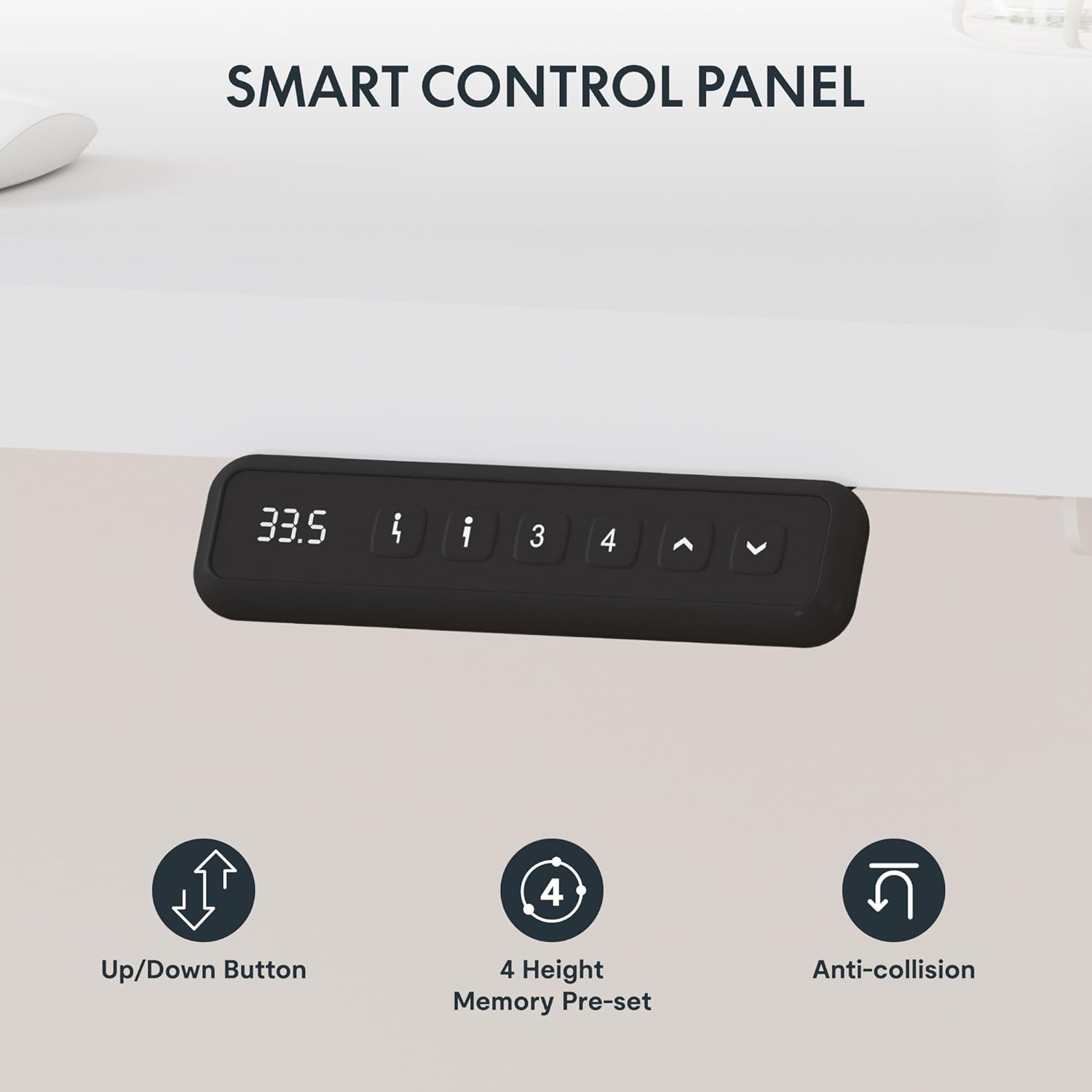
Image: A detailed view of the desk's smart control panel, showing the digital height display, up/down arrows, and four memory preset buttons for quick height adjustments.
- Up/Down Buttons: Use the arrow buttons (^ and v) to manually adjust the desk height. The desk height is adjustable from 29 inches (73.6 cm) to 46 inches (116.8 cm).
- Memory Presets (1, 2, 3, 4):
- Adjust the desk to your desired height using the up/down buttons.
- Press and hold one of the memory preset buttons (1, 2, 3, or 4) until the display flashes or beeps, indicating the height has been saved.
- To recall a saved height, simply press the corresponding memory preset button.
- Anti-Collision Feature: The desk is equipped with an anti-collision system. If the desk encounters an obstacle during height adjustment, it will automatically stop and rebound slightly to prevent damage.

Image: Visual representation of the anti-collision mechanism, illustrating how the desk automatically reverses direction upon detecting an obstruction, ensuring safety and preventing damage.
Ergonomic Use
Utilize the sit-to-stand functionality to alternate between sitting and standing positions throughout your workday. This can help improve comfort and reduce strain.

Image: A user seated at the desk, demonstrating the comfortable sitting position and ample workspace provided by the L-shaped design.

Image: A user standing at the desk, illustrating the ergonomic benefits of the adjustable height feature for a standing workstation.
Maintenance
Regular maintenance will ensure the longevity and optimal performance of your SANODESK standing desk.
- Cleaning: Wipe the desk surface and frame with a soft, damp cloth. Avoid abrasive cleaners or harsh chemicals that may damage the finish.
- Cable Management: Periodically check and organize cables to prevent tangling or interference with the desk's movement.
- Fasteners: Occasionally check all screws and bolts to ensure they are tight. Retighten if necessary.
- Motor Care: The electric motor is designed for durability. Avoid overloading the desk or continuously adjusting the height without short breaks, which could cause the motor to overheat.
Troubleshooting
If you encounter issues with your SANODESK Electric Corner L-Shaped Standing Desk, refer to the following common problems and solutions:
| Problem | Possible Cause | Solution |
|---|---|---|
| Desk does not move. | Power cable disconnected; Overload; Motor overheating. | Check power connection. Reduce weight on desk. Allow motor to cool down for 20 minutes. |
| Desk moves unevenly or makes unusual noise. | Loose fasteners; Obstruction; Uneven weight distribution. | Check and tighten all screws. Remove any obstructions. Redistribute weight evenly on the desktop. |
| Anti-collision feature triggers too often. | Sensitivity setting; Obstruction. | Ensure no objects are in the path of the desk's movement. Consult the full manual for adjusting anti-collision sensitivity if applicable. |
| Memory presets not working. | Not saved correctly; Power cycle needed. | Re-save the memory presets by holding the button until it confirms. Unplug the desk for 30 seconds and plug back in to reset. |
If the problem persists after attempting these solutions, please contact SANODESK customer support.
Specifications
Key specifications for the SANODESK Electric Corner L-Shaped Standing Desk (Model E2L):
| Feature | Detail |
|---|---|
| Brand | SANODESK |
| Model Number | E2L |
| Product Dimensions (L x W x H) | 63 x 55 inches (L-shape) x Adjustable Height |
| Adjustable Height Range | 29 inches (73.6 cm) to 46 inches (116.8 cm) |
| Color | White Top, White Frame |
| Style | Modern |
| Base Material | Carbon Steel |
| Top Material Type | Engineered Wood (Laminated Finish) |
| Item Weight | 100 Pounds (approx. 45.3 kg) |
| Maximum Weight Recommendation | 176 Pounds (approx. 80 kg) |
| Special Feature | Adjustable Height, Memory Presets, Anti-Collision |
| Required Assembly | Yes |
| Tools Recommended For Assembly | Screwdriver |
| Shape | L-Shape |
| Tabletop Thickness | 1 Inch |
| Mounting Type | Freestanding |
| UPC | 840460418867 |

Image: A detailed diagram illustrating the specific dimensions of the L-shaped desk, including the length of each segment and the adjustable height range.
Warranty and Support
Warranty Information
The SANODESK Electric Corner L-Shaped Standing Desk comes with a Limited Warranty. Please refer to the warranty card included with your product for specific terms, conditions, and duration of coverage.
Customer Support
For technical assistance, missing parts, or warranty claims, please contact SANODESK customer support. You can typically find contact information on the manufacturer's official website or through your purchase platform.
Visit the official SANODESK store for more information: SANODESK Store on Amazon
Related documentsE2L

Ask a question about this manual
Ask about setup, troubleshooting, compatibility, parts, safety, or missing instructions. Manuals+ will review the question and use this page’s manual context to help answer it.