
1. Introduction
This instruction manual provides essential information for the safe and efficient assembly, operation, and maintenance of your new Lafulaifu Computer Desk, Model ct140. Please read this manual thoroughly before beginning assembly or use to ensure proper setup and to maximize the product's lifespan. Keep this manual for future reference.
2. Product Features
The Lafulaifu Computer Desk is designed with several features to enhance your workspace:
- Multipurpose Design: This desk is versatile, suitable for use as a computer desk, office desk, work desk, gaming desk, or study table.
- Durable Surface: The tabletop is constructed from medium-density fiberboard (MDF) with a glossy finish, offering resistance to scratches and water.
- Ergonomic Monitor Stand: A large, movable monitor shelf accommodates two monitors, elevating screens to improve visibility and promote better posture, reducing neck strain.
- Sturdy Construction & Storage: Features 0.6 mm thick metal legs and a robust tabletop for stability and high load capacity. An additional fixed shelf provides extra storage space.
- Easy Assembly: All necessary mounting accessories and detailed instructions are included for straightforward setup.
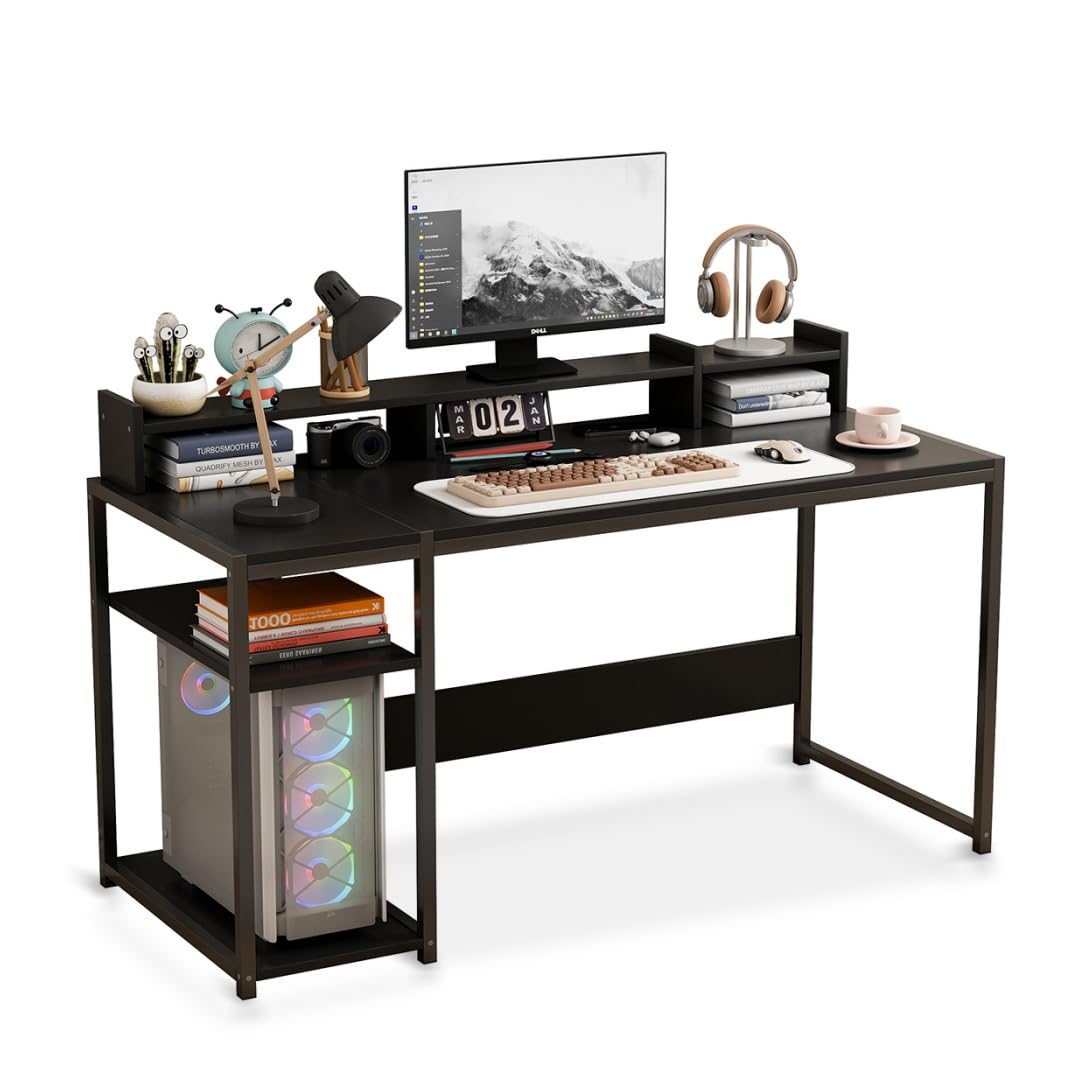
Image: The Lafulaifu Computer Desk, showcasing its spacious desktop and integrated shelving for various uses.
3. Assembly Instructions
Assembly of the Lafulaifu Computer Desk is required. Please follow the step-by-step instructions provided in the separate assembly manual included in your package. Ensure all components are present before starting.
- Unpack all components and verify against the parts list in the assembly manual.
- Identify all hardware (screws, bolts, etc.) which are typically organized and labeled.
- Assemble the metal frame structure according to the diagrams. Ensure all connections are secure but do not overtighten until the desk is fully assembled.
- Attach the main desktop panel to the assembled frame.
- Install the fixed storage shelf as indicated in the instructions.
- Place the movable monitor stand on the desktop. Note that this stand is not permanently affixed to the main desk surface, allowing for flexible positioning.
- Once all parts are in place, tighten all screws and bolts securely.
Note: All necessary tools for assembly are included in the package.

Image: Dimensional diagram of the desk, illustrating key measurements for setup and placement.
4. Operating Instructions
The Lafulaifu Computer Desk is designed for immediate use upon assembly. Consider the following for optimal operation:
- Workspace Setup: Arrange your computer, keyboard, mouse, and other peripherals on the main desktop.
- Monitor Placement: Utilize the monitor stand to elevate your screen(s) to eye level. This ergonomic positioning helps maintain a straight posture and reduces strain on your neck and eyes. The stand can be moved along the desktop to suit your preference.
- Storage Utilization: Use the integrated fixed shelf for storing books, documents, or your computer tower, keeping your workspace organized and clutter-free.
- Load Capacity: Distribute weight evenly across the desktop and shelves. Avoid placing excessively heavy items on any single point.

Image: Visual guide demonstrating the ergonomic benefits of using the monitor stand to maintain proper sitting posture.
5. Care and Maintenance
Proper care and maintenance will ensure the longevity and appearance of your Lafulaifu Computer Desk:
- Cleaning: Wipe the desktop and metal frame with a soft, damp cloth. For stubborn marks, use a mild soap solution and dry immediately. Avoid abrasive cleaners or harsh chemicals, as these can damage the finish.
- Spills: The desktop is water-resistant, but spills should be wiped immediately to prevent potential damage or staining.
- Stability Check: Periodically check all screws and bolts to ensure they remain tight. Retighten if necessary to maintain desk stability.
- Avoid Direct Sunlight: Prolonged exposure to direct sunlight may cause fading or material degradation over time.
- Heat Protection: Use coasters or protective pads under hot items to prevent heat damage to the desktop surface.

Image: Detailed view of the desktop material, highlighting its smooth, durable, and easy-to-maintain characteristics.
6. Troubleshooting
If you encounter any issues with your desk, consider the following common solutions:
- Desk Wobbles: Ensure all assembly screws and bolts are fully tightened. Check that the desk is placed on a level surface. If the floor is uneven, consider using furniture pads or shims under the legs.
- Missing Parts: If any parts are missing upon unpacking, refer to the parts list in your assembly manual and contact customer support for assistance.
- Monitor Stand Movement: The monitor stand is designed to be movable and is not fixed to the main desktop. This is intentional for flexibility in positioning.
7. Specifications
Detailed specifications for the Lafulaifu Computer Desk, Model ct140:
| Feature | Detail |
|---|---|
| Brand | Lafulaifu |
| Model | ct140 |
| Color | Black |
| Product Dimensions (D x W x H) | 50 x 140 x 88 cm (19.7 x 55.1 x 34.6 inches) |
| Item Weight | 12 Kilograms (26.4 lbs) |
| Top Material Type | Engineered Wood (MDF) |
| Frame Material Type | Metal (Iron) |
| Finish Type | Polished, Glossy |
| Number of Shelves | 1 (fixed) + Monitor Stand |
| Desktop Thickness | 1.5 Centimeters |
| Assembly Required | Yes |
| Tools Included | Yes |
| GTIN / UPC | 763523295734 |

Image: Detail of the desk's robust metal frame, emphasizing its stable and load-bearing design.
8. Warranty Information
The Lafulaifu Computer Desk, Model ct140, comes with a Limited Warranty. Please refer to the warranty card included with your purchase for specific terms, conditions, and duration of coverage. This warranty typically covers manufacturing defects and material flaws under normal use.
9. Customer Support
For any questions regarding assembly, missing parts, product functionality, or warranty claims, please contact Lafulaifu customer support. Refer to your purchase documentation or the manufacturer's website for contact details.