
1. Introduction
Thank you for choosing the MZYMI MD528 Mini Sleeping Earbuds. These ultra-lightweight and discreet earbuds are designed to provide a comfortable audio experience, especially for side sleepers, while offering clear sound and easy connectivity. This manual will guide you through the setup, operation, and maintenance of your new earbuds.
2. Safety Information
- Do not expose the earbuds or charging case to extreme temperatures, humidity, or liquids.
- Avoid dropping or subjecting the device to strong impacts.
- Clean the earbuds and charging case with a soft, dry cloth. Do not use harsh chemicals or abrasive materials.
- Listen at moderate volume levels to prevent hearing damage. Prolonged exposure to loud sounds can cause irreversible hearing loss.
- Keep out of reach of children and pets. Small parts may pose a choking hazard.
- Dispose of the product responsibly according to local regulations. Do not dispose of with household waste.
3. Product Overview
3.1 Package Contents
- MZYMI MD528 Mini Sleeping Earbuds (L/R)
- Charging Case
- USB Charging Cable
- User Manual
3.2 Component Identification
Familiarize yourself with the main components of your MZYMI MD528 earbuds and charging case.

Figure 3.2.1: The MZYMI MD528 Mini Sleeping Earbuds and their compact charging case. The case features an LED digital display indicating battery levels for both the case and individual earbuds.
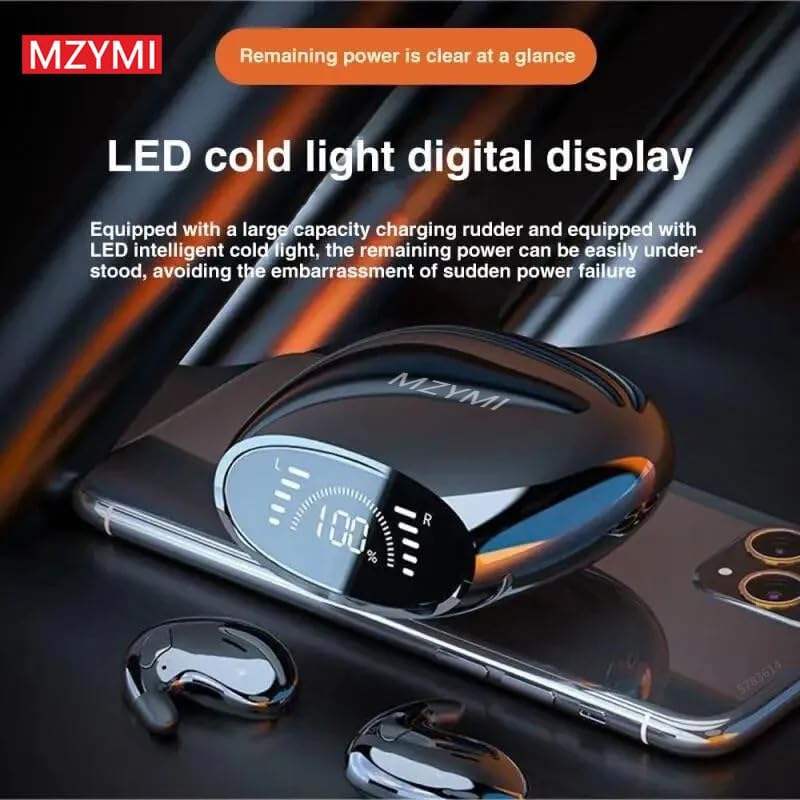
Figure 3.2.2: Close-up of the charging case's LED cold light digital display, which clearly shows the remaining power percentage of the case and the charging status of the left and right earbuds.

Figure 3.2.3: Demonstrates the ultra-thin design of the MZYMI MD528 earbuds, highlighting their compact size which makes them ideal for comfortable wear, especially for side sleepers. The image also indicates Bluetooth version 5.3.
4. Setup
4.1 Charging the Earbuds and Case
- Initial Charge: Before first use, fully charge both the earbuds and the charging case. Place the earbuds into the charging case.
- Connect Charger: Connect the provided USB charging cable to the charging port on the case and plug the other end into a USB power adapter (not included) or a computer USB port.
- Charging Indicators: The LED digital display on the charging case will show the battery percentage of the case and individual charging indicators for the left and right earbuds. The indicators will stop flashing or show 100% when fully charged.
4.2 Pairing with Your Device
- Power On: Open the charging case. The earbuds will automatically power on and enter pairing mode.
- Activate Bluetooth: On your smartphone or Bluetooth-enabled device, go to the Bluetooth settings and turn on Bluetooth.
- Select Device: Look for "MD528" or a similar name in the list of available devices and select it to connect.
- Confirmation: Once connected, you will hear an audible confirmation from the earbuds, and the device will show "Connected" in your Bluetooth settings.
- Automatic Reconnection: After the initial pairing, the earbuds will automatically connect to the last paired device when taken out of the case, provided Bluetooth is enabled on the device.
5. Operating Instructions
5.1 Wearing the Earbuds
The MD528 earbuds are designed for a snug and comfortable fit, especially for side sleepers. Ensure the earbuds are correctly oriented for optimal sound and comfort.

Figure 5.1.1: Proper placement of the MZYMI MD528 earbud in the ear, demonstrating its discreet and low-profile design for comfortable wear.

Figure 5.1.2: Illustrates the comfort of wearing the MZYMI MD528 earbuds while sleeping on your side, emphasizing their sound insulation capabilities to block ambient noise.
5.2 Touch Controls
The MD528 earbuds feature intuitive touch controls for easy management of your audio and calls.

Figure 5.2.1: Highlights the easy operation of the MZYMI MD528 earbuds, including the ability to wake up your device's voice assistant with a simple touch.
| Action | Function |
|---|---|
| Single Tap (L or R) | Play/Pause Music, Answer/End Call |
| Double Tap (L) | Previous Track |
| Double Tap (R) | Next Track |
| Triple Tap (L or R) | Activate Voice Assistant |
| Long Press (2s) | Reject Call |
5.3 Power On/Off
- Power On: The earbuds automatically power on when removed from the charging case.
- Power Off: Place the earbuds back into the charging case to automatically power them off and begin charging.
6. Maintenance and Care
- Cleaning: Regularly clean the earbuds and charging case with a soft, lint-free cloth. Do not use liquids or sprays directly on the device.
- Storage: When not in use, store the earbuds in their charging case to protect them and keep them charged.
- Battery Care: To prolong battery life, avoid fully discharging the earbuds and case frequently. Charge them regularly, even if not in constant use.
- Avoid Extreme Conditions: Do not expose the earbuds to extreme heat, cold, or direct sunlight for extended periods.
7. Troubleshooting
If you encounter any issues with your MZYMI MD528 earbuds, please refer to the following table for common problems and solutions.
| Problem | Possible Solution |
|---|---|
| Earbuds not pairing | Ensure earbuds are charged. Turn off and on Bluetooth on your device. Forget "MD528" from your device's Bluetooth list and re-pair. |
| No sound from one earbud | Ensure both earbuds are charged. Place both earbuds back in the case, close it, then take them out again. Check device's audio output settings. |
| Charging case not charging | Check the USB cable and power adapter. Ensure the charging port is clean and free of debris. |
| Touch controls not responding | Ensure your fingers are clean and dry. Try restarting the earbuds by placing them in the case and taking them out. |
| Poor sound quality | Ensure earbuds are clean. Try adjusting the volume on your device. Move closer to your device to avoid interference. |
8. Specifications
| Feature | Detail |
|---|---|
| Model | MD528 |
| Bluetooth Version | 5.3 |
| Control Method | Touch |
| Headphones Jack | No Jack |
| Manufacturer | mzymi |
| ASIN | B0DLKNDD9K |
9. Warranty Information
MZYMI products are manufactured with high-quality standards. For specific warranty details, please refer to the warranty card included in your product packaging or contact customer support. This warranty typically covers manufacturing defects for a specified period from the date of purchase.
10. Customer Support
If you have any questions, require assistance, or encounter issues not covered in this manual, please contact our customer support team. Please have your product model (MD528) and purchase details ready when contacting support.
For the most up-to-date contact information, please visit the official MZYMI website or refer to your product packaging.