
Introduction
This manual provides essential instructions for the assembly, operation, and maintenance of your OKD 75-Inch 3-Sided Electric Fireplace TV Stand. Please read this manual thoroughly before assembly and use to ensure safe and efficient operation. Keep this manual for future reference.
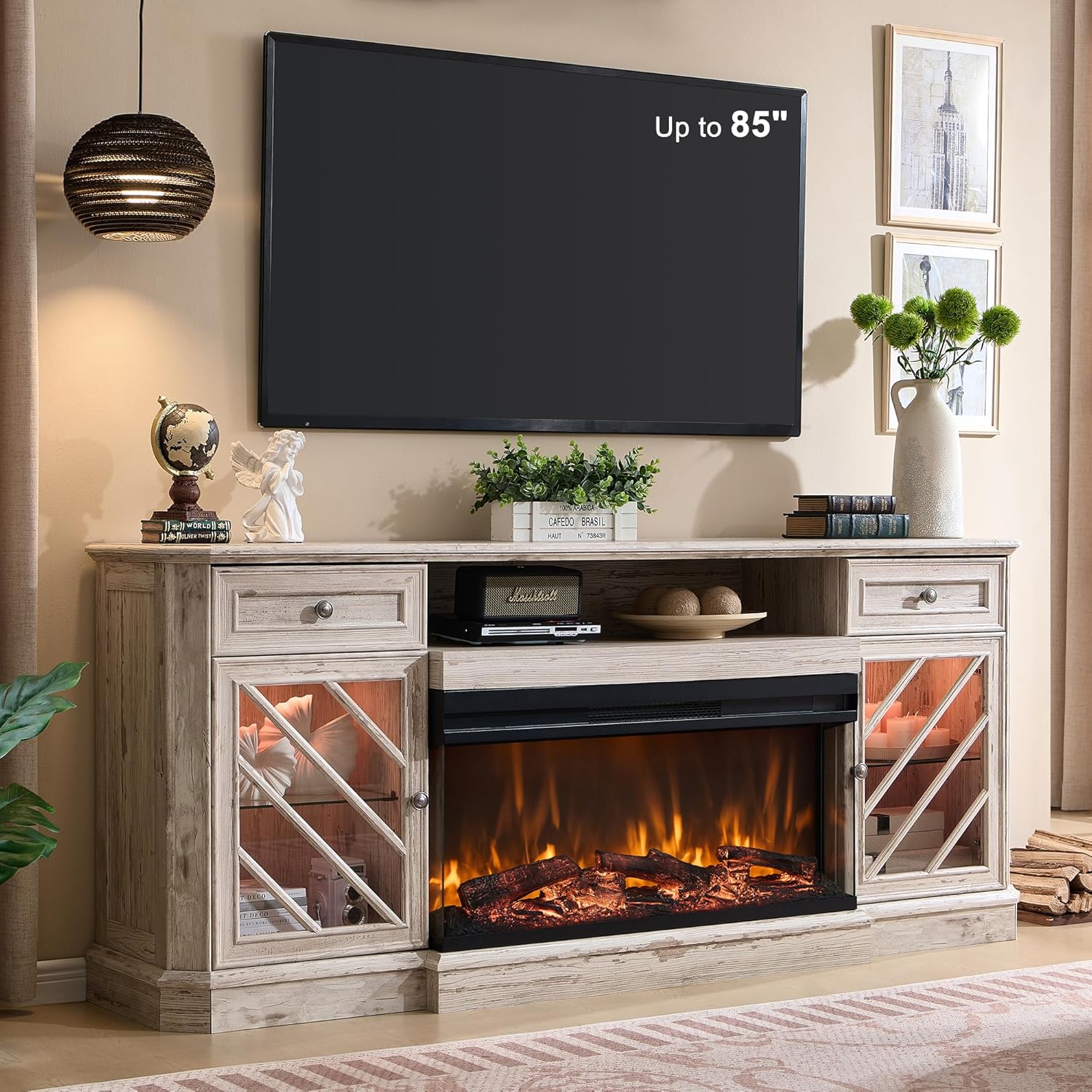
Image: The OKD 75-Inch Electric Fireplace TV Stand, featuring a 3-sided electric fireplace, drawers, and glass-door cabinets, positioned under a large television.
Safety Information
Observe the following safety precautions to reduce the risk of fire, electric shock, or injury.
- Electrical Safety: Ensure the power outlet meets the voltage requirements of the electric fireplace. Do not overload circuits.
- Placement: Position the TV stand on a flat, stable surface. Maintain adequate clearance from combustible materials.
- Ventilation: Do not block the air vents of the electric fireplace. Proper ventilation is crucial for safe operation.
- Children and Pets: Keep children and pets away from the electric fireplace, especially when it is operating. The glass surface can become hot.
- Overheat Protection: The electric fireplace is equipped with overheat protection. If it overheats, it will automatically shut off. Unplug the unit and allow it to cool before restarting.
- Cleaning: Always unplug the electric fireplace before cleaning. Use a soft, damp cloth; avoid abrasive cleaners.
- Assembly: Follow all assembly instructions carefully. Do not use power tools for assembly unless specified, as this may damage components.
Package Contents
Verify that all components are present before beginning assembly. If any parts are missing or damaged, contact customer support.
- TV Stand Components (Engineered Wood Panels, Hardware)
- 36-Inch Electric Fireplace Insert
- Remote Control for Fireplace
- Assembly Instructions Manual
- Small bag of spare parts
Note: This product is shipped in two separate packages, which may arrive on different days.
Assembly Instructions
Assembly requires patience and attention to detail. Refer to the included assembly manual for detailed diagrams and step-by-step guidance. All parts are labeled for easier identification.
- Unpack and Identify Parts: Carefully unpack all components and lay them out on a clean, soft surface to prevent scratches. Identify each part using the labels and the parts list in your assembly manual.
- Prepare Tools: You will need a Phillips head screwdriver. It is recommended to have screwdrivers of various sizes. Additional wood glue may be beneficial as the provided amount might be limited.
- Assemble the Main Frame: Follow the diagrams to connect the main panels of the TV stand. Ensure all connections are secure.
- Install Drawers and Cabinets: Assemble the drawers and cabinet doors according to the instructions. When installing cam bolts, turn them gently and avoid over-tightening to prevent breakage. Adjust drawers and cabinet doors as needed for proper alignment and smooth operation.
- Insert Electric Fireplace: Carefully place the 36-inch electric fireplace insert into its designated opening in the TV stand. Ensure it fits snugly and is properly aligned.
- Cable Management: Utilize the cable management hole at the back of the unit to organize power cords and media cables.

Image: Product dimensions, illustrating the 75-inch width, 32-inch height, and 15.5-inch depth, and indicating compatibility with TVs up to 85 inches. Also shows the two-package delivery.
Operating Instructions
The electric fireplace offers various settings for flame effects and heating. All functions can be controlled via the touch screen panel on the unit or the included remote control.
Electric Fireplace Controls

Image: Detailed view of the 36-inch electric fireplace insert, highlighting the control panel and remote control with icons for power, heat, flame color, timer, brightness, and flame speed.
- Power (On/Off): Press the power button to turn the fireplace on or off.
- Heat Function: Activate the heating element (5118 BTUs) to warm areas up to 400 sq ft. The temperature can be adjusted between 64°F and 82°F. Flame and heat can be operated independently.
- Flame Colors: Choose from 3 elegant flame colors to suit your ambiance.
- Flame Brightness: Adjust the flame brightness through 5 levels (L1-L5).
- Flame Speed: Select from 5 flame speed settings (P1-P5).
- Timer Function: Set the automatic shut-off timer for 1 to 9 hours to conserve energy.
- Remote Control: The remote control operates the fireplace functions from up to 19 feet away. Ensure the remote has working batteries.
Maintenance
Regular maintenance ensures the longevity and optimal performance of your TV stand and electric fireplace.
- Cleaning the Stand: Wipe the engineered wood surfaces with a soft, dry, or slightly damp cloth. Avoid harsh chemicals or abrasive cleaners that can damage the distressed finish.
- Cleaning the Fireplace: Ensure the fireplace is unplugged and cool before cleaning. Gently wipe the glass and exterior surfaces with a soft, lint-free cloth. Do not spray water directly onto the unit.
- Dust Removal: Periodically vacuum or wipe dust from the air intake and exhaust vents of the fireplace to maintain proper airflow.
- Hardware Check: Periodically check all screws and fasteners to ensure they remain tight. Re-tighten if necessary.
Troubleshooting
Refer to the table below for common issues and their solutions.
| Problem | Possible Cause | Solution |
|---|---|---|
| Fireplace does not turn on. | No power, power cord loose, overheat protection activated. | Check power connection. Ensure outlet is functional. Unplug and allow unit to cool for 15-20 minutes if overheat protection is suspected. |
| No heat, but flames are visible. | Heat function is off. | Activate the heat function using the control panel or remote. |
| Remote control not working. | Dead batteries, remote out of range, obstruction. | Replace batteries. Ensure you are within 19 feet of the unit and there are no obstructions. |
| Drawers or cabinet doors are misaligned. | Improper assembly or loose hinges. | Adjust hinges or drawer slides as per assembly instructions. Tighten any loose screws. |
Specifications
| Feature | Detail |
|---|---|
| Brand | OKD |
| Model Name | Fireplace TV Stand (VSC75FP36P) |
| Product Dimensions | 75"W x 15.5"D x 32"H |
| Material | Engineered Wood |
| Finish Type | Distressed Finish |
| TV Compatibility | Up to 85 inches |
| Fireplace Size | 36 inches (3-sided glass display) |
| Heat Output | 5118 BTUs |
| Heating Coverage | Up to 400 sq ft |
| Temperature Range | 64°F to 82°F |
| Flame Effects | 3D flame effect, 3 colors, 5-speed, 5 brightness levels |
| Timer Function | 1-9 hours |
| Control Method | Touch screen, Remote control |
| Remote Control Range | Up to 19 feet |
| Weight Capacity | Up to 300 lbs |
| Safety Certifications | ETL/FCC, Overheat Protection |
| Item Weight | 120 Pounds |
Warranty and Support
This product comes with a limited warranty. For specific warranty details, please refer to the documentation included with your purchase or contact OKD customer support.
If you encounter any issues or have questions regarding your OKD Electric Fireplace TV Stand, please contact OKD customer support for assistance. Ensure you have your model number (VSC75FP36P) and purchase information ready.
Customer Support: Refer to your purchase documentation for contact information or visit the official OKD website.