
Introduction
Thank you for choosing the Soundcore Anker Life Q20 Hybrid Active Noise Cancelling Headphones. This manual provides essential information for the safe and optimal use of your device. Please read these instructions carefully before use and retain them for future reference.
What's in the Box
Verify that all components are present in your package:
- Soundcore Life Q20 Headphone x1
- USB-C Charging Cable x1
- AUX Cable x1
- Travel Pouch x1

Image: The Soundcore Life Q20 headphones, USB-C charging cable, AUX cable, and a black travel pouch laid out on a white surface.
Product Overview
The Soundcore Life Q20 headphones feature an over-ear design with controls located on the earcups for easy access.

Image: A pair of blue Soundcore Life Q20 headphones, highlighting the earcups and headband.
Key Features:
- Hybrid Active Noise Cancellation: Reduces ambient noise by up to 90%.
- Hi-Res Audio: Custom 40mm dynamic drivers for extended high frequencies up to 40 kHz.
- BassUp Technology: Real-time low-frequency analysis for enhanced bass.
- Extended Playtime: Up to 60 hours in standard mode, 40 hours with ANC.
- Comfortable Design: Foam ear cups with soft protein leather and multi-angle rotation.

Image: A hand holding one ear cup of the Soundcore Life Q20, with callouts for multi-angle rotation, breathable mesh, and memory foam cushions.
Setup
1. Charging the Headphones
Before first use, fully charge your Life Q20 headphones. Use the provided USB-C charging cable.
- Connect one end of the USB-C cable to the charging port on the headphone and the other end to a USB wall charger (not included) or a computer's USB port.
- The LED indicator will show charging status. A full charge typically takes approximately 2 hours.
2. Power On/Off
- To power on, press and hold the Power button on the left earcup for 3 seconds.
- To power off, press and hold the Power button for 3 seconds.
3. Bluetooth Pairing
The Life Q20 headphones can connect wirelessly via Bluetooth.
- Ensure the headphones are powered off.
- Press and hold the Power button for 5 seconds until the LED indicator flashes blue, indicating pairing mode.
- On your device (smartphone, tablet, computer), enable Bluetooth and search for "Soundcore Life Q20".
- Select "Soundcore Life Q20" from the list of available devices to connect.
- Once connected, the LED indicator will turn solid blue.
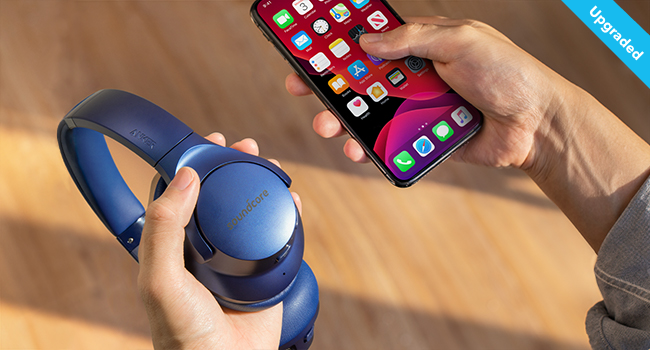
Image: A visual representation of connecting the Soundcore Life Q20 headphones to a smartphone via Bluetooth.
4. Wired Connection (AUX Mode)
You can use the provided 3.5mm AUX cable for a wired connection, which is useful when battery is low or for devices without Bluetooth.
- Connect one end of the AUX cable to the 3.5mm audio jack on the headphone and the other end to your audio device.
- Note: Active Noise Cancellation is not compatible with AUX cable connection.
Operating Instructions
1. Music Playback Controls
- Play/Pause: Press the Play button once.
- Next Track: Press and hold the Volume Up button for 2 seconds.
- Previous Track: Press and hold the Volume Down button for 2 seconds.
- Volume Up: Press the Volume Up button.
- Volume Down: Press the Volume Down button.
2. Call Management
- Answer/End Call: Press the Play button once.
- Reject Call: Press and hold the Play button for 2 seconds.
- Switch Between Calls: During a call, press the Play button once to switch to an incoming call. Press and hold for 2 seconds to reject the incoming call.
3. Active Noise Cancellation (ANC)
The Life Q20 features Hybrid Active Noise Cancellation to reduce ambient noise.
- To activate/deactivate ANC, press the NC button on the left earcup.
- The LED indicator will light up green when ANC is active.

Image: An exploded view of the ear cup showing the internal feedback microphone and external feedforward microphone for hybrid ANC.

Image: A graph demonstrating the effectiveness of Life Q20's noise cancellation, particularly against low and mid-frequency noises like airplane and car engines.
4. BassUp Mode
Enhance bass output for certain music genres.
- Double press the Play button to activate or deactivate BassUp mode.
Maintenance
Proper care ensures the longevity of your Soundcore Life Q20 headphones.
- Cleaning: Use a soft, dry cloth to clean the headphones. Do not use harsh chemicals or abrasive materials.
- Storage: When not in use, store the headphones in the provided travel pouch to protect them from dust and scratches. Avoid storing in extreme temperatures.
- Water Exposure: The headphones are water-resistant, but not waterproof. Avoid prolonged exposure to water or submerging them.
- Battery Care: To preserve battery life, charge the headphones at least once every 3 months if not used regularly.
Troubleshooting
| Issue | Possible Solution |
|---|---|
| Cannot power on | Ensure the headphones are charged. Connect to a power source using the USB-C cable. |
| Cannot pair via Bluetooth | Ensure headphones are in pairing mode (flashing blue LED). Turn off and on Bluetooth on your device. Clear previous pairings on your device. Move closer to your device. |
| No sound | Check volume levels on both headphones and connected device. Ensure headphones are correctly paired or AUX cable is fully inserted. |
| ANC not effective | Ensure ANC is activated (green LED). Adjust headphone fit for a better seal around your ears. Note that ANC is most effective for low-frequency sounds. |
| Poor call quality | Ensure microphone is not obstructed. Move to an area with less background noise. Check network connection on your phone. |
Specifications
| Feature | Detail |
|---|---|
| Model Name | Soundcore Life Q20 |
| Model Number | A3025 |
| Noise Control | Active Noise Cancellation |
| Connectivity Technology | Wired, Wireless (Bluetooth) |
| Bluetooth Version | 5.3 |
| Bluetooth Range | 15 Meters |
| Audio Driver Size | 40 mm (Custom Oversized Dynamic Drivers) |
| Frequency Response | 20 Hz - 40 kHz |
| Battery Life | Up to 60 Hours (Standard Mode), Up to 40 Hours (ANC Mode) |
| Charging Time | Approximately 2 Hours |
| Charging Port | USB-C |
| Headphones Jack | 3.5 mm Jack |
| Item Weight | 250 Grams (8.8 ounces) |
| Product Dimensions | 7.68 x 7.09 x 3.07 inches |
| Material | Polycarbonate (PC) |
| Water Resistance Level | Water Resistant |
Warranty and Support
Soundcore products are designed to provide reliable performance. For warranty information and customer support, please refer to the following:
- Warranty Period: Anker typically provides an 18-month warranty for products purchased via authorized retailers like Amazon. Please retain your proof of purchase for warranty claims.
- Customer Service: For technical support, troubleshooting assistance, or warranty inquiries, please contact Soundcore/Anker customer service directly. Contact information can usually be found on the official Soundcore website or within your product packaging.
- Online Resources: Visit the official Soundcore website for FAQs, updated manuals, and driver downloads.


