
Introduction
This manual provides detailed instructions for the safe and efficient operation of your Primevolve Portable Oscillating Standing Fan. Please read this manual thoroughly before first use and retain it for future reference.
Important Safety Instructions
- Read all instructions before using this appliance.
- Do not use the fan near water or in excessively humid environments.
- Keep fingers and other objects away from the fan blades when in operation.
- Ensure the fan is placed on a stable, flat surface to prevent tipping.
- Do not block air openings.
- Use only the provided USB-C cable for charging.
- Do not attempt to disassemble or repair the fan yourself. Contact customer support for assistance.
- Keep out of reach of children.
Package Contents
- 1 x Portable Fan
- 1 x Remote Control
- 1 x USB-C Charging Cable
- 1 x User Manual

Image: The Primevolve Portable Fan shown with its included accessories: a remote control, USB-C charging cable, and user manual.
Setup and Assembly
- Unfolding the Fan: Gently lift the fan head from its compact base. The telescopic rod will extend.
- Adjusting Height: Pull the telescopic rod upwards to achieve the desired height (from 3.93" to 39.3").
- Adjusting Angle: Tilt the fan head up or down by 180° to direct airflow.
- Folding for Storage: Push the telescopic rod down completely, then fold the fan head back into the base until it clicks securely.
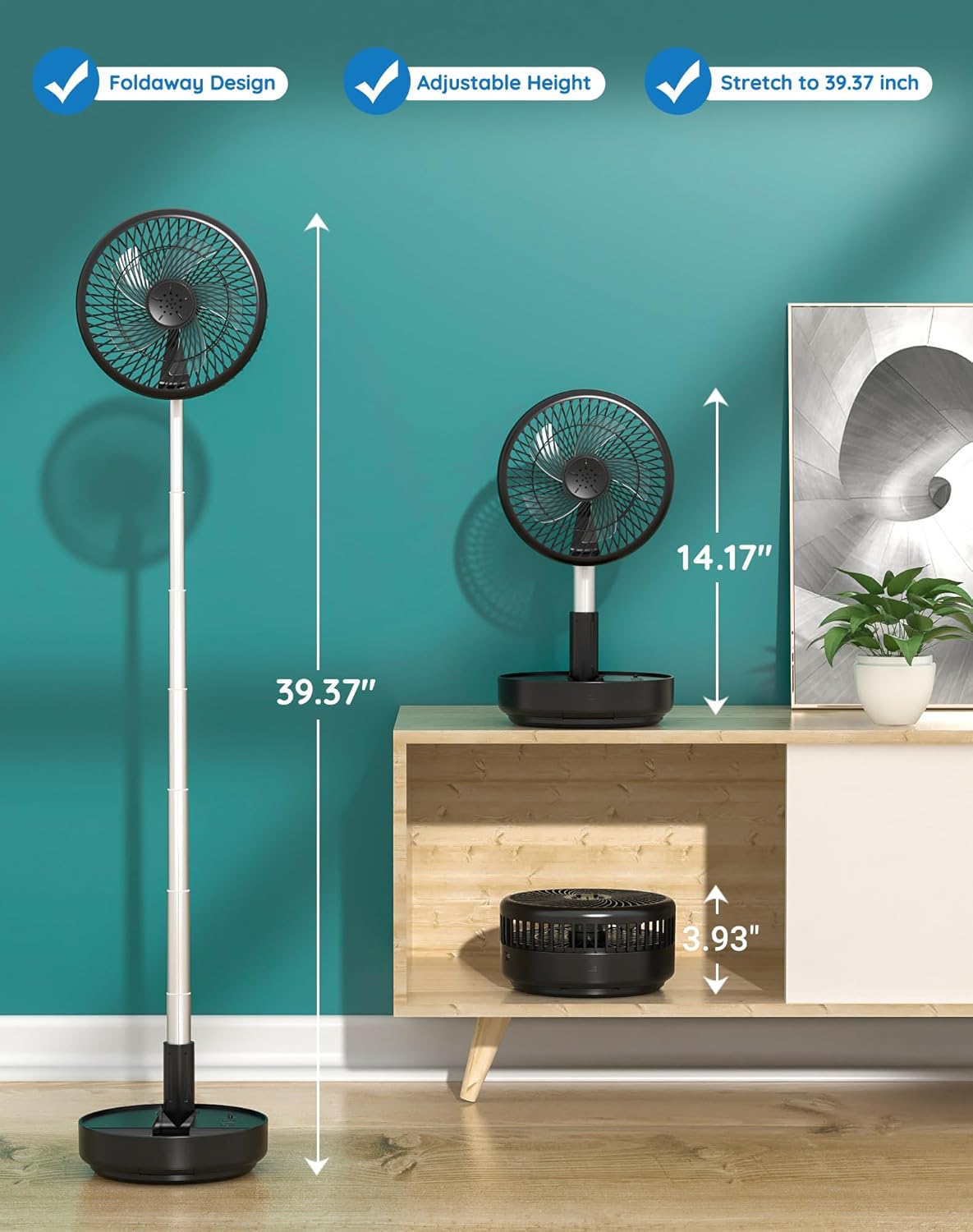
Image: The fan demonstrating its foldable design, adjustable height, and compact storage.

Image: Visual representation of the fan's adjustable height, ranging from a compact 3.93 inches to an extended 39.37 inches.
Video: A demonstration of unboxing and setting up the Primevolve Portable Fan, showcasing its various configurations.
Operating Your Fan
Power On/Off
Press and hold the power button on the base or the remote control to turn the fan on or off.
Speed Settings
The fan offers 4 speed settings: Breeze, Soft, Strong, and Natural mode. Press the speed button on the base or remote to cycle through the modes.
- Breeze Mode: Gentle airflow for quiet environments.
- Soft Mode: Moderate airflow for comfortable cooling.
- Strong Mode: Powerful airflow for rapid cooling.
- Natural Mode: Simulates natural wind patterns with varying speeds.

Image: Illustration of the fan's four speed settings (Low, Mid, High, Natural) and their corresponding battery life durations (up to 21 hours on Low).
Oscillation Function
Press the oscillation button on the base or remote to activate 90° automatic oscillation, distributing airflow across a wider area. Press again to stop oscillation.

Image: The fan showcasing its 90° auto oscillation and 180° adjustable head rotation for broad air distribution.
Remote Control
The infrared remote control allows you to operate all fan functions from up to 13 feet away.

Image: A detailed view of the fan's controls, including the remote, manual buttons, USB-C charging port, and anti-slip base.
Battery and Charging
The fan has a built-in rechargeable battery providing 6-21 hours of wireless operation depending on speed and oscillation settings. Charge fully in approximately 5 hours using the included USB-C cable. The fan can be used while charging.

Image: The fan's USB-C charging port and compatible power sources like power banks, AC adapters, and laptops.
Aromatherapy Feature
The fan includes a special compartment for aromatherapy. Place your favorite aromatherapy scent box into this compartment to diffuse pleasant fragrances while the fan operates.

Image: A close-up of the fan's aromatherapy feature, where a scent box can be inserted.
Care and Maintenance
Cleaning the Fan
The fan hood is detachable for easy cleaning. Gently twist and remove the front grille to access the blades. Wipe the blades and grille with a soft, damp cloth. Ensure all parts are completely dry before reassembling.

Image: The fan's detachable front grille and blades, illustrating how to clean the unit.
Storage
When not in use, fold the fan into its compact form and store it in a cool, dry place.
Troubleshooting
- Fan not turning on: Ensure the battery is charged. Connect to a power source using the USB-C cable.
- Weak airflow: Check the speed setting and increase if necessary. Ensure the fan grille is not obstructed.
- Fan not oscillating: Press the oscillation button to activate. If it still doesn't work, ensure the fan is on a flat surface.
- Remote control not working: Check the battery in the remote. Ensure there are no obstructions between the remote and the fan's sensor.
Product Specifications
| Feature | Detail |
|---|---|
| Brand | Primevolve |
| Model Name | PF11S |
| Power Source | Battery Powered |
| Voltage | 5 Volts (DC) |
| Noise Level | 30-40 Decibels |
| Number of Power Levels | 4 |
| Control Method | Remote, Push Button |
| Product Dimensions (compact) | 9.06"D x 4.33"W x 9.06"H |
| Adjustable Height | 3.93" to 39.3" |
| Oscillation | 90° Auto |
| Head Tilt | 180° |
| Battery Life | 6-21 hours (depending on speed/oscillation) |
| Charging Time | Approx. 5 hours |
| Charging Port | USB-C |
| Item Weight | 2.75 pounds |
| Indoor/Outdoor Usage | Indoor, Outdoor |
Warranty and Customer Support
This product comes with a one-year after-sales service. If you have any questions or require assistance, please contact Primevolve customer support.
For further assistance, please visit the Primevolve Store.


