
Introduction
This manual provides detailed instructions for the Podofo 7-inch 2 DIN Car Radio, designed to enhance your in-car entertainment and connectivity. It covers essential information regarding setup, operation, maintenance, troubleshooting, and product specifications to ensure optimal performance and user satisfaction. Please read this manual thoroughly before using the device.
Setup and Installation
Before installation, ensure your vehicle's power is disconnected. Professional installation is recommended. Refer to the wiring diagram provided in the package for correct connections.
Package Contents:
- 1 x Car Radio
- 1 x Power Cable
- 1 x Horn Cable
- 1 x Remote Control
- 1 x External Microphone
- 1 x User Manual
- 1 x HD Rear Camera (with connection cable)

Image: The car radio unit, its dimensions, and all included accessories: power cable, horn cable, external microphone, remote control, user manual, and HD rear camera.
Wiring Connections:
- Power Cable: Connect to your vehicle's power supply (ACC, B+, GND).
- Horn Cable: Connect to your vehicle's speaker system.
- Rear Camera: Connect the video input cable to the radio's CVBS input and the power cable to the reverse light circuit.
- External Microphone: Plug into the dedicated microphone input for clear hands-free calls.
Operating Instructions
1. Wireless CarPlay and Android Auto
This car radio supports wireless Apple CarPlay and Android Auto. Connect your smartphone wirelessly to access navigation, music, phone calls, and other applications directly from the car radio's 7-inch touchscreen. This feature allows for hands-free operation, enhancing driving safety.

Image: The car radio screen showing various applications and features available through Wireless CarPlay and Android Auto, including maps, music, and phone functions.
2. MirrorLink (iOS/Android)
The MirrorLink function allows you to mirror your smartphone's screen (iOS or Android) onto the car radio display. Connect your phone using a data cable to view videos, photos, and other content in real-time on the 7-inch touchscreen.

Image: A visual representation of MirrorLink, showing a smartphone connected to the car radio, with the phone's screen content displayed on the radio's larger screen.
3. Bluetooth 5.0 Connectivity
Equipped with Bluetooth 5.0, this car radio supports Bluetooth music streaming, hands-free calling, and voice control. Pair your mobile phone to enjoy audio playback and manage calls safely while driving.
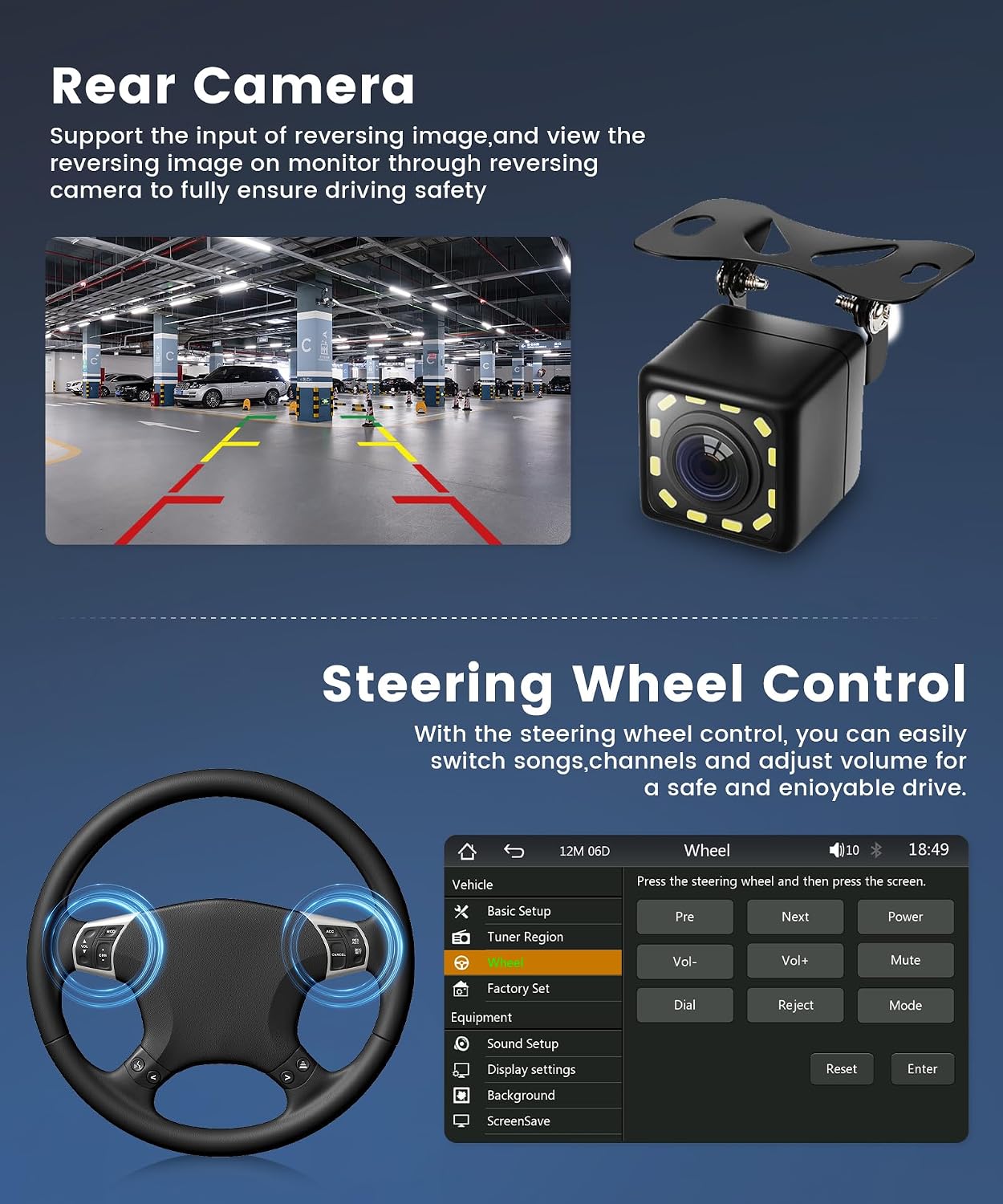
Image: The car radio screen showing the Bluetooth interface for music playback and hands-free calling, with icons for dial, record, contacts, pair, and BT Music.
4. FM Radio and EQ Sound Adjustment
Tune into your favorite FM radio stations within the 87.5 – 108.0 MHz range. The radio also features multi-band EQ modes (Jazz, Classical, Rock, Pop, Flat, User) allowing you to customize the sound to your preference for an immersive audio experience.
Image: The car radio screen displaying the FM radio interface with frequency selection and preset station buttons.
Image: The car radio screen showing the Equalizer (EQ) settings, with sliders for frequency adjustment and preset sound modes like Jazz, Classical, and Rock.
5. Rear Camera Functionality
The included HD rear camera provides a clear view of the area behind your vehicle, supporting reverse image input. This feature enhances driving safety by assisting with parking and maneuvering in tight spaces. The camera is waterproof and includes night vision capabilities.
Image: The car radio screen showing the live feed from the rear camera with parking assistance lines, alongside a detailed view of the physical HD rear camera.
6. Steering Wheel Control
Integrate your vehicle's steering wheel controls with the car radio. This allows you to easily switch songs, adjust volume, and manage calls without taking your hands off the steering wheel, contributing to a safer and more enjoyable driving experience.
Image: The car radio screen displaying the menu for configuring steering wheel controls, allowing users to map functions like volume and track changes.
7. Volume Control Knob & Connectivity Ports
The unit features a convenient volume control knob for quick audio adjustments. Multiple connectivity options are available, including Dual USB 2.0 ports for media playback and charging, a USB-C interface, an AUX interface, and a TF Card slot for expanded media options. The unit also includes customizable button backlighting.

Image: A detailed view of the car radio's front panel, highlighting the volume control knob and the various input ports including Dual USB, Type-C, AUX, and TF Card slot, along with an illustration of customizable button lighting.
Maintenance
- Cleaning: Use a soft, dry cloth to clean the screen and exterior. Avoid abrasive cleaners or solvents.
- Temperature: Operate the device within the specified temperature range of -20°C to 70°C.
- Software Updates: Check the manufacturer's website periodically for any available software updates to ensure optimal performance and compatibility.
- Fuse Replacement: If the unit does not power on, check the fuse in the power cable. Replace with a fuse of the same rating if necessary.
Troubleshooting
| Problem | Possible Cause | Solution |
|---|---|---|
| No power | Incorrect wiring; Blown fuse; Vehicle battery low. | Check power cable connections; Replace fuse; Charge vehicle battery. |
| No sound | Speaker wires disconnected; Volume too low; Mute function active. | Check speaker connections; Increase volume; Deactivate mute. |
| Bluetooth not connecting | Bluetooth not enabled on phone/radio; Incorrect pairing process. | Ensure Bluetooth is active on both devices; Follow pairing instructions in manual. |
| Rear camera not displaying | Camera cable loose; Reverse trigger wire not connected; Faulty camera. | Check camera video and power connections; Ensure reverse trigger is connected; Test camera. |
| Touchscreen unresponsive | System crash; Screen calibration issue. | Restart the unit; Perform a factory reset (password: 113266). |
Specifications
| Screen Size | 7 inches |
| Screen Resolution | 1024 x 600 pixels |
| Operating Voltage | 12 V |
| Audio Amplifier | 7388 |
| Bluetooth Version | 5.1 |
| Output Power | 4 x 45 W (180 W total) |
| USB Interface | USB 2.0 (Dual USB, USB-C) |
| Reversible Input Format | CVBS |
| FM Radio Range | 87.5 – 108.0 MHz |
| Operating Temperature | -20°C to 70°C |
| Factory Settings Password | 113266 |
| Audio Formats | MP3/WMA/WAV/APE/FLAC |
| Video Formats | MKV/AVI/TS/TP/MP4/M4V (max. 50-80 Mbit/s) |
| Supported Languages | Chinese, English, French, German, Hebrew, Italian, Polish, Russian, Spanish, Turkish |
| Dimensions (D x W x H) | 6.2 cm x 17.8 cm x 10.1 cm (2.4 in x 7.0 in x 4.0 in) |
| Control Method | Touchscreen |
| Compatible Devices | Smartphone, Tablet |
Warranty Information
This Podofo Car Radio comes with a 2-year warranty from the date of purchase. The warranty covers manufacturing defects and malfunctions under normal use. Please retain your proof of purchase for warranty claims. The warranty does not cover damage caused by improper installation, misuse, accidents, or unauthorized modifications.
Support
For technical assistance, troubleshooting beyond this manual, or warranty inquiries, please contact Podofo customer support. Refer to the contact information provided with your product packaging or visit the official Podofo website for further assistance.


