
Introduction
This manual provides instructions for the PWAY DT273P HDMI Extender Over IP Receiver (Model PW-DT273-RX). This device is designed to receive high-definition HDMI signals transmitted over long distances using standard network cables, supporting Power over Ethernet (POE) and one-to-multiple transmission setups.
Safety Information
- Do not expose the device to moisture, rain, or extreme temperatures.
- Use only the provided power supply (if applicable) or ensure your POE switch meets power requirements.
- Do not attempt to disassemble, modify, or repair the device. Refer all servicing to qualified personnel.
- Ensure proper ventilation around the device to prevent overheating.
- Keep the device away from strong magnetic fields.
Package Contents
- PWAY DT273P HDMI Extender Receiver (PW-DT273-RX)
- DC 12V Power Supply (if not using POE)
- User Manual (this document)
Product Overview
The PWAY DT273P HDMI Extender Receiver (PW-DT273-RX) is a compact unit designed to receive HDMI signals over an IP network. Below are images and descriptions of the receiver unit and its ports.

This image displays the PWAY DT273P HDMI Extender Receiver unit. It features an HDMI output port, a DC 12V power input, and indicator lights for Link and Status (STA). The top surface shows the PWAY branding and 'HD Extender over IP POE'.
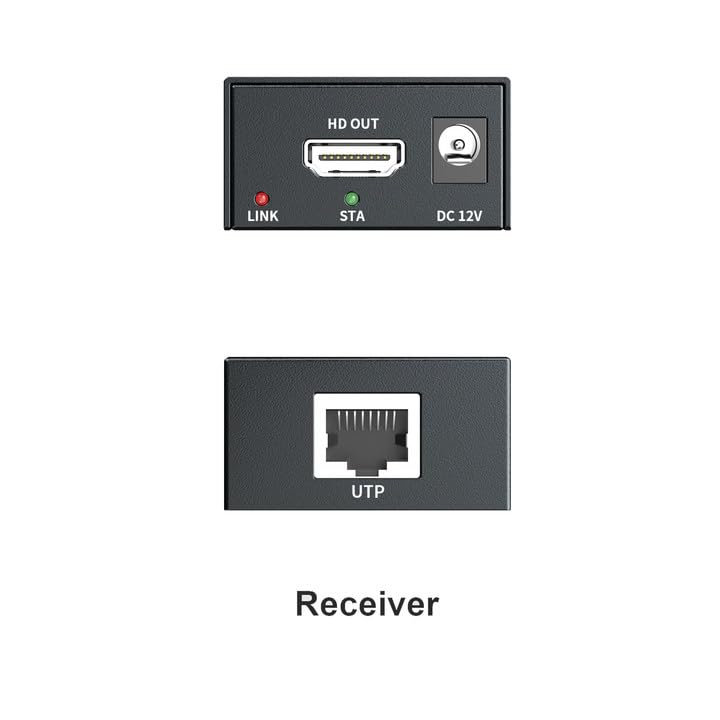
This close-up image shows the ports on the PWAY DT273P HDMI Extender Receiver. On one side, there is an HDMI OUT port, a DC 12V power input, and LED indicators for LINK and STA (Status). On the opposite side, there is a UTP (RJ45) port for network cable connection.
Receiver Port Descriptions:
- HDMI OUT: Connects to your display device (e.g., TV, monitor, projector) using an HDMI cable.
- DC 12V: Power input port for connecting the external power supply if POE is not used.
- LINK LED: Illuminates when a valid network link is established.
- STA LED: Indicates the operational status of the device.
- UTP (RJ45): Connects to the network cable (Cat5e/6/7/8) from the transmitter or network switch.
Setup
Basic Point-to-Point Connection
This setup describes a direct connection between a single transmitter (sold separately) and a single receiver (PW-DT273-RX).
- Connect your HDMI source (e.g., laptop, media player) to the HDMI IN port of the PWAY HDMI Extender Transmitter (sold separately) using an HDMI cable.
- Connect the UTP (RJ45) port of the Transmitter to the UTP (RJ45) port of the Receiver (PW-DT273-RX) using a single Cat5e/6/7/8 network cable.
- Connect the HDMI OUT port of the Receiver (PW-DT273-RX) to your display device (e.g., TV, monitor) using an HDMI cable.
- Power on the Transmitter and Receiver. If using POE, ensure your network switch provides power. Otherwise, connect the provided DC 12V power supply to the Receiver.

This diagram illustrates a point-to-point HDMI extension setup. An HDMI signal from a source is connected to a Transmitter unit. A network cable (Cat5e/6/7/8) connects the Transmitter to the Receiver unit, extending the signal up to 500 feet (approximately 150 meters). The Receiver then connects to a display.
One-to-Multiple Connection via POE Switch
This setup allows one HDMI source to transmit to multiple display devices using a network switch with Power over Ethernet (POE) capabilities.
- Connect your HDMI source to the HDMI IN port of the PWAY HDMI Extender Transmitter (sold separately) using an HDMI cable.
- Connect the UTP (RJ45) port of the Transmitter to a POE-enabled port on your network router/switch using a network cable.
- Connect the UTP (RJ45) port of each Receiver (PW-DT273-RX) to a POE-enabled port on the same network router/switch using network cables.
- Connect the HDMI OUT port of each Receiver (PW-DT273-RX) to its respective display device using an HDMI cable.
- Ensure the POE switch is powered on. The Receivers will draw power directly from the switch, eliminating the need for individual power adapters.

This diagram shows a 1-to-multiple HDMI extension setup using a POE switch. An input device connects to a Transmitter via HDMI. The Transmitter connects to a router/switch via a network cable. Multiple Receiver units then connect to the same router/switch via network cables, and each Receiver connects to a display device via HDMI. This setup utilizes POE, eliminating the need for separate power adapters for the receivers.
One-to-Multiple Connection (Non-POE Switch)
If your network switch does not support POE, you will need to power each receiver individually.
- Follow steps 1-3 from the 'One-to-Multiple Connection via POE Switch' section.
- Connect the provided DC 12V power supply to the DC 12V port of each Receiver (PW-DT273-RX).
- Ensure the network switch and all power supplies are connected and powered on.

This diagram illustrates a 1-to-multiple HDMI extension setup using a network switch, similar to the previous one, but explicitly showing the option to use individual power adapters for the Receiver units if the network switch does not provide POE. An input device connects to a Transmitter via HDMI. The Transmitter connects to a router/switch via a network cable. Multiple Receiver units connect to the same router/switch via network cables, and each Receiver connects to a display device via HDMI. Each Receiver is also shown connected to a power adapter.
Operating Instructions
Once all connections are made and devices are powered on, the HDMI signal should be automatically extended to the connected display(s). The extender operates on a plug-and-play principle, requiring no complex software configuration.
- Signal Transmission: The extender supports HDMI signal transmission up to 150 meters (492 feet) over Cat5e/6/7/8 network cables.
- Resolution: Supports resolutions up to Full HD 1080P at 60Hz for clear and smooth visuals.
- POE Support: If connected to a POE-enabled switch, the receiver will draw power directly from the network cable, simplifying installation.

This image shows a modern television displaying a high-definition image, with text overlay indicating '1080P@60Hz Enjoy HD Vision'. This illustrates the maximum supported resolution and refresh rate of the HDMI extender, ensuring a clear and smooth visual experience.
Troubleshooting
- No Picture/Signal:
- Ensure all HDMI and network cables are securely connected to their respective ports.
- Verify that both the Transmitter (sold separately) and Receiver (PW-DT273-RX) are powered on. Check LED indicators.
- Confirm that the HDMI source device and display device are functioning correctly.
- Try using different HDMI cables to rule out cable issues.
- Ensure the network cable is Cat5e/6/7/8 and does not exceed the maximum transmission length of 150 meters (492 feet).
- If using a network switch, ensure it is properly configured and functioning.
- Flickering/Poor Picture Quality:
- Reduce the network cable length if possible, especially if it's close to the maximum limit.
- Ensure the network cable is of high quality and properly terminated (e.g., T568B standard).
- Check for potential electromagnetic interference from other electronic devices.
- Verify that the resolution of the source device is supported by the extender (up to 1080P@60Hz).
- No Power to Receiver:
- If using POE, ensure the network switch port is POE-enabled and actively providing power. Check the switch's POE status indicators.
- If using an external power adapter, ensure it is correctly connected to the DC 12V port and the power outlet is active. Try a different power outlet.
Specifications
| Feature | Detail |
|---|---|
| Model | PW-DT273-RX |
| Brand | PWAY |
| Transmission Distance | Up to 150m (492ft) |
| Supported Resolution | 1080P@60Hz |
| Network Cable Requirement | Cat5e/6/7/8 |
| POE Support | Yes |
| Connector Type | HDMI, RJ45 |
| Compatible Devices | HDMI Sources/Displays (e.g., Laptop, Media Players) |
| Package Dimensions | 5.59 x 4.49 x 3.11 inches |
| Item Weight | 9.74 ounces |
Maintenance
- Keep the device clean and free from dust. Use a soft, dry cloth for cleaning.
- Avoid placing heavy objects on the device or subjecting it to physical shock.
- Store the device in a cool, dry place when not in use.
- Do not use harsh chemicals or abrasive cleaners.
Warranty and Support
For detailed warranty information, technical support, or service inquiries, please refer to the official PWAY website or contact your authorized retailer. Please retain your purchase receipt as proof of purchase for any warranty claims.