
Important Safety Instructions
To reduce the risk of fire, electric shock, or injury, observe the following safety precautions:
- Read all instructions before operating the appliance.
- Do not touch the evaporator or ice cubes directly during operation to avoid frostbite.
- Do not immerse the power cord, plug, or any part of the appliance in water or other liquids.
- Supervise children when the appliance is in use.
- Do not operate the appliance with a damaged cord or plug. Contact customer support for repair.
- Ensure proper ventilation around the appliance. Maintain at least 5 inches of space on all sides.
- Use only potable water in the water reservoir.
- Unplug the appliance before cleaning or when not in use.
- Do not use the appliance for purposes other than its intended use.
Product Overview
The OLIXIS Portable Countertop Ice Machine Maker is designed to produce bullet-shaped ice cubes efficiently. It features a compact design with a handle for portability and a self-cleaning function.

Figure 1: Front view of the OLIXIS Portable Countertop Ice Machine Maker, showcasing its compact design.

Figure 2: The ice maker features a portable handle for easy transportation.
Components:
- Ice Machine Unit
- Ice Basket (removable)
- Ice Scoop
Setup
- Unpacking: Carefully remove the ice maker from its packaging. Remove all packing materials, tape, and any protective film.
- Placement: Place the ice maker on a stable, level surface away from direct sunlight and heat sources. Ensure there is at least 5 inches (12.7 cm) of clear space around the unit for proper ventilation.
- Initial Cleaning: Before first use, clean the interior of the ice maker. Refer to the "Maintenance and Cleaning" section for detailed instructions.
- Power Connection: Plug the power cord into a grounded electrical outlet.

Figure 3: Rear view of the ice maker, highlighting the ventilation grilles. Ensure these are not obstructed.
Operating Instructions
Follow these steps to produce ice cubes:
- Add Water: Open the lid and fill the water reservoir with potable water up to the MAX fill line. The reservoir capacity is 1.5 liters.
- Power On: Press the ON/OFF button to start the ice making process. The POWER indicator light will illuminate.
- Select Ice Cube Size: Press the SELECT button to choose between small (S) or large (L) ice cube sizes. The corresponding indicator light will illuminate. Small cubes are approximately 22*24mm, and large cubes are 25*26mm.
- Ice Production: The ice maker will begin producing ice. Approximately 9 bullet-shaped ice cubes will be ready in about 6 minutes.
- Indicator Lights:
- ADD WATER: Illuminates when the water reservoir is low. Refill with water.
- ICE FULL: Illuminates when the ice basket is full. Empty the ice basket.
- POWER: Indicates the unit is powered on and operating.
- Noise Level: The ice maker operates at a noise level below 40dB, comparable to a working refrigerator.

Figure 4: The control panel features intuitive buttons for power, ice size selection, and indicator lights for operational status.

Figure 5: The ice maker produces two sizes of bullet-shaped ice cubes: small (S) and large (L).

Figure 6: Noise level comparison, indicating the ice maker operates quietly at approximately 40dB.
Official Product Video:
Video 1: An official video demonstrating the fast ice-making capabilities of the OLIXIS Countertop Ice Maker.
Maintenance and Cleaning
Regular cleaning ensures optimal performance and hygiene.
- Self-Cleaning Function: The ice maker features an automatic self-cleaning cycle. To activate, press and hold the ON/OFF button for 5 seconds. The cleaning cycle typically runs for 15 minutes.
- Draining Water: After the self-cleaning cycle or when preparing for storage, drain any remaining water from the reservoir. Locate the drain plug at the bottom of the unit, remove it, and allow water to flow out.
- Manual Cleaning: For thorough cleaning, unplug the unit. Remove the ice basket. Wipe the interior with a soft cloth and a mild detergent solution. Rinse thoroughly and dry. Clean the exterior with a damp cloth.
- Storage: Ensure the unit is completely dry before storing. Store in a cool, dry place.
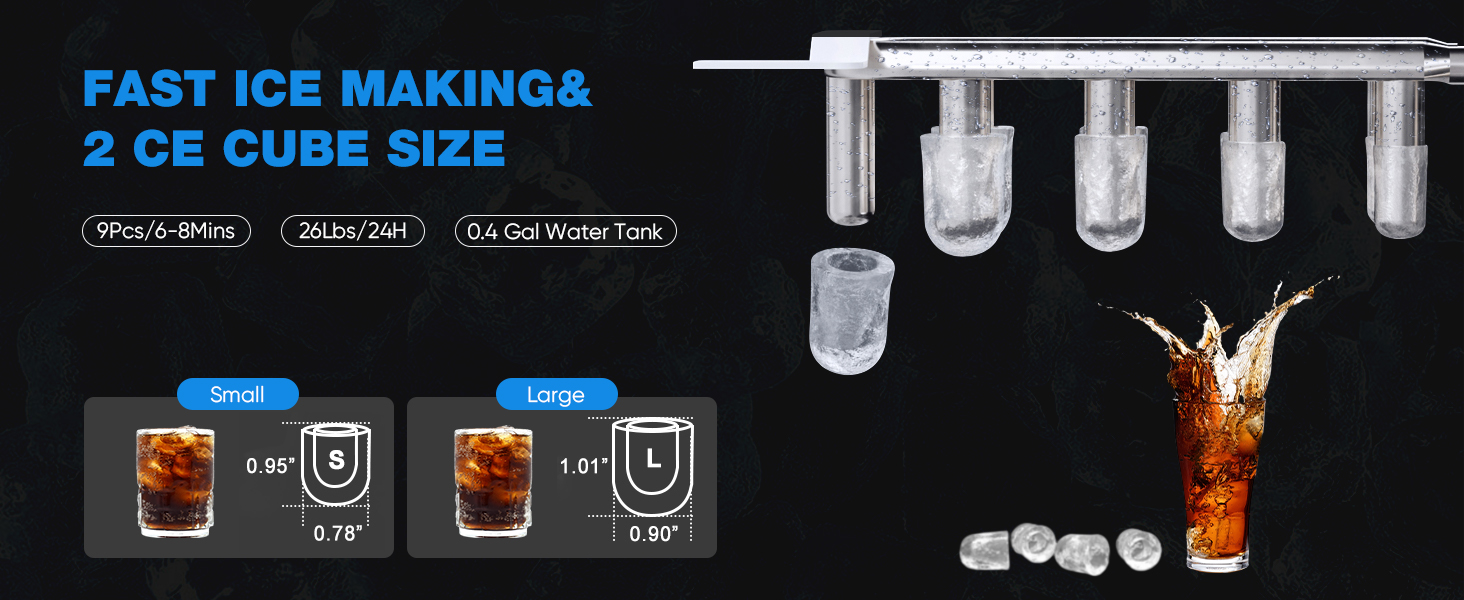
Figure 7: Steps for activating and completing the efficient self-cleaning function.
Troubleshooting
Review the following common issues and solutions before contacting customer support.
| Problem | Possible Cause | Solution |
|---|---|---|
| Ice maker not producing ice. | No water in reservoir; power issue; ambient temperature too high. | Fill water reservoir; check power connection; ensure proper ventilation. |
| "ADD WATER" indicator is on. | Water level is low. | Refill the water reservoir with potable water. |
| "ICE FULL" indicator is on. | Ice basket is full. | Empty the ice basket. |
| Ice cubes melt quickly in the basket. | Ice basket is not refrigerated. | This is normal. Transfer ice to a freezer for long-term storage. |
| Unusual noise during operation. | Normal operating sounds (compressor, water pump, ice dropping). | Verify the noise is not excessive (should be below 40dB). If unusual, contact support. |
Specifications
| Feature | Specification |
|---|---|
| Brand | OLIXIS |
| Model Name | OLIXIS Portable Ice Machine Maker Countertop with Handle |
| Model Number | OLM-PBK |
| Product Dimensions (D x W x H) | 11.6" x 8.8" x 12.5" |
| Capacity (Water Tank) | 1.5 liters |
| Voltage | 115V |
| Ice Production per Day | 26.5 pounds |
| Ice Cube Production Time | 9 cubes in 6 minutes |
| Refrigerant | R600a |
| Material Type | Plastic, Stainless Steel |
| UPC | 792138537182 |

Figure 8: Product dimensions: 8.8 inches (W) x 11.6 inches (D) x 12.5 inches (H).
Warranty Information
This product comes with a standard manufacturer's warranty. For specific details regarding warranty coverage, duration, and terms, please refer to the warranty card included in your product packaging. Alternatively, you may contact OLIXIS customer support for further information.
Customer Support
For technical assistance, troubleshooting guidance beyond this manual, or to inquire about warranty claims, please contact OLIXIS customer support. Contact information, including phone numbers and email addresses, can typically be found on the product packaging, the official OLIXIS website, or your purchase documentation.
