
1. Introduction
This manual provides detailed instructions for the assembly, operation, and maintenance of your TRYX Luca L70 ATX Mid-Tower PC Case. Please read this manual thoroughly before beginning installation to ensure proper setup and to maximize the performance and longevity of your system.
2. Product Features
- Enhanced Cooling Support: Designed to accommodate up to two 420mm radiators, ensuring optimal thermal performance for high-end components.
- Premium Construction: Crafted from anodized 6000 series aluminum with 4mm tempered glass panels, offering durability, style, and component visibility.
- Spacious and Modular Design: Supports GPUs up to 460mm in length, E-ATX motherboards, and features flexible power supply unit (PSU) placement options (top or bottom) along with an adjustable motherboard tray for versatile configurations.
- Effortless Installation: Features tool-free assembly with clip-on panels and hinged doors, simplifying the installation and maintenance process.
- Elegant Aesthetics: An X-shaped floating base elevates the chassis by 40mm, enhancing airflow and contributing to a sleek, modern appearance.
- Front Panel Connectivity: Includes 1x USB-C 3.2 Gen 2x2 (30W Power Delivery) and 4x USB-A 3.2 Gen 1 ports for extensive peripheral connectivity.

Figure 2.1: Internal view highlighting the sleek aesthetics, 19mm ultra-narrow bezel, 4mm tempered glass, and the X-shaped floating base design which elevates the case by 40mm for improved airflow.

Figure 2.2: Close-up of the case construction, illustrating the side panels and frame crafted from premium 6000 series anodized aluminum.
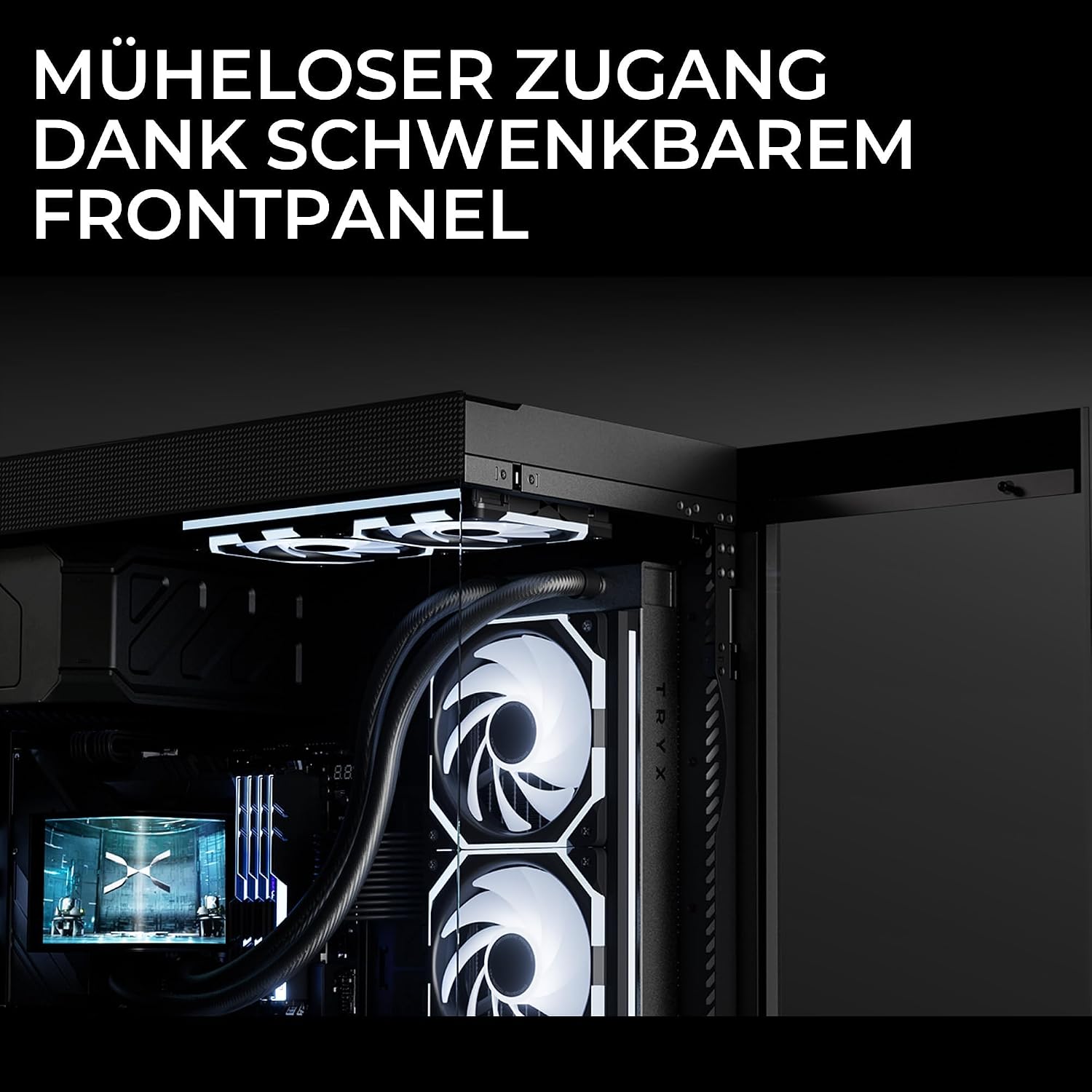
Figure 2.3: The hinged front panel in an open position, demonstrating the effortless access for installation and maintenance.

Figure 2.4: Diagram illustrating the modular design, including flexible PSU mounting options (top or bottom) and various radiator and fan compatibility configurations.

Figure 2.5: Front panel connectivity options, detailing the microphone and speaker jacks, 1x USB-C 3.2 Gen 2x2 (30W PD), and 4x USB-A 3.2 Gen 1 ports.
3. Specifications
| Feature | Detail |
|---|---|
| Model Name | Luca L70 |
| Model Number | C-L700N-NN0H-G0K |
| Case Type | Mid-Tower |
| Color | Black |
| Material | Anodized 6000 Series Aluminum, 4mm Tempered Glass |
| Dimensions (D x W x H) | 54P x 26l x 57H cm |
| Motherboard Compatibility | E-ATX, ATX, Micro-ATX, Mini-ITX |
| GPU Clearance | Up to 460 mm |
| CPU Cooler Clearance | Up to 170 mm |
| Expansion Slots | 7 |
| Drive Bays | Up to 9x 2.5" SSDs, Up to 2x 3.5" HDDs (Total internal bays: 11) |
| PSU Mounting | Bottom, Top (Flexible) |
| Cooling Method | Water (Supports up to dual 420mm radiators), Air (Supports up to 9 fans) |
| Front I/O Ports | 1x USB-C 3.2 Gen 2x2 (30W PD), 4x USB-A 3.2 Gen 1, Microphone, Speaker |
| UPC | 06977029650216 |
4. Setup and Installation
Follow these general steps for assembling your PC components within the TRYX Luca L70 case. Refer to your individual component manuals for specific installation details.
- Unpacking and Inspection: Carefully remove the case from its packaging. Inspect for any damage during transit.
- Panel Removal: The side panels and front panel are designed for easy removal. Gently unclip or unhinge them as needed to access the interior. The front panel is hinged for convenient access.
- Motherboard Installation: Install the necessary standoffs for your motherboard form factor (E-ATX, ATX, Micro-ATX, Mini-ITX). Carefully place your motherboard onto the standoffs and secure it with screws. The motherboard tray is adjustable for optimal positioning.
- Power Supply Unit (PSU) Installation: Install your PSU in the designated area. The Luca L70 offers flexible mounting options for the PSU, either at the top or bottom of the chassis. Secure it with screws.
- Storage Drive Installation: Mount your 2.5" SSDs and 3.5" HDDs into the available drive bays. The case supports up to 9x 2.5" SSDs and 2x 3.5" HDDs.
- Graphics Processing Unit (GPU) Installation: Insert your GPU into the appropriate PCIe slot on your motherboard and secure it. Ensure it is properly seated. The case supports GPUs up to 460mm.
- Cooling System Installation: Install your chosen cooling solution. The case supports up to two 420mm radiators for liquid cooling or up to 9 fans for air cooling. Position fans for optimal airflow.
- Cable Management: Utilize the cable routing channels and tie-down points behind the motherboard tray to manage cables. This improves airflow and aesthetics. The case provides 30mm of cable management space.
- Connecting Front Panel I/O: Connect the front panel cables (USB, audio, power, reset) to the corresponding headers on your motherboard. Refer to your motherboard manual for header locations.
- Closing Panels: Once all components are installed and cables are managed, reattach the side and front panels. Ensure they are securely fastened.
5. Operating Guidelines
The TRYX Luca L70 is designed for optimal performance with proper airflow. Ensure that your cooling fans are configured to create an efficient air intake and exhaust path. The elevated X-shaped base contributes to improved bottom-up airflow, which is crucial for systems with bottom-mounted intake fans or radiators.
Regularly monitor your system's temperatures, especially during intensive tasks, to ensure all components are operating within safe thermal limits.
6. Maintenance
To maintain optimal performance and longevity of your PC and case, regular maintenance is recommended:
- Dust Filter Cleaning: Periodically remove and clean any dust filters to prevent dust buildup, which can restrict airflow and lead to overheating. Use compressed air or a soft brush.
- Exterior Cleaning: Wipe the exterior surfaces of the case with a soft, damp cloth. Avoid abrasive cleaners or solvents that could damage the finish or tempered glass.
- Internal Dust Removal: Every few months, open the case and use compressed air to gently remove dust from internal components, especially heatsinks and fan blades.
- Cable Check: Occasionally check all internal and external cable connections to ensure they are secure.
7. Troubleshooting
If you encounter issues with your PC build, consider the following general troubleshooting steps:
- No Power: Ensure the PSU is switched on, the power cable is securely connected to both the PSU and the wall outlet, and the front panel power switch cable is correctly connected to the motherboard.
- Fans Not Spinning: Verify that all fan cables are properly connected to the motherboard or fan controller. Check BIOS/UEFI settings for fan speed control.
- Overheating: Confirm that all cooling fans are operating correctly and oriented for proper airflow. Clean any dust filters and internal components. Ensure CPU cooler and GPU fans are functioning.
- Front Panel I/O Issues: If USB ports or audio jacks are not working, check that the corresponding cables from the front panel are securely connected to the correct headers on your motherboard.
- Component Not Detected: Re-seat the component (e.g., GPU, RAM, storage drive) and ensure all power and data cables are firmly connected.
For more specific issues, consult the manuals for your individual PC components (motherboard, GPU, PSU, etc.) or seek assistance from a qualified technician.
8. Warranty and Support
For warranty information and customer support regarding your TRYX Luca L70 PC Case, please refer to your point of purchase or visit the official TRYX website. Keep your proof of purchase for warranty claims.
