
DICTAC BFX
DICTAC Queen Floating Bed Frame with LED Lights and Headboard Storage
Model: BFX
Product Overview
The DICTAC Queen Floating Bed Frame (Model BFX) is designed to provide a stable and functional sleeping solution. It features a headboard with integrated storage, a built-in charging station, and RGB LED lighting. The unique floating design enhances the aesthetic while providing practical under-bed space.

Image: Overview of the DICTAC Queen Floating Bed Frame, showcasing the LED lighting and headboard storage.
Safety Information
Please read and understand all safety warnings before assembly and use. Failure to follow these instructions may result in injury or damage to the product.
- Do not exceed the maximum weight capacity of 1300 pounds.
- A box spring is not required and should not be used with this bed frame. Using a box spring may compromise stability.
- Ensure all electrical connections for the LED lighting and charging station are secure and follow local electrical safety guidelines.
- Always follow assembly instructions carefully to prevent instability or collapse.
- Keep small parts away from children during assembly.
Package Contents
Before beginning assembly, verify that all components are present and undamaged. Refer to the included installation manual for a detailed parts list.
- Bed Frame Components
- Headboard with Storage and Charging Station
- Metal Slats
- LED Light Strips
- Assembly Tools (Allen wrench, screwdriver)
- Installation Manual
Setup and Assembly
Assembly typically takes approximately 30 minutes with two people. Follow the numbered steps in the provided installation manual. Ensure all connections are tightened securely before use.
- Unpack Components: Carefully remove all parts from the packaging and lay them out on a clean, soft surface to prevent scratches.
- Assemble Headboard: Attach the headboard sections, ensuring the storage compartments and charging station are correctly oriented.
- Connect Side Rails: Secure the side rails to the headboard and footboard using the provided hardware.
- Install Support Legs: Attach the central support legs and any additional frame supports.
- Place Slats: Position the metal slats across the frame. Ensure they are evenly spaced and securely fastened to prevent mattress sagging.
- Install LED Lights: Attach the RGB LED light strips to the designated areas under the bed frame using the strong Velcro provided.
- Connect Charging Station: Plug the charging station into a wall outlet.
- Final Check: Verify all screws and bolts are tight. Ensure the frame is stable and level.

Image: Detailed view of the bed frame's internal structure, highlighting metal support legs and main steel supports for stability. Also shows recommended mattress thickness and easy assembly features.
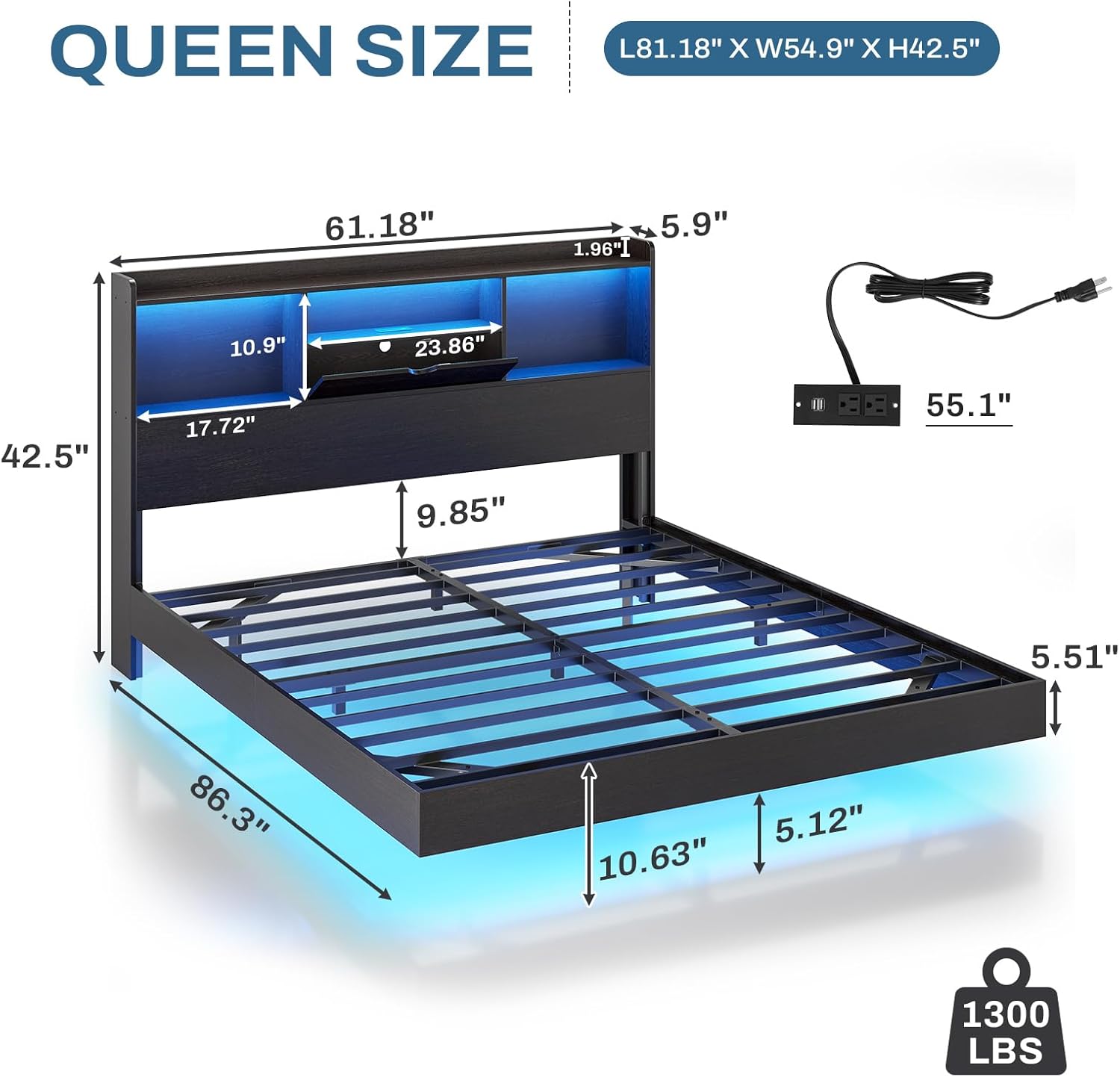
Image: Technical drawing displaying the dimensions of the Queen size bed frame, including length, width, height, and headboard storage measurements.
Operating Instructions
Headboard Storage and Charging Station
The headboard features a 2-tier storage system, including an open display layer and a second layer with three open compartments and one hidden compartment. This space is suitable for organizing small items such as alarm clocks, books, and personal devices.
The integrated charging station includes 2 AC outlets (120V/12A) and 2 USB ports (5V/2.1A). Connect the power cord to a wall outlet to activate the charging functions. This allows convenient charging of phones, tablets, and other mobile devices directly from the bed.

Image: Close-up view of the headboard, illustrating the open storage shelves, a hidden compartment, and the integrated charging station with AC outlets and USB ports.
RGB LED Lighting System
The bed frame is equipped with RGB LED lights on both the headboard and under the bed. These lights can be controlled via a mobile application, remote control, or a physical button.
- Color Selection: Access over 60,000 color options through the mobile app.
- Brightness Adjustment: Customize the light intensity to your preference.
- Mode Settings: Choose from various lighting modes, including static colors, dynamic effects, and music synchronization.
- Timer Function: Set schedules for the lights to turn on or off automatically.
- Music Sync: The LED lights can synchronize with music for an enhanced ambiance.

Image: The bed frame illuminated with RGB LED lights, showing the remote control and a smartphone displaying the control app interface.
Maintenance
Regular maintenance ensures the longevity and optimal performance of your bed frame.
- Cleaning: Wipe down the frame and headboard surfaces with a soft, damp cloth. Avoid harsh chemicals or abrasive cleaners.
- Fastener Check: Periodically check all screws and bolts to ensure they remain tight. Re-tighten if necessary to maintain stability.
- LED Lights: Ensure the LED strips remain securely attached. If any part becomes loose, re-secure it with the Velcro.
- Under-bed Area: The floating design allows for easy cleaning underneath the bed, including access for robotic vacuums.
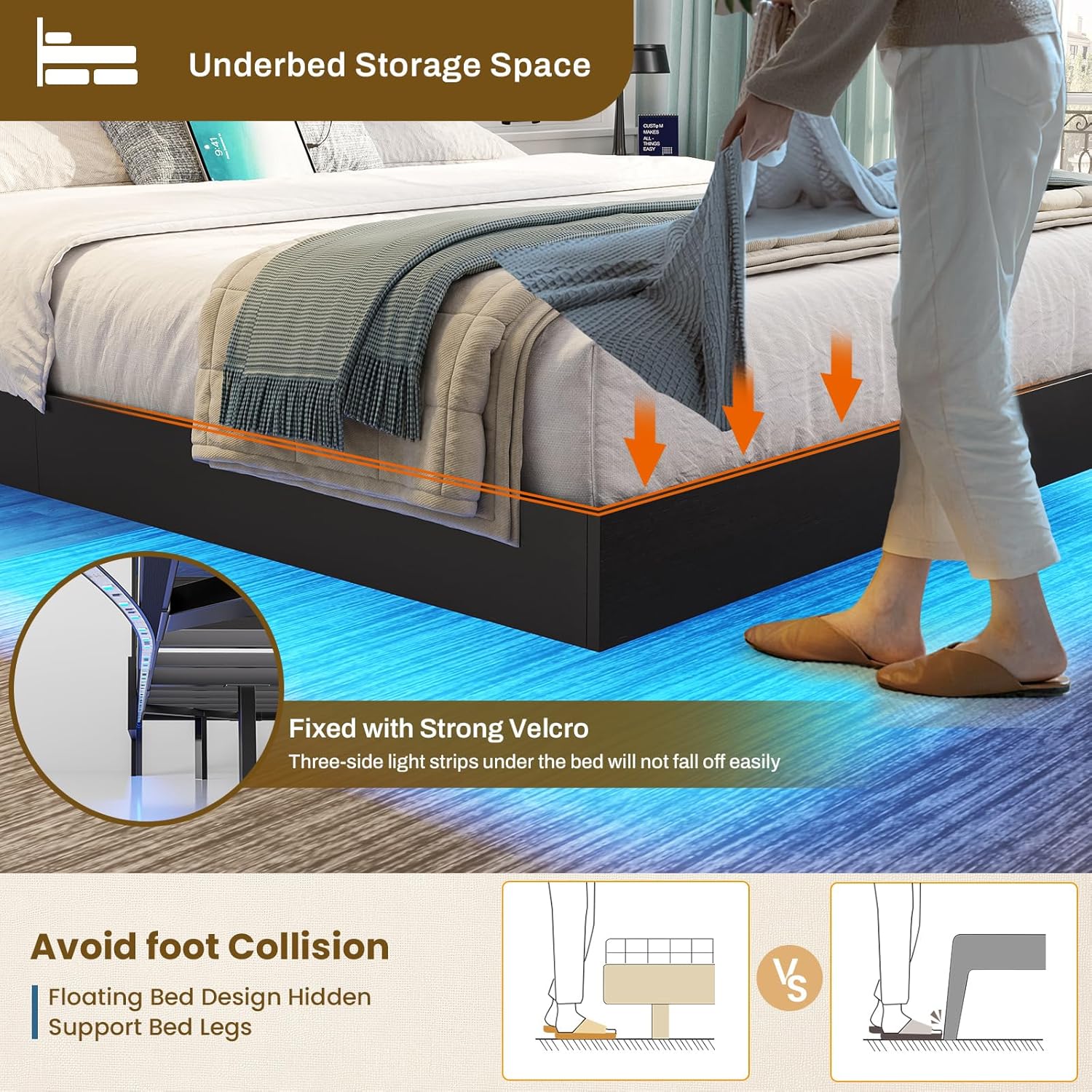
Image: Illustration of the underbed space, demonstrating how the floating design allows for easy access and prevents foot collision. Shows the Velcro attachment for LED strips.
Troubleshooting
If you encounter any issues with your DICTAC bed frame, refer to the following common solutions:
| Problem | Possible Cause | Solution |
|---|---|---|
| Bed frame is unstable or wobbly. | Loose fasteners; uneven floor. | Re-tighten all screws and bolts. Ensure the bed is on a level surface. |
| LED lights are not working. | Power connection issue; remote/app not paired; damaged strip. | Check if the power adapter is securely plugged in. Ensure the remote or app is correctly paired. Inspect LED strips for visible damage. |
| Charging station is not providing power. | Power cord not plugged in; wall outlet issue. | Verify the charging station's power cord is fully inserted into a functional wall outlet. Test the outlet with another device. |
| Squeaking noises from the frame. | Loose connections; friction between metal parts. | Tighten all fasteners. Anti-noise sponge strips are included to minimize noise; ensure they are properly installed. |
Specifications
| Feature | Detail |
|---|---|
| Model Number | BFX |
| Size | Queen |
| Product Dimensions (L x W x H) | 86.3" x 61.18" x 42.5" |
| Weight Capacity | Up to 1300 lbs |
| Recommended Mattress Thickness | 8" - 12" (No Box Spring Needed) |
| Ground to Item Distance | 5.12 Inches |
| Headboard Features | Bookcase Storage, Built-in Charging Station (2 AC outlets, 2 USB ports) |
| Lighting | RGB LED Lights (App/Remote/Button Control) |
| Material | FSC Certified Wood, Metal Frame |
| Assembly Required | Yes |
Warranty and Support
DICTAC is committed to providing quality products and customer satisfaction. While specific warranty details are not provided in this manual, please retain your proof of purchase for any warranty claims.
For any questions, concerns, or assistance with your DICTAC Queen Floating Bed Frame, please contact our customer support team. We are available to help before and after your purchase.
Contact information can typically be found on the product packaging or the official DICTAC website.
Ask a question about this manual
Ask about setup, troubleshooting, compatibility, parts, safety, or missing instructions. Manuals+ will review the question and use this page’s manual context to help answer it.