
NGTeco NG-5300
NGTeco 4MP Wireless Outdoor Security Camera User Manual
Model: NG-5300
Introduction
This user manual provides comprehensive instructions for setting up, operating, and maintaining your NGTeco 4MP Wireless Outdoor Security Camera. Designed for home security, this battery-powered camera offers advanced features such as 4MP Full HD video, color night vision, smart PIR motion detection, two-way audio, and flexible storage options (Cloud/SD card). It is built to withstand outdoor conditions with an IP65 waterproof rating and is compatible with Alexa for convenient control.
Product Overview

The NGTeco NG-5300 camera is a compact, wireless security solution. It features a high-resolution 4MP lens, integrated spotlight for color night vision, and a motion sensor. The camera is designed for easy wall mounting and includes a robust battery for extended operation.
What's in the Box
- NGTeco 4MP Wireless Outdoor Security Camera (1 unit)
- Mounting Bracket
- Mounting Screws and Anchors
- USB Charging Cable
- User Manual (this document)
Setup
1. Initial Charging
Before first use, fully charge the camera using the provided USB cable. The camera features a 5000mAh rechargeable battery for long standby times.

The NGTeco camera is equipped with a 5000mAh battery, providing significantly longer working time compared to cameras with smaller capacities. It can also be charged via a compatible solar panel (not included) for continuous power.
2. App Download and Account Creation
Download the official NGTeco app from your smartphone's app store (iOS or Android). Follow the in-app instructions to create an account and log in.
3. Connecting to Wi-Fi
The camera supports 2.4G Wi-Fi networks only. Ensure your smartphone is connected to a 2.4G Wi-Fi network during the setup process. Open the app, select "Add Device," and follow the on-screen prompts to connect your camera to your home Wi-Fi network. This typically involves scanning a QR code generated by the app with the camera's lens.
4. Mounting the Camera
The NGTeco camera is designed for quick and easy installation with no wiring needed. Choose a suitable outdoor location that provides the desired viewing angle and is within range of your Wi-Fi signal. Use the provided mounting bracket, screws, and anchors to securely attach the camera to a wall or other stable surface.

Installation is straightforward. The camera can be quickly mounted on an exterior wall using the included hardware, providing a secure and stable position for optimal surveillance.
Operating the Camera
Live View
Access the live video feed from your camera anytime through the NGTeco app. This allows you to monitor your property in real-time.
Smart PIR Motion Detection
The camera utilizes advanced PIR (Passive Infrared) sensing technology to detect motion. When motion is detected, the camera will send real-time notifications to your app. You can adjust the PIR sensitivity (Low/Medium/High) within the app to optimize detection and reduce false alerts.
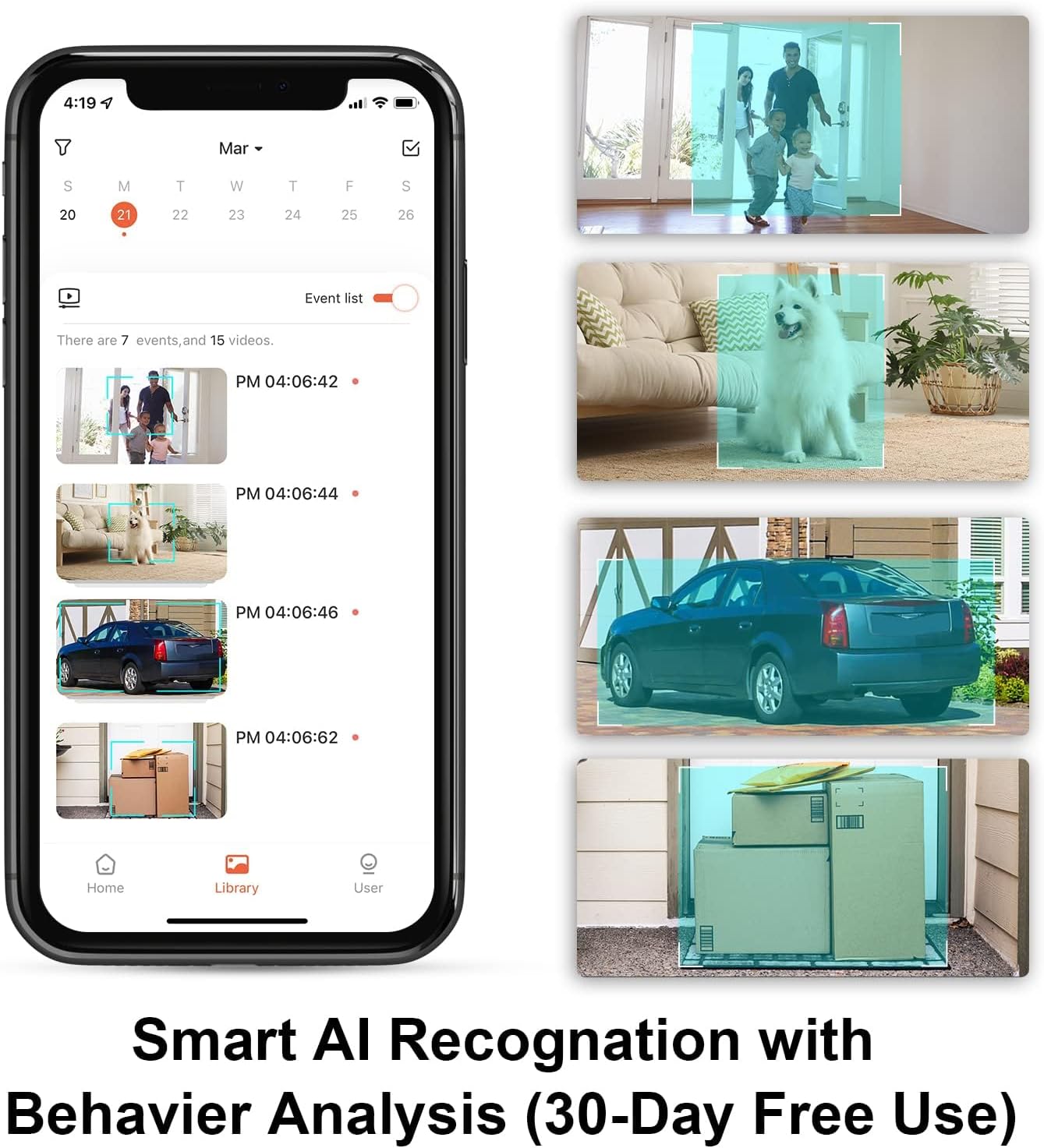
The NGTeco app provides smart AI recognition with behavior analysis, allowing the camera to differentiate between humans, pets, and vehicles. Detected events are recorded and accessible through the app's event list.
Two-Way Audio
Communicate with visitors or deter intruders using the camera's built-in microphone and speaker. Access the two-way audio feature directly from the live view in your app.

The two-way audio feature enables live communication through the camera, allowing you to speak with someone at your door or on your property directly from your smartphone.
Night Vision
The NGTeco camera offers both color night vision and infrared (IR) night vision. The color night vision is activated when the integrated spotlight is on, providing clear, full-color images even in low-light conditions. When the spotlight is off, the camera automatically switches to infrared mode for black and white night vision.

The camera provides versatile night vision capabilities. With the spotlight on, you get clear color images at night. In infrared mode (spotlight off), the camera captures detailed black and white footage.
Cloud and SD Card Storage
Recorded video footage can be stored either in the cloud (30-day free trial available) or locally on a microSD card (not included). This provides flexible options for reviewing past events.

The NGTeco camera supports both secure cloud storage and local storage via an SD card, giving you options for saving and accessing your video recordings.
Sharing Permissions
You can share camera access and permissions with family and friends through the NGTeco app. This allows multiple users to view live feeds, receive notifications, and access recorded videos.

The app allows you to easily share camera permissions with family and friends, enabling them to receive notifications, view live broadcasts, and access cloud or SD card video recordings.
For more details on sharing, visit: NGTeco Camera Sharing Guide
Alexa Compatibility
The NGTeco camera is compatible with Alexa. You can integrate your camera with Alexa-enabled devices to view live feeds using voice commands (e.g., "Hey Alexa, show me the front yard").

Seamlessly integrate your NGTeco camera with Alexa to view live footage on compatible smart displays using simple voice commands.
Maintenance
Battery Management
To ensure continuous operation, monitor the battery level through the NGTeco app. Recharge the camera when the battery is low. For extended outdoor use, consider pairing the camera with a compatible solar panel (sold separately).
Cleaning
Periodically clean the camera lens and body with a soft, damp cloth to remove dust and debris. Avoid using harsh chemicals or abrasive materials that could damage the camera.
Weather Resistance
The NGTeco camera has an IP65 waterproof rating, meaning it is protected against dust and low-pressure water jets. It is designed to safely operate in various weather conditions, including rain, hot days, and extreme cold (14°F ~ 113°F).

The camera's IP65 rating ensures it can withstand various weather conditions, including rain, making it suitable for reliable outdoor surveillance.
Troubleshooting
- Camera not connecting to Wi-Fi: Ensure your Wi-Fi is 2.4Ghz. Check Wi-Fi signal strength at the camera's location. Restart your router and the camera. Re-attempt the connection process in the app.
- Poor video quality: Check your Wi-Fi signal strength. Ensure the camera lens is clean and free from obstructions.
- Motion detection not working: Verify PIR sensitivity settings in the app. Ensure the camera's view is clear and not obstructed.
- Battery draining quickly: Reduce motion detection sensitivity or frequency of recordings. Ensure the camera is not in an area with constant motion. Consider using a solar panel for continuous charging.
- No audio or poor audio: Check microphone and speaker settings in the app. Ensure there are no physical obstructions blocking the microphone or speaker.
If you encounter persistent issues, please refer to the Support section for contact information.
Specifications
| Feature | Detail |
|---|---|
| Model Name | NG-5300 |
| Indoor/Outdoor Usage | Outdoor |
| Video Capture Resolution | 1920p (4MP) |
| Power Source | Battery Powered (5000mAh) |
| Connectivity Technology | Wireless (2.4G Wi-Fi Only) |
| Waterproof Rating | IP65 |
| Special Feature | 2-Way Audio, Color Night Vision, Motion Detection |
| Compatible Devices | Smartphone (Android, iOS), Alexa |
| Product Dimensions | 7.56 x 3.15 x 3.15 inches |
| Item Weight | 1.01 pounds |
Support
For technical assistance or any inquiries regarding your NGTeco security camera, please contact our support team:
- Phone: +1(770)800-2321
- E-mail: ngtime@ngteco.com
- Operating Hours: Monday to Friday, 6:00 am to 6:00 pm (EST)
NGTeco provides Free Lifetime USA Technical Support for its products.

Our dedicated call center service is available to assist you with any product-related questions or issues during business hours.
Related documentsNG-5300


Ask a question about this manual
Ask about setup, troubleshooting, compatibility, parts, safety, or missing instructions. Manuals+ will review the question and use this page’s manual context to help answer it.