
1. Product Overview
The imagitarium in-FIL 20 Internal Filter provides essential water purification for your aquarium. It utilizes a hang-on internal filtration system, offering chemical, mechanical, and biological filtration to maintain a healthy aquatic environment. This filter is suitable for 10 to 20-gallon aquariums.
Key features include:
- Designed for framed and frameless 10 to 20-gallon aquariums.
- Includes biological filter cartridge and coconut carbon filter cartridge.
- Adjustable height aquarium wall hanger.
- Adjustable water flow.
- Optional water inlet sponge pre-filter.
- Includes 4 suction cups for secure placement.
- Rated for 70-120 Gallons Per Hour (GPH).
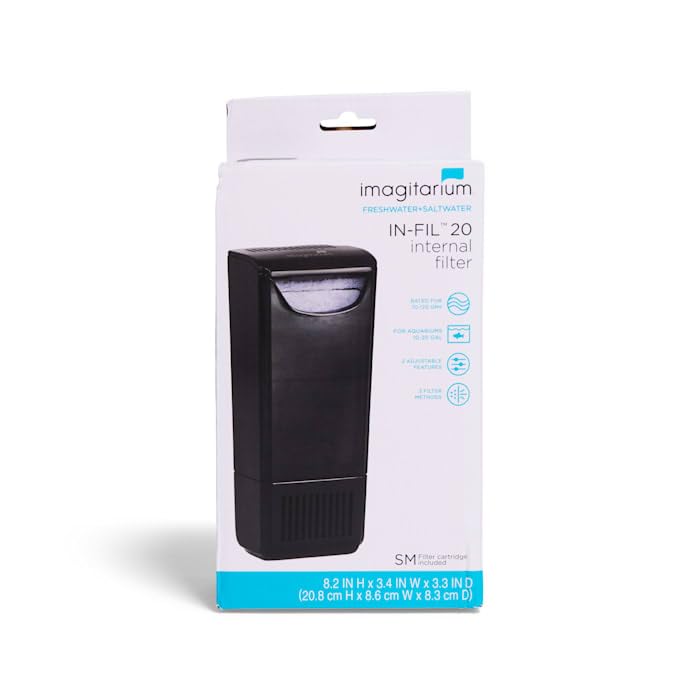
Figure 1: Imagitarium in-FIL 20 Internal Filter, front view.
2. Setup Instructions
Follow these steps to properly set up your in-FIL 20 Internal Filter:
- Preparation: Rinse and wipe down all filter parts with a clean, soft towel. Ensure all components are free of debris before first use.
- Inspection: Assemble the filter components and check for any broken or damaged parts. Do not use if any parts are damaged.
- Cartridge Installation: Insert the biological and coconut carbon filter cartridges into their designated slots within the filter unit. Refer to the diagram for correct placement.
- Pre-Filter (Optional): If using, attach the water inlet sponge pre-filter to the intake.
- Mounting: Attach the adjustable height aquarium wall hanger to the filter unit. Use the included 4 suction cups to securely mount the filter to the inside wall of your aquarium. Ensure the filter is fully submerged and positioned correctly for optimal water flow.
- Placement: Position the filter in your aquarium, ensuring the water level is between the 'MIN' and 'MAX' indicators on the filter body.

Figure 2: Disassembled filter components, including cartridges and suction cups.

Figure 3: Rear view of the filter showing the four suction cups for secure mounting.

Figure 4: Packaging diagram illustrating filter components and installation points.
3. Operating the Filter
Once the filter is securely installed and submerged, plug it into a suitable power outlet. The filter will begin to circulate and purify the aquarium water.
- Water Flow Adjustment: The filter features an adjustable water flow control. Rotate the flow knob (if present) to increase or decrease the water output to suit your aquarium's needs and inhabitants.
- Water Level: Ensure the water level in your aquarium remains above the minimum water level indicator on the filter body for continuous operation.
- GPH Rating: The filter operates at a rate of 70-120 GPH, providing adequate filtration for its recommended tank sizes.
4. Maintenance
Regular maintenance is crucial for the optimal performance and longevity of your filter. Always unplug the filter from the power source before performing any cleaning or maintenance.
- Frequent Inspection: Regularly inspect the filter for any blockages, wear, or damage.
- Cleaning: Disassemble the filter and rinse all parts with clean aquarium water (not tap water, as chlorine can harm beneficial bacteria). Gently clean the impeller and impeller housing to remove any buildup.
- Cartridge Replacement: The biological and coconut carbon filter cartridges should be replaced periodically, typically every 2-4 weeks, depending on your aquarium's bioload. Follow the instructions provided with replacement cartridges.
- Reassembly: After cleaning and/or cartridge replacement, reassemble all parts and ensure they are securely fitted before returning the filter to the aquarium and plugging it back in.

Figure 5: Front view of the filter, showing access points for maintenance.
5. Troubleshooting
If you encounter issues with your filter, consider the following common solutions:
- Reduced Water Flow: Check if the filter cartridges are clogged and require cleaning or replacement. Ensure the impeller is free of debris and spinning correctly. Verify the water level in the aquarium is sufficient.
- Filter Not Starting: Ensure the filter is securely plugged into a working power outlet. Check for any obstructions in the impeller.
- Excessive Noise: This can often be caused by a dirty or improperly seated impeller. Unplug, clean the impeller and its housing, and reassemble. Ensure the filter is fully submerged and not vibrating against the tank wall.
- Water Clarity Issues: Ensure filter cartridges are clean and correctly installed. Consider if the filter is appropriately sized for your tank's bioload.
6. Product Specifications
| Feature | Specification |
|---|---|
| Model | in-FIL 20 |
| Recommended Aquarium Size | 10-20 Gallons |
| Flow Rate (GPH) | 70-120 GPH |
| Filtration Type | Mechanical, Chemical (Coconut Carbon), Biological |
| Mounting | Internal, Suction Cups, Adjustable Hanger |
| Item Dimensions (LxWxH) | 3.54 x 3.4 x 8.2 inches |
| Item Weight | 0.98 Pounds (approx. 15.7 ounces) |
| Manufacturer | Imagitarium |
7. Warranty and Support
Specific warranty information for the imagitarium in-FIL 20 Internal Filter is not provided within this manual. For details regarding warranty coverage, product support, or to purchase replacement parts, please refer to the manufacturer's official website or contact their customer service directly.