
1. Introduction
The imagitarium EX-FIL 10 Hang-On-Back Filter provides comprehensive water purification for your aquarium. It utilizes mechanical, chemical, and biological filtration to maintain a healthy aquatic environment. This filter is designed for aquariums up to 10 gallons and features coconut carbon media for effective chemical filtration. This manual will guide you through the proper installation, operation, and maintenance of your filter.
2. Important Safety Information
Please read and follow all safety instructions carefully to prevent injury or damage. Failure to do so may result in electric shock, fire, or damage to the product.
- Electrical Safety: Always unplug the filter from the power outlet before performing any maintenance, cleaning, or assembly. Ensure your hands are dry when handling the power cord or plug.
- Water Contact: This appliance is designed for use with water. Do not immerse the power plug or cord in water.
- Children and Pets: Keep this product out of reach of children and pets.
- Damage Inspection: Regularly inspect the filter and power cord for any signs of damage. Do not operate if any part is damaged.
- Intended Use: Use this product only for its intended purpose as an aquarium filter.
3. Package Contents
Verify that all components are present and in good condition before proceeding with installation.
- EX-FIL 10 Filter Unit
- Biological Filter Cartridge
- Coconut Carbon Filter Cartridge
- Adjustable Height Water Inlet Tube
- Optional Water Inlet Sponge Pre-Filter
- Adjustable Footing
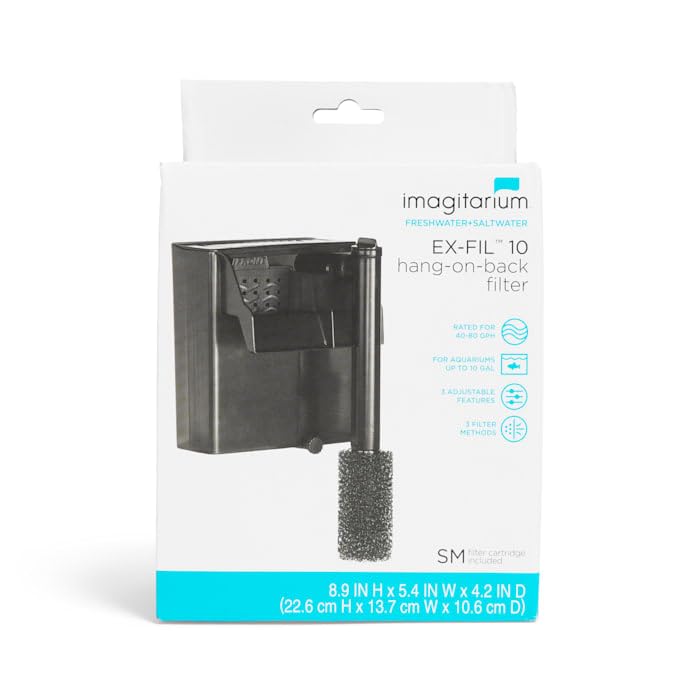
Figure 1: Diagram illustrating the various components of the imagitarium EX-FIL 10 filter, including the adjustable water flow valve, adjustable height water inlet, biological filter cartridge, coconut carbon filter cartridge, optional water inlet sponge pre-filter, and adjustable footing. Dimensions are also indicated.
4. Setup Instructions
Follow these steps to properly set up your imagitarium EX-FIL 10 filter.
- Prepare Components: Rinse and wipe down all filter parts with a clean, soft towel prior to first use. Inspect all parts for any damage.
- Install Filter Cartridges: Insert the biological filter cartridge and the coconut carbon filter cartridge into their designated slots within the filter unit. Ensure they are seated correctly.
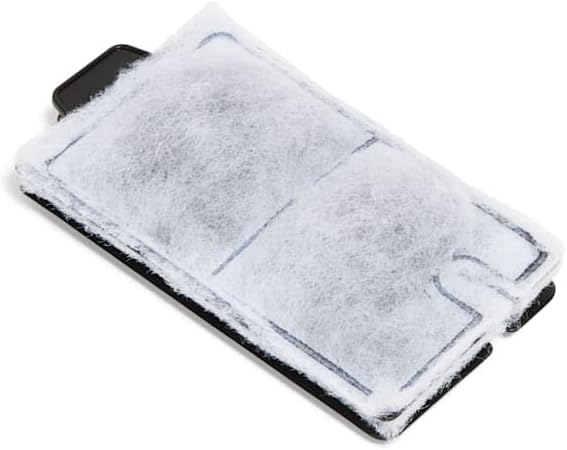
Figure 2: A close-up view of the filter cartridge, showing its design for effective filtration.
- Attach Water Inlet Tube: Connect the adjustable height water inlet tube to the filter unit. Adjust its length as needed for your aquarium depth.
- Add Sponge Pre-Filter (Optional): If desired, attach the optional water inlet sponge pre-filter to the bottom of the water inlet tube. This helps prevent larger debris from entering the filter and protects small fish or invertebrates.

Figure 3: A detailed view of the sponge pre-filter, designed to attach to the water inlet tube.
- Attach Adjustable Footing: Secure the adjustable footing to the bottom of the filter unit. This footing helps stabilize the filter on both framed and frameless aquariums.
- Hang on Aquarium: Carefully hang the assembled filter unit on the back of your aquarium. Ensure it is level and securely positioned.
- Prime the Filter: Before plugging in, fill the filter reservoir with water from your aquarium. This primes the pump and prevents it from running dry.
- Connect Power: Once the filter is primed and securely in place, plug the power cord into a grounded electrical outlet.
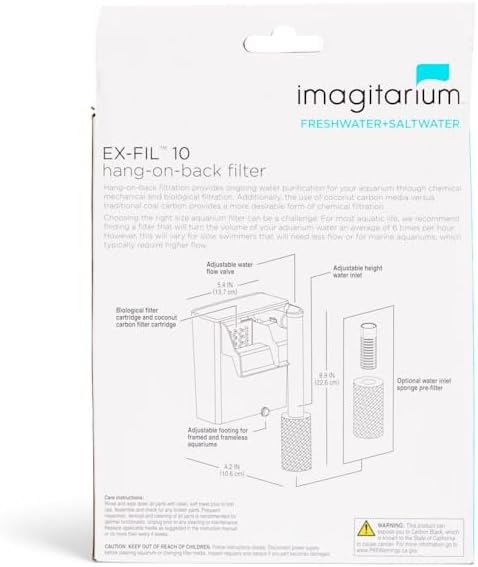
Figure 4: The imagitarium EX-FIL 10 filter fully assembled with the optional sponge pre-filter attached to the water inlet.
5. Operating Instructions
Once installed, the EX-FIL 10 filter is designed for continuous operation. You can adjust its performance to suit your aquarium's needs.
- Water Flow Adjustment: The filter features an adjustable water flow valve. Rotate the valve to increase or decrease the water flow rate, allowing you to customize it for your aquatic inhabitants.
- Water Inlet Height: The adjustable height water inlet allows you to position the intake at the optimal depth for your aquarium, ensuring efficient water circulation and debris removal.
- Continuous Operation: For optimal water quality, the filter should run continuously. Ensure the water level in your aquarium is maintained to keep the filter submerged and operating correctly.
6. Maintenance
Regular maintenance is essential for the longevity and efficient performance of your filter. Always unplug the filter before performing any maintenance.
- Frequent Inspection: Inspect all parts of the filter regularly for any signs of wear, damage, or blockages.
- Cleaning: Remove and clean all parts as needed. Rinse filter media and the filter housing with aquarium water to avoid killing beneficial bacteria. Do not use tap water directly on biological media if it contains chlorine.
- Cartridge Replacement: The filter cartridges (biological and coconut carbon) should be replaced periodically to maintain optimal filtration. The frequency depends on your aquarium's bioload and water conditions, typically every 2-4 weeks for chemical media.
- Impeller Cleaning: Periodically remove and clean the impeller and its housing to ensure smooth operation and prevent reduced flow.
7. Troubleshooting
If you encounter issues with your filter, refer to the common problems and solutions below.
| Problem | Possible Cause | Solution |
|---|---|---|
| Filter not running | No power; Impeller jammed; Not primed | Check power connection; Unplug and clean impeller; Fill filter with aquarium water before plugging in. |
| Reduced water flow | Clogged intake tube or media; Dirty impeller | Clean intake tube and sponge pre-filter; Rinse or replace filter cartridges; Clean impeller. |
| Noisy operation | Low water level; Impeller not seated correctly; Air in filter | Ensure aquarium water level is above the minimum intake level; Unplug, re-seat impeller, and re-prime; Gently shake filter to release trapped air. |
| Water leaking | Improper seating on aquarium; Cracked housing | Ensure filter is level and securely hung; Inspect for cracks and replace if damaged. |
8. Specifications
- Model: EX-FIL 10
- Aquarium Size: Up to 10 Gallons
- Flow Rate: 40-80 GPH (Gallons Per Hour)
- Dimensions (approx.): 5.4 inches (W) x 6 inches (H)
- Filtration Type: Mechanical, Chemical (Coconut Carbon), Biological
- Item Weight: Approximately 1.08 pounds
- Manufacturer: Imagitarium
- ASIN: B0DLGKLSSS
9. Warranty & Support
This product does not include a specific warranty statement in the provided information. For details regarding warranty coverage, terms, and conditions, please refer to the retailer's purchase policy or visit the official imagitarium or Petco website.
For further assistance, troubleshooting not covered in this manual, or to inquire about replacement parts, please contact imagitarium customer support through the official brand channels or visit the Petco website for product information.