
Introduction
This manual provides detailed instructions for the operation and maintenance of your HANNLOMAX HX-208Wi CD/MP3 Player with Alarm Clock Radio and Wireless Charger. Please read this manual thoroughly before using the product to ensure proper function and to maximize your user experience. Keep this manual for future reference.
Safety Information
- Power Source: Use only the provided AC adapter. Ensure the voltage matches your local power supply.
- Water and Moisture: Do not expose the unit to rain, moisture, or dripping/splashing liquids. Do not place objects filled with liquids, such as vases, on the unit.
- Ventilation: Do not block any ventilation openings. Ensure adequate space around the unit for proper airflow.
- Heat: Keep the unit away from heat sources such as radiators, heat registers, stoves, or other apparatus (including amplifiers) that produce heat.
- Cleaning: Unplug the unit from the wall outlet before cleaning. Use a soft, dry cloth only.
- Servicing: Do not attempt to service this product yourself. Refer all servicing to qualified service personnel.
- CD Handling: Handle CDs by their edges. Avoid touching the playing surface. Keep discs clean and free from scratches.
Product Overview
The HANNLOMAX HX-208Wi is a versatile audio device combining a CD/MP3 player, PLL FM radio, dual alarm clock, and wireless charging capabilities. It features a clear 1.2-inch green LED display with dimmer control, USB ports for both charging and MP3 playback, and an Aux-in jack for external audio devices.
Key Features:
- Top-loading CD/MP3 player for CD/MP3 disc playback.
- 5W Wireless charger for compatible smartphones.
- PLL FM Radio with preset station memory.
- USB port for MP3 playback from a USB flash drive.
- USB port for 2.1A charging of smart devices.
- 1.2" Green LED display with adjustable dimmer.
- Digital clock with dual alarm functionality (wake to CD, buzzer, or radio).
- SLEEP and SNOOZE functions.
- Aux-in jack for connecting external audio sources.
- AC operation only.
Unit Components and Controls
Familiarize yourself with the various parts and controls of your HX-208Wi unit.
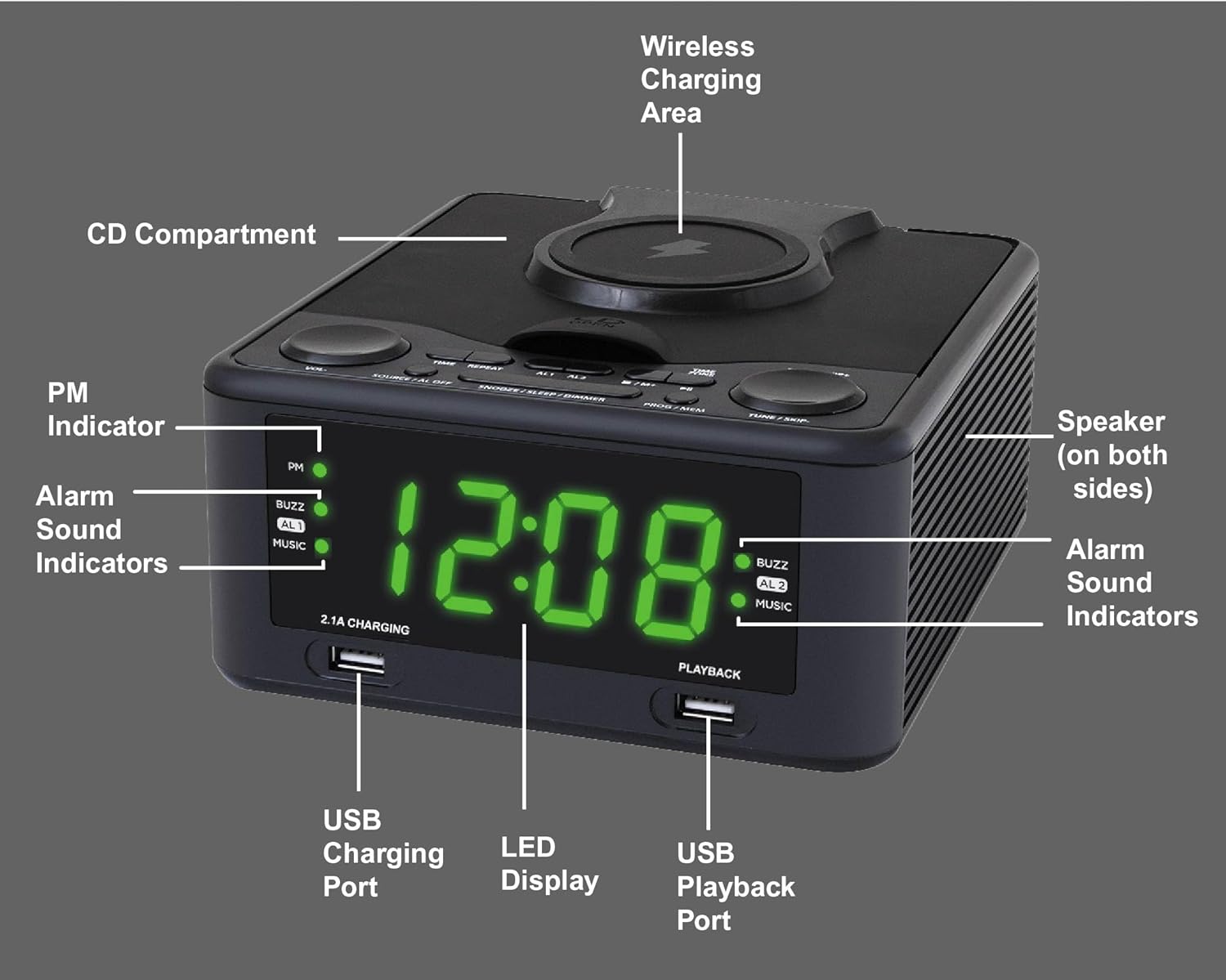
Image Description: This image displays the HANNLOMAX HX-208Wi unit from a slightly elevated front-right angle. Key components are labeled with white text and lines pointing to them. These include the PM Indicator, Alarm Sound Indicators (AL1, AL2, BUZZ, MUSIC), USB Charging Port (2.1A CHARGING), LED Display, USB Playback Port (PLAYBACK), Wireless Charging Area (on top), CD Compartment (on top), and Speaker (on both sides). This diagram helps users identify the physical features of the device.

Image Description: This image provides a close-up view of the top panel of the HANNLOMAX HX-208Wi, highlighting the control buttons. Each button is labeled with its primary function: Volume +, Volume -, Power / Source / Alarm Off, Repeat, Alarm 1, Alarm 2, Snooze / Sleep / Dimmer, Program / Memory, Time Zone / Play / Pause / Skip +, Tuning + / Skip +, Stop / Memory +, and Time / 10 +. This visual guide assists users in understanding the purpose of each control.
Unit Dimensions
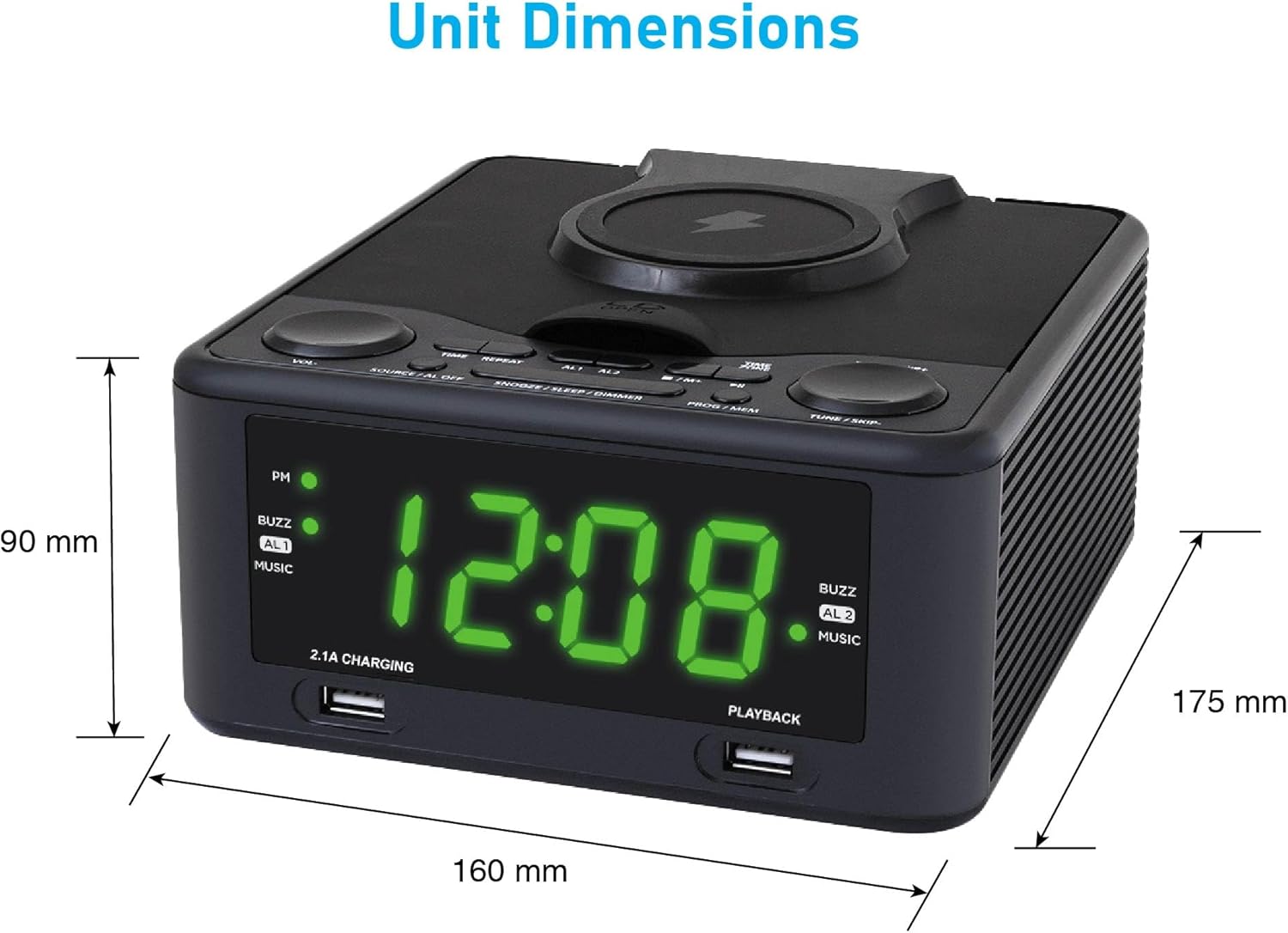
Image Description: This image illustrates the physical dimensions of the HANNLOMAX HX-208Wi. The width is indicated as 160 mm, the depth as 175 mm, and the height as 90 mm. This information is useful for planning placement of the unit.
Setup
Power Connection
- Unpack the unit and all accessories.
- Connect the provided AC adapter to the DC IN jack on the back of the unit.
- Plug the AC adapter into a standard 120V AC wall outlet. The unit will power on and the display will light up.
Initial Clock Setting
Upon first power-up or after a power interruption, you may need to set the clock.
- Press and hold the TIME button until the hour digits begin to flash.
- Use the TUNE + / SKIP + or TUNE - / SKIP - buttons to adjust the hour. Pay attention to the PM indicator if using 12-hour format.
- Press the TIME button again. The minute digits will begin to flash.
- Use the TUNE + / SKIP + or TUNE - / SKIP - buttons to adjust the minutes.
- Press the TIME button once more to confirm and save the time.
Video Description: This video demonstrates how to set the clock and alarm on a similar alarm clock device. It visually guides the user through pressing the time set button, adjusting hours and minutes, and then setting the alarm times and wake-up sources. While the device in the video may differ slightly in appearance, the button functions and setting process are generally applicable to the HANNLOMAX HX-208Wi.
Operation
CD/MP3 Playback
- Press the POWER / SOURCE button to turn on the unit.
- Press the POWER / SOURCE button repeatedly until "CD" appears on the display.
- Open the CD compartment lid by gently lifting it.
- Place a CD or MP3 disc onto the spindle with the label side facing up.
- Close the CD compartment lid. The unit will read the disc and begin playback automatically.
- Use the VOLUME + / - buttons to adjust the sound level.
- Use the TUNE + / SKIP + or TUNE - / SKIP - buttons to skip tracks. Press and hold to fast forward or rewind.
- Press the PLAY / PAUSE button to pause or resume playback.
- Press the STOP button to stop playback.
PLL FM Radio Operation
- Press the POWER / SOURCE button to turn on the unit.
- Press the POWER / SOURCE button repeatedly until "FM" appears on the display.
- Extend the FM antenna fully for optimal reception.
- Auto Scan: Press and hold the PROGRAM / MEMORY button to automatically scan and store available FM stations.
- Manual Tuning: Press the TUNE + / SKIP + or TUNE - / SKIP - buttons briefly to fine-tune the frequency. Press and hold to scan for the next available station.
- Recalling Presets: Use the 10+ button to cycle through stored preset stations.
Wireless Charging
The unit features a 5W wireless charging pad on top for compatible devices.
- Ensure the unit is powered on and connected to AC power.
- Place your wireless charging compatible smartphone directly onto the wireless charging area on top of the unit.
- Ensure the phone is centered on the charging pad. The phone's display should indicate that it is charging.
- If charging does not begin, reposition the phone.

Image Description: This image shows the HANNLOMAX HX-208Wi with a smartphone placed on its top surface, indicating wireless charging in progress. The front of the unit also highlights the 2.1A USB Charging port and the MP3 Playback USB port, demonstrating the multiple charging and playback options available.
USB MP3 Playback
- Insert a USB flash drive containing MP3 files into the USB Playback port (labeled "PLAYBACK") on the front of the unit.
- Press the POWER / SOURCE button repeatedly until "USB" appears on the display.
- The unit will automatically detect and begin playing MP3 files from the USB drive.
- Use the TUNE + / SKIP + or TUNE - / SKIP - buttons to navigate between tracks.
USB Charging
The unit provides a 2.1A USB port for charging external devices.
- Connect your smart device (e.g., smartphone, tablet) to the USB Charging port (labeled "2.1A CHARGING") on the front of the unit using a compatible USB cable.
- Ensure the unit is connected to AC power.
- Your device should begin charging automatically.
Aux-In Connection
Connect external audio devices using the Aux-in jack.
- Connect one end of a 3.5mm audio cable (not included) to the Aux-in jack on the unit.
- Connect the other end of the cable to the headphone jack or audio output of your external device (e.g., smartphone, MP3 player).
- Press the POWER / SOURCE button repeatedly until "AUX" appears on the display.
- Start playback on your external device. The audio will be routed through the HX-208Wi speakers.
- Adjust the volume using the VOLUME + / - buttons on the unit or your external device.
Alarm Setting
The unit features dual alarms (Alarm 1 and Alarm 2).
- Setting Alarm 1: Press and hold the ALARM 1 button until the hour digits flash.
- Use the TUNE + / SKIP + or TUNE - / SKIP - buttons to set the desired alarm hour.
- Press the ALARM 1 button again. The minute digits will flash.
- Use the TUNE + / SKIP + or TUNE - / SKIP - buttons to set the desired alarm minutes.
- Press the ALARM 1 button again to select the wake-up source (CD, BUZZER, or RADIO). The corresponding indicator will light up.
- Press the ALARM 1 button once more to confirm and save Alarm 1 settings.
- Repeat the process using the ALARM 2 button to set Alarm 2.
Video Description: This video demonstrates how to set the clock and alarm on a similar alarm clock device. It visually guides the user through pressing the time set button, adjusting hours and minutes, and then setting the alarm times and wake-up sources. While the device in the video may differ slightly in appearance, the button functions and setting process are generally applicable to the HANNLOMAX HX-208Wi.
Sleep Timer
The sleep timer allows you to fall asleep to music or radio, which will automatically turn off after a set period.
- While the unit is playing (CD, USB, FM, or AUX), press the SNOOZE / SLEEP / DIMMER button repeatedly to cycle through available sleep times (e.g., 10, 20, 30, 60, 90 minutes).
- The display will show the selected sleep time. The unit will automatically turn off after the set duration.
Snooze Function
When an alarm sounds, press the SNOOZE / SLEEP / DIMMER button to temporarily silence the alarm for approximately 9 minutes. The alarm will sound again after this period.
Display Dimmer
Adjust the brightness of the LED display.
- When the unit is in standby mode (clock displayed), press the SNOOZE / SLEEP / DIMMER button repeatedly to cycle through different brightness levels for the LED display.
Maintenance
Cleaning the Unit
- Always unplug the unit from the power outlet before cleaning.
- Use a soft, dry cloth to wipe the exterior surfaces. Do not use abrasive cleaners, waxes, or solvents as they may damage the finish.
- For the CD lens, use a specialized CD lens cleaner disc or a soft, lint-free cloth designed for optical lenses.
CD Care
- Keep CDs in their cases when not in use to prevent scratches and dust accumulation.
- Clean discs with a soft, lint-free cloth, wiping from the center outwards.
Troubleshooting
| Problem | Possible Cause | Solution |
|---|---|---|
| Unit does not power on. | AC adapter not properly connected. | Ensure the AC adapter is securely plugged into the unit and a working wall outlet. |
| No sound from CD/USB/AUX. | Volume is too low or muted. Incorrect source selected. | Increase volume. Press POWER / SOURCE to select the correct input. Check connections for AUX. |
| CD skips or does not play. | Disc is dirty, scratched, or inserted incorrectly. | Clean the CD. Try another disc. Ensure the disc is placed correctly with the label side up. |
| Poor FM radio reception. | Antenna not extended. Weak signal. | Fully extend the FM antenna. Try repositioning the unit or antenna. |
| Wireless charging not working. | Phone not compatible or not positioned correctly. | Ensure your phone supports wireless charging. Reposition the phone on the charging pad. Remove thick phone cases. |
| Alarm does not sound. | Alarm not set or turned off. Volume too low. | Verify alarm settings and ensure it is enabled. Increase the volume. |
Specifications
| Feature | Specification |
|---|---|
| Model Number | HX-208Wi |
| Power Source | AC 120V |
| Product Dimensions (L x W x H) | 16L x 8.3W x 8.3H Centimetres (approx. 160 x 83 x 83 mm) |
| Weight | 1.09 kg |
| Display | 1.2" Green LED |
| CD Compatibility | CD, MP3 disc |
| Radio Tuner | PLL FM Radio with preset stations |
| Wireless Charger Output | 5W |
| USB Charging Port Output | 2.1A |
| USB Playback | Supports MP3 playback from USB flash drive |
| Aux-In | 3.5mm jack |
| Alarms | Dual Alarms (Wake to CD, Buzzer, or Radio) |
| Manufacturer | Hannix Ltd. |
| Country of Origin | China |
Warranty and Support
HANNLOMAX products are designed for reliability and performance. For specific warranty information, please refer to the warranty card included with your purchase or contact your retailer. For technical support or service inquiries, please contact the manufacturer or your point of purchase.


