
Introduction
The JZBRAIN Air Compression Leg Recovery System is designed to provide sequential full-leg compression, promoting healthy circulation and aiding in muscle recovery. This system utilizes rhythmic inflation and deflation across 5 air chambers, delivering a smooth, wave-like compression from foot to thigh. It is ideal for athletes, fitness enthusiasts, and individuals seeking daily leg relief from fatigue or muscle tightness.
The device offers dual-power flexibility, allowing use via plug-in electricity or its built-in 3500mAh rechargeable battery for portable convenience. With 6 full-leg preset modes, 14 customizable zone presets, and 8 adjustable pressure levels (60-130 mmHg), users can tailor their recovery experience for warm-up, post-workout relaxation, or daily comfort.
Important Safety Warnings
Always read and follow all instructions before use.
- Do not use while sleeping or taking a bath.
- Keep away from heat sources.
- Do not use if you have deep vein thrombosis, heart conditions, or other serious medical conditions.
- Unplug and store safely when not in use.
- Do not use if the power cord is damaged.
- Always use the device on a flat, stable surface.
- Do not use if the device is damaged or not functioning properly.
- If you experience any discomfort or pain, stop using the device immediately and consult a healthcare professional.
Usage Restrictions: Consult a physician before use if you are:
- Pregnant women
- Heart patients
- Equipped with implanted medical electronic devices, such as a cardiac pacemaker
- Cerebral hemorrhage patients
- Deep venous thrombosis patients
- Abnormal blood pressure patients
- Acute cardiovascular and cerebrovascular patients
- Purulent inflammation patients
Package Contents
Your JZBRAIN Air Compression Leg Recovery System package includes:
- 2 x Full-Leg Massage Sleeves (Boots)
- 1 x Handheld Controller with LCD Display
- 1 x Power Adapter (Charger)
- 1 x Portable Carrying Bag
- 1 x User Manual
- 1 x Quick Guide Tips
Setup Instructions
- Prepare the Leg Sleeves: Unzip the full-leg massage sleeves completely.
- Wear the Leg Sleeves: Slide your legs into the sleeves, ensuring your feet are comfortably positioned at the bottom. Zip up the sleeves to secure them around your legs.
- Connect Air Hoses: Locate the air hoses extending from the leg sleeves. Connect the air hose connectors to the corresponding ports on the handheld controller. Ensure the "UP" arrow on the connector aligns with the controller port for proper connection.
- Charge the Controller (if needed): If using wirelessly, ensure the controller's built-in 3500mAh battery is charged using the provided power adapter.
- Position for Comfort: Sit or lie down in a comfortable position, ensuring the air hoses are not kinked or obstructed.


Operating Instructions
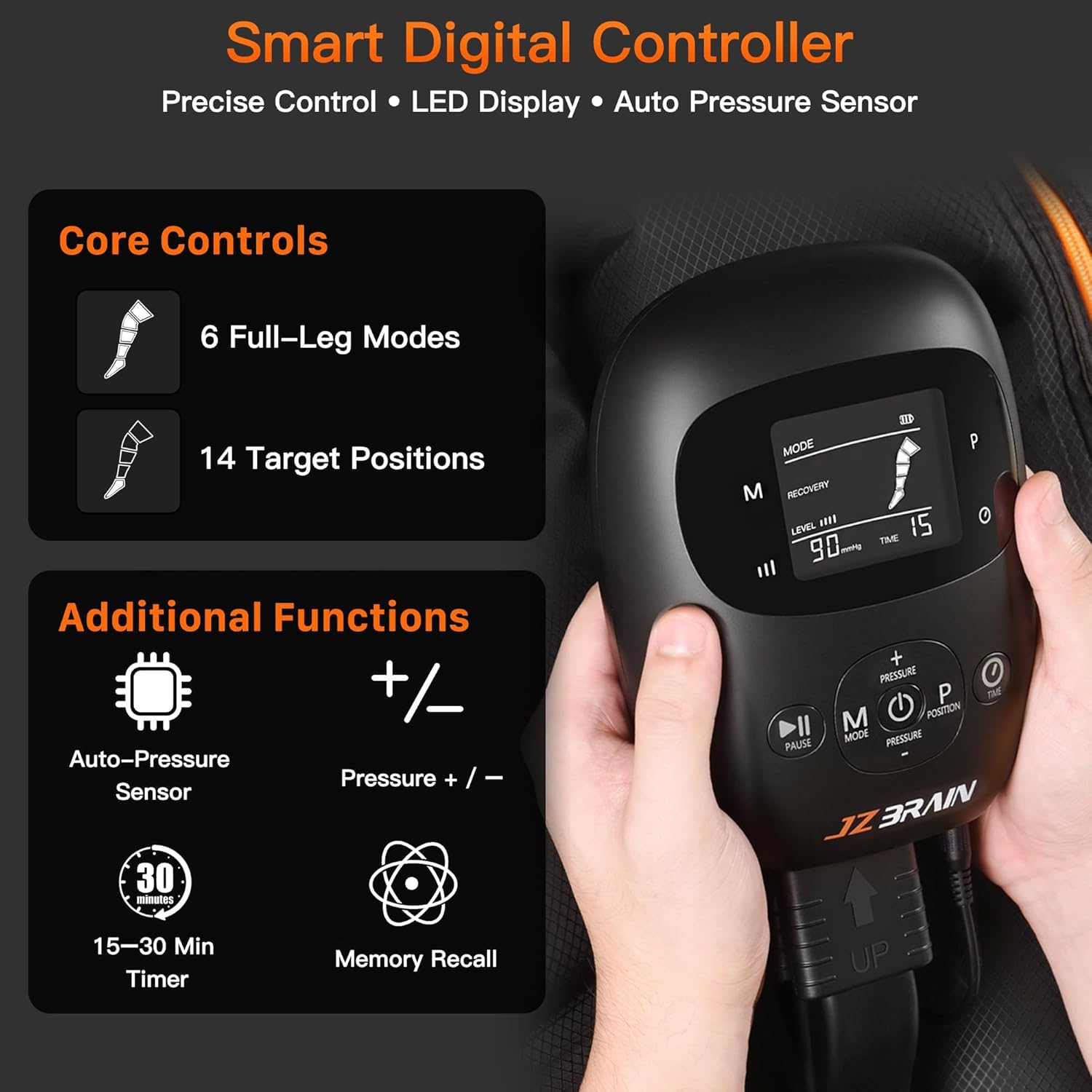
- Power On: Press and hold the Power button (center button on controller) for 1.5 seconds to turn on the device. The LCD screen will light up.
- Select Mode: Press the "M" (Mode) button to cycle through the 6 full-leg massage modes: Activation, Recovery, Massage, Press, Relax, and Relieve. Each mode has a built-in massage sequence and recommended duration.
- Adjust Pressure Level: Use the "+" and "-" Pressure buttons to select from 8 intensity levels (60-130 mmHg). Gradually increase intensity to your comfort level.
- Choose Position (Targeted Zones): Press the "P" (Position) button to access 14 targeted massage modes. This allows you to choose 1 to 4 adjacent air chambers to inflate, progressively filling from bottom to top.
- Set Timer: Press the "Time" button to select a session duration of 15, 20, 25, or 30 minutes. The device will automatically shut off after the selected time.
- Start/Pause: Press the Play/Pause button to start or pause the compression session. When paused, air bags will stay in their current inflation state.
- Power Off: Press and hold the Power button for 1.5 seconds to turn off the device. Air will automatically deflate.


Maintenance
- Cleaning: If sweating occurs during use, wipe the leg sleeves and controller with a damp cloth to maintain cleanliness. Ensure the device is powered off and unplugged before cleaning.
- Storage: After use, ensure the device is fully deflated. Disconnect the air hoses from the controller and store all components neatly in the provided portable carrying bag. Store in a cool, dry place away from direct sunlight.
- Inspection: Regularly inspect the air hoses and connectors for any signs of wear or damage. Ensure zippers on the leg sleeves are functioning smoothly.
Troubleshooting Guide
If you encounter any of the following problems, please contact customer support immediately:
- Zipper damaged
- Controller button malfunction
- The controller screen is not displaying
- Chamber leakage or inability to fill with gas
- Any other questions or issues
Specifications
| Feature | Detail |
|---|---|
| Product Dimensions | 15.75 x 7.87 x 9.45 inches |
| Item Model Number | FE-7223M |
| Item Weight | 7.45 Pounds (3.38 Kilograms) |
| Batteries | 1 Nonstandard Battery (included) |
| Power Source | Battery Powered (Built-in 3500mAh rechargeable battery) & Plug-in (110–240V) |
| Target Use Body Part | Calf, Foot, Leg, Thigh |
| Massage Therapy Technique | Compression |
| Pressure Levels | 8 levels (60–130 mmHg) |
| Massage Modes | 6 Full-Leg Preset Modes |
| Custom Modes | 14 Customizable Zone Presets |
| Timer Options | 15, 20, 25, 30 Minutes (Auto Shut-Off) |
| Other Special Features | LCD Display, Portable, Smart Adaptive Pressure Sensor |
| Color | Black |
Warranty & Customer Support
JZBRAIN is committed to providing high-quality air compression recovery systems. Every unit includes a 12-month warranty for reliable, worry-free use.
Our dedicated team is ready to assist you promptly with any questions or issues, helping you maintain a consistent and effective leg recovery routine. For customer support, please refer to the contact information provided in your product packaging or on the official JZBRAIN website.
This system is also FSA/HSA eligible.