
1. Introduction
Thank you for choosing the POOEKEN A90W6L Automatic Pet Feeder. This device is designed to provide convenient and consistent feeding for your pets, ensuring they receive meals on schedule and in appropriate portions. This manual provides detailed instructions for setting up, operating, and maintaining your new pet feeder.
2. Product Overview
The POOEKEN A90W6L is a 6-liter automatic pet feeder suitable for cats, small dogs, and other small animals. Key features include programmable meal times, adjustable portion sizes, a 10-second voice recording function, and dual power options for reliability.

Image: The POOEKEN A90W6L Automatic Pet Feeder, white in color, with a full food reservoir and a bowl of kibble, positioned next to a golden-colored cat.
Features:
- Programmable Feeding: Schedule up to 6 meals per day, with 1-13 portions per meal.
- Dual Power Supply: Operates via 5V adapter USB power cable or 3D-cell batteries (not included) for uninterrupted feeding during power outages.
- 6L Large Capacity: Provides a long-term food supply, reducing the frequency of refills.
- Secure Lid Lock: Double-lock mechanism prevents pets from accessing food prematurely.
- Voice Recorder: Record a 10-second message to call your pet at meal times.
- Anti-Jam Design: Engineered to prevent food blocking during dispensing.
3. Setup
Follow these steps to assemble and prepare your pet feeder for use:
- Unpack Components: Carefully remove all parts from the packaging. You should have the main unit (base with control panel), food reservoir, lid, and food bowl.
- Install Desiccant Bag: Locate the desiccant bag holder on the underside of the lid. Insert the provided desiccant bag to help keep food fresh.
- Attach Food Reservoir: Align the food reservoir with the base unit. Ensure the triangle icons on both parts match. Rotate the reservoir clockwise until it clicks securely into place, indicating it is locked.
- Attach Food Bowl: Place the food bowl onto the designated area at the front of the base unit, ensuring it is stable.
- Power Connection: Connect the 5V adapter USB power cable to the port at the back of the base unit and plug it into a wall outlet. For battery backup, insert 3D-cell batteries (not included) into the battery compartment at the bottom of the unit.
- Fill Food Reservoir: Open the lid and pour dry pet food into the reservoir. Ensure the food size is appropriate (2-12mm recommended) to prevent jamming. Close the lid securely.

Image: All components of the POOEKEN A90W6L Automatic Pet Feeder, including the base, food reservoir, lid, food bowl, power adapter, and desiccant bag, laid out on a white surface.
Setup Video:
Video: A step-by-step guide demonstrating the assembly and initial setup of the POOEKEN A90W6L Automatic Pet Feeder, including attaching the food reservoir and bowl, and connecting the power.
4. Operating Instructions
The control panel features a display screen and several buttons for programming. Ensure the feeder is unlocked before making changes (long press 'SET' button).
4.1. Setting Current Time
- Long press the 'SET' button until the lock icon on the screen disappears, indicating the feeder is unlocked.
- Press 'SET' once to enter time setting mode. The hour display will flash.
- Use the 'Up' and 'Down' arrow buttons to adjust the hour.
- Press 'SET' again to move to minute setting. Adjust minutes using 'Up' and 'Down' arrows.
- Press 'SET' to confirm and exit time setting.
4.2. Setting Meal Times and Portions
You can program up to 6 meals per day.
- Ensure the feeder is unlocked.
- Press 'SET' repeatedly until the meal number (e.g., '1') starts flashing.
- Use 'Up' and 'Down' arrows to select the desired meal number (1-6).
- Press 'SET' to set the meal time. The hour will flash. Adjust using 'Up' and 'Down' arrows.
- Press 'SET' to set the minutes. Adjust using 'Up' and 'Down' arrows.
- Press 'SET' to set the portion size (1-13 portions). Adjust using 'Up' and 'Down' arrows.
- Repeat for all desired meals. Long press 'SET' to exit programming mode.
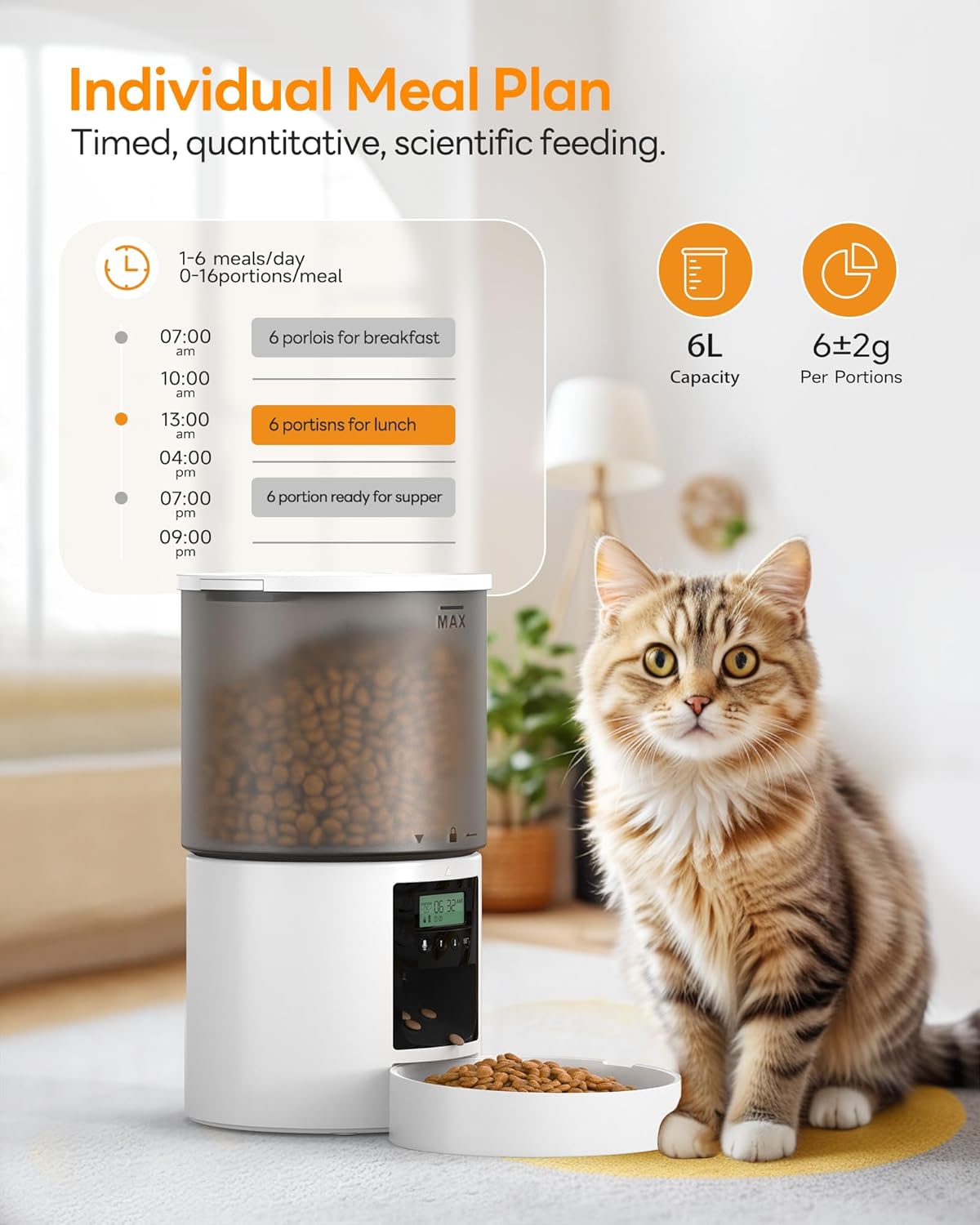
Image: The POOEKEN A90W6L Automatic Pet Feeder showing a digital display with a programmed meal schedule, indicating 1-6 meals per day and 0-16 portions per meal, with a cat sitting nearby.
4.3. Voice Recording
Record a personalized message to call your pet at meal times.
- Ensure the feeder is unlocked.
- Long press the microphone button. The recording indicator light will turn on.
- Record your 10-second message.
- Release the microphone button to save the recording. The recording will play automatically at each scheduled meal.

Image: The POOEKEN A90W6L Automatic Pet Feeder with a speech bubble indicating 'Meow~Meow~, time to eat' and a cat looking towards the feeder, illustrating the voice recording feature.
4.4. Manual Feeding
To dispense food instantly:
- Ensure the feeder is unlocked.
- Press the 'Up' arrow button once to dispense one portion of food. Repeat as needed.
4.5. Restoring Factory Settings
To reset the feeder to its original factory settings:
- When the screen is locked, simultaneously press and hold the 'Up' and 'Down' arrow buttons until the display resets.
Operation Video:
Video: A detailed demonstration of how to set the time, program meal schedules, record a voice message, and manually dispense food using the control panel of the POOEKEN A90W6L Automatic Pet Feeder.
5. Maintenance
Proper maintenance ensures the longevity and hygiene of your pet feeder.
- Cleaning: The food reservoir and food bowl are detachable for easy cleaning. Hand wash these components with mild soap and water. The base unit, containing electronic components, should only be wiped clean with a damp cloth. Do not immerse the base unit in water.
- Desiccant Bag: Replace the desiccant bag every 2 weeks to maintain food freshness, especially in humid environments.
- Food Type: Use only dry pet food. Wet food or treats may cause blockages or spoilage.

Image: A cutaway view of the POOEKEN A90W6L Automatic Pet Feeder highlighting the desiccant bag placement in the lid and the sealing equally divided vane design to keep dry food fresh.
6. Troubleshooting
If you encounter issues with your pet feeder, refer to the following common problems and solutions:
- Feeder Not Dispensing Food:
- Check if the food reservoir is empty.
- Ensure the food exit is not blocked by large kibble or debris.
- Verify the power supply (AC adapter or batteries) is functioning correctly.
- Confirm meal times and portions are correctly programmed.
- Incorrect Time/Settings:
- Ensure the feeder is unlocked before attempting to change settings.
- Refer to sections 4.1 and 4.2 for detailed programming steps.
- Voice Recording Not Playing:
- Ensure a recording was successfully saved (refer to section 4.3).
- Check if the volume is set appropriately (if applicable, though not explicitly mentioned in data, it's a common feature).
- Food Not Staying Fresh:
- Ensure the lid is securely closed.
- Replace the desiccant bag regularly (every 2 weeks).
7. Specifications
| Feature | Detail |
|---|---|
| Model Name | A90 |
| Item Model Number | A90W6L |
| Capacity | 6 Liters |
| Item Weight | 0.9 Kilograms (1.98 pounds) |
| Item Dimensions (LxWxH) | 4 x 4 x 10 inches |
| Material | Acrylonitrile Butadiene Styrene |
| Power Supply | 5V Adapter (USB cable) or 3D-cell batteries (not included) |
| Max Meals per Day | 6 |
| Portions per Meal | 1-13 |
| Voice Recording Duration | 10 seconds |
| Recommended Kibble Size | 2-12mm |
| Target Species | Cat, Small Dog, Small Animals |
| Care Instructions | Hand Wash Only (detachable parts) |
8. Warranty and Support
The POOEKEN A90W6L Automatic Pet Feeder comes with a warranty. The warranty description states '2'. Please refer to your purchase documentation or contact POOEKEN customer support for specific warranty terms and conditions.
For further assistance, technical support, or warranty claims, please contact POOEKEN customer service through the retailer where you purchased the product or visit the official POOEKEN website.