
EPEVER 25.6V, 150Ah (LFP3.84KWH25.6V-P65L2TN40)
EPEVER LiFePO4 Lithium Battery User Manual
Model: 25.6V, 150Ah (LFP3.84KWH25.6V-P65L2TN40)
Brand: EPEVER
1. Introduction
This manual provides essential information for the safe and efficient operation, installation, and maintenance of your EPEVER 25.6V 150Ah LiFePO4 Lithium Battery. Please read this manual thoroughly before using the product and keep it for future reference.
The EPEVER LiFePO4 battery is designed for reliable energy storage solutions in various applications, including RVs, boats, camping, and stationary energy systems. It features integrated Bluetooth for easy monitoring, a robust Battery Management System (BMS), and an innovative self-heating function for optimal performance in cold conditions.

Image: Front view of the EPEPOVER 25.6V 150Ah LiFePO4 Lithium Battery, showing its capacity and model number.
2. Safety Information
WARNING: Failure to follow these safety instructions may result in fire, electric shock, serious injury, or property damage.
- Do not open the sealed container. There are no user-serviceable parts inside.
- Do not short circuit the battery terminals. This can cause severe damage to the battery and pose a fire hazard.
- Do not incinerate, crush, puncture, or disassemble the battery.
- Do not discard in fire or expose to excessive heat.
- Do not overcharge or overdischarge the battery. The integrated BMS protects against this, but ensure your charging system is compatible.
- Only use approved battery chargers specifically designed for LiFePO4 batteries.
- Ensure proper ventilation during charging and discharging.
- Keep out of reach of children.
3. Product Overview and Features
The EPEVER LiFePO4 battery is engineered for high performance and longevity, incorporating advanced features for safety and convenience.
3.1. Key Features
- A-Grade LiFePO4 Cells: Utilizes high-quality aluminum shell cells for superior performance and safety.
- Long Cycle Life: Offers over 4000 charge cycles at 80% Depth of Discharge (DOD) at 25°C, ensuring an exceptionally long lifespan.
- Integrated Battery Management System (BMS): Provides comprehensive protection against:
- Overcharge protection
- Undercharge (deep discharge) protection
- Temperature protection
- Short circuit protection
- Overcurrent protection
- Integrated Self-Heating Function: Automatically warms the battery when temperatures drop below 0°C during charging, ensuring optimal performance and charging efficiency in cold environments.
- Bluetooth Connectivity: Allows for easy real-time monitoring and parameter adjustment via the "Xiaoxiang Electric" mobile application.
- IP65 Rating: Dustproof and water-resistant, making it suitable for various indoor and outdoor applications.
- Expandable System: Supports connection of up to 2 units in series and up to 4 units in parallel for increased voltage or capacity.
- Certifications: UN38.3, MSDS, IEC62619, CE RED, ROHS, ensuring safety and reliability.

Image: Illustration of A-Class LiFePO4 aluminum shell cells, highlighting 4000+ cycles, Bluetooth, Smart BMS, App Monitoring, and IP65 rating.

Image: Diagram illustrating the integrated self-heating function, showing automatic warming when temperatures are below 0°C during charging.

Image: Visual representation of the integrated BMS, detailing protections against overcharge, undercharge, temperature, short circuit, and overcurrent.

Image: The battery shown alongside a smartphone displaying the "Xiaoxiang Electric" app interface, demonstrating Bluetooth monitoring capabilities.
4. Setup and Installation
4.1. Initial Inspection
Upon receiving your battery, inspect it for any visible damage. If damage is found, contact your supplier immediately.
4.2. Connection Guidelines
The EPEVER LiFePO4 battery supports both parallel and series connections to meet various power requirements. Always ensure all batteries are at a similar State of Charge (SoC) before connecting them in parallel or series.
4.2.1. Parallel Connection (Max 4 Units)
For increased capacity while maintaining the nominal voltage, connect batteries in parallel. Connect all positive terminals together and all negative terminals together. Ensure all connecting cables are of appropriate gauge and length to minimize resistance.
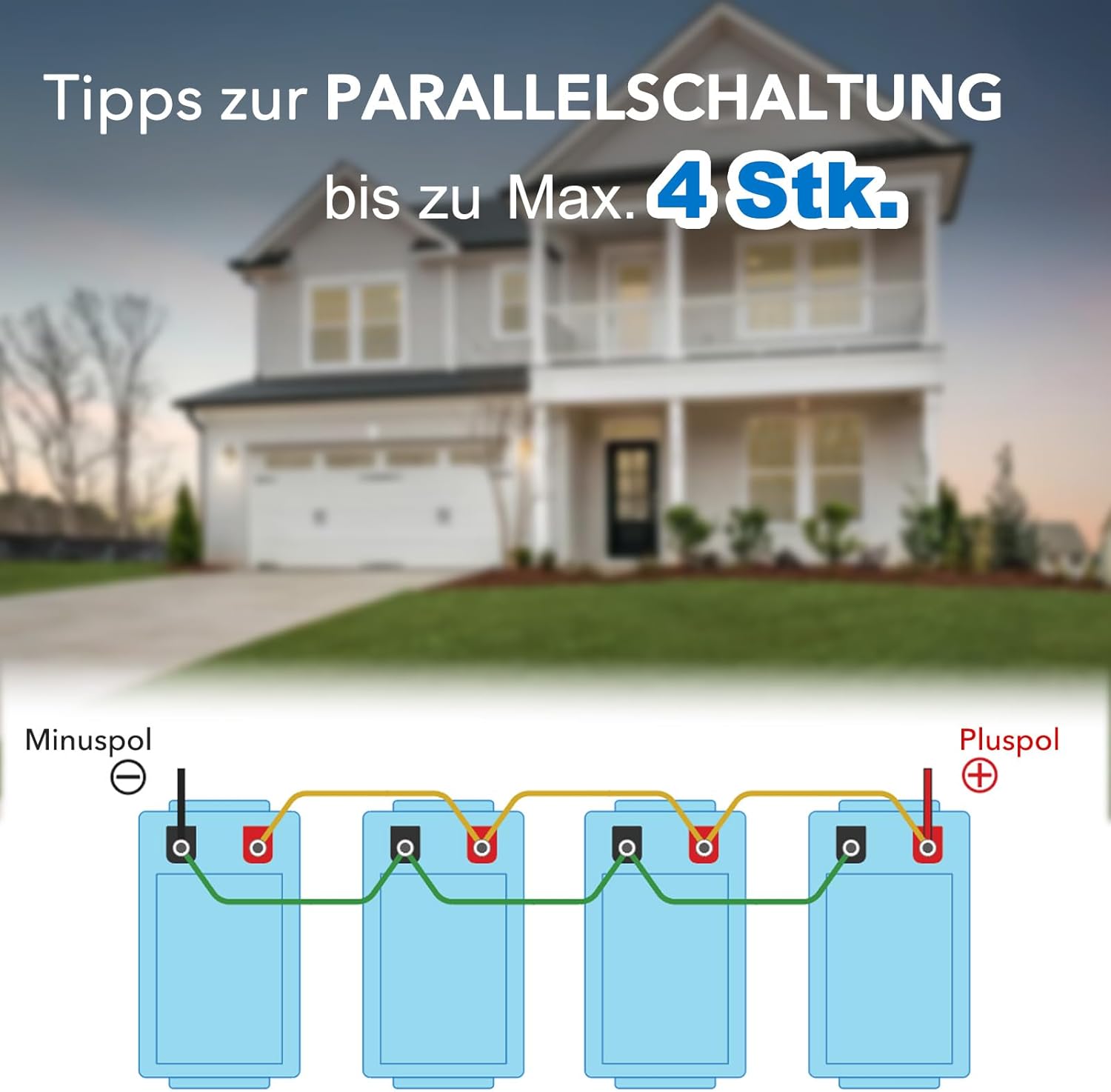
Image: Diagram illustrating how to connect up to 4 batteries in parallel, showing positive and negative terminals connected.
4.2.2. Series Connection (Max 2 Units)
For increased voltage, connect batteries in series. Connect the positive terminal of one battery to the negative terminal of the next. The remaining free positive and negative terminals will be your system's output. Do not exceed 2 units in series for this model.

Image: Diagram illustrating how to connect up to 2 batteries in series, showing the connection between positive and negative terminals.
4.3. App Installation and Connection
The "Xiaoxiang Electric" app allows you to monitor your battery's status and adjust settings via Bluetooth.
- Download the "Xiaoxiang Electric" app from your device's app store.
- Enable Bluetooth on your mobile device.
- Open the "Xiaoxiang Electric" app and follow the on-screen instructions to connect to your EPEVER battery.

Image: QR codes for downloading the "Xiaoxiang Electric" app from the Apple App Store and Google Play Store.
5. Operating Instructions
5.1. Charging
Use a compatible LiFePO4 charger. The integrated self-heating function will activate automatically if the battery temperature is below 0°C during charging, ensuring safe and efficient charging in cold conditions. Monitor charging status via the "Xiaoxiang Electric" app.
5.2. Discharging
The battery can be discharged continuously up to 75A. The BMS will protect the battery from over-discharge. For optimal battery life, avoid consistently discharging to 0% DOD.
5.3. Monitoring with the App
The "Xiaoxiang Electric" app provides real-time data on your battery's performance, including:
- State of Charge (SoC)
- Voltage
- Current (Charge/Discharge)
- Temperature
- Cycle Count
- Individual Cell Voltages (if supported by app interface)
Refer to the app's internal help or user interface for detailed instructions on specific features and parameter adjustments.
6. Maintenance
The EPEVER LiFePO4 battery is designed for minimal maintenance. However, following these guidelines will help ensure its longevity and optimal performance:
- Regular Visual Inspection: Periodically check the battery and its terminals for any signs of damage, corrosion, or loose connections. Ensure terminals are clean and tight.
- Keep Clean: Wipe the battery casing with a dry, clean cloth. Do not use solvents or abrasive cleaners.
- Temperature Control: While the battery has self-heating, avoid prolonged exposure to extreme temperatures (hot or cold) outside its operating range when not in use.
- Storage: If storing the battery for an extended period, ensure it is charged to approximately 50-70% State of Charge (SoC) and stored in a cool, dry place. Recharge every 3-6 months to prevent deep discharge.
- Firmware Updates: Check the "Xiaoxiang Electric" app periodically for any available firmware updates for the battery's BMS.
7. Troubleshooting
This section addresses common issues you might encounter. For problems not listed here, please contact customer support.
| Problem | Possible Cause | Solution |
|---|---|---|
| Battery not charging. | Charger not connected, charger fault, battery temperature too low/high (BMS protection), BMS in protection mode. | Check charger connection and functionality. Allow battery to warm up (self-heating should activate). Check app for BMS error codes. Disconnect and reconnect battery to reset BMS. |
| Battery not discharging. | Over-discharge protection, short circuit protection, overcurrent protection, battery temperature too low/high. | Charge the battery. Check for short circuits in the load. Reduce load. Allow battery to reach optimal temperature. Check app for BMS error codes. |
| Bluetooth connection issues. | Bluetooth disabled on device, app not updated, battery too far, interference. | Ensure Bluetooth is enabled. Update "Xiaoxiang Electric" app. Move closer to the battery. Restart app and device. |
| Battery capacity seems low. | Not fully charged, high discharge rate, cold temperature affecting performance. | Ensure battery is fully charged. Reduce peak discharge current. Allow self-heating to activate in cold conditions. |
8. Specifications
Detailed technical specifications for the EPEVER 25.6V 150Ah LiFePO4 Lithium Battery.
| Specification | Value |
|---|---|
| Brand | EPEVER |
| Battery Composition | Lithium Iron Phosphate (LiFePO4) |
| Nominal Capacity | 150 Ah |
| Nominal Voltage | 25.6 V |
| Continuous Discharge Current | 75 A |
| Max. Discharge Current (30 min) | 200 A |
| Terminal Type | M8 |
| Dimensions (L x W x H) | 522 x 268 x 218 mm |
| Weight | 30.7 kg (± 0.5 kg) |
| IP Rating | IP65 |
| Max Series Connection | 2 units |
| Max Parallel Connection | 4 units |
| Cycle Life | >4000 cycles (@80% DOD, 25°C, 0.5C) |
| Model Number | LFP3.84KWH25.6V-P65L2TN40 (25.6V, 150Ah) |
| ASIN | B0DLBFMS4X |
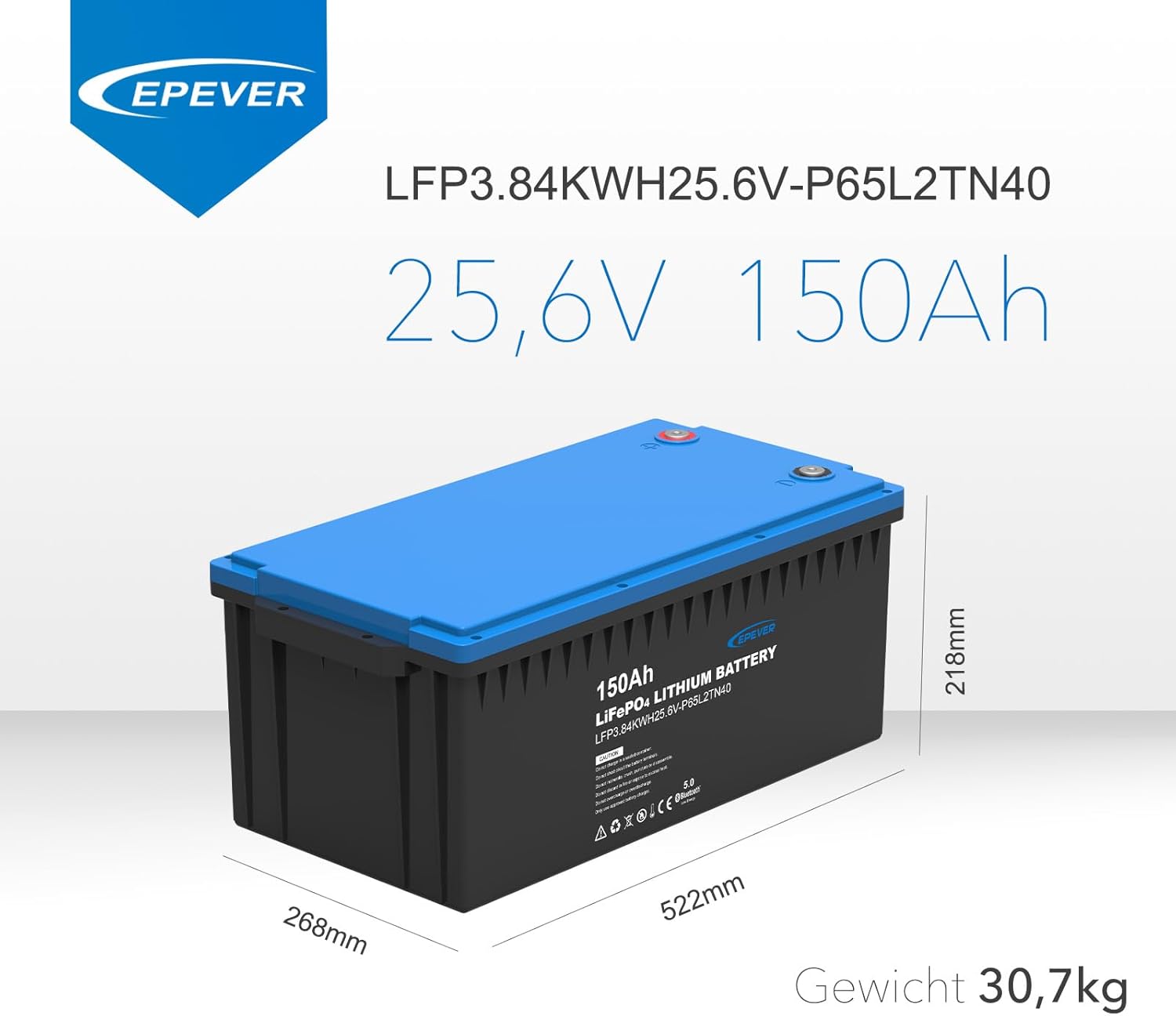
Image: Diagram showing the dimensions (length, width, height) and weight of the EPEVER 25.6V 150Ah LiFePO4 battery.
9. Warranty and Support
This product is sold by SolarV GmbH. For specific warranty terms and conditions, please refer to the documentation provided with your purchase or contact SolarV GmbH directly. Standard return policy is 30 days for refund/replacement.
For technical support, troubleshooting assistance, or warranty claims, please contact the seller or manufacturer through the platform where you purchased the product.
Seller: SolarV GmbH
Manufacturer: SolarV
Related documents25.6V, 150Ah (LFP3.84KWH25.6V-P65L2TN40)


Ask a question about this manual
Ask about setup, troubleshooting, compatibility, parts, safety, or missing instructions. Manuals+ will review the question and use this page’s manual context to help answer it.